A wallet drainer scam tricks you into signing a permission that empties your crypto wallet. See how drainers work, what not to sign and what to do next.
Quick answer: A wallet drainer scam is a phishing website that gets you to connect your crypto wallet and sign a transaction or message that gives the scammer permission to move your tokens or NFTs. Once you sign, an automated script transfers your most valuable assets out, often within minutes. If it happened to you, move whatever is left to a new wallet, revoke the approvals you granted, and report the theft with the transaction details.
Drainers don't need your password or recovery phrase. They rely on wallet prompts that look alike and on the fact that "sign to claim" sounds harmless. This guide explains how drainers work, which signatures to refuse, and what to do in the first hour after a theft. If your project or exchange is the brand being used as bait, the last section covers getting drainer sites taken down.
How a wallet drainer scam works
Most attacks follow the same four steps.
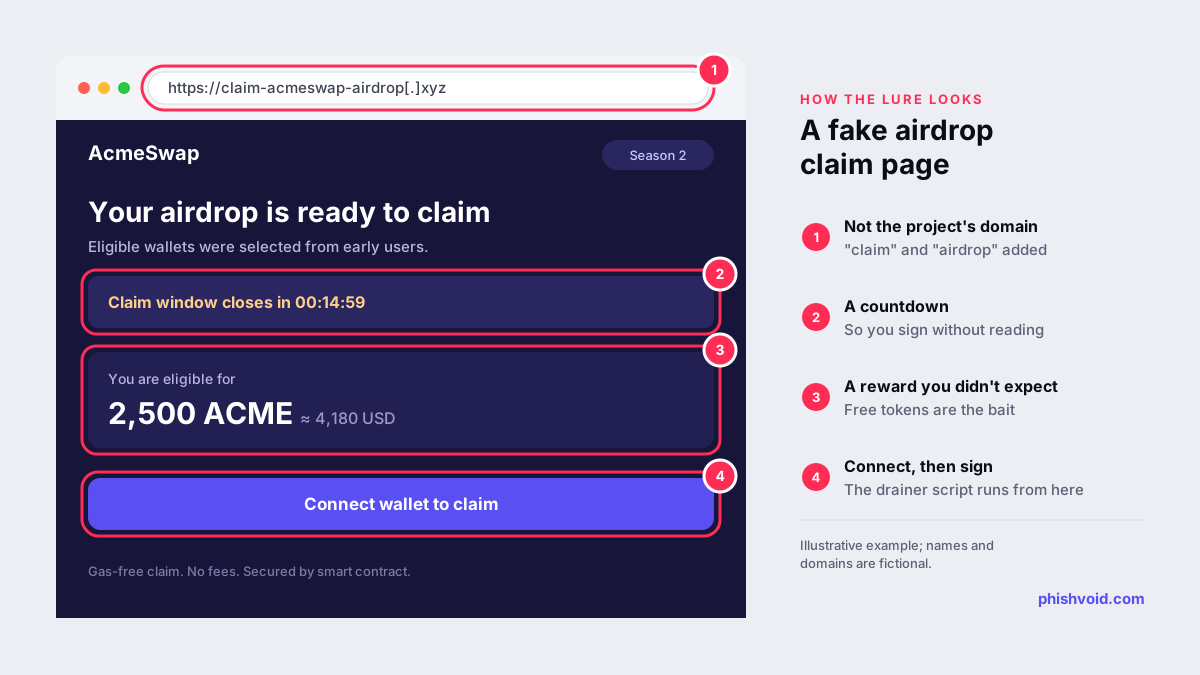
- The lure. A post, advert, direct message or email promises an airdrop, a token claim, an NFT mint or a reward, often from a hijacked or cloned account of a real project. The FBI described this pattern in a public service announcement about criminals posing as NFT developers, who promote "limited supply" mints and send people to cloned sites.
- The fake site. The link leads to a copy of the project's site on a lookalike domain, usually with a countdown to rush you.
- Connect and sign. You connect your wallet. The site reads your balances and asks you to sign one or more requests chosen to cover your most valuable assets.
- The drain. The script moves the assets to wallets the attacker controls. The FBI notes that stolen assets are often passed through mixers and exchanges to hide where they went.
The sites are rarely built from scratch. Drainer kits are sold or rented to affiliates who run the phishing campaigns and share the proceeds with the kit's developers, much like a phishing kit for stealing passwords.
The signatures that empty a wallet
A drainer only needs one of a handful of permissions. Learn to recognise them in your wallet's prompt.
- Token approvals (
approve,increaseAllowance): an on-chain transaction that lets another address spend a token from your wallet, often in unlimited amounts. MetaMask calls token approvals "a common attack vector for both hackers and scammers". - NFT approvals (
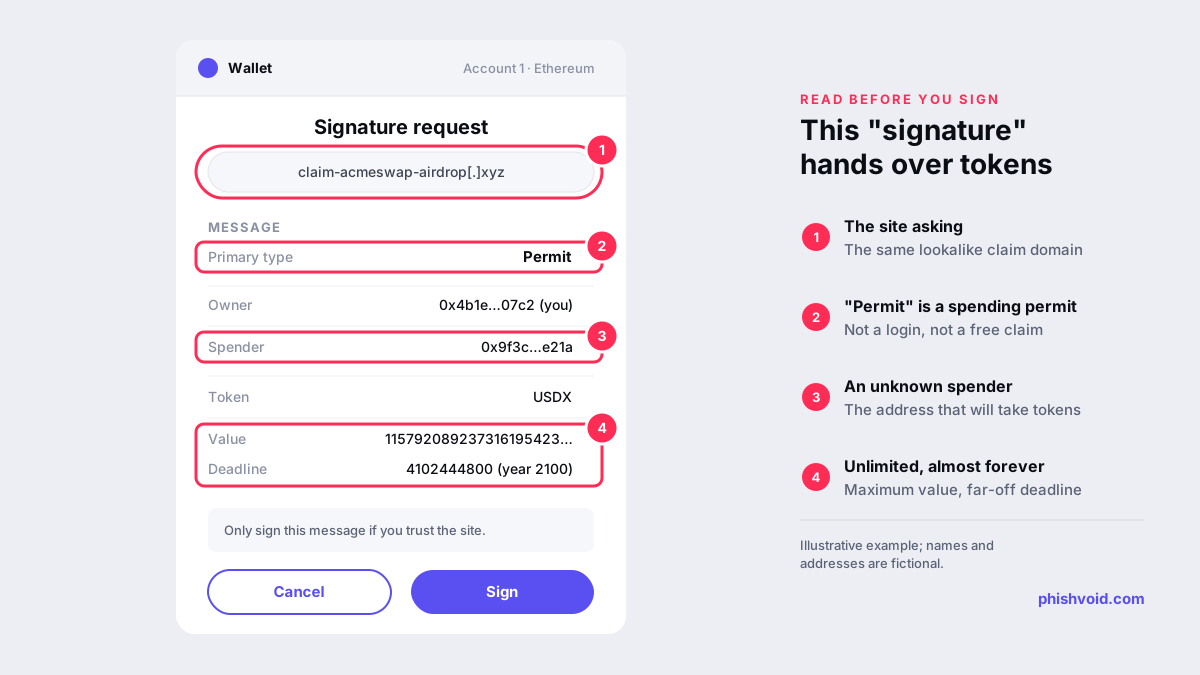
setApprovalForAll): gives another address control of every NFT you hold in a collection. - Permit signatures: an off-chain message, defined in EIP-2612, that grants the same spending permission as an approval without a transaction from you. Permit2-style signatures work the same way across many tokens. Because nothing appears in your transaction history, victims often assume nothing happened.
- Direct transfers: a plain send dressed up as a claim, gas refund or verification step.
- Account delegation: since Ethereum's Pectra upgrade, EIP-7702 lets an ordinary wallet delegate to smart contract code, and drainers have begun abusing these signatures too.
How much is lost? Scam Sniffer, a Web3 anti-scam company, tracks drainer phishing on Ethereum-compatible chains. Its 2025 report counted $83.85 million stolen from 106,106 victims, down from about $494 million and 332,000 victims in 2024. Permit and Permit2 signatures accounted for 38% of losses in cases above $1 million, and the largest single theft of the year, $6.5 million, came from one Permit signature. The company describes its figures as a lower-bound estimate. For phishing volumes beyond crypto, see our phishing statistics 2026.
How to spot a drainer before you sign
- Reach the site yourself. Open the project's official site from a bookmark or its verified documentation, not from a reply, direct message, advert or search ad.
- Read the domain. Words like claim, airdrop, mint or rewards bolted onto a project's name are a classic pattern. The same check applies to exchanges, as explained in how to tell if a crypto exchange is legit.
- Read every prompt. If you see Permit, approve, increaseAllowance or setApprovalForAll, ask why a free claim needs permission to spend your tokens. Check who the spender is and how much it may take.
- Distrust urgency. Countdowns and "last chance" banners exist to stop you reading.
- Use a separate wallet for trying new sites and keep only small amounts in it. Keep savings in a wallet that never connects to unfamiliar apps.
- Never type your recovery phrase into a website. No airdrop, support agent or "wallet validation" needs it. Fake support accounts that reply to public complaints are a common route to this request, as described in fake customer-support accounts.
Wallet drained? What to do in the first hour
- Disconnect and stop signing. Close the site and don't approve anything else, including "refund" or "recovery" prompts.
- Move what is left. Create a new wallet with a new recovery phrase and transfer your remaining assets there. If you ever typed or pasted your recovery phrase into a site, assume the old wallet is fully compromised and stop using it.
- Revoke approvals. Use a token approval checker such as Etherscan's, or one of the options in MetaMask's guide, to remove approvals you don't recognise. Revoking is an on-chain transaction, so each one costs gas. A signed Permit only becomes a visible approval once the attacker submits it, which drainers usually do at once, so moving your assets matters more than revoking.
- Record the evidence. Save the site address, your wallet address, the attacker's addresses and every transaction hash. The FBI lists these as the key details for cryptocurrency reports (FBI).
- Report it. In the US, report at ic3.gov. If the stolen funds moved to a known exchange, send that exchange the transaction hashes. Report the phishing site to Google Safe Browsing so other people get a warning.
- Ignore recovery offers. Accounts that offer to trace and recover your funds for a fee are a scam in their own right. The FBI's 2025 Internet Crime Report counted 10,516 recovery scam complaints with $1.4 billion in losses.
Be realistic: blockchain transfers can't be reversed, and drained assets are rarely returned. Speed still helps, because the sooner exchanges and investigators see the transaction hashes, the better the chance of tracing the funds.
For projects and exchanges: drainer sites using your name
Drainer campaigns borrow the names of real tokens, NFT collections, wallets and exchanges, because a familiar brand makes a claim page believable. Cleaning up means working on several fronts at once: report the domain to browser blocklists such as Google Safe Browsing and to wallet blocklists such as MetaMask's eth-phishing-detect list, send abuse reports to the registrar and host, report the CDN in front of the site (see taking down a phishing site behind Cloudflare), and get the impersonating social accounts removed. A pinned post listing your only official domains also helps. Phishvoid handles this for crypto brands as a managed takedown service, and anyone can report a drainer site to us.
FAQ
What is a crypto wallet drainer?
A drainer is a malicious script on a phishing site. It requests token approvals, Permit signatures or transfers from a connected wallet, then automatically moves the victim's most valuable assets to the attacker.
Can a wallet be drained just by connecting it to a site?
Connecting lets a site see your address and balances, but it can't move assets on its own. The theft happens when you approve a transaction or sign a message, which is why reading every prompt matters.
Does revoking approvals get my crypto back?
No. Revoking only stops further spending by the approved address. Assets that were already transferred stay with the attacker, so the priority is to move what is left to a new wallet.
Is my recovery phrase compromised after a drain?
Not necessarily. If you only signed a malicious request, the phrase itself may be safe, but approvals or delegations can remain. If you ever entered the phrase on a website, treat the wallet as permanently compromised. In both cases a fresh wallet is the safest choice.
Is someone impersonating your brand?
We find lookalike domains and cloned pages and take them down. Start with a free exposure scan.