Brand protection software vs managed service: who handles triage, evidence and takedowns, the hidden workload, how to compare cost and when a hybrid fits.
Quick answer: Brand protection software gives your team a detection platform and an alert queue; your own people then verify each finding, collect evidence, file takedown requests and chase providers until sites are removed. A managed service does that work for you under your written authorization and reports the results. Software suits teams with dedicated analysts who want direct control. A managed service suits teams without that capacity, or with more cases than they can handle. Many organizations end up with a mix.
The choice is less about features than about who does the work after an alert appears. This guide breaks that work down step by step so you can see where your team's time would go under each model. For a broader look at what providers offer, see brand protection services: what they cover and how to choose.
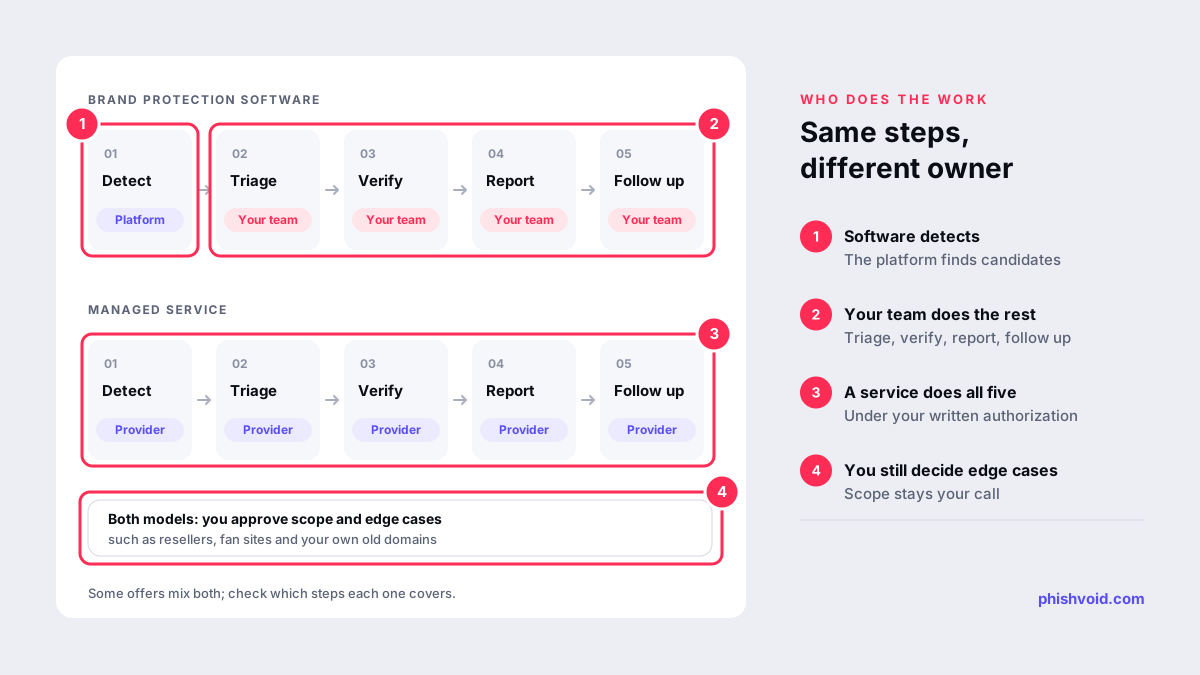
Who does what: the work, step by step
Every phishing or impersonation case passes through the same stages, whichever model you choose. The difference is whose name is on each one.
| Stage | Software | Managed service |
|---|---|---|
| Detection | Platform | Provider |
| Triage of alerts | Your team | Provider |
| Verification and evidence | Your team, often with platform screenshots | Provider |
| Blocklist reports | Your team, sometimes automated | Provider |
| Host, registrar and CDN notices | Your team | Provider, under your authorization |
| Follow-up and escalation | Your team | Provider |
| Re-emergence checks | Platform alerts, your team acts | Provider |
| Decisions on edge cases | Your team | Your team, advised by the provider |
Some software vendors sell takedown credits or an add-on service, and some managed providers give you a dashboard. Ask exactly which rows each offer covers, because the labels on vendor websites overlap.
The hidden workload behind software
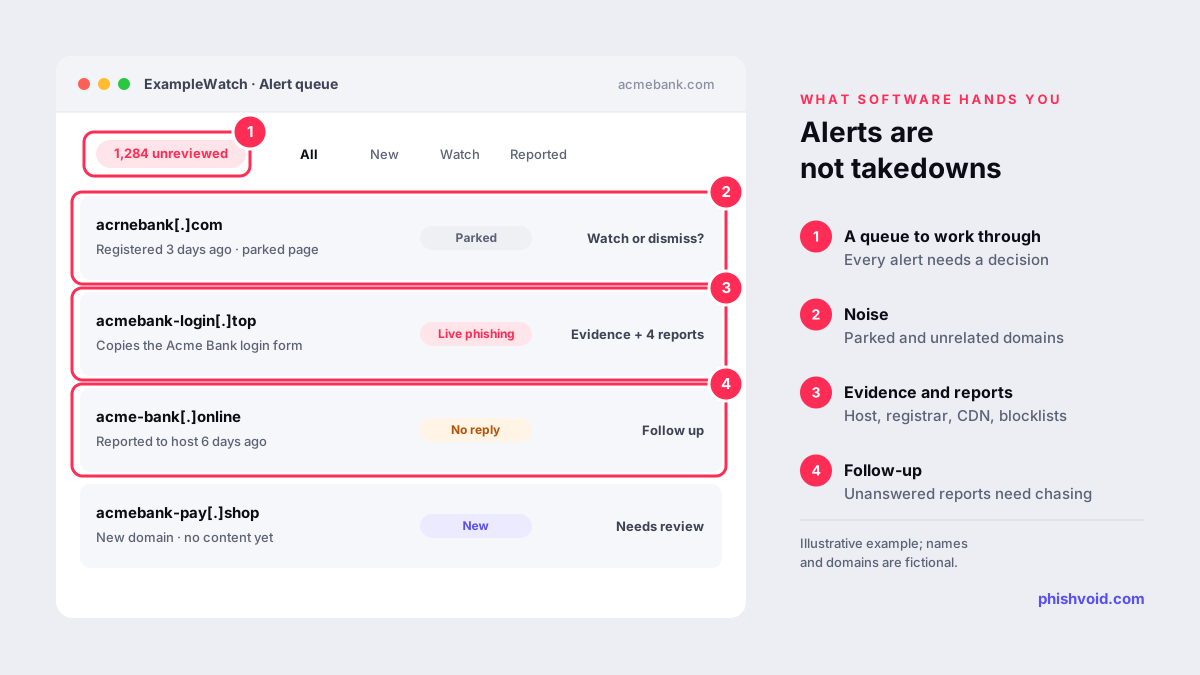
A detection platform is only as useful as the time your team spends on its output. The workload is easy to underestimate during a trial, when everyone is paying attention.
- Noise. Many registered lookalike domains are parked, held defensively or used by unrelated businesses. Each one needs a decision, and many need watching rather than reporting.
- Evidence. Hosts and registrars act on reports they can verify themselves: full URLs, screenshots, timestamps and what the page collects. Many kits show their content only to phones or to visitors from certain countries, so capturing it takes care.
- Finding the right contact. Each case can involve a host, a registrar, a CDN and a platform, each with its own form, email address and evidence requirements.
- Follow-up. Reports go unanswered, get closed as "not enough information" or need escalation, often across time zones and outside your working hours.
- Re-emergence. The same phishing kit often returns on a new domain or path, and the cycle starts again.
None of this is difficult once you know the routes, which our takedown process guide describes. It is simply time that someone has to find every week.
When software is the better fit
- You have a security operations or threat intelligence team with time set aside for this work.
- You want raw detection data in your own systems, such as a SIEM or ticketing tool, and to correlate it with other signals.
- Policy requires that every notice sent in your name is written and sent by your own staff.
- Your volume is low and predictable, and your team already has working relationships with the providers you deal with.
When a managed service is the better fit
- Nobody on your team owns phishing takedowns as part of their job, or the person who does is already stretched.
- Case volume is high or spikes with campaigns, holidays and product launches.
- You operate in several countries and need local channels, such as national CERTs and country-code registries, and reports in more than one language.
- You want follow-up to continue at night and at weekends.
- You prefer a predictable cost to a mix of license fees and staff time.
A hybrid can work well: a platform for your security team's visibility, and a managed service for verification and takedowns. If you go that way, agree who owns each case so the same site is not reported twice or not at all.
How to compare the real cost
License fees and service fees are not directly comparable, because one leaves the labor with you. A fair comparison counts both:
- Count your cases. Look back over the last twelve months: fake sites, fake accounts, lookalike domains and the support tickets linked to them.
- Measure your effort per case. Time the next few cases from first alert to confirmed removal, including follow-ups. Use your own figures; they vary widely between organizations.
- Add the hidden items. Training, cover for holidays and nights, and the cost of cases that are noticed late or never reported.
- Read the service terms. Check for per-takedown fees, quotas, channels that cost extra and limits on brands or domains.
Pricing models vary. Phishvoid, for example, is a managed service with one all-inclusive subscription and unlimited takedowns, quoted after a demo, so a busy month does not change the bill.
Questions to ask either kind of vendor
- Who verifies a finding before it is reported, a person or a rule?
- Which channels are reported to: blocklists, hosts, registrars, CDNs, platforms, search engines, national CERTs?
- Do you send notices in our name, and on what authorization?
- How is time to takedown measured, and what is the median across all cases?
- What happens when a site returns on a new domain?
- Can we export our case history if we leave?
The fastest way to compare is to see real data for your own brand. Most providers will run a short exposure scan; you can ask us for one and judge the results against a software trial.
FAQ
What is the difference between brand protection software and a managed service?
Software provides detection and a dashboard, and your team handles verification, reporting and follow-up. A managed service performs those steps for you, under your authorization, and reports what it found and removed.
Is a managed brand protection service more expensive than software?
Not necessarily. A software license leaves the analyst time with you, while a service fee includes it. Compare total cost by adding your own staff time per case to the license, then set that against the service quote for the same scope.
Does a managed service need access to our systems?
Usually not. A provider typically needs a signed letter of authorization, the list of brands, domains and official accounts in scope, and a contact for edge cases. Access to DMARC reports or logs can help but is optional.
Can we combine software and a managed service?
Yes. Some teams keep a platform for visibility and use a service for verification and takedowns. Agree clearly who owns each case so nothing is reported twice or missed.
Which option removes phishing sites faster?
Speed depends mostly on what happens after detection: the quality of evidence, the number of channels reported and how persistently providers are followed up. Ask both kinds of vendor for median time to takedown across all cases.
Is someone impersonating your brand?
We find lookalike domains and cloned pages and take them down. Start with a free exposure scan.