Brand impersonation protection explained: the six channels attackers use to pose as your brand and the controls that prevent, detect and remove each one.
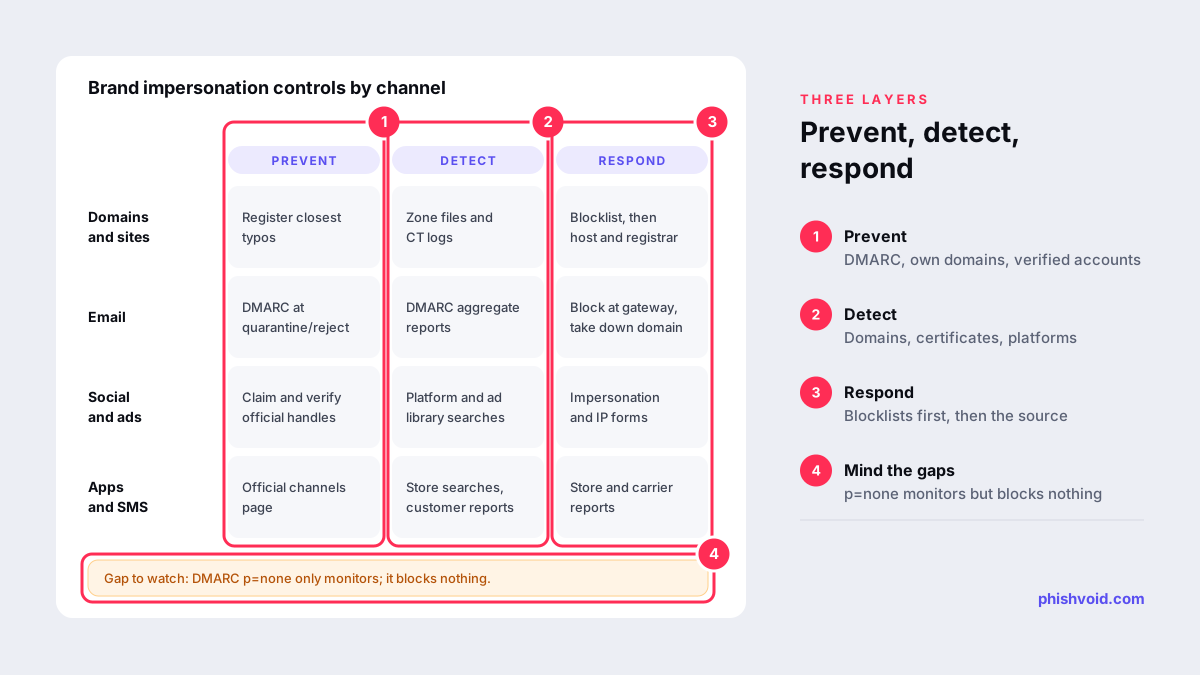
Quick answer: Brand impersonation protection is the set of controls that stops criminals from posing as your company. It works in three layers: prevent what you can (email authentication, defensive domains, verified accounts), detect the rest early (domain, certificate, social and ad monitoring, plus customer reports), and respond fast to what goes live (blocklisting and takedowns). No single tool covers every channel, so plan by channel and by layer.
The scale explains why this has become a board-level topic. The US Federal Trade Commission reports that people lost $3.5 billion to imposter scams in 2025, including nearly $1 billion to scammers posing as businesses, reached through text, phone, email, social media and search results. This article is about building the program. If a fake site is live right now, start with our first 24 hours playbook instead.
The six channels attackers use to impersonate a brand
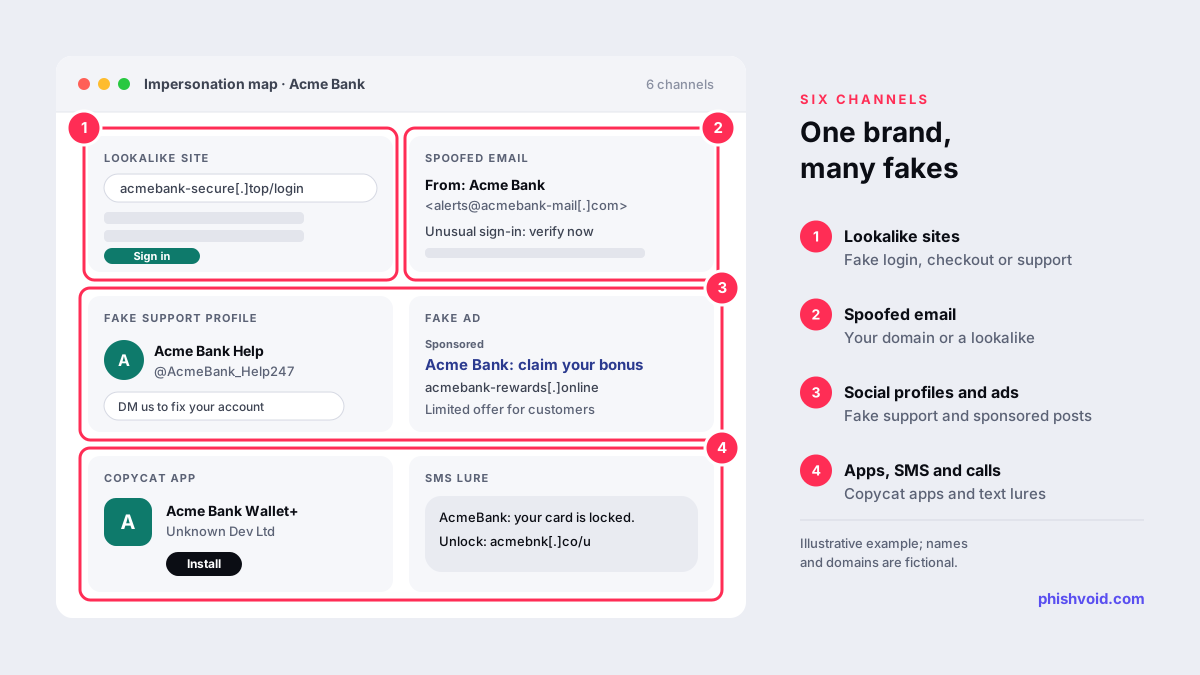
Brand impersonation is rarely a single fake website. A typical campaign combines a lure in one channel with a fake destination in another. These are the six surfaces to map for your brand:
- Lookalike domains and cloned websites. Fake login, checkout or support pages on domains such as
acmebank-secure[.]top. - Spoofed email. Messages sent from your exact domain when it is not protected, or from a lookalike domain when it is.
- Fake social profiles and support accounts. Accounts that copy your name and logo and reply to customers who complain publicly. Our guide to fake customer-support accounts covers how they operate.
- Fake ads and search results. Paid ads and sponsored posts that use your brand, sometimes with deepfaked executives.
- Fake apps. Copycat mobile apps, browser extensions or desktop downloads that carry your name.
- SMS, messaging and phone. Texts and calls that claim to be from you and push people to a fake page or a fake agent.
Prevent: close the doors you control
Some impersonation can be made much harder before it starts.
- Enforce DMARC. DMARC lets receiving mail servers reject messages that fake your exact domain. Google requires DMARC from senders of more than 5,000 messages a day to personal Gmail accounts, but it accepts a policy of
p=none(Google), which only monitors. To actually block spoofing, move toquarantineorrejectonce your legitimate senders pass. Our SPF, DKIM and DMARC guide walks through the steps. - Register the most obvious lookalikes. You cannot buy every variation, but the closest typos and your name on the main extensions are worth owning. The free lookalike domain finder lists them and shows which are already taken.
- Claim and verify official accounts on every major platform, even the ones you do not use actively, so a fake cannot become the only result for your name.
- Publish an official channels page listing your domains, social handles, app store links and support numbers, plus what you will never ask customers for.
- Keep trademarks registered in the markets you serve. Platform impersonation and intellectual property forms often ask for a registration number.
Detect: find impersonation before customers do
Prevention leaves gaps: an attacker can register a lookalike domain or open a fake account at any time. Detection shortens how long those stay unnoticed.
- Domain and certificate monitoring. Watch new registrations and certificate transparency logs for names that resemble yours. Our guide to lookalike domain monitoring explains the data sources and the signals that a domain is being prepared for an attack.
- Content signals. Cloned pages sometimes load images or scripts straight from your servers, which shows up as unfamiliar referrers in your web logs.
- Platform searches. Regularly search social networks, ad libraries and app stores for your brand and executive names.
- DMARC aggregate reports. They show which servers send mail using your domain, including those that should not.
- An easy reporting path. A clear abuse mailbox or form for customers and staff. People who receive the lure are often your fastest sensor.
Respond: remove what goes live
When a confirmed impersonation goes live, speed matters more than perfection. A good response runs several tracks the same day:
- Blocklists first. Report fake sites to Google Safe Browsing, Microsoft SmartScreen, Netcraft and the APWG so browsers start warning visitors while removal is pending.
- Infrastructure. Send evidence-backed notices to the host, the registrar and any CDN in front of the site. A site behind Cloudflare needs its own route.
- Platforms. Use each network's impersonation or intellectual property form for fake accounts, ads and apps.
- Customers. If the campaign is large, warn customers through your own channels and give support a short script.
- Re-emergence. Keep watching. Phishing kits often come back on a new domain, path or host after removal.
For lookalike domains that are registered in bad faith but not yet used, legal routes such as the UDRP can transfer the domain to you. They take longer and cost more than a takedown, so they suit high-value names rather than every variation.
Where to start: a 30-day plan
- Week 1: inventory. List your domains, brand and product names, official social handles, apps and support numbers. Publish the official channels page.
- Week 2: email. Read your DMARC reports, fix legitimate senders that fail and plan the move to enforcement.
- Week 3: detection. Set up domain, certificate and platform monitoring and name one owner for triage.
- Week 4: response. Agree who can approve a takedown, prepare evidence templates and decide whether to run removals yourself or with a partner.
The last decision matters most for smaller teams. Detection without someone to verify, report and chase providers produces a list of problems, not fewer fake sites. Our comparison of brand protection software vs managed service helps with that choice. Phishvoid covers the detect and respond layers as a managed service: we monitor, a person verifies each site, and we report it to every relevant channel until it is gone.
FAQ
What is brand impersonation protection?
It is the combination of preventive controls, monitoring and takedown processes that stops criminals from posing as your company online, by email, on social media, in ads, in app stores and by phone or SMS.
Does DMARC stop brand impersonation?
Only part of it. A DMARC policy of quarantine or reject stops attackers from sending mail that fakes your exact domain. It does not stop lookalike domains, fake websites, fake social accounts or ads, which need monitoring and takedowns.
Is impersonating a business illegal?
Fraud and trademark laws apply in most countries. In the United States, the FTC's rule on impersonation of government and businesses took effect on April 1, 2024, enabling the agency to go to federal court to get money back for injured consumers (FTC).
How do I report a fake account impersonating my company?
Use the platform's impersonation or intellectual property reporting form, and include proof that you represent the brand, such as an official email address or trademark registration.
Can a small company afford brand impersonation protection?
The preventive layer costs mostly time: DMARC, a few defensive domains and an official channels page. Monitoring and takedowns can be handled in-house for low volumes or outsourced when cases become regular.
Is someone impersonating your brand?
We find lookalike domains and cloned pages and take them down. Start with a free exposure scan.