Lookalike domain monitoring explained: the data sources that reveal new impersonating domains, the warning signs to watch and what to do when one appears.
Quick answer: Lookalike domain monitoring means continuously watching for newly registered domains and newly issued TLS certificates that resemble your brand, then tracking each match for signs that it is being prepared for phishing: mail records, certificates and content that copies your site. Some phishing domains are registered days or weeks before they are used, and monitoring turns that gap into warning time. A practical first step is to list the variations attackers are most likely to use with our free lookalike domain finder, then decide which ones to watch, buy or act on.
Our article on typosquatting and homoglyph domains explains how lookalike names are built. This one is about the monitoring itself: where new domains become visible, which signals matter and what to do with a match.
Where new lookalike domains show up
No single source sees every new domain. Monitoring combines several, each with its own blind spots.
Zone files
A zone file lists the active domains in a top-level domain. Through ICANN's Centralized Zone Data Service, approved users can request zone files from participating generic TLDs such as .com, .online or .shop, and download them once per 24-hour period (ICANN). Comparing each day's file with the previous one shows which domains are new. Two limits: CZDS covers generic TLDs only, so country-code domains such as .tr or .de are not included, and a domain only appears once it is active in the zone.
Certificate transparency logs
Publicly trusted TLS certificates are recorded in public, append-only certificate transparency logs, and Chrome and Safari help enforce this (certificate.transparency.dev). Because phishing pages commonly use HTTPS, a new certificate for acmebank-login[.]top is often the first public sign that a site is about to go live. Logs also cover country-code domains and subdomains, which zone files miss.
DNS and registration data
Resolving each candidate regularly shows when it gains a website, a mail server or a new host. Registration data from RDAP, which you can look up at ICANN Lookup, shows when a domain was created and which registrar holds it.
People
Customers, staff and partners who forward suspicious links remain a valuable source, especially for domains that look nothing like your brand.
What to monitor: building your watchlist
Monitoring is only as good as the list of names it matches against. Build it from:
- Your domains and brand names, including product names, app names and well-known campaign names.
- Typos and lookalike characters: missing, doubled or swapped letters,
rnform, digits for letters and internationalised characters that look identical. - Brand plus a word: login, secure, support, verify, pay, refund and their equivalents in your customers' languages.
- Other extensions: your name on popular generic and country-code endings.
The lookalike domain finder generates these variations for a domain and checks which already have DNS records, so you can export a starting list in minutes. Keep the list focused. Matching on a short, common word will flood you with unrelated domains, while matching only exact typos will miss combinations like acmebank-refund[.]com.
Signals that a lookalike is being weaponized
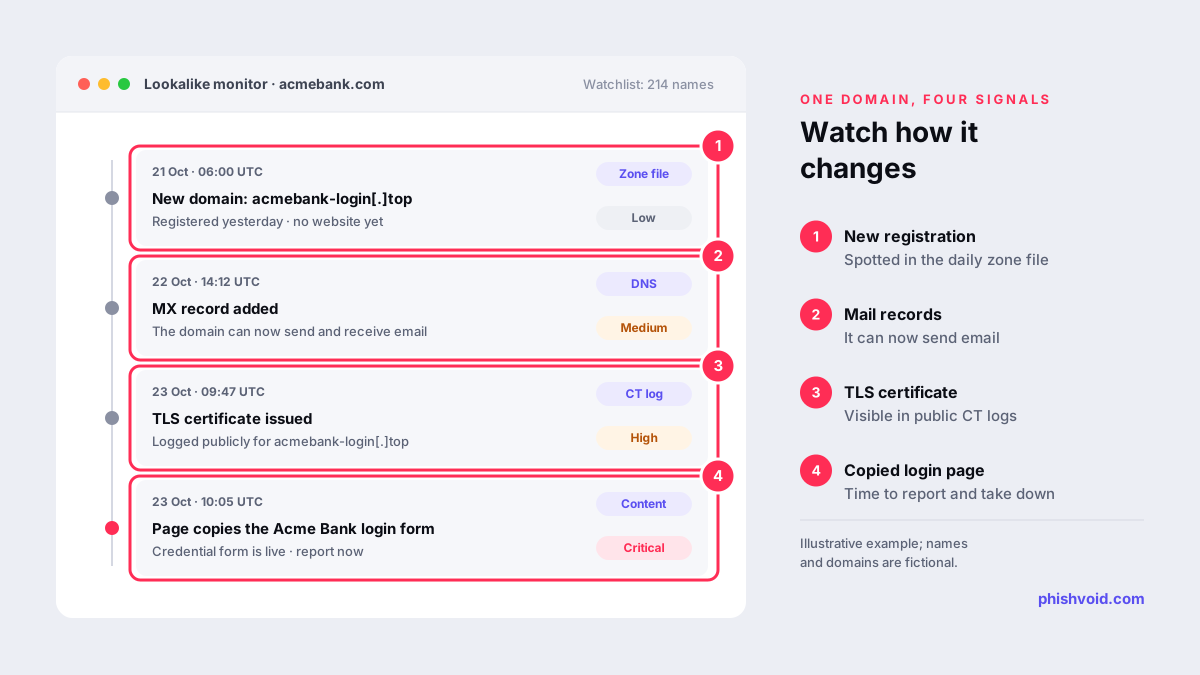
A registered lookalike is not automatically an attack. Some are parked by domain investors, some are defensive registrations and some belong to unrelated businesses. What matters is how a domain changes over time. Watch for these signals, roughly in the order they tend to appear:
- New registration. A newly registered domain close to your name. Low priority on its own, but worth watching.
- Mail records. An MX record means the domain can send and receive email, which matters for invoice fraud and spear phishing.
- A certificate. A new TLS certificate suggests a website is about to be used.
- Content. The page copies your logo, layout, login or payment form, or redirects to a page that does.
- A lure in circulation. The domain appears in SMS, email, ads or social posts reported by customers or staff.
Steps one to three justify closer watching and preparation. Steps four and five justify action.
What to do when you find one
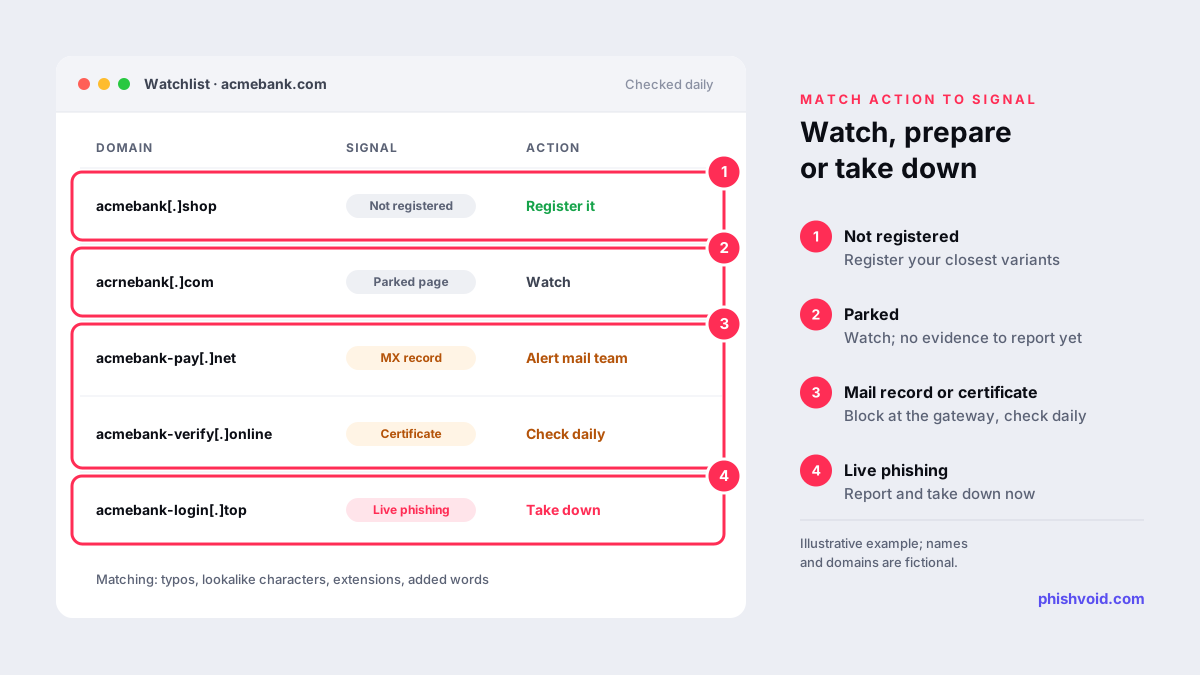
- Unregistered and high-risk: consider registering it yourself. This is the cheapest protection for your closest variants.
- Registered but parked: keep it under watch. Hosts and registrars usually will not act on a domain that does nothing harmful yet, and reporting it without evidence wastes goodwill. If the name clearly targets your trademark, legal routes such as a UDRP complaint can transfer it; at WIPO the filing fee starts at USD 1,500 for one to five domains with a single panelist (WIPO).
- Mail records or a certificate appear: tell your email security team so they can block the domain at the gateway, and check it more often.
- Live phishing content: capture evidence, report it to blocklists and request takedown from the host, registrar and CDN. Our first 24 hours playbook covers the order of steps.
Doing it yourself or having it done
A basic in-house setup is possible: request CZDS access for the generic TLDs you care about, subscribe to a certificate transparency monitor, resolve your watchlist daily and review the changes. The effort lies in tuning the matching, reviewing results every day and following each live case through to removal.
If that is more than your team can sustain, a managed service can take it over. Phishvoid includes 24/7 lookalike monitoring in its subscription: a person verifies every match before anything is reported, and sites that turn into phishing are taken down. Our comparison of brand protection software vs managed service can help you decide which route fits.
FAQ
What is lookalike domain monitoring?
It is the ongoing tracking of new domains and certificates that resemble your brand, combined with checks for signs that a domain is being used for phishing, such as mail records, certificates and copied content.
How often should lookalike domains be checked?
Daily at a minimum. Generic TLD zone files can be downloaded once a day through CZDS, and certificate transparency logs can be watched continuously, so a weekly check leaves several days of blind time.
Can I monitor country-code domains such as .tr?
Not through CZDS, which covers generic TLDs. Certificate transparency logs, regular DNS checks of your watchlist and reports from customers still give you visibility of country-code lookalikes.
Does a registered lookalike domain mean we are under attack?
No. Many lookalikes are parked or belong to unrelated owners. Treat registration as a reason to watch, and act when you see a certificate, copied content or a lure using the domain.
Is the free lookalike domain finder enough on its own?
It is a snapshot. It shows which variations exist today, but it does not alert you when a new one is registered or starts hosting a phishing page. Use it to build your watchlist, then monitor that list continuously.
Is someone impersonating your brand?
We find lookalike domains and cloned pages and take them down. Start with a free exposure scan.