Facebook Page impersonating your business? Learn how to report it, which Meta trademark and copyright forms to use, and how to warn your customers.
Quick answer: If a Facebook Page is impersonating your business, open the fake Page, click the three-dot options button under the cover photo, choose Report Page and follow the prompts for a Page that is pretending to be a business, naming your official Page when asked. If the impostor uses your registered trademark or copies your logo and photos, also file Meta's trademark or copyright form, which goes to a dedicated rights team. All of these routes are free.
Removing the Page is only half the job. Most impostor Pages exist to send people somewhere: a fake giveaway, a cloned shop or a "support" chat that asks for card details. This guide covers which reporting route to use, the evidence that makes a report succeed, how to warn customers and what to do when the Page stays up. If the impostor is replying to your customers as your support team, also read our guide to fake customer-support accounts.
Save the evidence before you report
Impostor Pages are often renamed, emptied or deleted and recreated once they are reported. Capture what you need first, because these screenshots and links are what you will attach to every form:
- The Page address. Copy the full URL from the address bar, not just the Page name, since several Pages can share a name.
- Screenshots of the name, profile picture, cover photo, About section and the posts or ads that use your brand.
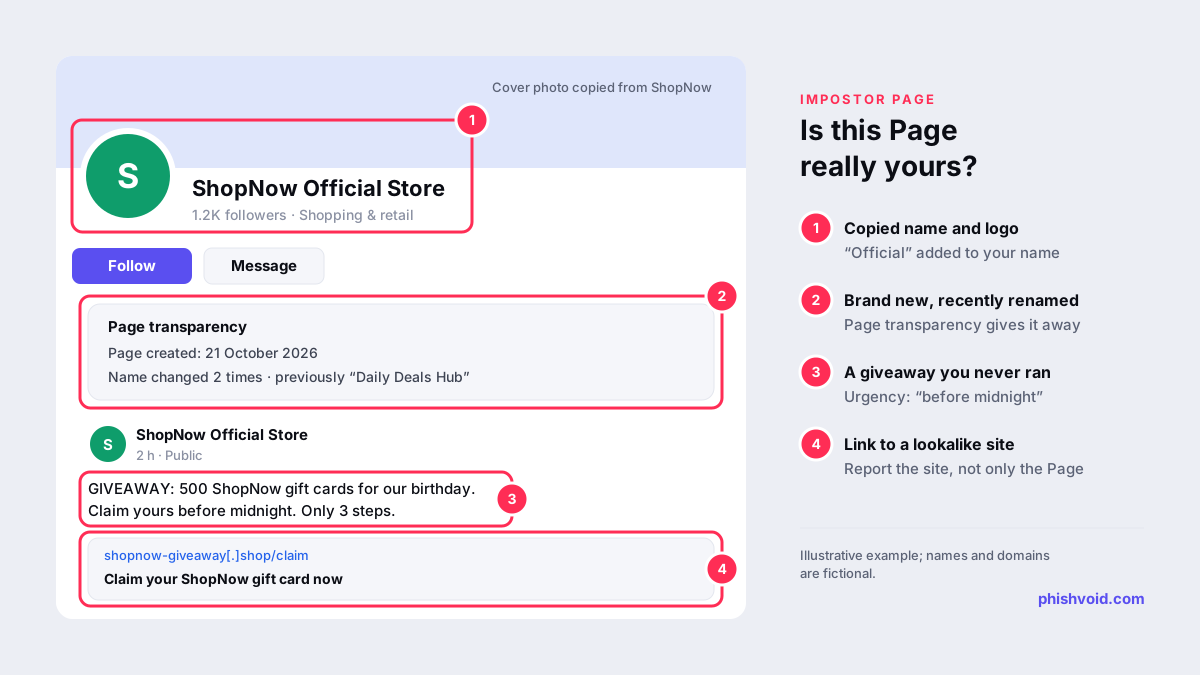
- The Page transparency section. Facebook shows a Page's creation date and any name changes there, a feature Meta introduced in 2018. A Page that claims to be your official store but was created last week, or was renamed from something unrelated, is strong evidence.
- Where it sends people. Copy every link the Page posts or sends in Messenger as text, without opening it on a work device, and note any phone numbers or chat handles.
- Customer reports. Messages from people who were contacted or charged by the fake Page show real harm.
- Your own proof: your official Page URL, your website and, if you have one, your trademark registration number.
How to report a Facebook Page impersonating your business
There are four routes. Most businesses should use the first one immediately and add a second one when their name or content is protected.
1. Report the Page from Facebook itself
Facebook's help article on reporting a profile or Page that is pretending to be you or someone else gives the steps: go to the Page, click the options button under the cover photo, select Report Page and follow the on-screen instructions. Choose the reason that says the Page is pretending to be someone or a business, and select or name your official Page when asked. Menu wording changes from time to time, but the impersonation option is always under the Page's report menu.
Report the worst individual posts and ads as well, choosing scam or fraud where it fits. If you don't have a Facebook account or have lost access to it, Facebook provides a separate contact form for impersonation reports.
2. File a trademark report
If your business name or logo is a registered trademark, use Meta's trademark report form. It is meant for the rights owner or an authorised representative, asks for the registration details and the exact URLs of the infringing content, and requires a good-faith declaration. Each report covers one registered mark. Meta lists the equivalent forms for its other apps on its intellectual property page.
3. File a copyright report
Impostors usually copy your product photos, videos, logo artwork or text. You don't need a registered trademark to report that, but you must own the content or act for the owner. Use the copyright report form and list each copied item with a link to your original.
4. Use Brand Rights Protection if you are enrolled
Meta's Brand Rights Protection tool lets brands with a registered trademark search for and report trademark, counterfeit and copyright problems in ads, posts, Pages, profiles, Shops and Marketplace from one place. It is worth applying if impersonation keeps coming back.
| Route | Who can use it | What you need |
|---|---|---|
| Report Page (in-app) | Anyone, ideally the business | Fake Page URL, your official Page |
| Impersonation contact form | People without an account or access | Fake Page URL, your details |
| Trademark form | Rights owner or authorised agent | Registration number, URLs, declaration |
| Copyright form | Content owner or authorised agent | Your originals, the copies' URLs |
| Brand Rights Protection | Enrolled brands with a registered mark | Approved access in Business settings |
What counts as impersonation, and what doesn't
Not every Page that uses your name breaks the rules. Meta's business help on impostor accounts says fan Pages and opinion accounts generally don't violate its standards, so a fan community, a review Page or a critic is unlikely to be removed, and reporting them can delay the reports that matter.
A Page is impersonating your business when it presents itself as you in order to mislead people. Typical signs are your exact name with "official", "store" or "support" added, your logo as the profile picture, posts announcing giveaways or discounts you never ran, and requests for card details, codes or payments in Messenger. In your report, point to the deception, not only to the copied logo: a post that says "official page" or a message asking for payment is what reviewers look for. Our glossary entry on social media impersonation explains the common patterns.
Report what the fake Page links to
Deleting the Page doesn't remove the website it advertised. If customers were sent to a fake shop or a login page, that site keeps working for anyone who saved the link, and the same people often relaunch it under a new Page within days.
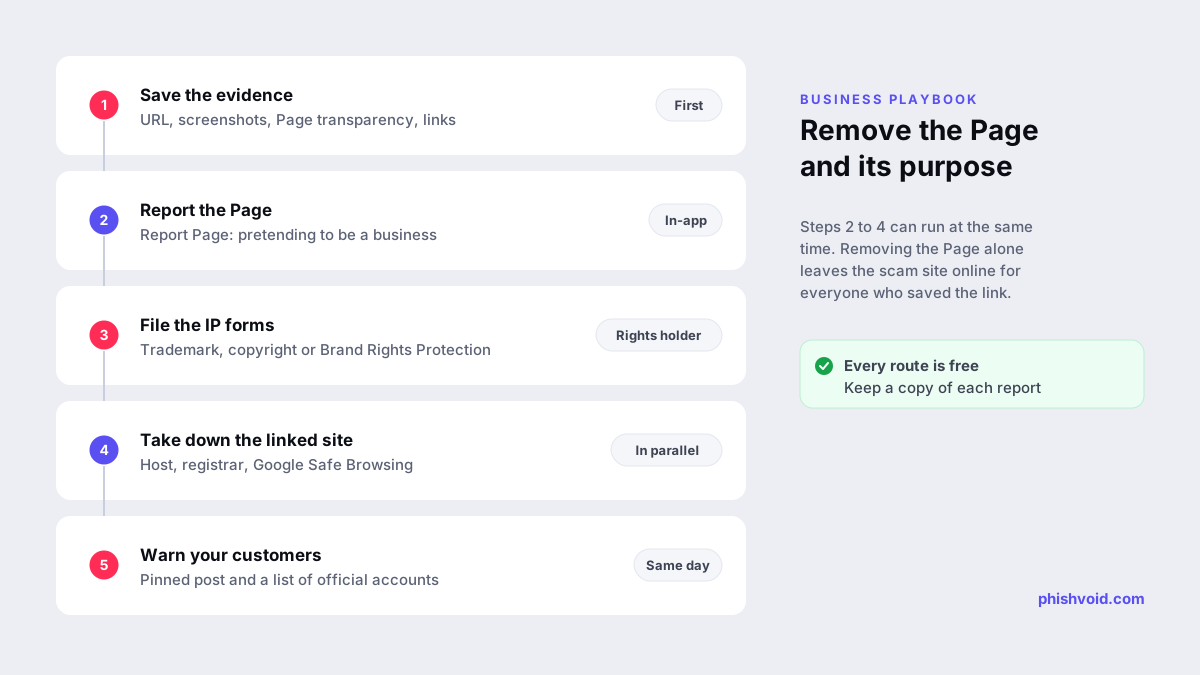
Report the destination in parallel: to the hosting provider, the domain registrar and browser blocklists such as Google Safe Browsing. Our guide on how to report a scam website walks through each step, and the free abuse report generator drafts the emails for you. Phishvoid handles this as one job for brands: our team verifies each impostor Page and the site behind it, then reports both to the platform, the host, the registrar and the blocklists.
Warn customers without promoting the fake
While the reports are reviewed, protect the people who might find the fake Page:
- Post a short notice on your official Page and pin it: name your only official Page, say you never ask for card details or codes in Messenger and say where real promotions are announced.
- Don't link to or tag the fake Page. Describe it by name instead, so you don't send it traffic.
- List your official social accounts on your website, so customers can check a Page against a source you control.
- Give your support team a short script for customers who paid or shared details: contact their bank, change passwords and report it. Our I got phished page covers the steps for victims.
If Facebook doesn't remove the Page
Meta doesn't publish a fixed review time for impersonation reports. If your first report is rejected or nothing happens:
- Report again with better evidence. Add the creation date, name changes, the scam posts and customer complaints.
- Switch routes. If you used the in-app report, file the trademark or copyright form, which is reviewed by a different team.
- Report the individual scam posts and ads, which can be removed even while the Page is under review.
- Remove the destination anyway. A Page that links to a dead site does far less harm.
- Keep watching. Search for your name regularly, because removed impostors often return under a slightly different name.
FAQ
How long does Facebook take to remove an impersonating Page?
Meta doesn't publish a fixed timeframe. Clear reports with a direct link to your official Page and evidence of deception are usually handled faster than vague ones, and intellectual property reports go to a dedicated team.
Can I report a fake Facebook Page if I don't have an account?
Yes. Facebook offers a contact form for impersonation reports from people who don't have an account or have lost access to it.
Do I need a registered trademark to get a fake Page removed?
No. The impersonation report doesn't require one. You need a registered mark only for the trademark form and Brand Rights Protection. Copied photos and logo artwork can be reported under copyright.
Is a fan Page using my business name allowed?
Generally yes, as long as it doesn't pretend to be your official Page. Meta's guidance is that fan Pages and opinion accounts generally don't break its rules, so focus your reports on Pages that deceive people.
Should I also report the fake Page's ads?
Yes. Use the report option on each ad, choosing scam or fraud. Ads reach people who never visit the Page, so they often cause more harm than the Page itself.
Is someone impersonating your brand?
We find lookalike domains and cloned pages and take them down. Start with a free exposure scan.