How to report a fake app on Google Play: flag it in the Play Store, use the policy violation form, file trademark claims and report fake APK download sites.
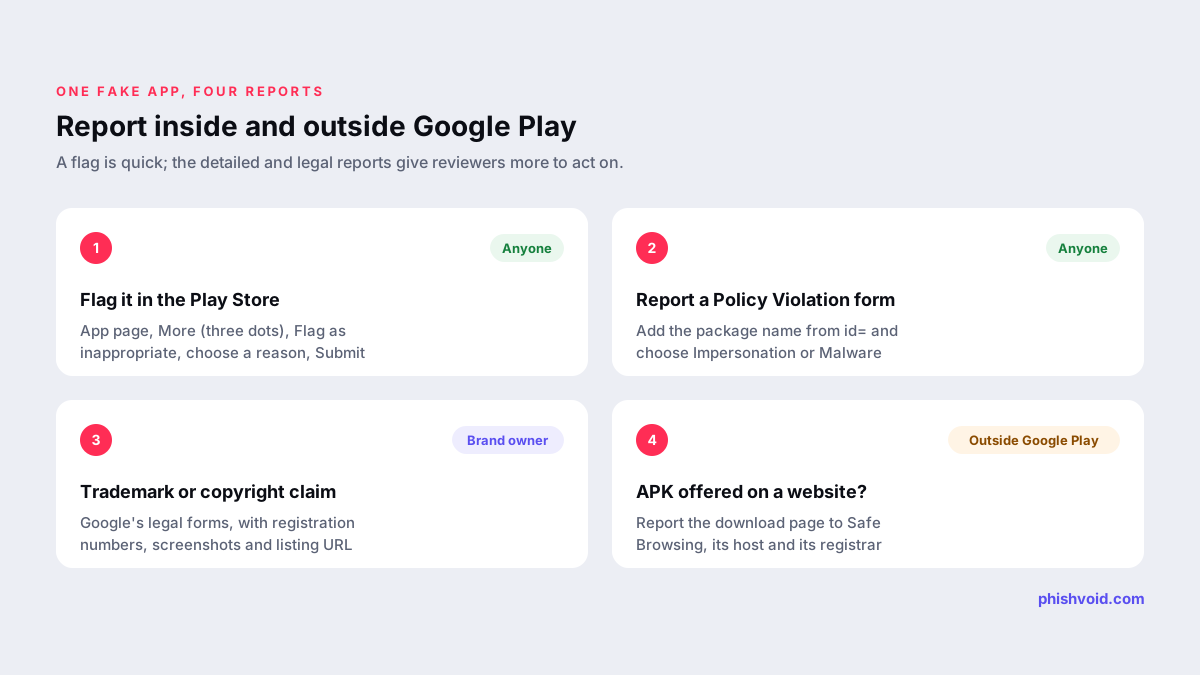
Quick answer: To report a fake app on Google Play, open the app's page in the Play Store, tap More (the three dots), choose Flag as inappropriate, pick a reason and tap Submit. For a more detailed report, use Google Play's Report a Policy Violation form with the app's package name and choose the Impersonation category. If the app uses your trademark, file a trademark complaint through Google's legal forms as well.
Below are the exact steps for users and for brand owners, how to pick the right category, and what to do when the fake app is not on Google Play at all but is pushed as a download from a scam website.
Is it really a fake app? Quick checks
Copycat apps borrow a real company's name, logo and screenshots. Before reporting, take a minute to confirm what you are looking at. The checks below also give you the details a good report needs.
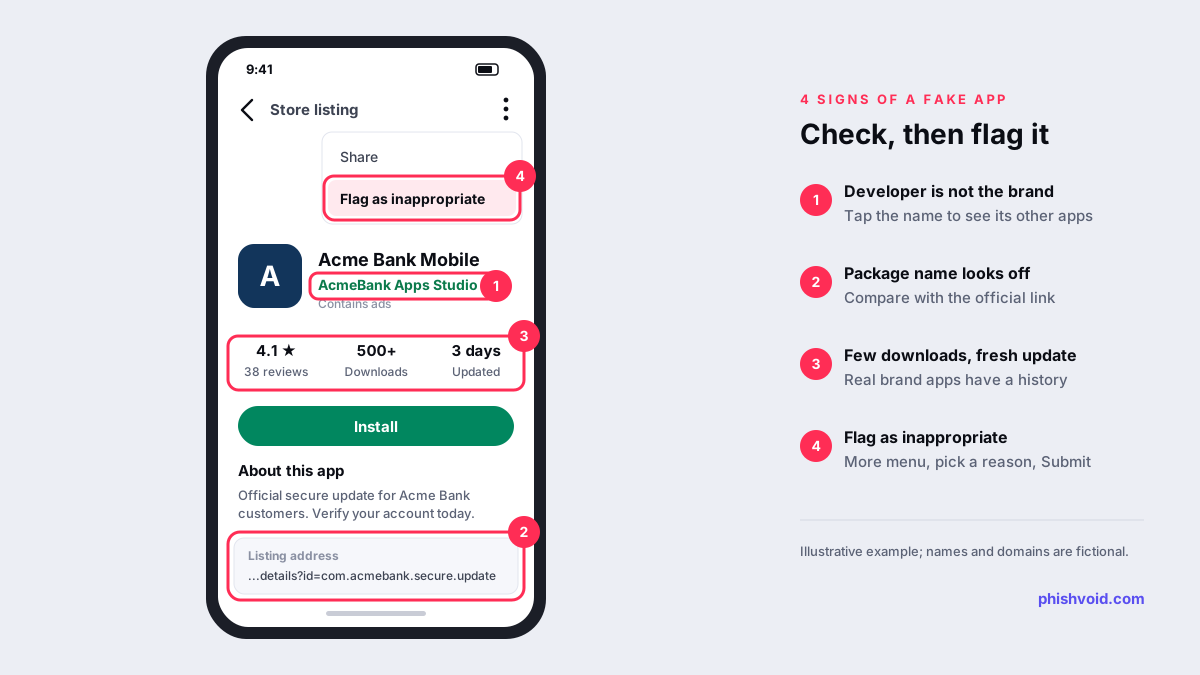
- Developer name. Tap the developer name under the app title and look at the other apps it publishes. A bank's official app is rarely published by an account that also sells flashlight apps and wallpapers.
- Package name. Every app on Google Play has a unique ID, shown at the end of its web address after
id=. Compare it with the app linked from the company's official website. - Downloads and age. A "new version" of a major brand's app with a few hundred downloads, or a listing updated days ago, deserves suspicion.
- Reviews. Look for recent reviews mentioning lost money, requests for card details or the app asking for a "verification fee".
- Permissions and requests. Apps that want to read your SMS messages or use accessibility features without a clear reason can intercept one-time codes.
The safest way to find the real app is to follow the link from the company's official website, which you type into the browser yourself.
How to report a fake app on Google Play
On an Android phone or tablet
- Open the Google Play app and go to the fake app's detail page.
- Tap More (the three-dot icon) at the top right.
- Tap Flag as inappropriate.
- Choose the reason that fits best and tap Submit.
These steps come from Google's help page Flag an app or review on Google Play. Google says flags go to its team for review and possible action. It does not promise an individual reply, so keep your own record of the app name, package name and date.
On a computer
Open the app's listing on the Google Play website, click More, select Flag as inappropriate, choose a reason and click Submit. The same help page also links to Google Play's Report an app or developer form, which asks you to sign in.
The detailed policy violation form
A flag is quick but short on detail. Google Play's Report a Policy Violation form lets you explain more. It asks for:
- your name and two confirmations that the report is accurate and in good faith;
- the application package name, from the
id=part of the Play Store address; - the suspected violation category, which includes Impersonation, Intellectual property and Malware, followed by a type and subtype;
- where you saw the problem: in the app, in the store listing, in another app's notifications or elsewhere;
- whether the app is still on Google Play, and your country.
Google notes that it can act only on apps published on Google Play, so use this form while the listing is live.
Which reason should you choose?
Picking the right category routes the report to the right reviewers. Google Play's Impersonation policy says it does not allow apps that mislead users by impersonating someone else, or that imply a relationship or authorization that does not exist. That covers most fake brand apps.
| What the app does | Best route | Who can use it |
|---|---|---|
| Pretends to be a bank, shop or other company | Policy form, Impersonation | Anyone |
| Steals logins, codes or card data, or installs harmful code | Policy form, Malware | Anyone |
| Uses your registered trademark in its name or icon | Trademark complaint | Rights holder or agent |
| Copies your copyrighted screenshots, text or code | Copyright notice | Rights holder or agent |
| Sells counterfeit versions of your products | Counterfeit notice | Rights holder or agent |
For brand owners: legal routes alongside the policy report
Google Play's Intellectual Property policy says it does not allow apps that infringe others' trademarks or that sell or promote counterfeit goods. It links three routes for rights holders:
- Trademark: the trademark complaint form for Google Play. The policy encourages contacting the developer first, which makes sense for a genuine business dispute. For an app built to defraud your customers, rely on the formal complaint and the Impersonation report instead.
- Copyright: a notice through Google's legal removals troubleshooter.
- Counterfeit: the counterfeit notice for Google Play.
Prepare a short evidence pack before you start: the package name and listing URL, screenshots of the icon, title, description and in-app screens, your trademark registration numbers and countries, and any customer complaints. If an agency files for you, it may need a letter of authorization. Also check the same developer account for sibling apps, since copycats often publish several at once. Fake apps rarely travel alone: the same campaign may run a fake online store using your brand or a cloned login page.
Fake apps outside Google Play
Many fake banking and delivery apps never appear on Google Play. They are sent as an APK file through a text message, a social media ad or a fake website, and the victim is talked into allowing installs from unknown sources. Our guide to phishing links and texts shows how those lures look.
- Report the download page. Submit the website to Google Safe Browsing using the malware report, and report it to its host and registrar. Our guide on how to report a scam website lists each step.
- Keep Play Protect on. Google says Play Protect also checks apps from other sources, warns about harmful ones and may disable or remove them. In the Play Store, tap your profile icon, then Play Protect and Settings, and make sure Scan apps with Play Protect is on. The Improve harmful app detection setting sends unknown apps to Google for checking (Google).
Phishvoid takes down the phishing sites and download pages that push fake apps, so the lure stops working even while a store report is still under review.
If you already installed the fake app
- Uninstall it. If Android blocks removal, check whether it was given device admin or accessibility access and revoke that first.
- From a different, trusted device, change the passwords for any account you entered into the app.
- If you entered card or banking details, call your bank using the number on your card.
- Report the app as described above, so others are protected.
Our I got phished page has a fuller checklist for the first hour.
FAQ
Will Google tell me what happened to my report?
Not necessarily. Google says flags are reviewed and may lead to action, but it does not promise an individual reply. Check the listing again after a few days, and file a more detailed policy or legal report if it is still live.
Where do I find an app's package name?
Open the app's listing on the Google Play website and look at the address bar. The package name is the text after id=, for example com.example.app.
How long does it take Google to remove a fake app?
Google does not publish a timeframe. Detailed reports with a correct package name, a clear category and evidence are easier to act on than a bare flag. Brand owners can add a trademark or copyright complaint in parallel.
Can I report a fake app that is not on Google Play?
Google says the policy form applies only to apps published on Google Play. For an APK offered on a website, report the site to Google Safe Browsing and to its host and registrar, and keep Play Protect turned on.
Is someone impersonating your brand?
We find lookalike domains and cloned pages and take them down. Start with a free exposure scan.