Learn how to remove a scam site from Google Search: which Google form to use for phishing, spam, scam ads and legal claims, and how to clear dead results.
Quick answer: Google cannot delete a scam website, because it does not host it, and it rarely drops a single result just because someone asks. To remove a scam site from Google Search, report it through the route that matches the problem: Safe Browsing for phishing or malware, the search spam report for deceptive pages, the ad report for sponsored results and the legal form for rights claims. At the same time, get the site taken offline by its host or registrar. Once the page is gone, Google's Refresh Outdated Content tool can clear the leftover result.
This guide covers Google's own routes and what each one can realistically achieve. For reporting outside Google, to hosts, registrars and national agencies, see our guide on how to report a scam website.
What Google can and cannot do about a scam site
Google Search is an index of pages hosted by other people. Removing a result does not remove the website: anyone who receives the link by text message, email or social media can still open it. That is why the most durable fix is always removal at the source, with Google's tools working alongside it.
Within its own products, Google has four levers:
- Warn visitors. Pages listed by Google Safe Browsing trigger a full-page warning in Chrome and other browsers and apps that use the service, wherever the link was found.
- Keep scam pages out of results. Google's spam policies include a "Scam and fraud" section, which says Google uses automated systems to identify scammy or fraudulent pages and keep them out of Search results. Policy violations can also lead to a manual action.
- Remove results for legal reasons. Copyright claims, counterfeit complaints and court orders go through Google's legal removals process.
- Drop results that no longer exist. When a page has been taken down, Google can refresh its index so the dead result disappears.
Which lever you can pull depends on what the site does and who you are, so start by matching the problem to the route.
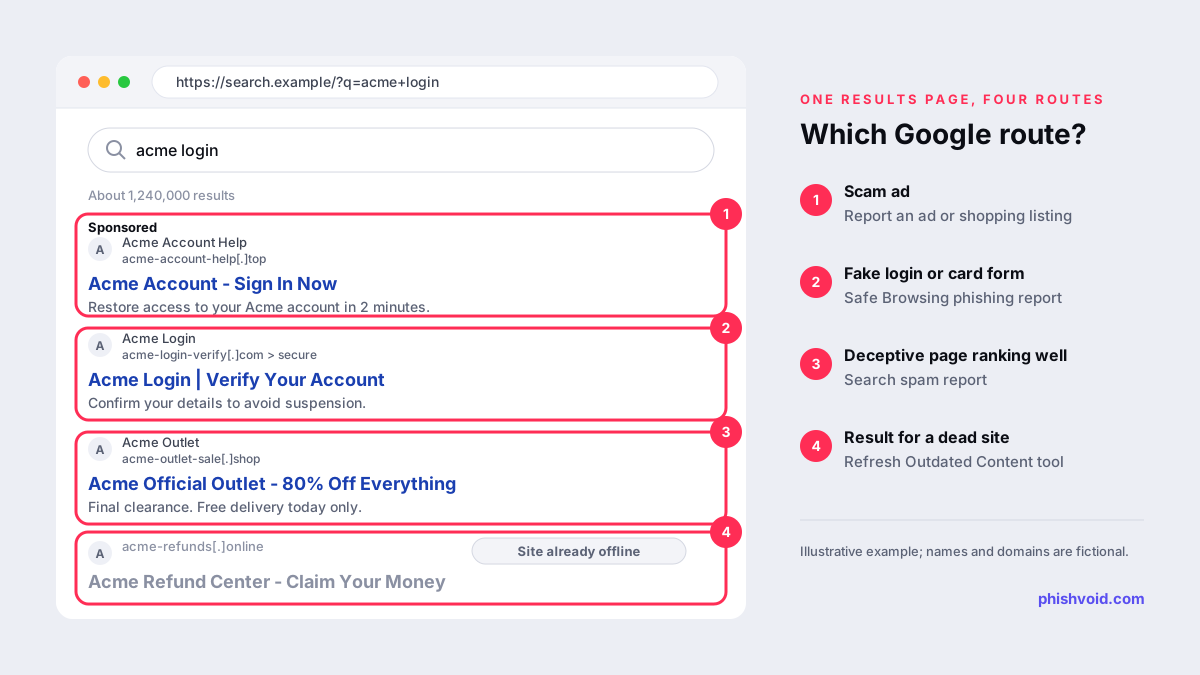
Google's report routes, matched to the problem
Phishing or malware: Google Safe Browsing
If the site imitates a login page, asks for card details or pushes harmful downloads, report it to Safe Browsing. Google lists both forms on its Report spam, phishing or malware page:
- Report a phishing page for fake logins, fake checkouts and data-stealing pages. Google forwards these reports to the Safe Browsing team.
- Report malware for sites that infect devices or push unwanted software.
A Safe Browsing listing does not delete the search result, but it protects the people most at risk: those who click. You can check whether a URL is already flagged with the Safe Browsing site status tool.
Deceptive or spammy pages: the search spam report
For pages that rank through deception, such as fake reviews of a scam investment platform or a cloned shop stuffed with brand keywords, use Google's spam report. Set expectations carefully. Google says it may use a report to take manual action against sites that violate its spam policies, and that reports help improve its spam detection systems. It does not promise to act on every report or to reply. Keep personal details out of the text: Google says it may send submission text to the site owner if it issues a manual action, and it won't process submissions that contain personally identifying information.
Scam ads at the top of the results
Sponsored results are handled by the ads team, not the search team. Use the Report an ad or shopping listing form. It covers policy violations, such as scams and phishing, and legal issues, such as trademark and counterfeit complaints. Our article on fake ads and deepfake investment scams explains how to capture an ad before it rotates out of view.
Legal claims: copyright, counterfeits and court orders
Google's Report Content for Legal Reasons page leads to a request form where you choose the product and the legal issue. Google asks you to list the specific URLs and explain why the content is unlawful, and it sends an email confirmation with a reference number. A cloned site that copies your text and images is often a candidate for a copyright notice; see DMCA notices against cloned websites for when that works and when it backfires.
Your personal details on a scam page
If a scam page publishes your contact details, ID documents, bank details or other private information, use Google's Remove my private info from Google Search process. It is designed for people whose own information is exposed, not for brands.
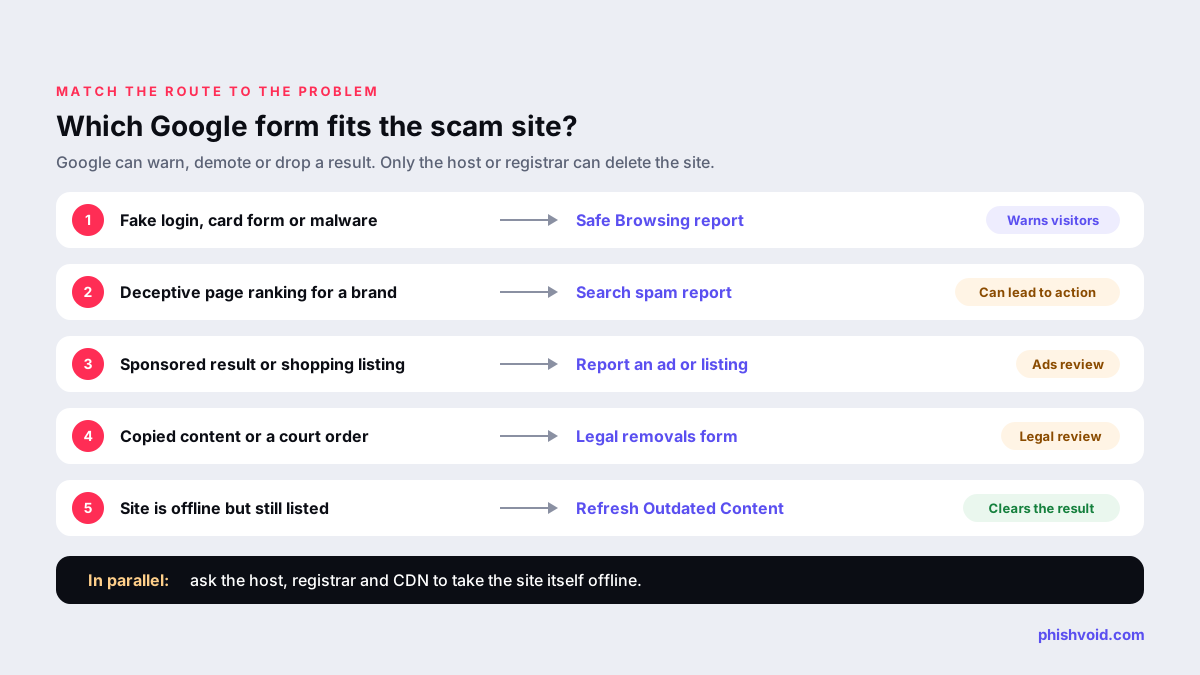
Remove the site at the source first
Everything above treats symptoms inside Google. The site itself lives on a hosting account, behind a domain name and often behind a CDN. Each of those providers can switch it off:
- Hosting provider: removes the content or suspends the account.
- Domain registrar: suspends the domain, which takes every page on it offline at once.
- CDN or proxy: forwards the complaint to the real host and may reveal who that is.
Use an RDAP lookup such as ICANN Lookup to find the registrar and its abuse contact, then send a short, factual report with the URLs, screenshots and what the page collects. Timing varies widely by provider and evidence; our article on how long it takes to take down a phishing site covers what research shows and what speeds things up.
After the takedown: clear the leftover result
When a scam site goes offline, its result can linger in Google for a while. You don't have to wait. Google's Refresh Outdated Content tool works for pages you do not own:
- You sign in with a Google account, which Google requires to prevent abuse.
- The page must no longer exist or must have changed significantly. The tool will not remove a page that is still live.
- Google's help page says processing can take a few days, and you can check the request status in the tool.
- If a request is denied, the tool links to an explanation, often because the page still loads.
If the scam page sits on a site you control, for example a hacked folder on your own domain, clean it up and use the Removals tool in Search Console instead, which Google reserves for verified owners.
For brands: when scam sites rank for your name
Scam pages often target searches that combine a brand with words like "login", "support", "outlet" or "refund". A short routine catches most of them:
- Search those combinations regularly, on mobile as well as desktop, since some campaigns show only to phones or certain countries.
- Capture sponsored results with a screenshot and the destination URL before reporting, because ads rotate.
- Report each finding through the matching Google route above and, in parallel, to the host and registrar.
- Recheck after removal and submit the dead URLs to Refresh Outdated Content.
Fake shops are a common case; our guide to a fake online store using your brand walks through the commerce-specific routes. Phishvoid's team verifies each site and reports it to Google Safe Browsing, search engines, hosts, registrars and CDNs at the same time, under one subscription with unlimited takedowns.
FAQ
Can I make Google delete a scam website?
No. Google does not host the site, so it cannot delete it. It can warn visitors through Safe Browsing, keep scam pages out of results, remove results for legal reasons and drop pages that no longer exist. Only the host, registrar or site owner can take the site itself offline.
How long does it take for a scam site to disappear from Google?
There is no fixed timeline for reports. Once the page is actually gone, Google says a Refresh Outdated Content request can take a few days to process. Removing the site at the source is usually what makes the result disappear for good.
Do I need to own the website to use the outdated content tool?
No. Refresh Outdated Content is meant for pages you don't own. You need a Google account, and the page must no longer exist or must have changed significantly. Verified owners should use the Removals tool in Search Console instead.
Is a scam ad reported the same way as a scam result?
No. Ads go through the Report an ad or shopping listing form, which covers scams, phishing, trademark and counterfeit issues. Organic results go through Safe Browsing, the spam report or the legal removals form.
Will the scam site's owner see my report?
Google says spam report text may be shared with the site owner if a manual action is issued, so leave out personal details. Phishing reports go to the Safe Browsing team.
Is someone impersonating your brand?
We find lookalike domains and cloned pages and take them down. Start with a free exposure scan.