Who is hosting this website? Find a site's IP address, look up who owns it, spot Cloudflare and other proxies, and reach the right abuse contact fast.
Quick answer: To find out who is hosting a website, look up the IP address its domain points to, then look up who owns that IP address in an RDAP or WHOIS service. The organisation holding the address is usually the hosting company. If it turns out to be Cloudflare or another CDN, the real host is hidden behind it, and you need the CDN's abuse process to reach it. All of this is free and takes a few minutes.
One common mix-up first: the company where the domain was registered is usually not the company that hosts the website. The steps below show how to tell them apart and what to do with the answer, especially if you want to report a phishing or scam site.
Host, registrar, DNS and CDN: four different roles
| Role | What it does | Where you see it |
|---|---|---|
| Hosting provider | Runs the server that stores and serves the website's files | Owner of the IP address |
| Registrar | Sells and manages the domain name | ICANN Lookup for the domain |
| DNS provider | Answers the question "which IP address does this domain use?" | The domain's name server (NS) records |
| CDN or proxy | Sits in front of the server, caching content and hiding its address | IP owner and response headers |
One company can play several roles, but often each is different. A phishing domain might be registered at one company, use another's name servers, sit behind Cloudflare and run on a server rented from a fourth.
Step 1: Find the website's IP address
Start with the domain, not the full URL. If you have a long or suspicious link, paste it into our link checker, which shows the real domain without opening the page. Then:
- In a terminal on Windows, macOS or Linux, run
nslookup suspicious-site.example. On macOS and Linux,dig +short suspicious-site.examplealso works. - In a browser, use Google's public DNS lookup page: enter the domain and read the A record (IPv4) and the AAAA record (IPv6).
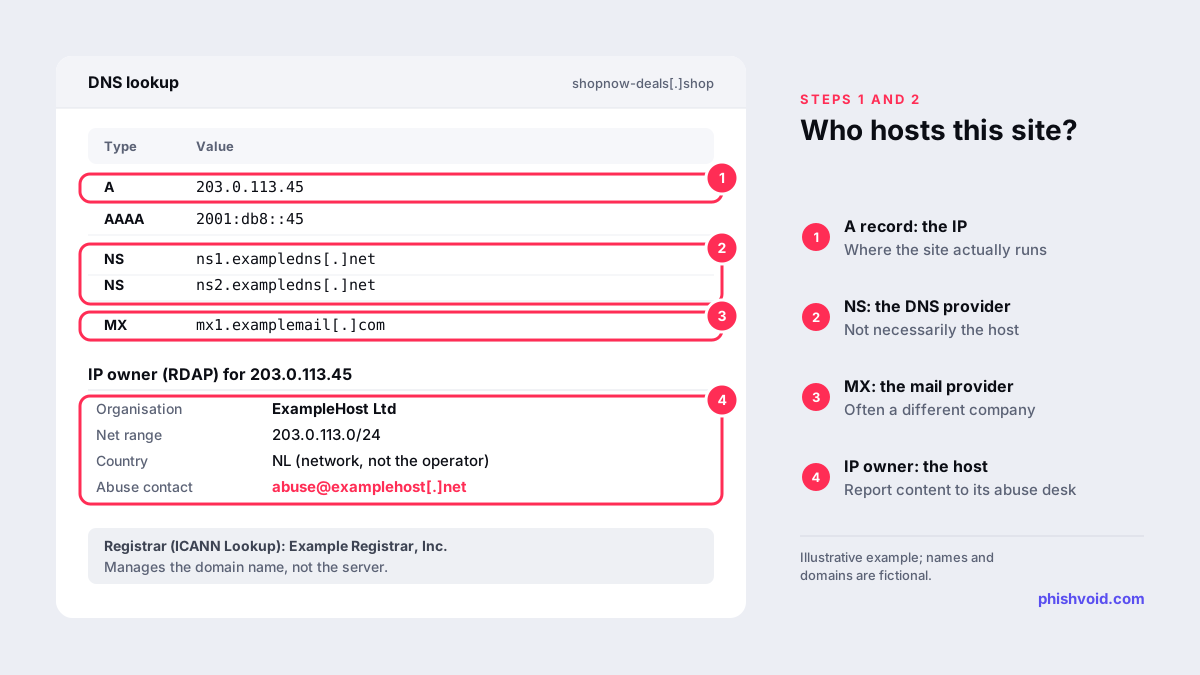
Look up the exact hostname in the URL, such as login.suspicious-site.example, because a subdomain can point somewhere different from the main domain. While you are there, note the NS records (name servers) and MX records (mail servers); they help in the steps below.
Step 2: Look up who owns the IP address
Every public IP address is registered by one of five regional internet registries: ARIN, RIPE NCC, APNIC, LACNIC and AFRINIC. You don't need to know which one. Paste the address into ARIN's Whois/RDAP search, which follows referrals to the other registries and shows the record wherever it is held.
In the result, read:
- Name and organisation: the network's owner, normally the hosting or cloud company.
- Net range: the block of addresses it holds.
- Contacts with the Abuse role: the address where the owner accepts complaints.
Sometimes the owner is a large data centre or cloud platform, and the site belongs to one of its customers or to a smaller host that resells its servers. For an abuse report, that does not matter much: the IP owner can act on its own network and can pass the case on to its customer.
When the answer is Cloudflare
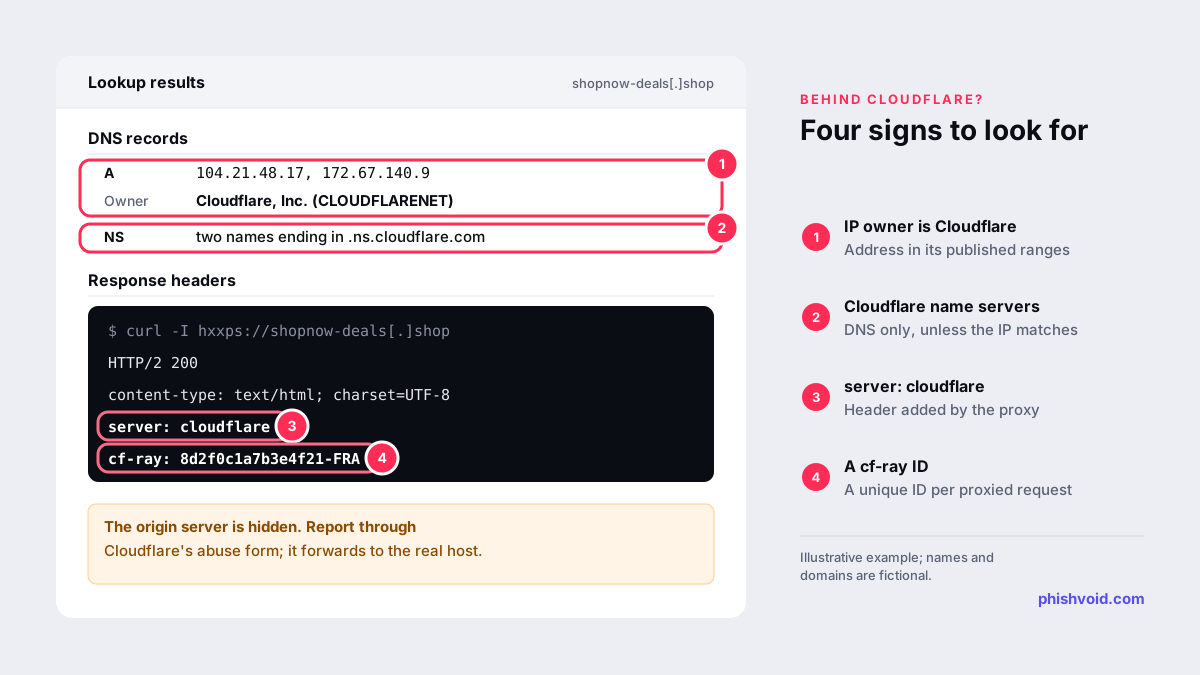
Many websites, legitimate and malicious, use Cloudflare as a reverse proxy. In that case the IP lookup shows Cloudflare, Inc., and the real server, called the origin, stays hidden. Signs you are looking at Cloudflare:
- The IP address falls within the ranges Cloudflare publishes on its IP ranges page.
- The name servers end in
ns.cloudflare.com. On their own, these only show that Cloudflare runs the DNS; the site is proxied when the IP address is Cloudflare's too. - The HTTP response headers include
server: cloudflareand acf-rayID. Runningcurl -Ifollowed by the site's address prints the headers without rendering the page.
To reach the hidden host, report the site through Cloudflare's abuse form. Cloudflare says it forwards complaints to the website operator and the hosting provider, gives the host the origin IP address so it can find the content, and may reply with additional details so you can follow up (Cloudflare). Passive public sources, such as historical DNS records and certificate transparency logs, sometimes reveal the origin as well. Our guide to taking down a phishing site behind Cloudflare covers this route in detail. Other CDNs and proxies work in a similar way and have their own abuse contacts.
Other clues, and what they don't tell you
- Website builders and free hosting. If the site is a subdomain of a site builder or hosting platform, the platform is the host. Use its own report form.
- Shared hosting. Many unrelated sites can share one IP address, so a reverse IP lookup that lists other domains does not mean they are connected.
- Mail records. MX records show who handles the domain's email, which is often a different company from the web host.
- Location. IP geolocation shows roughly where the server or network is, not where the operator or the hosting company is based.
- "Hosting checker" websites run these same lookups for you. They are convenient, but confirm the IP owner yourself before you send a report.
What to do with the answer
If you are looking up the host because a site imitates a brand or steals data, use the result straight away:
- Report the content to the host's abuse contact. Our guide on reporting abuse to a web hosting provider explains what to include.
- Report the domain to its registrar, which you find in ICANN Lookup. See how to report domain abuse to a registrar.
- Report the URL to Google Safe Browsing and other blocklists so browsers warn visitors in the meantime.
Our abuse report generator finds the registrar's abuse address and writes the report for you. If you are responsible for a brand that keeps being copied, Phishvoid can run these lookups and reports for every new site and follow each one up until it is removed.
FAQ
Can I find out who hosts a website behind Cloudflare?
Not directly, because Cloudflare hides the origin server's IP address. Report the site through Cloudflare's abuse form, which forwards complaints to the hosting provider, and check passive sources such as historical DNS records.
Is the hosting provider the same as the domain owner?
No. The hosting provider runs the server, the registrar manages the domain name, and the registrant is the customer who holds it. Each can be a different party.
Is it OK to look up who hosts a website?
Yes. DNS records and IP registration data are public by design, and looking them up is passive. Scanning or probing a server you don't control is a different matter, so leave that alone.
Why does the lookup show a country that doesn't match the website?
Hosting is international. A site in one language can run on a server anywhere, and IP location data describes the network, not the person running the site.
Can I see who owns the domain too?
Often only partly. ICANN Lookup shows the registrar and the registration dates, but owner details are usually redacted for privacy. You can still report abuse to the registrar.
Is someone impersonating your brand?
We find lookalike domains and cloned pages and take them down. Start with a free exposure scan.