How to report phishing to Google Safe Browsing: which form fields to choose, what to write in the details box and what happens after you submit it.
Quick answer: To report phishing to Google Safe Browsing, open Google's Report a Page to Google Safe Browsing form, keep the report type as "This page is not safe", choose the threat type "Social Engineering" and the closest threat category, paste the full URL and explain in the details box what the page imitates. It is free. If Google confirms the page, Chrome and other products that use Safe Browsing start warning people before they open it.
A Safe Browsing listing protects people without waiting for the host or registrar to act. It does not remove the site, though, so treat it as one track among several. Our guide on how to report a scam website lists the other places to report.
How to report phishing to Google Safe Browsing, step by step
- Copy the full URL of the phishing page as text, including the path after the domain. Do not type anything into the page.
- Open the report form. Google links to it as "Report phishing" on its report spam, phishing or malware page.
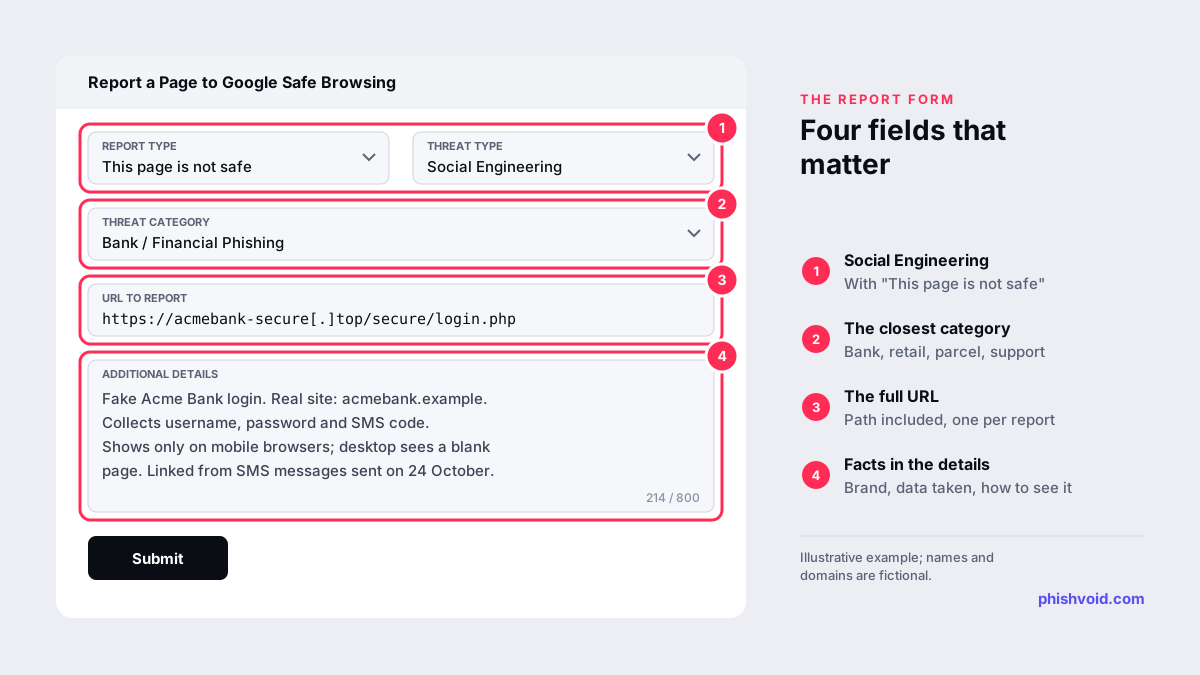
- Report Type: leave it on "This page is not safe".
- Threat Type: choose "Social Engineering", Google's term for phishing and other deceptive pages. Choose "Malware" or "Unwanted Software" only for sites that push harmful downloads.
- Threat Category: pick the closest match. The options include Bank / Financial Phishing, Crypto Exchange Phishing, Social Media Platform Phishing, Retail Phishing, Email Provider Phishing, Government Agency Phishing, Package Tracking Scam and Fake Support Scam, with "Other Phishing" and "Other Scam" for everything else.
- URL to report: paste the working URL, not a defanged version.
- Additional details: describe the page in up to 800 characters, as explained below, then submit.
Before you submit, check the URL in the Safe Browsing site status tool described below. If Google already flags it, another report adds little, and your time is better spent on the host and registrar.
The form says that some account and system information is sent to Google with your report, and that Google may update the site's status in its Transparency Report and share the URL and its status with third parties.
What to write in the additional details box
Reviewers need to see what you saw. The form has no field for screenshots, so the text has to do the work. 800 characters is enough if you stick to concrete, checkable facts rather than opinions such as "this is a scam":
- The brand being imitated and its real website, for comparison.
- What the page collects: passwords, card numbers, one-time codes or crypto wallet phrases.
- How to reproduce it. Many phishing pages use cloaking and show the fake content only to mobile browsers, to visitors from one country or to links that contain a token. If a reviewer opens the page on a desktop and sees nothing, your report is harder to confirm.
- Related URLs on the same site. The form takes one URL per submission, so submit pages on other domains separately.
An example: "Fake Acme Bank login. Real site: acmebank.example. Collects username, password and SMS code. Content shows only on mobile browsers; desktop sees a blank page. Linked from text messages sent on 24 October."
What happens after you report
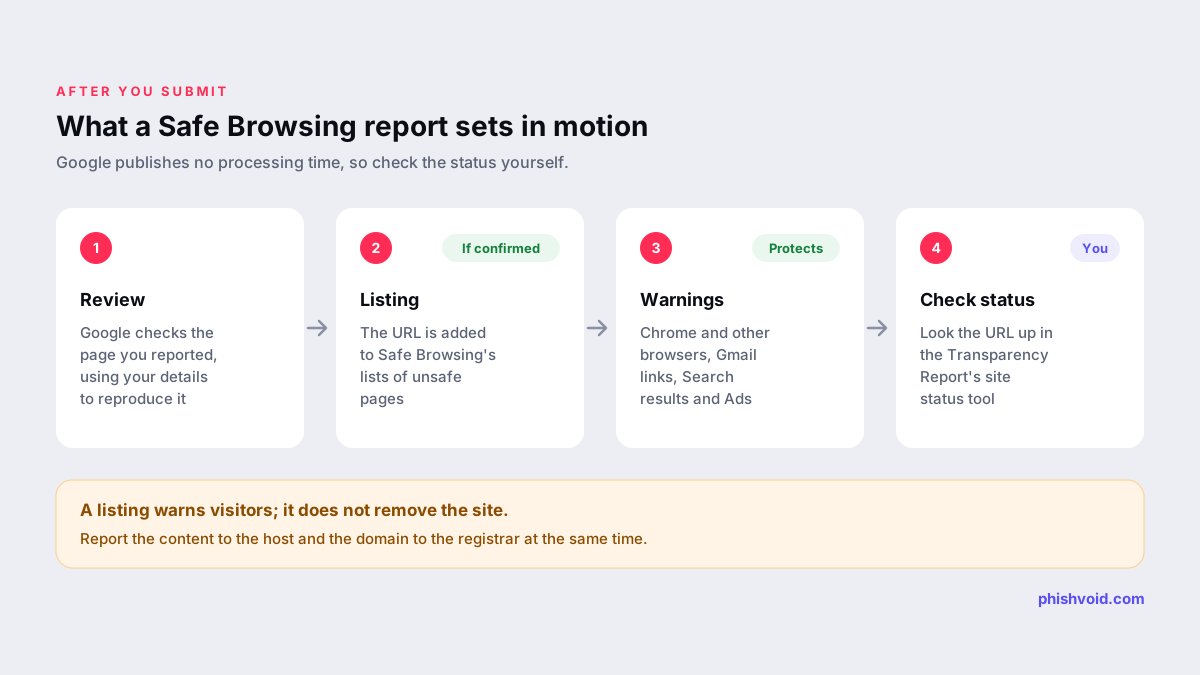
Google reviews the submission. If it confirms that the page is deceptive, the URL is added to Safe Browsing's lists, which help protect over five billion devices every day, according to Google. Google lists these protections, among others:
- Chrome and other browsers show warnings before people reach dangerous sites.
- Google Search shows a warning next to possibly dangerous sites.
- Gmail warns about dangerous links in emails.
- Google Ads uses the lists to keep ads from promoting dangerous pages.
Google does not publish a processing time, and the form does not promise a reply. To see whether the URL has been listed, check it in the Safe Browsing site status tool in Google's Transparency Report. If the page is still live and unlisted after a while, submit it again with clearer details on how to reproduce it.
What a Safe Browsing listing does not do
A listing adds a warning; it does not take the site offline. The page stays reachable for anyone who clicks past the warning or uses a browser or app that does not check Safe Browsing. The operator can also move the same kit to a new domain, which starts with a clean record. And a warning that appears today does not help anyone who entered their details yesterday; if that was you, change the password through the official site and call your bank if card details were involved.
To remove the site itself:
- Report the content to the hosting provider, which can delete it.
- Report the domain to its registrar, which can suspend it.
- If the site is behind Cloudflare, use Cloudflare's abuse form; our Cloudflare takedown guide explains how.
- Submit the URL to other blocklists, such as Microsoft SmartScreen and Netcraft, so more browsers and security products warn.
Other ways to report phishing to Google
- Phishing emails in Gmail: open the message, click More (the three dots) next to Reply and choose Report phishing (Google).
- Malware sites: use the separate Report malware form instead of the phishing form.
If your own site is flagged by mistake
If Safe Browsing warns about a site you own, sign in to Google Search Console and open the Security Issues report, which lists the problems Google found. Fix them on every affected page, then select Request Review. For deceptive pages, Google says a review can take from a few days to a few weeks (Google). The Safe Browsing report form also accepts reports of legitimate pages that are wrongly flagged, through its Report Type field. If the warning followed a report by Phishvoid, you can also submit an appeal to us.
FAQ
Is reporting to Google Safe Browsing free?
Yes. Anyone can submit a URL through the form at no cost.
How long does it take for a warning to appear?
Google does not publish a timeframe. Check the URL in the Safe Browsing site status tool to see whether it has been listed, and report the site to its host and registrar in the meantime.
Does Google remove the phishing site?
No. Safe Browsing adds warnings in products that use it. Only the hosting provider, the registrar or the site operator can take the site offline.
Should I report every URL on a phishing site?
Report the page that collects data, with its full path, and mention other paths on the same site in the details box. Report pages on other domains separately, since each submission takes one URL.
Can I check whether a site is already flagged?
Yes. Enter the domain or URL in the Safe Browsing site status tool. A clean result does not prove a site is safe, because new phishing pages may not be listed yet.
Is someone impersonating your brand?
We find lookalike domains and cloned pages and take them down. Start with a free exposure scan.