How to report fake bank ads on Google step by step, through the ad menu, the Ads Transparency Center and the report form, plus the extra routes banks can use.
Quick answer: To report a fake bank ad on Google, select More (the three dots) or Info next to the ad, choose Report ad, pick the reason that fits, add the name of the bank it imitates and submit. Google emails you to confirm it received the report, and its Trust & Safety team reviews the ad (My Ad Center Help). You can also report through the Ads Transparency Center or Google's Report an ad form, and banks have extra routes as rights holders.
Fake bank ads are a form of malvertising: paid search ads that look like the bank's official login link but lead to a copy of its sign-in page. Because they appear at the top of the results, they can catch careful people who would never click a link in a text message.
What a fake bank ad looks like
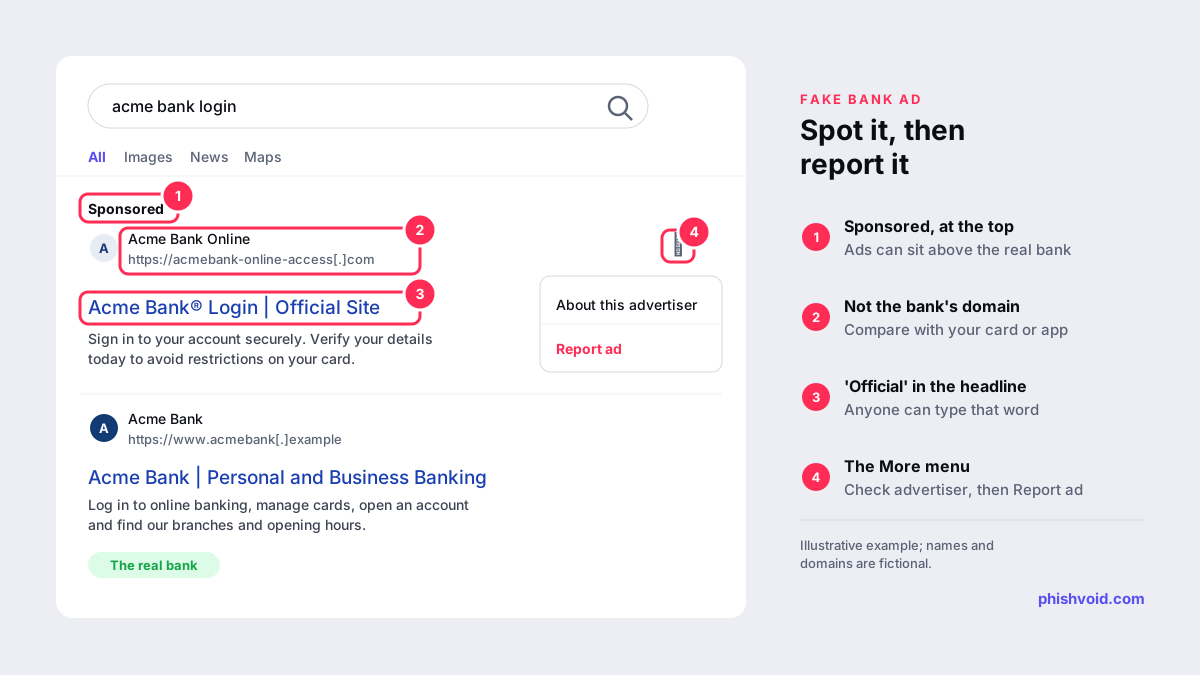
- It is labelled Sponsored and sits above the bank's real website in the results.
- The web address shown is not the bank's domain, or it combines the bank's name with extra words, such as
acmebank-online-access[.]com. - The headline claims to be official, often with words like "login", "secure access" or "verify".
- The advertiser does not match the bank. Select About this advertiser in the ad menu. Google shows the name and location that advertisers provide through its identity verification (Google), and a name unrelated to the bank is a warning sign.
Some fake ads use cloaking: they show a harmless page to reviewers and the phishing page only to selected visitors. That is why a report describing what you actually saw is useful.
How to report a fake bank ad on Google
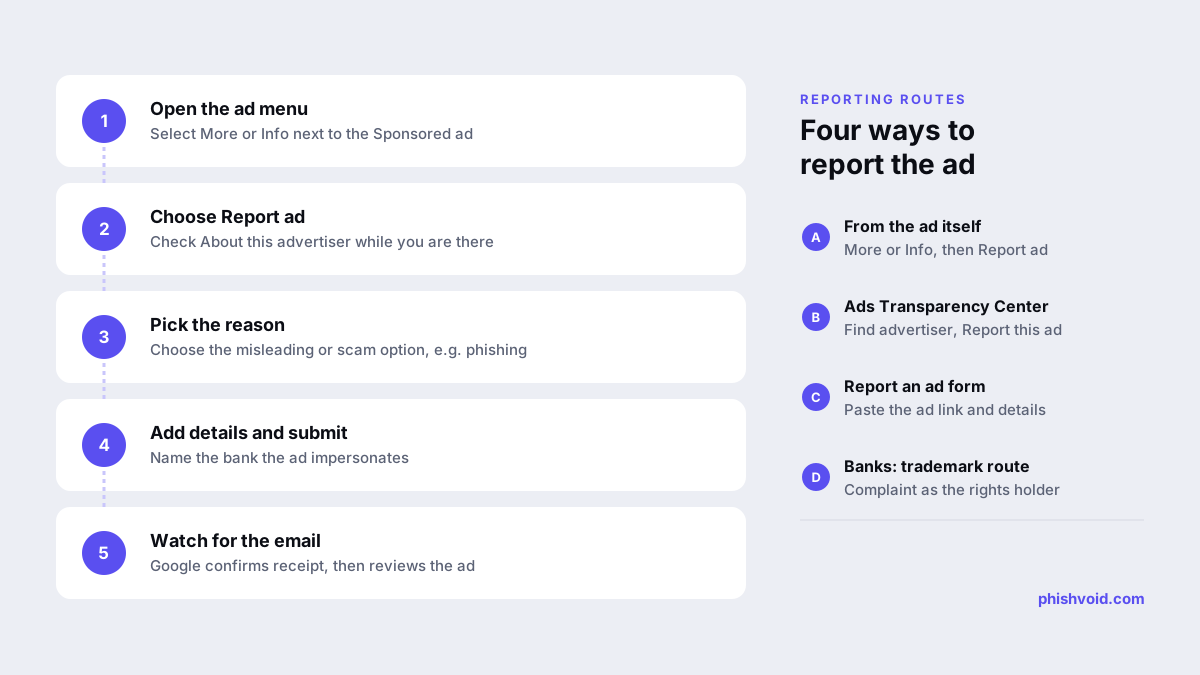
From the ad itself
- Next to the ad, select More (three dots) or Info.
- Select Report ad. If several ads are listed, choose the right one first.
- Choose the reason for your report and complete the form. For a phishing ad, you can name the site the ad is impersonating. Leave any pre-filled fields as they are.
- Select Submit. If you are signed out, you will be asked for an email address.
Google notes that reporting an ad does not block it for you; blocking is a separate option. Ads that break Google's rules or the law are acted on, and egregious or repeated violations can lead to the advertiser's account being suspended (Google).
From the Ads Transparency Center
If the ad has disappeared from your results, open the Ads Transparency Center, search by the advertiser's name or the website shown in the ad, filter by region if needed, then open the ad and use its report option.
With the Report an ad form
Google's Report an ad form asks you to choose what is wrong, paste a link to the ad and describe the problem. The option "It's misleading or a scam" covers phishing and impersonation. Add your email address if you want updates on the report.
Also report the website behind the ad
An ad report deals with the ad. The fake login page it leads to is a separate target and can stay online after the ad is removed, ready to be promoted again from a new account. If you already opened the page, copy the address from the browser bar without entering anything. Report it to Google Safe Browsing and Microsoft, and forward the details to your bank. Our guide on how to report a scam website lists national services, and how to spot a fake bank website covers what to check on the page itself.
What banks can do beyond the report button
Banks see these ads in volume and need routes that carry more weight than a single user report. They work best as part of a wider brand protection programme for banks.
- Policy reports that cite impersonation. Google's Unacceptable business practices policy prohibits impersonating other brands or businesses to get users to give money or personal information. Google treats violations as egregious and says suspension happens upon detection and without prior warning. Citing the policy and supplying evidence of the phishing page makes a report easier to act on.
- Trademark complaints. Under the Google Ads trademark policy, a trademark owner can complain about use of the mark in ad text. The mark must appear in the ad itself, not only on the landing page, and Google does not restrict trademarks used as keywords. A trademark complaint complements fraud reporting rather than replacing it.
- Financial services verification. In 42 countries and regions, including the UK, Türkiye and every EU and EEA member state, Google requires advertisers of in-scope financial services to complete verification (Google Ads Help). The United States is not on that list. Make sure your own accounts are verified, so customers and reviewers can tell your ads from imitations.
- Monitoring and evidence. Search your brand with "login", "app" and "support" in each market, on mobile as well as desktop, and check the Ads Transparency Center for advertisers using your name. Keep screenshots of each ad, the advertiser details and the landing page, because cloaked campaigns may not show the same content to reviewers.
Fake ads are also used for investment scams that borrow a bank's or an executive's name; see fake ads and deepfake investment scams. Phishvoid reports fake ads and the phishing sites behind them as part of one managed takedown subscription, so the ad, the domain and the hosting are handled together.
What to do if you clicked a fake bank ad
If you only opened the page, close it and report the ad. If you entered your login details, a card number or a code, call your bank straight away on the number on your card, change your password through the official app, and follow the checklist on our page for people who have been phished.
FAQ
How long does Google take to remove a reported ad?
Google does not publish a fixed timeframe. You receive an email confirming the report, and the ad is reviewed against Google's policies. Report the landing page separately so it can be blocked while the ad review is under way.
Can I report an ad if I am not signed in to Google?
Yes. Google asks for your email address when you report an ad while signed out.
Does reporting the ad stop it from showing to me?
No. Reporting and blocking are separate. Use the block option if you no longer want to see the ad.
Can a bank stop others from bidding on its name?
Google's trademark policy does not restrict the use of trademarks as keywords, so bidding on a bank's name is not removable in itself. Ads that impersonate the bank or misuse its trademark in the ad text can be reported under Google's policies.
Are fake bank ads only found on Google?
No. They also appear on other search engines and on social media. The same approach applies: report the ad on the platform where you saw it, and report the website it leads to.
Is someone impersonating your brand?
We find lookalike domains and cloned pages and take them down. Start with a free exposure scan.