How to recognise a fake bank website, what to do if you entered your details and where to report it, plus what banks should do when customers report one.
Quick answer: A fake bank website is a copy of a bank's login or verification page, hosted on a domain the bank does not own and built to steal your login details, one-time codes or card numbers. To recognise one, check the exact web address, think about how you got there, and be suspicious of any page that asks for your PIN, your full card number or the code your bank just texted you. If you have already entered details, call your bank on the number on your card straight away, then report the site.
This guide is written for bank customers first. If you work at a bank and want to stop these sites at the source, there is a short section for you near the end, and a fuller guide to brand protection for banks.
How fake bank websites reach you
Few people find a fake bank site by accident. They are almost always sent there by:
- Text messages about a blocked card, a new payee you did not add or a payment that "needs confirming". See phishing links and texts.
- Emails that warn of suspended access or unusual sign-ins.
- Search ads that appear above the real bank when you search for its name and "login". Our guide to fake bank ads on Google explains how to report them.
- Phone calls from someone claiming to be the bank's fraud team, who then asks you to open a link to "secure" your account.
- Social media replies from accounts posing as the bank's support team.
How to recognise a fake bank website
Fake bank sites can be near-perfect copies, so judge the address and the request, not the design.
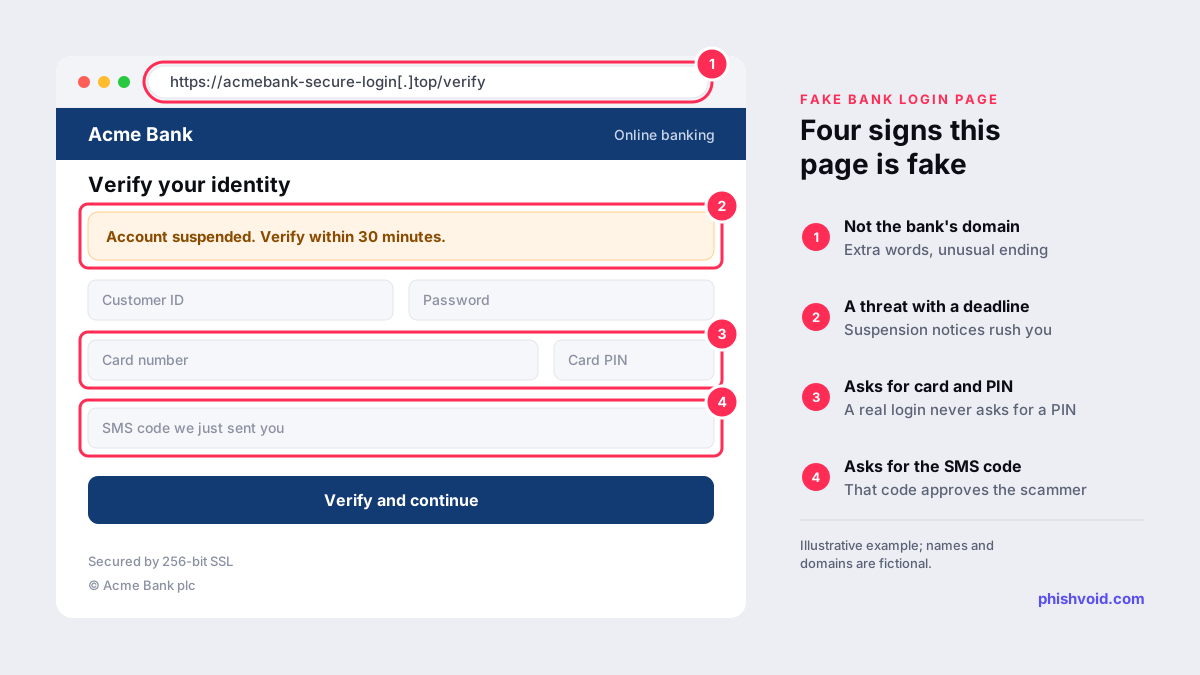
- Read the domain carefully. Look at the part before the first single slash and read it from right to left.
acmebank-secure-login[.]topis not Acme Bank, however official the page looks. Extra words such as "secure", "verify" or "online", hyphens and unusual endings are common. - Do not rely on the padlock. The padlock only means the connection is encrypted. Scam sites can get certificates for free, just like real ones.
- Think about how you arrived. If you came from a text, an email, a call or an ad, treat the page as unverified until you have checked it another way.
- Watch what it asks for. A login page that also wants your full card number, PIN, card security code or the code that just arrived by SMS is a strong sign of fraud. Those codes exist to approve logins and payments, so giving one away can let the scammer approve theirs.
- Notice the pressure. Countdown timers, threats of suspension and "verify within 30 minutes" banners are designed to stop you thinking.
- Check the domain's age. If you are unsure, look the domain up at ICANN Lookup. A domain created last week is not your bank's long-standing website.
How to reach your bank safely
The simplest protection is never to log in through a link someone sent you. Use the bank's official app, a bookmark you saved yourself, or type the address you already know. For phone contact, use the number on the back of your card or on a statement. In the UK you can also dial 159, a service run by Stop Scams UK that connects you to the fraud line of participating banks (Stop Scams UK). When you are looking for your bank's login page, skip the ads in search results; your bookmark or the app is safer.
What to do if you entered your details
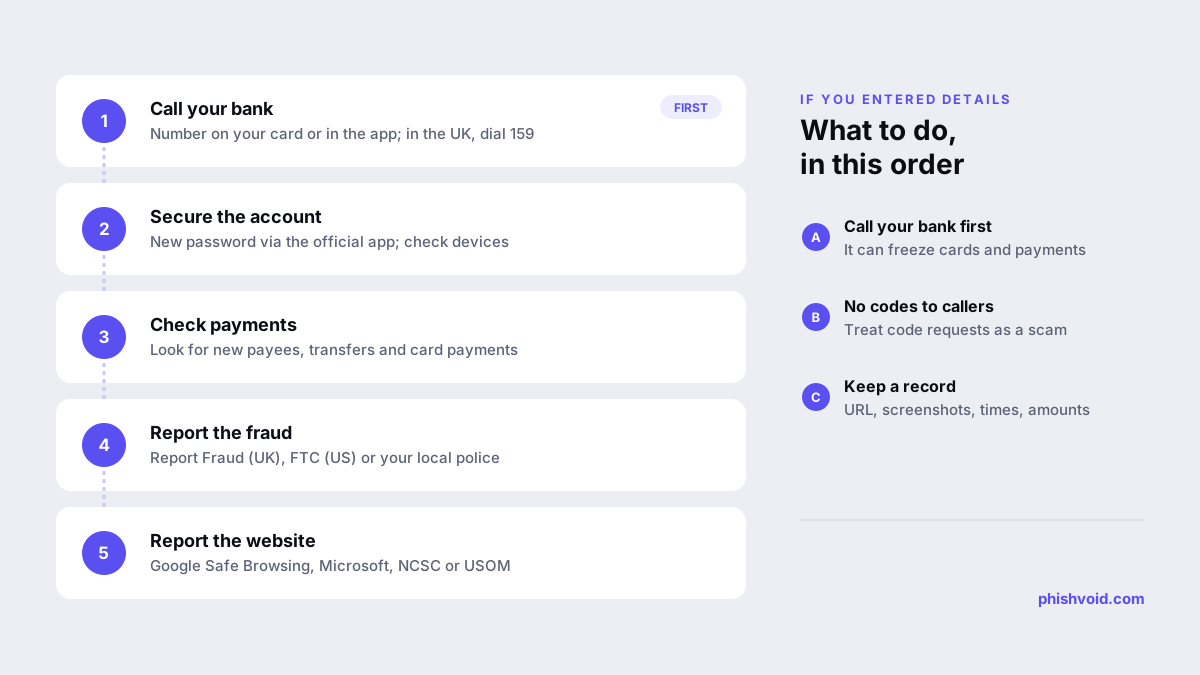
Act quickly and in this order:
- Call your bank. Use the number on your card or in the app, explain what happened, and ask the bank to block your cards and review recent activity.
- Secure your online banking. Change your password through the official app or website, and change it anywhere else you used the same password. Check for devices or payees you do not recognise.
- Check your accounts over the following weeks for new payees, transfers and card payments.
- Be wary of follow-up calls. Scammers often call soon after a phishing attack, pretending to be the bank's fraud team. Treat any request for a code, a PIN or a transfer to a "safe account" as a scam.
- Report the fraud. In the US, report to the FTC at ReportFraud.ftc.gov. In England, Wales and Northern Ireland, use Report Fraud. Elsewhere, contact your local police or national fraud reporting service.
Our page for anyone who has been phished has a fuller recovery checklist.
How to report a fake bank website
Reporting helps get the site blocked for other people, and it takes only a few minutes:
- Your bank. Most banks have an address or form for reporting phishing. Find it on the bank's official website, not in the suspicious message.
- Google Safe Browsing. Report a phishing page, which can lead to warnings in Chrome and other browsers that use Safe Browsing.
- Microsoft. Report an unsafe site for Edge and SmartScreen.
- UK. The NCSC's report a suspicious website service.
- Türkiye. USOM at siberguvenlik.gov.tr/ihbar or by email to ihbar@siberguvenlik.gov.tr.
For other countries and channels, see how to report a scam website.
If you work at a bank
Customer reports are often the first sign of a new campaign. Make it easy for customers to send them, acknowledge every report, and check each link the same day. Report verified sites to browser blocklists and to the host, registrar and any CDN in parallel, and warn customers in the app without linking to the fake page. Phishvoid handles this for banks as a managed takedown service, and anyone can report a phishing site to us directly.
FAQ
Can a fake bank website have a padlock and HTTPS?
Yes. Certificates are easy to obtain, so most phishing sites use HTTPS. The padlock shows that the connection is encrypted, not that the site belongs to your bank.
How can I check if a bank website is real?
Compare the domain with the one printed on your card or statement or used by the bank's app, and check whether you reached it by typing the address or using a bookmark. If in doubt, close the page and call the bank.
I visited a fake bank website but did not enter anything. Am I at risk?
The risk is usually low if you entered nothing and downloaded nothing. Close the page, report it, and keep your browser and device updated. If you did download a file, run a security scan and tell your bank.
Will my bank refund money lost to a fake website?
It depends on your country's rules, your bank's policy and the circumstances. Contact the bank as soon as possible, because quick reporting gives it the best chance of stopping or recovering payments.
Is someone impersonating your brand?
We find lookalike domains and cloned pages and take them down. Start with a free exposure scan.