How to report abuse to a web hosting provider: find the host from the site's IP address, reach its abuse desk and send a report it can act on fast.
Quick answer: To report abuse to a web hosting provider, find the IP address the website runs on, look up who owns that IP address to get the provider's abuse contact, and send a short report with the full URLs, your evidence and a clear request to remove the content. If the provider has an abuse web form, use it. If the IP address belongs to Cloudflare or another CDN, the real host is hidden behind it, so you report through the CDN first.
This guide covers the hosting step in depth: finding the right provider, writing a report its abuse desk can act on, and what to do when nothing happens. For every other place to report a fake site, such as browser blocklists and national agencies, see how to report a scam website.
What a hosting provider can and cannot do
The hosting provider runs the server where the website's files live. When it confirms abuse, it can remove the files, suspend its customer's account or take the server offline. That makes it one of the two parties that can actually stop a phishing or scam site, alongside the domain registrar.
What the host cannot do is touch the domain name. If it removes the content, the operator can point the same domain at a new server. That is why abuse reports usually go to the host and the domain registrar at the same time.
Who counts as "the host" depends on the setup:
| What you find | Who to report to |
|---|---|
| A server at a hosting or cloud company | That company's abuse desk |
| A page on a website builder or free hosting platform, often on a subdomain of the platform | The platform's own abuse or report form |
| A hacked page on a legitimate business website | The host, which can ask its customer to remove it, and the site owner if you can reach them through a channel you find yourself |
| Cloudflare or another CDN in front of the site | The CDN's abuse process, which forwards reports to the real host |
Step 1: Find the hosting provider
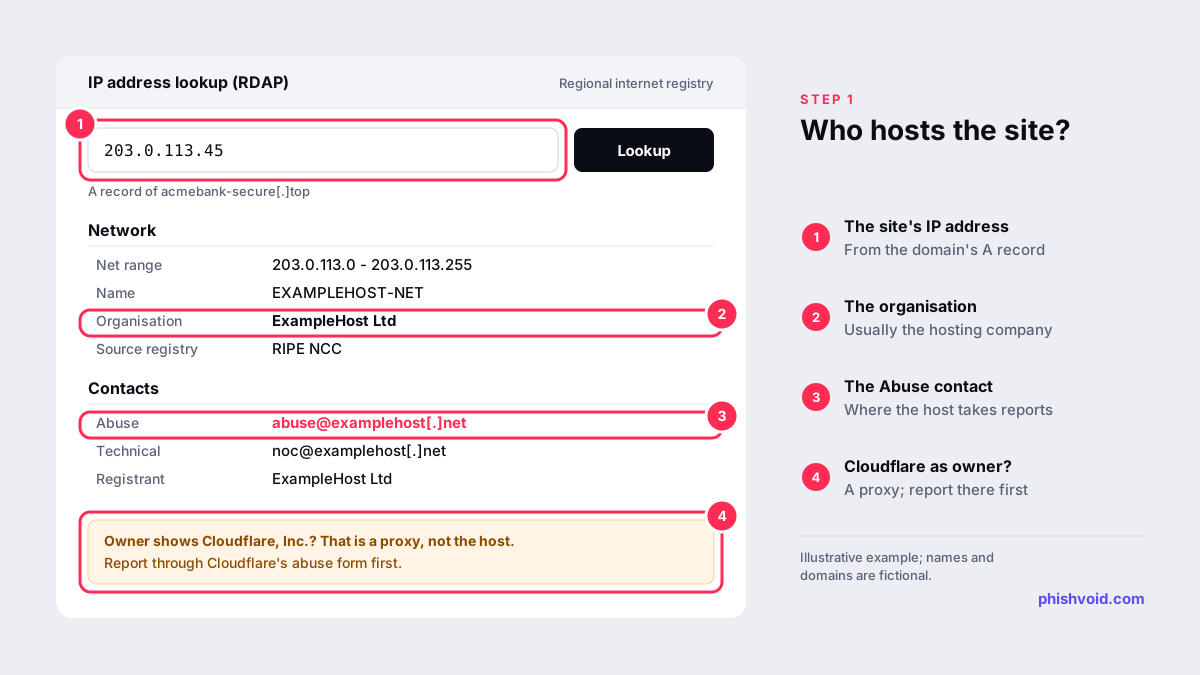
Every website runs on one or more IP addresses, and every public IP address is registered to an organisation. To find it:
- Get the IP address. On a computer, run
nslookup suspicious-site.examplein a terminal, replacing the placeholder with the domain from the URL. Without a terminal, use Google's public DNS lookup page and read the A record (IPv4) and the AAAA record (IPv6). - Look up who owns that address. Paste it into ARIN's Whois/RDAP search. ARIN covers North America, but its search follows referrals to the other regional registries (RIPE NCC, APNIC, LACNIC and AFRINIC), so it works for addresses anywhere.
- Read the result. The organisation that holds the address range is normally the hosting company. Look for a contact with the role Abuse: that is the address the provider registered for complaints. In the RIPE NCC region, which covers Europe, the Middle East and parts of Central Asia, resource holders must publish an abuse-c contact that points to an abuse mailbox (RIPE NCC).
If the domain returns several IP addresses, look up each one. If the owner turns out to be Cloudflare, you have found a proxy, not the host. Our guide to finding who is hosting a website shows how to recognise this, and taking down a phishing site behind Cloudflare explains what to do next.
Step 2: Choose the right channel
Most providers accept abuse reports in one of two ways:
- The abuse email address from the IP lookup. By long-standing convention,
abuse@is the mailbox for reports of inappropriate behaviour on a network, and RFC 2142 lists it among the standard role mailboxes. - An abuse web form on the provider's own website, usually linked from the footer as "Report abuse" or from its legal or trust pages. Many large cloud and hosting companies prefer forms, and an email to their abuse address may get an automatic reply pointing you to one. Find the form by typing the provider's address yourself.
Avoid sales chat, general support tickets and social media. They are not set up to handle abuse, and your report may never reach the team that does.
Step 3: Write a report the abuse desk can act on
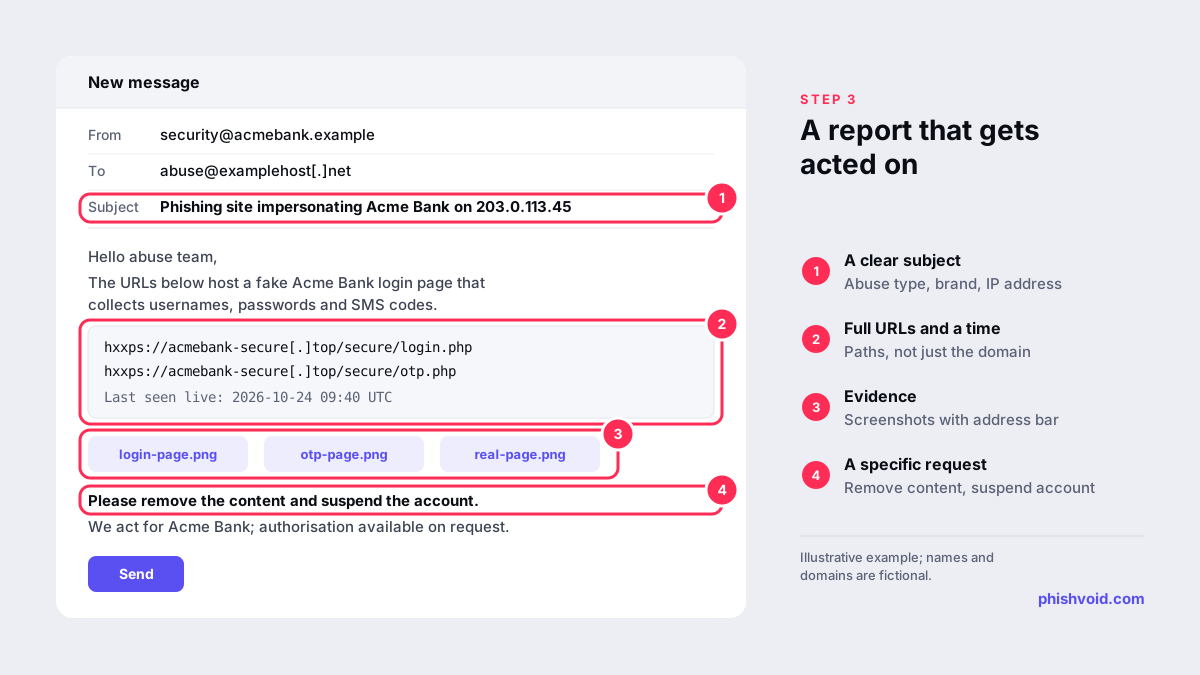
Abuse teams handle a steady stream of reports, and they act fastest on the ones they can verify in a minute. Include:
- A clear subject line, for example "Phishing site impersonating Acme Bank on 203.0.113.45".
- Every full URL, including the path, not just the domain. Phishing kits often keep the homepage blank and serve the fake login deeper in the site.
- The IP address and the date and time, with time zone, when you last saw the content live.
- What the page does: which brand it imitates, and whether it collects passwords, card numbers, one-time codes or ID documents.
- Evidence: screenshots that show the address bar and, ideally, the real page it copies for comparison.
- How to see it, if the page hides from some visitors: for example, "only loads on a mobile browser" or "only for visitors from Türkiye".
- Who you are and, if you act for the brand, that you are authorised to do so.
- A specific request: remove the content and suspend the account used to host it.
Keep it short and factual, and write in English if you do not share a language with the provider. Paste links as text rather than sending archives or other files that a security filter may block. Our free abuse report generator builds a report in this format for a host, a registrar or Cloudflare.
What happens after you report
Most providers first send an automatic acknowledgement with a ticket number. Keep it, and reply in the same thread if you need to add anything. A reviewer then checks the URLs. If the attacker set up the account, the provider can suspend it outright. If it is a hacked page on a customer's site, the provider may give the customer a deadline to remove it instead, because suspending the whole account would also take down a legitimate business.
There is no standard deadline, and response times vary between providers. Do not rely on a reply to learn the outcome. Check every reported URL yourself, and remember that a removed page sometimes reappears on the same server under a new path.
Reporting abuse to a host costs nothing, and you do not need to be its customer.
If the hosting provider does not respond
- Follow up once in the same ticket after a reasonable wait, with fresh evidence that the site is still live.
- Report the domain to its registrar. Suspending the domain takes the site offline wherever it is hosted. Our guide on reporting domain abuse to a registrar walks through it.
- Get browsers to warn visitors by reporting the URL to Google Safe Browsing and the other blocklists, so the site does less harm while it stays online.
- Look at the network above the host. Smaller hosts buy connectivity from larger networks, which have their own abuse contacts. Treat this as a last resort for hosts that ignore well-documented reports.
Some providers knowingly ignore complaints. This is known as bulletproof hosting, and for sites on it, the registrar, blocklists and upstream networks matter more than the host. If your brand is copied every week, Phishvoid sends these host, registrar and blocklist reports for you and follows each one up until the site is gone.
FAQ
How do I find a hosting provider's abuse email?
Look up the site's IP address in an RDAP or WHOIS service, such as ARIN's search, and find the contact with the Abuse role. If none is listed, look for an abuse page or form on the provider's own website.
Should I report to the host or the registrar?
Both. The host can remove the content from its server, while the registrar can suspend the domain. Reporting to both at once leaves the operator fewer ways to keep the site online.
Will the website owner see my report?
Possibly. Providers often pass complaints on to their customer, and Cloudflare says it forwards complaints to the website operator and the hosting provider (Cloudflare). Leave out personal details you do not want shared, and consider sending from a role address.
What if the IP address belongs to Cloudflare?
Cloudflare is a proxy in front of the real host. Report through Cloudflare's abuse form, which forwards complaints to the hosting provider, and report the domain to its registrar at the same time.
How long does a host take to remove a phishing site?
There is no fixed timeframe. It depends on the provider, the quality of your evidence and whether the site was built by the attacker or hacked. Complete reports, sent in parallel to the registrar and blocklists, give the best chance of a quick result. Our guide on how long a phishing takedown takes covers the factors in detail.
Is someone impersonating your brand?
We find lookalike domains and cloned pages and take them down. Start with a free exposure scan.