Phishing on free hosting platforms uses builder and hosting subdomains. Learn why registrars cannot help and how to report the page to the platform.
Quick answer: Phishing on free hosting platforms means fake pages built on website builders, form tools or developer hosting and published on the platform's own subdomain, such as acmebank-verify.buildpage[.]site. The registrar cannot help here, because the domain belongs to the platform. Report the page to the platform itself through its abuse or phishing form, give the full subdomain and path, and submit the same URL to browser blocklists so visitors are warned while the platform reviews it.
Free platforms are attractive to attackers because a convincing page costs nothing, needs no domain registration and inherits the platform's clean reputation and valid HTTPS certificate. The good news for defenders is that the platform is both the host and the owner of the domain, so a single well-evidenced report to the right team can remove the page completely.
Why phishing on shared platforms is different
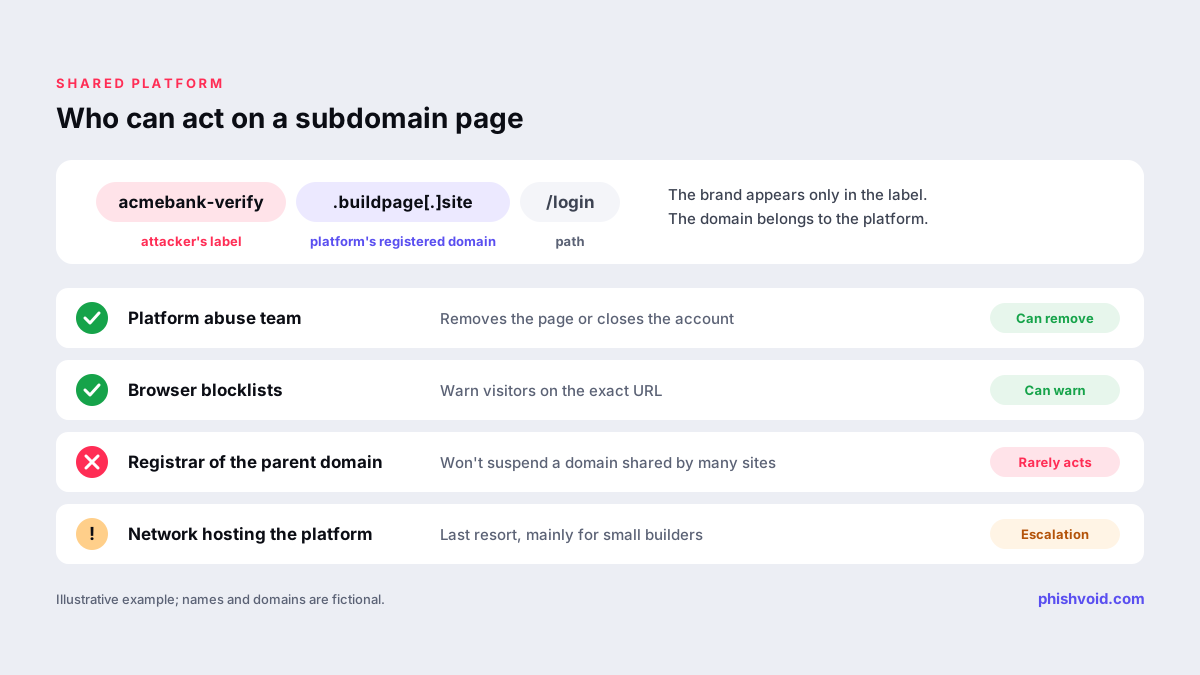
On a domain registered by the attacker, you can ask the registrar to suspend the whole domain. On a shared platform that route is closed: the parent domain hosts thousands or millions of legitimate sites, and no registrar will suspend it over one user's page. Three practical consequences follow.
- The platform is the only party that can remove the page. It controls the account, the content and the subdomain.
- Blocklists must target the exact host and path. Security tools are careful not to block a whole platform, so give them the full URL, not the parent domain.
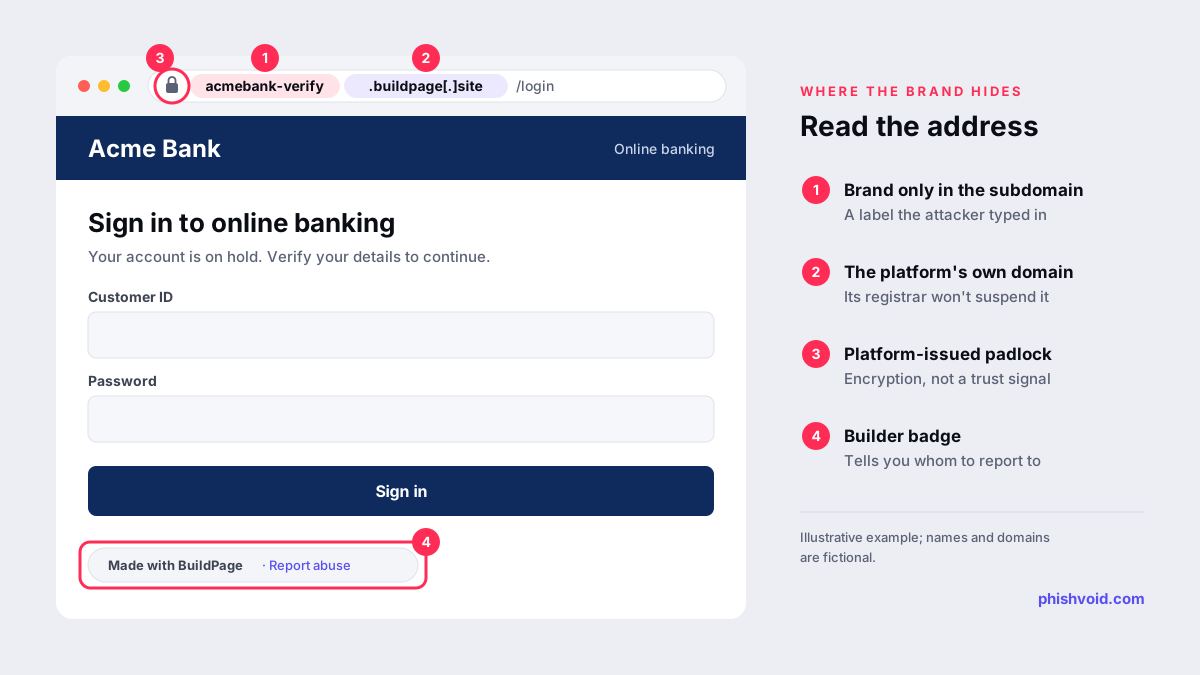
- The brand appears only in the subdomain or path. The registered domain is the platform's, which is why victims see a familiar-looking name and a padlock.
How to identify the platform
Before you report, confirm who actually hosts the page. Read the domain from right to left: in acmebank-verify.buildpage[.]site, the registered domain is buildpage[.]site, and acmebank-verify is just a label the attacker chose. Our suspicious link checker shows the real domain behind a link if you are unsure.
- Look at the page footer. Free plans often show the builder's name or a "made with" badge, and some include a report abuse link.
- Look up the parent domain. ICANN Lookup shows who registered it. For a well-known platform, the registrant is usually the platform's company.
- Read the path, too. Some platforms give each site a path rather than a subdomain, as in
sites.google.com/view/…. There the identifying part is the path, so copy the complete address, not just the host name. - Check the IP owner. If the parent domain is unfamiliar, the network that owns the IP address tells you which hosting company to contact.
Be careful with one look-alike case: some attackers register their own domain and only design it to resemble a builder site. If the parent domain is not a real platform, report it as an ordinary phishing domain to its registrar and host, as described in how to report a scam website.
Where to report phishing on common platforms
Each platform runs its own process. The routes below come from the platforms' own help pages; use the current version of each form, as wording and links change.
| Platform | Typical address | Official reporting route |
|---|---|---|
| Google Sites | sites.google.com/view/… | The Report abuse option in the site's menu, described in Google Sites Help |
| Google Forms, Docs and Drive | docs.google.com/forms/… | Google's abuse program policies prohibit phishing and link to the report abuse process |
| Wix | username.wixsite.com/… | The abuse form linked from Wix's help article on identifying and reporting a phishing site |
| GitHub Pages | username.github.io | GitHub's report abuse contact form, as set out in GitHub's reporting guidance |
| Cloudflare Pages and Workers | project.pages.dev, name.workers.dev | Cloudflare's abuse form; Cloudflare says it can remove or disable content it hosts |
For a platform not listed here, look for a "Report abuse" link in the page footer, an abuse or trust and safety page on the platform's main website, or the abuse contact of the network that owns the IP address. Note that Google states a report does not guarantee removal or any other action; the same is true on every platform, which is why the quality of the evidence matters.
What to put in a platform report
Platform trust and safety teams review many reports, and most of them see the page through the platform's own tools. Make their check easy:
- The full URL, including subdomain and path, plus any related pages, such as the second step that asks for a one-time code.
- The brand being impersonated and a link to its official login page for comparison.
- What the page collects, such as passwords, card data or codes, and where the form sends it if you can see that.
- Screenshots with the address bar visible and the date and time noted.
- How the link was spread: SMS, email, an ad or a social media message.
- Any other pages from the same account, such as a second subdomain with the same design, so the platform can review the whole account rather than one page.
Never enter real or made-up credentials into the page to test it; a screenshot of the empty form is enough evidence. If you represent the brand, say so and offer authorization documents. A reusable wording is in the abuse report generator; on a web form, paste the text into the description field.
After you report: blocklists, follow-up and monitoring
Submit the exact URL to Google Safe Browsing, Microsoft SmartScreen and Netcraft at the same time as the platform report. Browser warnings often arrive before removal, and they protect people who already have the link.
Then recheck the page from a phone and a desktop. A removed page usually returns the platform's own "site not found" or "this site has been removed" notice. If the page is still live, reply to the platform's confirmation with fresh evidence. If the platform does not respond, the blocklist entries keep protecting visitors while you escalate, and the network that hosts the platform is a last resort for very small builders.
Expect the same attacker to open a new free account. Platform subdomains are cheap to create, so monitor for your brand name in new subdomains and pages, and report each new copy quickly. The overall workflow is the same as in the phishing site takedown process; only the first contact changes. For brands that see this every week, Phishvoid handles platform reports along with registrar, host and blocklist reports, with every site checked by a person first.
FAQ
Can I ask the registrar to suspend a free hosting subdomain?
Not in practice. The registered domain belongs to the platform and serves many legitimate users. The platform is the party that can remove the page or close the account.
Why does a phishing page on a free platform have a valid padlock?
Most platforms provide HTTPS automatically for the sites they host, so the padlock only shows that the connection is encrypted. It says nothing about who built the page or whether it is genuine.
Will blocklists block the whole platform?
Generally no. Blocklists aim at the specific subdomain or URL, which is why your report should include the full address with the path.
What if the platform has no abuse form?
Look for an abuse or trust and safety email on its main website. If there is none, report to the network that owns the platform's IP address and submit the URL to blocklists in the meantime.
Is someone impersonating your brand?
We find lookalike domains and cloned pages and take them down. Start with a free exposure scan.