A phishing site came back after takedown? Find out whether it is the same domain, a new host or a hacked site, and which layer to report to this time.
Quick answer: If a phishing site came back after takedown, first work out what actually returned: the same URL on the same domain, the same domain on a new host, a new path on a hacked site, or the same phishing kit on a brand-new domain. Each one needs a different report. Reopen the original ticket with fresh evidence, go one layer up when the last fix was only partial (usually from the host to the registrar), and start watching for the kit itself rather than a single address.
A comeback does not mean the first takedown failed. Most phishing operations are built to be redeployed, and a removal at one layer often leaves another intact. This guide covers what to do when you see a site you already reported online again. If you are starting from scratch, read the phishing site takedown process, step by step first.
Four ways a phishing site comes back
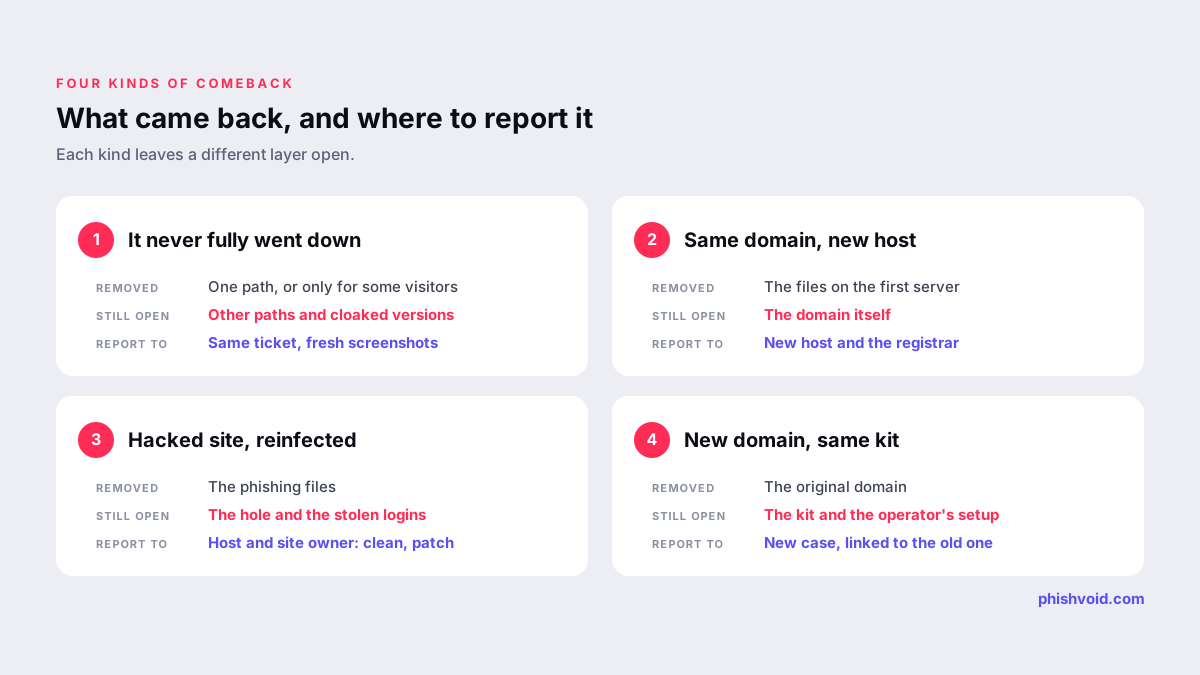
1. It never fully went down
The provider removed one path while the rest of the site stayed up, or the page was hidden from you but not from victims. Phishing kits often use cloaking to show the real page only to certain devices, countries or visitors arriving from a specific link, so a "removed" check from a desktop in another country can be misleading. Cached copies and blocklist warnings can also make a site look gone or alive when it is not.
2. Same domain, new host
The hosting provider deleted the content, but the domain was never suspended. The operator simply pointed the domain at a different server. You can spot this when the domain resolves to a new IP address owned by a different network. The host did its job; the registrar layer was never closed.
3. Same hacked website, new path
The phishing page sat on a compromised legitimate website. The owner deleted the files but did not fix the vulnerability or change the stolen passwords, so the attacker uploaded the kit again, often under a new folder name.
4. New domain, same kit
The original domain is suspended for good, but the same phishing kit appears on a fresh lookalike domain, sometimes with a different registrar and host. Technically this is a new site, but it is the same campaign, and it is the most common reason a takedown feels pointless.
Check exactly what came back
Spend a few minutes on these checks before you report again. They decide where the next notice goes and make it far more convincing.
- Compare the full URL with the one in your original report: same domain, same path, or neither?
- Resolve the domain and compare the current IP address with the one you recorded. A new network owner means a new host.
- Look up the registrar with ICANN Lookup. Check the creation date and status; a domain registered a day ago is a new site, not a returning one.
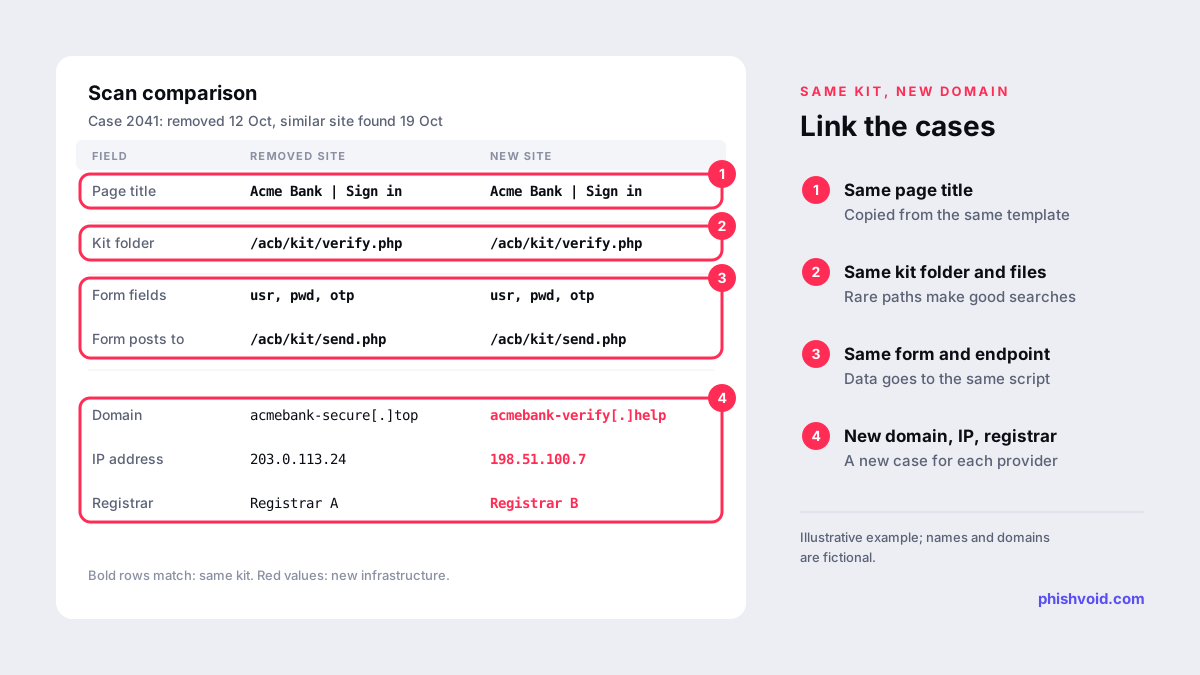
- Compare the page itself. Look at the page title, file and folder names, image file names, form field names and where the form sends its data. Matching details point to the same kit.
- Test like a victim. Open the link on a mobile device and, if possible, from the country being targeted, ideally through the same channel the link was spread on.
Write down the date, time and time zone of every observation. Providers take returning cases more seriously when you can show a clear timeline: reported, removed, and live again.
Report it again, one layer higher
The response depends on which comeback you found.
- Partial removal: reply in the original ticket. Quote the ticket number, give the paths that are still live and attach fresh screenshots that show the address bar. Ask the provider to review the whole account, not just the URL.
- Same domain, new host: report to the new host, and this time also to the registrar, asking for the domain to be suspended. Point out that the domain has now been used on two networks, which shows it exists to serve the phishing page. Since April 2024, ICANN's amended agreements require registrars of generic top-level domains to take prompt, appropriate action when they have actionable evidence of phishing.
- Hacked website, reinfected: contact the host and, where you can reach them, the site owner. Explain that the files were removed once and have returned, which means the entry point is still open. The fix is a cleanup plus patching and new credentials, not another file deletion.
- New domain, same kit: treat it as a new case with a link to the old one. In every notice, list the matching kit details next to each other. Registrars and hosts act faster when they can see a pattern.
In every case, submit the new URL to blocklists such as Google Safe Browsing, Microsoft SmartScreen and Netcraft as well, so browsers warn visitors while providers work. Our guide on how to report a scam website lists each form.
Why the domain layer matters most
A host can only remove what sits on its servers. A registrar suspension stops a domain from resolving at all, wherever it is hosted, and also stops email from it. That is why a domain registered purely for phishing should be reported to the registrar, not only the host. Research supports how central this layer is: in a 2025 study of 286,237 phishing URLs, Lee and colleagues found that DNS resolution errors, meaning the domain stopped resolving, were the most common reason phishing sites went offline (ACM Web Conference 2025).
Hacked websites are the exception. Suspending a legitimate business's domain would harm the owner, so there the host and the site owner have to fix the root cause. Our article on how long it takes to take down a phishing site explains why these cases usually take longer.
Stop the next one before it goes live
Once you know the kit's fingerprints, you can hunt for them instead of waiting for victims to report the next domain.
- Watch new lookalike domains. Operators often reuse naming patterns, such as the brand name plus words like "secure", "verify" or "login". Our free lookalike domain finder lists common variations to monitor.
- Search for the kit, not the URL. Unusual file paths, page titles and form endpoints from the old site make good search terms for URL scanning services and threat feeds.
- Track infrastructure. A host or registrar that served one instance may serve the next. Note it, and report quickly when it appears again.
- Keep records per campaign. Group every domain, ticket and screenshot under one campaign. A long, documented history strengthens each new report.
This is the part that is hardest to sustain in-house, because it never ends. Phishvoid monitors for new instances of known kits, has a person verify each one and reports it to every layer, under one subscription with unlimited takedowns.
FAQ
Why did the phishing site come back after the host removed it?
Usually because the domain was never suspended. The host deleted the files, and the operator moved the domain to a new server. Reporting to the registrar closes that gap for domains registered to deceive.
Should I open a new ticket or reply to the old one?
Reply to the old one when the same provider is involved, so the reviewer sees the history. Open a new ticket for a new provider, and mention the earlier ticket number in it.
Is a site on a new domain with the same design a new case?
For the provider, yes, because it is a different domain. For you, treat it as the same campaign, and show the matching kit details in your report to make the connection obvious.
Does a blocklist warning stay after the site comes back?
It can, if the same URL is still listed, but a new domain or path is usually not covered until someone reports it or the blocklist's systems detect it. Report each new URL as soon as you find it.
Is someone impersonating your brand?
We find lookalike domains and cloned pages and take them down. Start with a free exposure scan.