A phishing takedown notice template to copy, with versions for registrars, hosts and Cloudflare, the evidence to attach and a follow-up message.
Quick answer: A phishing takedown notice is a short, factual report that tells a registrar, hosting provider or CDN exactly which URL is phishing, which brand it imitates, what it collects and what evidence proves it, then asks for one specific action. Copy the template below, fill in the brackets and send a separate, tailored copy to each provider that controls part of the site. If you want the registrar and its abuse address looked up for you, our free abuse report generator builds the same notice in your browser.
The notice that gets acted on is the one an analyst can verify in a minute or two. This guide is about the wording of the notice itself. For where it fits in the wider workflow, see the phishing site takedown process, step by step.
What a phishing takedown notice must contain
Whoever receives it, every version needs the same core facts:
- A precise subject line with the word "phishing" and the domain, so the ticket lands in the right queue.
- The exact URL, including the path. A fake login page often sits deep in a folder while the homepage is blank or harmless.
- The brand being impersonated and its official website, so the analyst can compare the two.
- What the page collects: passwords, card numbers, one-time codes, ID documents or wallet recovery phrases.
- Evidence: a timestamped screenshot, the IP address the domain resolved to and notes on any cloaking, such as content shown only on mobile or only in one country.
- Your relationship to the brand: the brand itself, an authorized agent or a member of the public who received the link.
- One clear request: suspend the domain, remove the content or forward the report to the host.
- Contact details for questions.
Keep the tone neutral. Describe what the page does, not who you think is behind it. The reader is usually an analyst who must check every claim before acting.
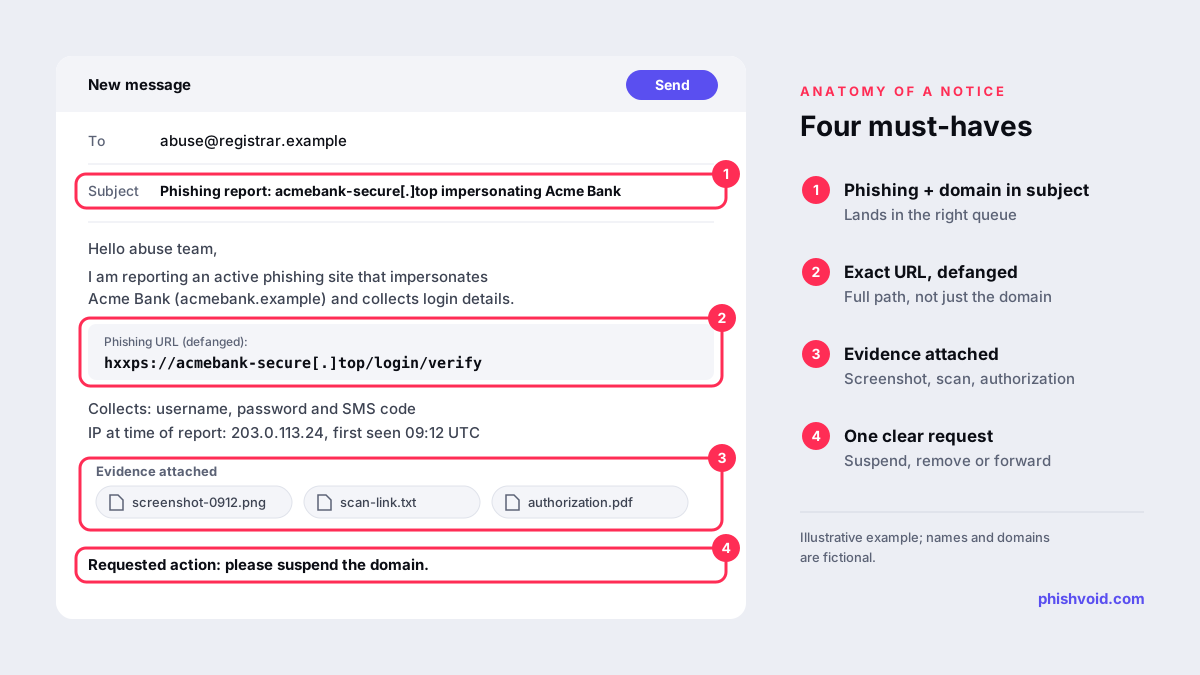
The phishing takedown notice template
Replace everything in square brackets. The example URL is defanged, with [.] instead of a dot and hxxps instead of https, so nobody opens it by accident. If a web form rejects defanged addresses, paste the live URL into the URL field only.
Subject: Phishing report: [domain] impersonating [Brand]

Hello [registrar / hosting provider] abuse team,

I am reporting an active phishing site that impersonates
[Brand] ([official website]) and collects [what it
collects] from visitors.

Phishing URL (defanged; replace [.] with . and hxxps
with https):
hxxps://acmebank-secure[.]top/login/verify

Domain: acmebank-secure[.]top
IP address at time of report: [IP address]
First seen: [date, time and time zone]
Last confirmed live: [date, time and time zone]

What the page does:
- Copies the [Brand] login page, logo and wording
- Asks for [username, password and SMS code]
- Sends the data to [form endpoint, if known]

Cloaking notes: [e.g. the phishing page only appears
on mobile devices in country X; desktop visitors see
a blank page]

Evidence:
- Screenshot: [link or attachment name]
- Page scan or source: [link]
- How the link was spread: [SMS / email / ad]

Relationship to [Brand]: [I work for [Brand] / we are
its authorized agent, letter of authorization
attached / I received this link as a customer]

Requested action: [suspend the domain / remove the
content and review the account / forward this report
to the hosting provider]

Please confirm receipt and let me know if you need
anything else to act.

[Name]
[Company and role]
[Email] | [Phone]
Adapting the template for each provider
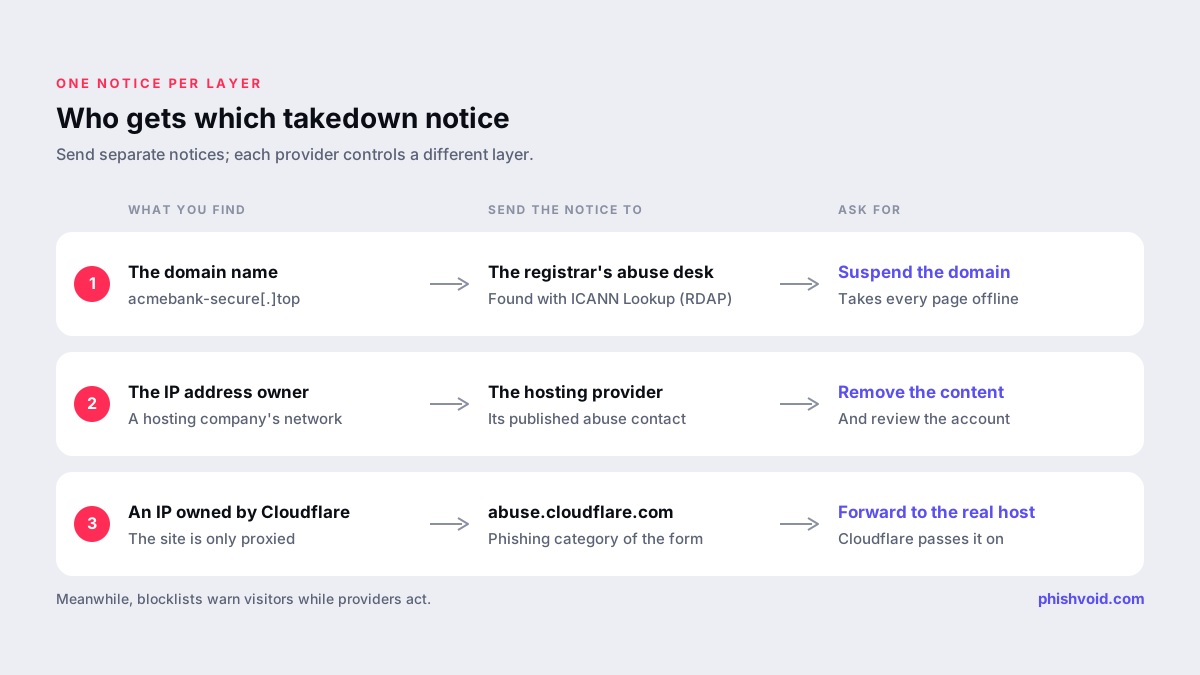
Send separate notices rather than one email with every provider in copy. Each party controls a different layer and can only act on its own. Find the registrar with ICANN Lookup, and find the network that hosts the site by looking up who owns the IP address.
Domain registrar
Ask for the domain to be suspended. That takes every page on it offline, wherever it is hosted. If the domain was clearly registered to deceive, say so: a lookalike name such as acmebank-secure[.]top is stronger evidence than a phishing page on an otherwise ordinary domain. Since 5 April 2024, ICANN's amended agreements require registrars of generic top-level domains to confirm receipt of abuse reports and to take prompt, appropriate mitigation action when they have actionable evidence of DNS abuse such as phishing. ICANN leaves the exact action and timing to the registrar, so your evidence has to make the case on its own. Many registrars use a web form instead of email; paste the body of the template into it.
Hosting provider
Ask for the content to be removed and the account reviewed. If the phishing page sits on a hacked legitimate website, say so and give the exact path, because the host will want the site cleaned rather than an innocent business suspended. Send the notice to the abuse contact of the network that owns the IP address. The abuse@ mailbox convention dates back to RFC 2142, but always use the contact the provider publishes, which may be a form.
Cloudflare or another CDN
If the IP address belongs to Cloudflare, the site is usually only proxied through it. Cloudflare explains that it cannot remove content it does not host; it forwards the report to the website operator and the hosting provider and gives the host the origin IP address. Use the phishing category of its form at abuse.cloudflare.com. Content hosted on Cloudflare's own services, such as Pages or Workers, is different: Cloudflare says it can remove or disable that content itself. Our guide to phishing sites hidden behind Cloudflare covers what to do once the real host is known.
Evidence to attach, and what to leave out
- A screenshot of the whole browser window, with the address bar and the date and time visible.
- A public scan link from a URL scanning service, so the analyst can see the page without visiting it.
- The distribution sample, such as the phishing email with full headers or a screenshot of the SMS, if you have it.
- A letter of authorization when you act for a brand you do not work for. See the glossary entry on the letter of authorization.
Leave out anything the provider does not need. Do not attach files the phishing page offered for download, do not include data belonging to real victims and never type real or test credentials into the form to "prove" it works. A screenshot of the empty form shows what the page asks for.
The follow-up notice
The first reply is often automated. If the page is still live after the acknowledgement, reply in the same ticket thread so the history stays together:
Subject: Re: [ticket number] Phishing report: [domain]

Hello,

Following up on ticket [number] from [date]. The
phishing page is still live as of [date, time and
time zone]:

hxxps://acmebank-secure[.]top/login/verify

New evidence: [fresh screenshot / new IP / new path]

Please let me know if anything else is needed.

[Name]
Check the site from more than one network and device before you follow up, because cloaking can make a live page look gone, or the reverse. If the host stays silent, the registrar can still suspend the domain, and blocklists protect visitors in the meantime. Submit the URL to Google Safe Browsing and Microsoft SmartScreen as described in how to report a scam website.
Mistakes that get takedown notices ignored
- Sending only the domain when the phishing page lives at a specific path.
- Reporting to the wrong party, for example to the registrar of the impersonated brand's own domain.
- Copying every provider into one email, which leaves nobody sure who should act.
- Cropping screenshots so the address bar is missing, which makes it impossible to tie the image to the URL.
- Using threats or legal demands in a notice that only needs facts.
For a brand facing many cases a week, this becomes a daily workload. Phishvoid sends them for its clients after a person has verified each site, then follows every ticket until the content is actually gone.
FAQ
Is a phishing takedown notice the same as a DMCA notice?
No. A phishing notice reports fraud under the provider's terms of service, and anyone can send one. A DMCA notice is a copyright claim that only the rights holder or its agent should file. Both can be used together when a phishing site copies your content; see DMCA notices against cloned websites.
Should I send the notice by email or through a web form?
Use whichever channel the provider publishes. Many registrars and hosts now prefer web forms, and ICANN's 2024 amendments allow registrars to use them. The same text works in both.
Do I need to own the brand to send a takedown notice?
No. Anyone can report a phishing site. Brand owners and their authorized agents can add context and authority, which helps with borderline cases and hacked websites.
How long should I wait before following up?
There is no standard deadline. ICANN requires registrars of generic domains to act promptly but does not set a time. A practical approach is to recheck the site several times the same day and follow up in the same ticket, with fresh evidence, if it is still live.
Is someone impersonating your brand?
We find lookalike domains and cloned pages and take them down. Start with a free exposure scan.