Learn how to report an impersonation account on Instagram as a business: the in-app steps, the impersonation and trademark forms, and what evidence to send.
Quick answer: To report an impersonation account on Instagram as a business, open the fake profile, tap the three dots at the top right, tap Report, choose the option that the account is pretending to be someone else, then select a business or organization. If the account uses your registered trademark, also file Instagram's trademark report form. Instagram acts on impersonation reports only from the business itself or its authorised representative, and reporting is free.
That is the short version. In practice, which route you choose decides how quickly the account goes and whether it stays gone. Below: the four reporting routes and when to use each, the evidence Instagram needs, how to file as a company rather than as an individual, and what to do about the link in the impostor's bio. If the fake account poses as your customer service team, our guide to fake customer-support accounts covers that scam in detail; for Facebook Pages, see Facebook Page impersonating my business.
Check that it really is impersonation
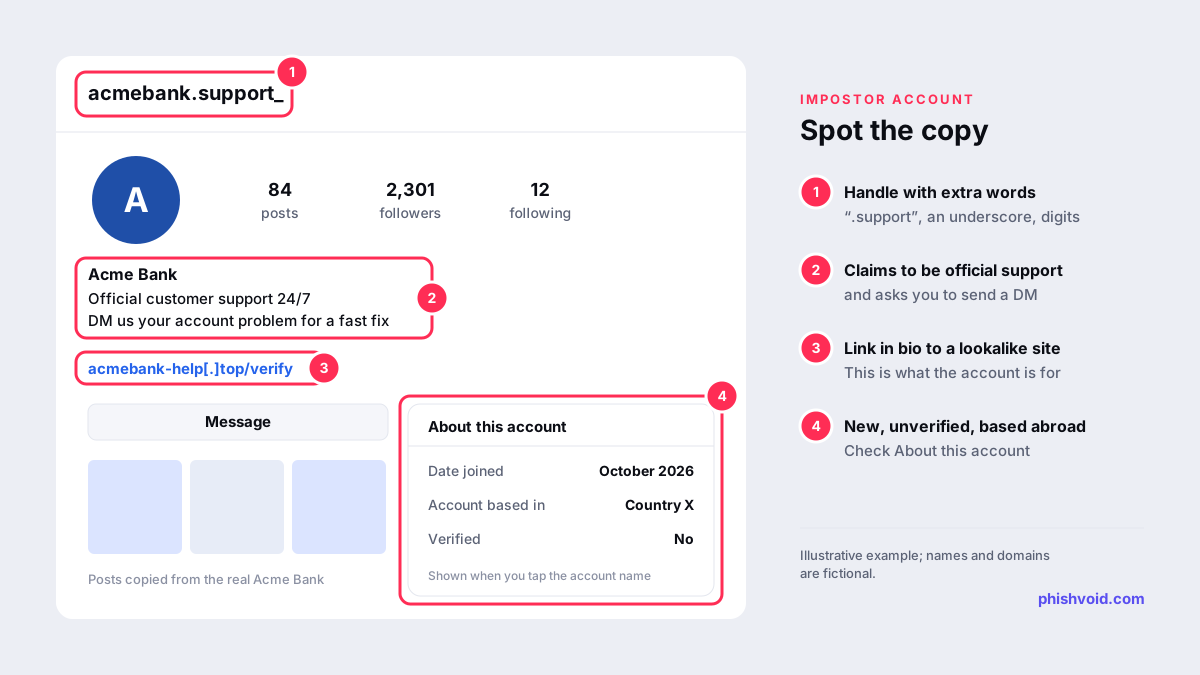
Instagram distinguishes between accounts that pretend to be you and accounts that merely talk about you. Fan accounts, resellers, reviewers and critics usually stay up. An impersonation account presents itself as your business: your name, your logo as the profile picture, a bio such as "official support" or "official store", and a link or a request to message it.
Before reporting, open the account's About this account panel by tapping its name or the three-dot menu. Instagram's help page on About this account says it shows the date the account joined, the country where it is based, accounts with shared followers, any active ads and its verification status. An account that claims to be your official profile but joined last month and is based in a country where you don't operate is good evidence, so screenshot this panel.
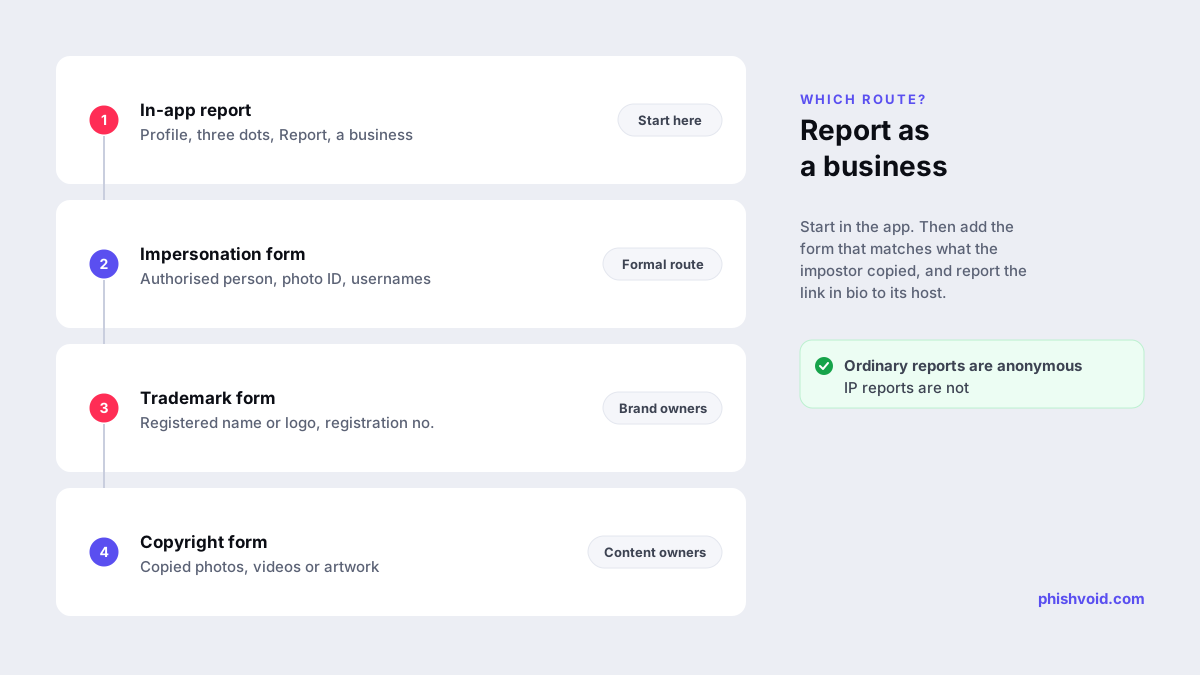
Four ways to report an impersonation account on Instagram
| Route | Best for | What you need |
|---|---|---|
| In-app report | A fast first report from your business account | Access to the fake profile |
| Impersonation form | Filing as the authorised representative | Photo ID, both usernames |
| Trademark form | Use of your registered name or logo | Registration details, URLs |
| Copyright form | Copied photos, videos or artwork | Links to your originals |
1. Report it in the app
Instagram's help article on reporting an account for impersonation lets you say who is being impersonated: you, someone you know, a celebrity or public figure, or a business or organization. Choose the business option and, where asked, identify your official account. Send the report from your verified or official business account if you can, so the comparison is obvious. Instagram says reports are anonymous, except reports of intellectual property infringement.
2. Use the impersonation form
The Report an Impersonation Account on Instagram or Threads form is useful when you can't see the account in the app or want to file formally. It asks for your full name, email address, your relationship to the party being impersonated, the full name and username shown on the reported account, and a photo of you holding your ID. Instagram states that it only acts on reports from the impersonated party or an authorised representative.
The form is worded around people, so a company files through someone with authority to act for it, such as an owner, director or in-house lawyer. If an agency reports for you, give it a signed letter of authorization. For many brands, the trademark form below fits the situation better.
3. File a trademark report
If the impostor uses your registered brand name or logo, file Instagram's trademark report form. Meta's intellectual property page lists it alongside the copyright forms for each app. Expect to give the registration number or a link to the registry entry, the URL of each infringing account or post, and a good-faith declaration that you are the rights owner or act for them. Because IP reports are not anonymous, file from a company address rather than a personal one.
4. File a copyright report
Impostors often repost your product photos, campaign videos and graphics. You can report those through Instagram's copyright report form even without a registered trademark, as long as you own the content or act for the owner. Removing the copied posts makes the account look less like you even before it is taken down. Brands with a registered trademark can also apply for Meta's Brand Rights Protection, which covers Instagram as well as Facebook.
Evidence that gets reports approved
Reviewers compare two accounts quickly, so make the comparison easy:
- The exact username and profile URL of the fake account, plus your official account.
- Screenshots of the profile, bio, highlights and the About this account panel.
- Posts or messages that show deception: "official support", fake giveaways, requests for card details, codes or payment.
- The link in bio and any links sent in direct messages, copied as text.
- For IP reports, your trademark registration number and links to your original photos.
File one report per account, and report related accounts separately rather than listing them in one free-text box. Impostors often run several near-identical handles at once.
Deal with the link in bio and the DMs
Most impostor accounts exist to move people somewhere else: a lookalike website, a checkout page or a chat on another app. When the account is removed, that site keeps working for everyone who already has the link. Report it to its host, its registrar and browser blocklists at the same time; our guide on how to report a scam website explains each step. You can also check whether similar domains using your name already exist with the lookalike domain finder.
Phishvoid does this for brands as one job: our analysts verify each impostor account and the site behind it, then report both to the platform, the host, the registrar and the blocklists, and keep watching for replacements.
After the report: protect customers and watch for repeats
- Post a short notice on your official account naming your real handle and stating that you never ask for passwords, card details or codes in DMs.
- List your official accounts on your website, so customers can check against a source you control.
- Turn on two-factor authentication for your own account, so impostors can't take over the real one.
- Search regularly for your name combined with words like "official", "support", "help" or "store". Removed accounts often return with an underscore or an extra letter.
FAQ
How long does Instagram take to remove an impersonation account?
Instagram doesn't publish a fixed timeframe. Reports from the business itself, with a clear link to the official account and evidence of deception, are the easiest to act on.
Can our agency or law firm report an Instagram impersonator for us?
Yes, as your authorised representative. Instagram acts only on reports from the impersonated party or its representative, so give the agency a letter of authorization and the documents it needs.
Will the impostor see that our business reported them?
Ordinary reports are anonymous, according to Instagram. Intellectual property reports are not, so the reported party may see who filed a trademark or copyright report.
Do we need a verified badge to report impersonation?
No. Any business can report impersonation. Verification makes your real account easier to recognise, but it isn't required for a report.
Does the impersonation form cover Threads?
Yes. Instagram's impersonation form covers accounts on both Instagram and Threads, and asks for the Threads username if there is one.
Is someone impersonating your brand?
We find lookalike domains and cloned pages and take them down. Start with a free exposure scan.