Got a text about an Amazon refund, order or account problem? Learn the common scam texts, how to verify a message with Amazon and where to report it safely.
Quick answer: A text that uses Amazon's name to offer a refund, warn about a big purchase you didn't make or say your account is locked, and asks you to tap a link, call a number or reply, is very likely a scam from someone impersonating the company. Amazon says it will never ask you via text message to provide personal information, payment details or gift card codes, or to call a phone number. Check your orders by opening the Amazon app or typing the website address yourself. To check a message, forward it to verify@amazon.com. To report it, use Amazon's Report a scam page, forward the text to 7726 and report it to the FTC at ReportFraud.ftc.gov.
Amazon does send genuine texts: its help page says it might text you about orders, payments, deliveries or account status. So the useful skill isn't ignoring every text with the name in it, but knowing which requests a real one never makes. This guide covers the common scam texts that borrow the Amazon name, how to verify a message, where to report it and what to do if you already replied. For the general rules on links in texts, see phishing links and texts; for fake delivery messages from any sender, see fake parcel-delivery SMS scams.
Common Amazon scam texts
The refund or recall text
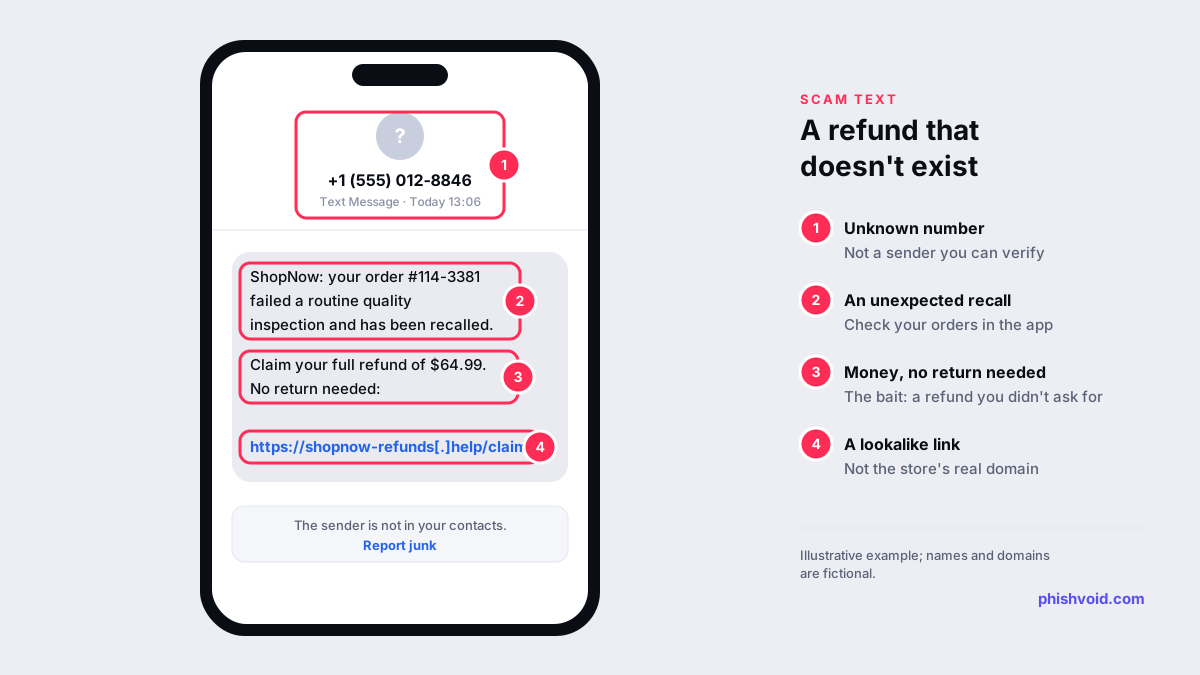
The FTC described this one in July 2025 in its alert Scammy texts offering "refunds" for Amazon purchases. The message says an item you bought failed a "routine quality inspection" or was recalled, and offers a full refund through a link, with no need to send the item back. The FTC's verdict is short: there is no refund. The link leads to a page built to take your money or personal information.
The fake fraud alert
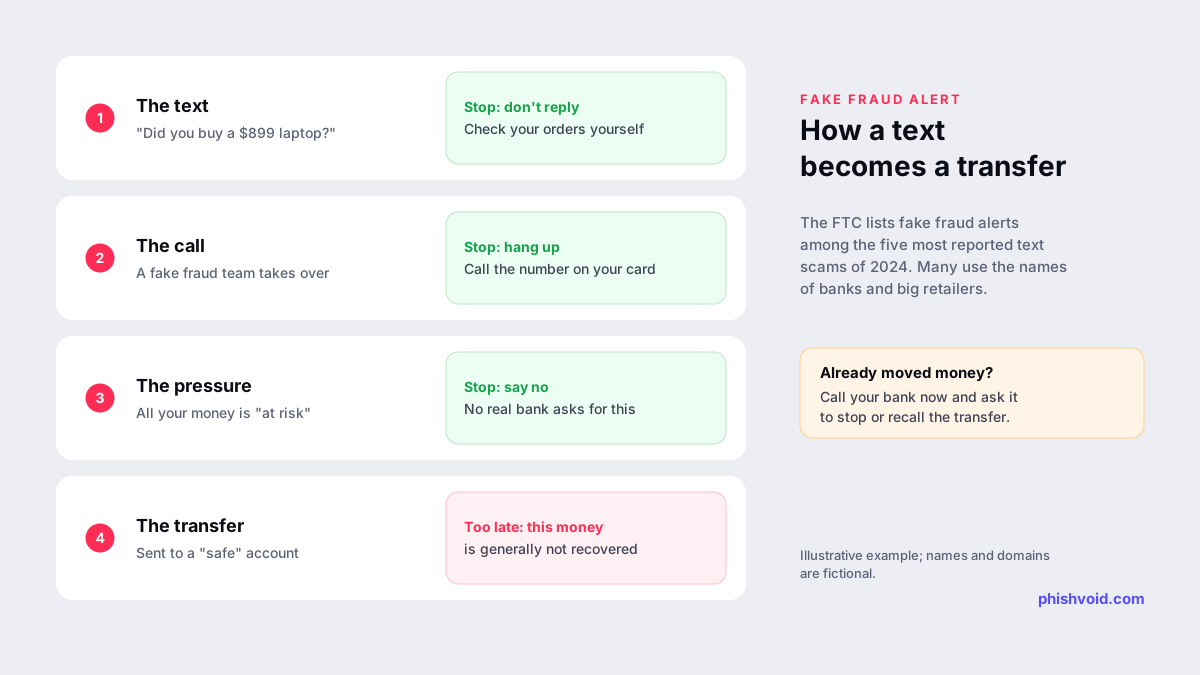
In its review of the top text scams of 2024, the FTC listed fake fraud alerts among the five most reported types and said these texts often look like they come from a bank or Amazon. They claim suspicious activity or a big purchase you didn't make, then ask you to call a number or reply YES or NO. That puts you in touch with a fake fraud department, which says all your money is at risk and pressures you to move it to a "safe" account the scammers control. The FTC notes that money moved this way is generally not recovered.
Account, payment and delivery problems
Other versions claim your account is locked, a payment failed or a delivery needs a fee or an address update, and push you to "fix" it through a link. They lean on the same pressure: act now or lose the order or the account.
How to spot a fake Amazon text
Amazon's help page How to identify fake text messages/SMS lists the signs that a text isn't from Amazon:
- A number you don't recognise, or one with a country code different from the country you live in.
- An order or delivery you weren't expecting. If you didn't place the order, the message most likely didn't come from Amazon.
- A link with a misspelled address, typos or an IP address instead of a normal domain name.
- A request for personal information, payment details or gift card codes, or to call a phone number. Amazon says it will never ask for these by text.
Its page on identifying a scam adds wider red flags: false urgency, requests to pay outside the Amazon website or app, and demands for payment by gift card. If a link looks odd, don't open it to find out. Our link checker lets you inspect a URL without visiting it.
How to verify an Amazon text without the link
- Check Your Orders yourself. Open the Amazon app or type the website address in your browser, sign in and look at your order history. If the order, refund or problem isn't there, the text wasn't genuine. The FTC gives the same advice for refund texts.
- Forward the message to
verify@amazon.com. Amazon says anyone can send a suspicious message to this address, or submit it through the Verify Communications form on its customer service pages, to find out whether it came from Amazon. - Ask Alexa for Shopping. In the US, Amazon says customers can ask Alexa for Shopping on the website or app whether a message, call or text came from Amazon.
- Contact customer service through the app or website, never through a phone number in the text.
How to report an Amazon scam text
- Report it to Amazon. The Report a scam page asks what, if anything, you shared (nothing, Amazon account information, banking information, remote access to a device or something else) and gives advice for each case. If you don't have an Amazon account, you can send the suspicious message to
reportascam@amazon.com; Amazon says sending it as an attachment is the best way for it to track the message. - Report it to the FTC. Amazon's own page points people to ReportFraud.ftc.gov for suspicious calls and texts.
- Forward the text to 7726 (SPAM) or use your phone's report junk option, then delete it. This reports the number to your mobile carrier.
Outside the US, 7726 also works in the UK. For other countries, see our guide on how to report a scam.
If you replied, called or paid
- Stop contact. Hang up and don't answer follow-up calls from the same people. A real fraud team will never ask you to move money to a "safe" account.
- Call your bank on the number on your card if you shared card details, paid anything or moved money. Ask them to block the card and try to stop or recall the transfer.
- Secure your Amazon account if you typed your password into a link: change it from the app or website, turn on two-step verification and check for orders, addresses or gift card activity you don't recognise. Then use the "I have shared Amazon account information" option on the Report a scam page.
- If you gave someone remote access to your computer, disconnect it from the internet, remove the remote access software and have the device checked.
- Report the scam to the FTC, and if you shared ID details, get a recovery plan at IdentityTheft.gov.
Our I got phished page has a fuller checklist.
Why the same names keep appearing
Scammers borrow the names people already trust and deal with often, which is why large retailers, banks and carriers turn up in these texts again and again. The brands fight back at scale: Amazon says that in 2025 it initiated takedowns of more than 70,000 phishing websites and 14,000 phone numbers used in impersonation scams. Any brand whose name is being used in texts faces the same task on a smaller scale: find the lookalike sites quickly and get them removed by hosts, registrars and browser blocklists. That is the work Phishvoid does for brands, with a person verifying each site before it is reported.
FAQ
Does Amazon send text messages?
Yes. Amazon says it might text you about orders, payments, deliveries or account status. It also says it will never ask you by text for personal information, payment details or gift card codes, or ask you to call a phone number.
What is verify@amazon.com?
It is an address where anyone can forward a suspicious message to find out whether it really came from Amazon. Amazon also offers a Verify Communications form on its customer service pages.
Is the Amazon recall refund text real?
The FTC has warned that texts offering a refund for a recalled or failed-inspection item, with no need to return it, are a scam. Check Your Orders in the app or on the website instead.
Should I reply NO to a text about a purchase I didn't make?
No. Replying connects you to the scammers, who then pose as a fraud department. Check your orders yourself, then report the text and delete it.
Is someone impersonating your brand?
We find lookalike domains and cloned pages and take them down. Start with a free exposure scan.