Got a Booking.com message asking you to verify your card or open a guest file? Learn how guests and hotel partners can spot the scam, check it and report it.
Quick answer: A Booking.com phishing message is a fake email, chat or text that uses the Booking.com name, or a hotel's hijacked account, to steal card details or partner logins. Guests usually get a message saying their card "couldn't be verified" and the stay will be cancelled unless they pay through a link. Hotel partners get emails from fake guests or fake support staff carrying a link or file that steals extranet credentials. Booking.com says it will never ask guests to share card details by email, over the phone, by text or on WhatsApp (Booking.com). Check everything by opening the Booking.com app or website yourself.
The two sides of this scam feed each other. Criminals phish the property first, then use its genuine account to message its guests. That is why a fake payment request can arrive inside the real Booking.com app and quote the correct hotel, dates and names. This guide covers both sides.
Two kinds of Booking.com phishing message
| Messages to guests | Messages to hotel partners | |
|---|---|---|
| Typical claim | Your card couldn't be verified; confirm it or the booking is cancelled | A guest complaint, a question about a booking, a review problem or an account check |
| Where it arrives | Booking.com chat, email, SMS or WhatsApp | Email to the property's reservations or front desk address |
| What it wants | Card number, security code and bank one-time codes | Extranet login, or malware on a front-desk computer |
| Safe check | Your booking confirmation and payment policy in the app | The extranet, opened from a bookmark you created |
For guests: how to spot a fake payment request
Booking.com's traveller safety page sets out what it will and won't do (Booking.com):
- It will never ask you to share credit card details by email, phone, text or WhatsApp.
- It will never ask you to make a bank transfer that differs from the payment policy in your booking confirmation.
- Its customer service will only ask for your reservation ID and/or PIN, and you shouldn't be asked for your Booking.com password.
Do not rely on the channel. A message inside the Booking.com chat, sent from the property's real profile, can still be a scam if the property's account was taken over. The test is what the message asks for. Any request to "verify", "re-confirm" or "secure" a card through a link, or to pay anything not shown in your confirmation, should be treated as fake.
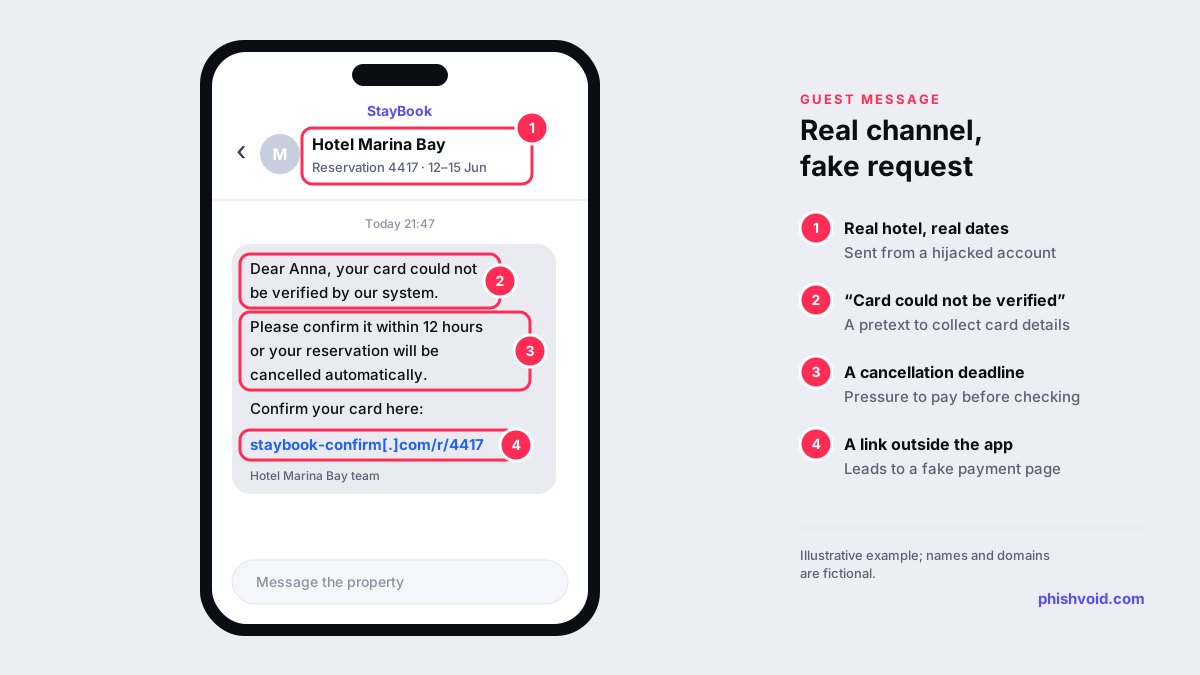
Scammers may also know more about your trip than you expect. In April 2026, Booking.com told some guests that unauthorised third parties may have accessed booking information, and it reset reservation PINs for affected bookings, BleepingComputer reported. The exposed data included names, contact details and messages exchanged with properties, so a stranger quoting your booking correctly proves nothing.
To check a request, open your confirmation in the app and read the payment policy. If something still seems wrong, contact the property on a number you find yourself, or use Booking.com's customer service.
For guests: if you entered card details or paid
- Call your bank or card issuer on the number printed on your card, block the card and ask about disputing the payment.
- Contact Booking.com customer service straight away and report that you may have been scammed, as its safety page advises (Booking.com).
- Change your Booking.com password if you typed it into the fake page, and review your account security settings.
- Don't answer follow-up calls from "the bank" or "the hotel" asking for codes. Call back on a number you trust.
- Report the message to your national service. Our guide to reporting a scam by country lists the options.
The I got phished page has a fuller checklist.
For hotel partners: how attackers get into the extranet
Most guest-side fraud starts with phishing aimed at property staff. Microsoft described one campaign, which it tracks as Storm-1865, that began in December 2024 and targeted hospitality staff likely to work with Booking.com. The emails used pretexts such as negative guest reviews, requests from prospective guests and account verification, with a link or a PDF supposedly leading to Booking.com.
The landing page showed a fake CAPTCHA over a faded copy of a Booking.com page and told the visitor to open the Windows Run box and paste a command that the page had already copied to the clipboard. This technique, known as ClickFix, installed credential-stealing malware. Microsoft says the goal was to steal financial data and credentials, which can then be used for fraudulent charges.
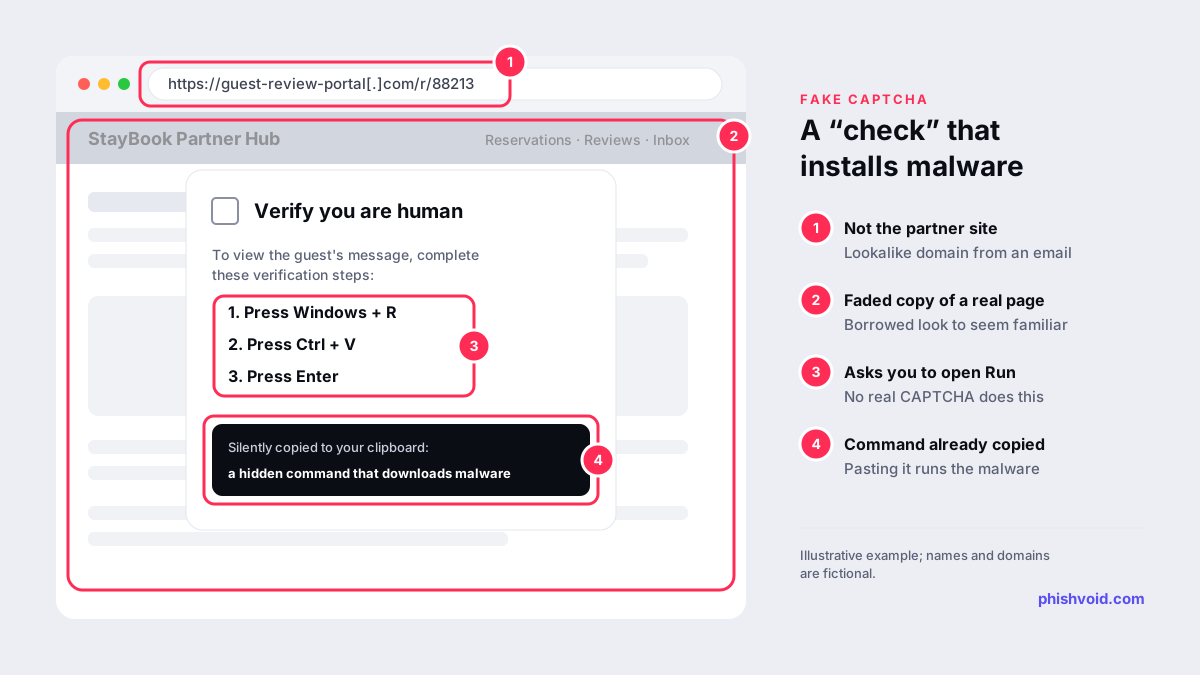
Not every lure carries malware. Many simply link to a copy of the partner sign-in page, a classic credential harvesting setup.
For hotel partners: protect the account and the guests
- Bookmark the extranet. Booking.com's partner guidance recommends typing
https://admin.booking.com/into your browser and bookmarking it, instead of following links in emails (Booking.com Partner Help). - Know what staff will never ask. Booking.com says its employees will never ask to take control of your computer or phone, or request login details such as your password or two-factor code (Booking.com Partners).
- Use two-factor authentication on the extranet and control which phone numbers receive the codes.
- Watch for signs of takeover. Booking.com lists unrecognised changes to listings, guests receiving payment requests you didn't send and two-factor phone numbers you didn't add (Booking.com Partner Help).
- Train the front desk on one rule: never paste and run a command because a web page says so, and never open attachments from "guests" on the computer used for the extranet.
If you suspect a compromise, Booking.com's guidance is to reset your email password first, then your Booking.com password, and to report the incident to Booking.com straight away (Booking.com Partner Help). Then warn guests with upcoming stays, through a channel you control, that you will never ask them to pay by link.
Reporting the fake pages behind the messages
Both kinds of message lead to websites: a fake payment page for guests, a fake sign-in or ClickFix page for staff. Reporting those pages to Google Safe Browsing and to the hosting provider shortens their life, and our abuse report generator drafts the host report. Hotel groups and travel brands whose own names appear in these domains face the same problem at scale. Phishvoid monitors for such sites, verifies each one by hand and reports it to hosts, registrars and browser blocklists until it is taken down.
FAQ
Can a scam message come through the real Booking.com app?
Yes. If a property's account has been taken over, criminals can message its guests through the genuine chat. Judge the message by what it asks for: Booking.com says it will never ask for card details by email, phone, text or WhatsApp, or for payments outside the policy in your confirmation.
Does Booking.com ask guests to re-verify their card?
Not by message. Check the payment policy in your confirmation in the app. If you are unsure about a charge, contact Booking.com customer service through the app or website rather than any link you were sent.
I'm a hotel and a guest says we asked them to pay by link. What now?
Treat it as a likely account compromise. Reset your email and extranet passwords, check two-factor phone numbers and recent changes, report it to Booking.com and warn guests with upcoming stays.
How do I report a Booking.com phishing message?
Guests should contact Booking.com customer service and report the fake page to Google Safe Browsing. Partners should report to Booking.com from the extranet. Phishing emails can also go to national services, such as report@phishing.gov.uk in the UK or reportphishing@apwg.org in the US.
Is someone impersonating your brand?
We find lookalike domains and cloned pages and take them down. Start with a free exposure scan.