Got a message that your Facebook Page broke Meta's rules and will be deleted? Learn how page admins can verify it, spot the fake appeal form and report it.
Quick answer: A message saying your Facebook Page violated Meta's policies and will be deleted unless you "appeal" through a link is a common phishing scam aimed at page admins. Scammers use Meta's name to collect your login, your two-factor code or your personal details, then take over the Page and any ad account connected to it. To check, ignore the link, open Meta Business Suite yourself and look at Business Support Home. If no issue is listed there, the notice is fake.
This guide is for people who run Pages for a business, a creator or an organisation. If someone has created a fake Page copying your business, that is a different problem, covered in Facebook Page impersonating my business.
What the fake policy-violation message looks like
The warning reaches page admins through several channels, often more than one at a time:
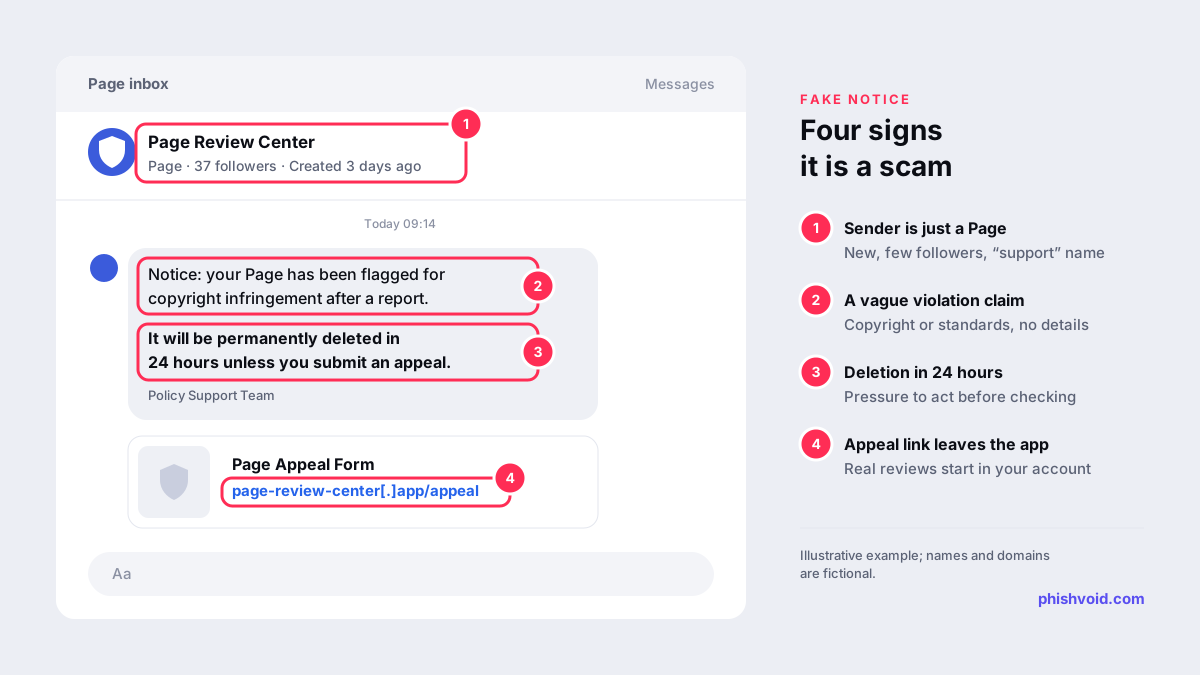
- Messenger or Page inbox messages from a Page or profile with a name like "Policy Support Center" or "Page Review Team" and a shield or Meta-style logo as its picture.
- Comments and tags on your posts repeating the same warning, so you are sure to see it.
- Emails from lookalike domains, or messages pushed through real platform features. Check Point researchers reported a 2025 campaign that set up fake Business pages with Meta-like branding and used the Business invitation feature, so the phishing emails arrived from the genuine facebookmail.com domain and linked to credential-stealing pages.
The text typically mentions a copyright or trademark complaint, a "community standards" breach or "unusual activity", sets a 24 or 48 hour deadline and links to an "appeal" or "verification" form. Meta's own help center lists claims that you violated Community Standards or advertising and commerce policies, and warnings that your account will be acted on unless you take an action, among the usual patterns of fake messages (Facebook Help).
How to check whether your Page really has a violation
Real enforcement is visible inside Meta's own tools, so you can confirm it without touching the message.
- Open Meta Business Suite or your Page directly, by typing the address or using the app you normally use.
- Check Business Support Home. Meta describes it as the place to track, review and resolve issues with your business portfolios, ad accounts and Pages (Meta Business Help). Meta also tells business owners who receive a suspicious message to check there whether their accounts really have an issue (Facebook Help).
- Check emails in Accounts Center. Open
facebook.com/recent_emails/security, or go to Settings, Accounts Center, Password and security, Recent emails. Security emails from the past year are listed there (Facebook Help). If the email in your inbox is missing from that list, it is a strong sign it didn't come from Meta. - Check the sender domain. Meta says its emails come only from fb.com, facebook.com, facebookmail.com, instagram.com, meta.com, metamail.com or global.metamail.com and their subdomains (Facebook Help). Remember the exception above: an invitation sent through a real Meta feature can carry a scammer's words, so the content matters as much as the domain.
A warning that exists only in a chat, a comment or an email, and not in Business Support Home, should be treated as fake. If a real issue is listed there, use the review options shown in that tool rather than any link you were sent.
Red flags in the message and the appeal form
- The sender is a Page or a profile. Open it. Recently created Pages with few followers and names built from words like "support", "policy" or "review" are typical.
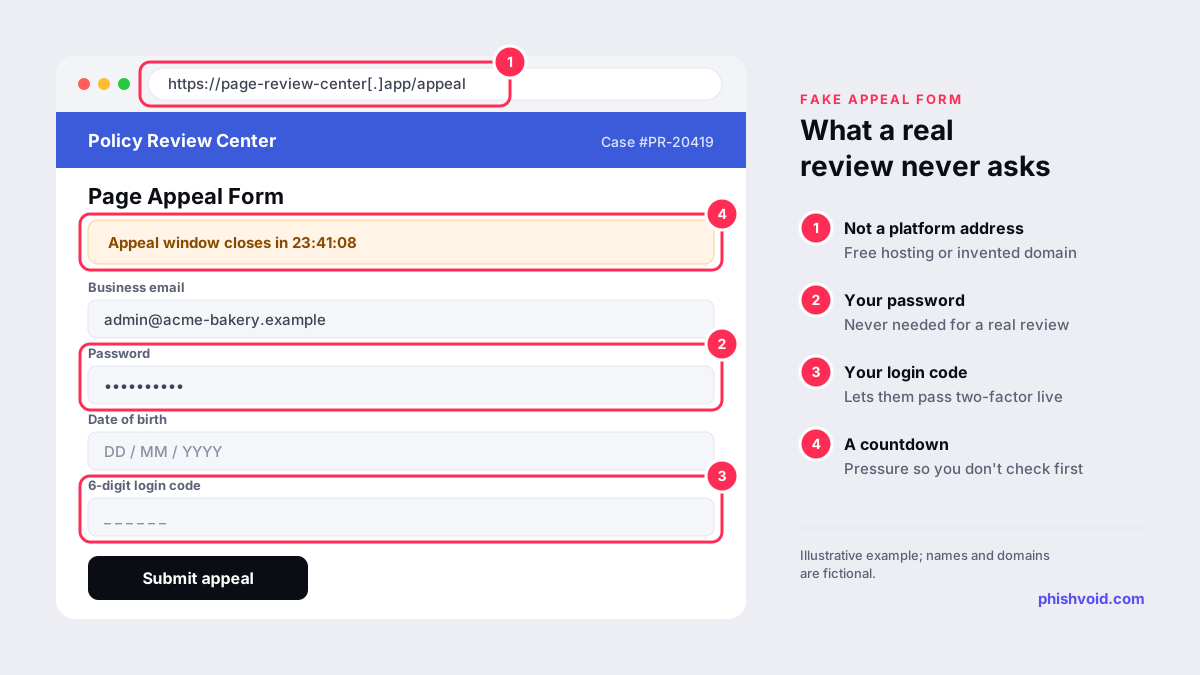
- The link leaves Facebook. Appeal forms sit on free hosting, link shorteners or invented domains such as
page-review-center[.]app. - The form asks for your password. Meta says Facebook will never ask for your password in an email (Facebook Help).
- It asks for a login code. A form that wants the six-digit code from your authenticator app or SMS is trying to get past your two-factor authentication in real time.
- It asks only for personal details at first. Bitdefender described a 2025 variant whose "Policy Violation Confirmation" form asked for name, emails, phone number and date of birth but no password, so the attackers could later pose as Meta staff and talk the victim into handing over the login.
- The deadline. "Your Page will be permanently deleted in 24 hours" is meant to stop you from checking.
What attackers want from a page admin
The appeal form is a credential harvesting page, and the Page itself is rarely the main prize. The admin's personal account is the key to everything attached to it: business portfolios, other Pages, ad accounts and saved payment methods. Once inside, attackers can remove the real admins, rename or repurpose the Page and run ads through the ad account. Bitdefender's analysis lists taking over the business Page and running fraudulent ads among the goals of these campaigns.
Agencies and freelancers who manage several clients are especially attractive, because a single login can open many Pages and ad accounts at once.
If you clicked or entered your details
- Change your Facebook password from a device you trust, and log out of sessions you don't recognise in Accounts Center, under Password and security.
- Check two-factor authentication. Make sure it is on and that no unknown phone number, app or security key has been added. An authenticator app or security key is harder to phish than SMS alone.
- Review your business portfolio. Check People, Partners, Pages and ad accounts, and remove anyone or anything you don't recognise.
- Check ad accounts and payment methods for new campaigns or charges. Tell your bank if your card was used.
- If you have lost access, follow Meta's steps for a hacked account (Meta Help).
Our I got phished page has a general checklist for the hours after a phishing attack.
How to report the fake notice
- Emails: forward them to
phish@fb.com, as Meta advises, or use the report links on Facebook (Facebook Help). - The sending Page or profile: report it as a scam from its menu, and report the comments on your posts.
- The appeal form: report its address to Google Safe Browsing and to the hosting provider. Our abuse report generator drafts the email for you.
- Your team: tell other admins and your agency so nobody else "appeals".
If the same campaign also copies your own company's name, for example a fake support Page or appeal site built around your brand, that part is a brand-impersonation problem. Phishvoid finds and takes down such sites for companies, with a human team that verifies each one before reporting it to hosts, registrars and blocklists.
Protect the Page before the next message arrives
- Require two-factor authentication for everyone in your business portfolio. Meta explains how to turn on this requirement from Security Center in Meta Business Suite (Meta Business Help).
- Keep full control to a few people. Give others only the task access they need, and remove former staff and agencies promptly.
- Agree on one rule: nobody responds to a violation notice from a link. Every notice is checked in Business Support Home first.
- Use a dedicated browser profile for admin work, without unnecessary extensions.
FAQ
Can a policy violation warning come from a Facebook Page?
Anyone can create a Page and name it after a support team, so a Page in your inbox proves nothing. The reliable test is whether the issue appears in Business Support Home when you open it yourself.
I entered my password but not the login code. Is my account safe?
Not fully. Change your password straight away, log out unknown sessions and check that two-factor authentication is still on. The attacker may try again or contact you pretending to be Meta to get the code.
The email came from facebookmail.com. Can it still be a scam?
Yes. Researchers have documented campaigns that abused Meta's own Business invitation feature, so the email came from a real Meta domain while the message and link were written by the attacker. Check Business Support Home and Recent emails before acting.
What should I do if the violation turns out to be real?
Use the review or appeal option shown inside Business Support Home or Meta Business Suite. A genuine process starts from your account, never from a link someone sent you in a chat.
Is someone impersonating your brand?
We find lookalike domains and cloned pages and take them down. Start with a free exposure scan.