How to tell a Docusign phishing email from a real envelope, check it with the security code, report it to Docusign and what to do if you entered a password.
Quick answer: A Docusign phishing email copies the look of a signature request ("Please review and sign", "Completed: your document") to send you to a fake login page or to a file that installs malware. To check one, don't click. Docusign says genuine notifications come from official domains such as docusign.net and include a unique security code, which you can enter on the Docusign website under Access Documents to open the document without using the email's link (Docusign Safety Center). If you're still unsure, forward the email to verify@docusign.com; Docusign says you will get an answer in two hours or less on whether it is legitimate (Docusign).
This guide shows what these emails look like, how to verify one, where to report it and what to do if you entered your password. It also covers the case that catches careful people: real Docusign envelopes sent by scammers who opened their own account. For a general method that works on any email, see how to spot a phishing email.
What a Docusign phishing email looks like
Scammers like e-signature lures because signing requests are routine at work, often come from people outside your company and usually feel slightly urgent. Typical versions include:
- Business documents you might plausibly expect: an invoice, a payment confirmation, a contract renewal, a payroll or bonus notice, or an updated HR policy.
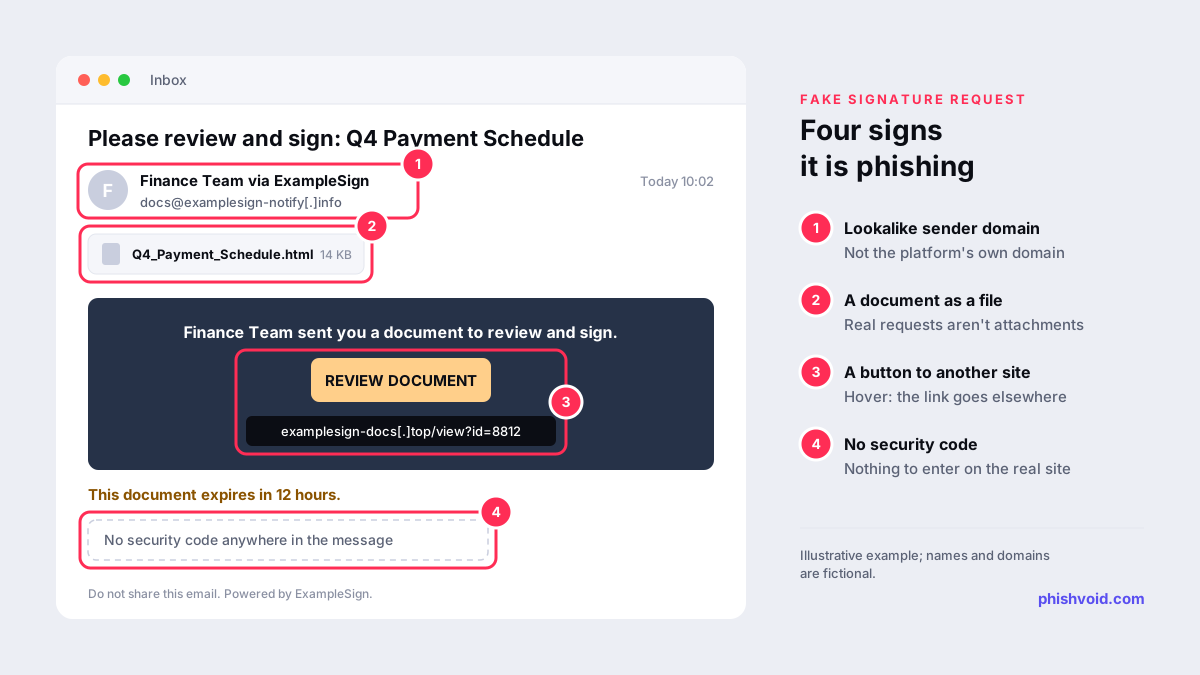
- A familiar name in the display name, such as a colleague, a supplier or your own company, combined with a sender address on an unrelated domain.
- A "Review Document" button that leads not to Docusign but to a fake sign-in page for your email account. The real target is usually your work email password, a form of credential harvesting.
- An attached file, such as an HTML page or a PDF, presented as the document to sign. Docusign says it never sends signature requests as a file. Some attachments carry a QR code instead of a link, which moves the risky click to your phone (quishing).
- Pressure: a deadline, a "final reminder" or a warning that the document will expire.
Fake email or a real envelope from a scammer?
Docusign's incident reporting page separates two situations, and the difference matters.
- Emails that impersonate Docusign. These never touched Docusign's systems. The sender domain, the links or the missing security code usually give them away.
- Suspicious envelopes sent through Docusign. Here someone opened a real account and sent a real envelope. The email comes from Docusign, the security code works and the document opens on Docusign's site. The scam is in the content: an invoice with new bank details, a link inside the document to a phishing page, or a request for personal data.
So passing the technical checks only tells you that the email came through Docusign, not that the sender is who they claim to be or that the request is safe. For anything involving money, bank details or a login, confirm with the sender through a phone number or address you already have. This kind of request is a common route for business email compromise.
How to check if a Docusign email is real
- Ask whether you expected it. If not, contact the named sender using details you already have, not by replying.
- Check the sender domain. Docusign lists docusign.com and docusign.net as its official domains. A lookalike or unrelated domain settles it; a correct-looking one is not proof on its own, since From lines can be spoofed.
- Use the security code. Find the unique code in the email, type docusign.com into your browser yourself, choose Access Documents and enter the code. If the document isn't there, the email was fake.
- Hover over links before clicking. Docusign advises not clicking any link that doesn't lead to docusign.com or docusign.net.
- Be suspicious of attachments. A signature request delivered as an attached file is a red flag.
- Notice what it asks for. Docusign says it never asks for passwords, Social Security numbers or bank details by email.
- Still unsure? Forward the email, ideally as an attachment, to verify@docusign.com and wait for the answer before acting.
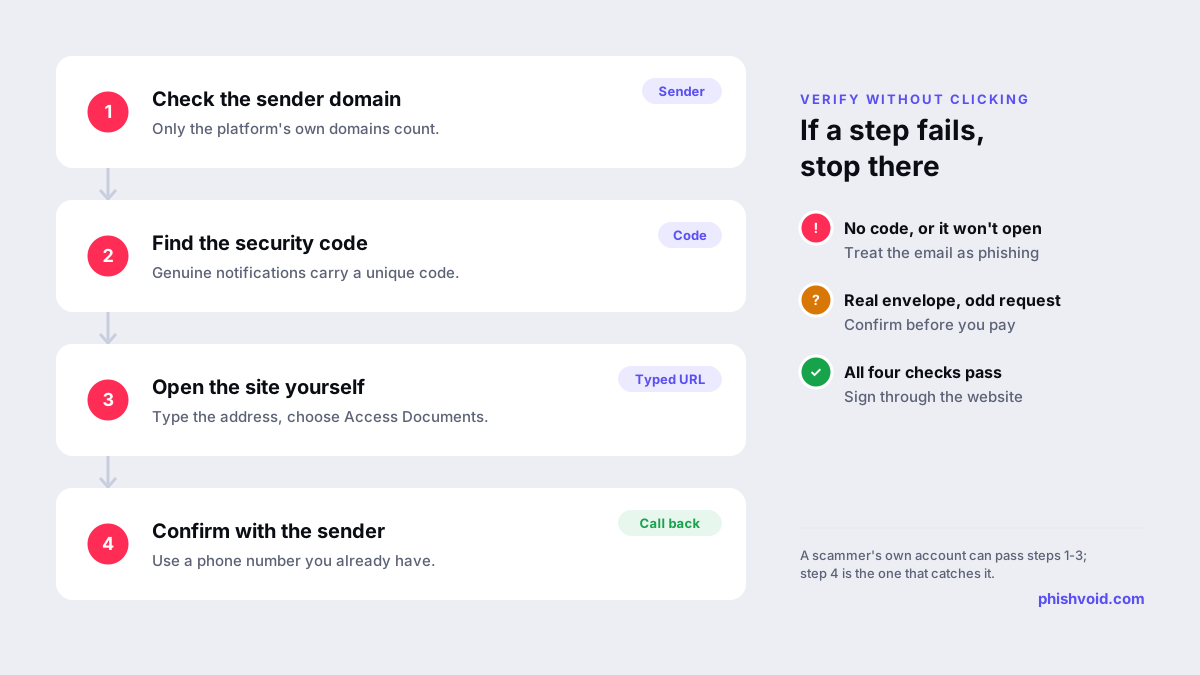
Our checklist Is this a legit email? walks through the same checks for any sender.
How to report a Docusign phishing email
Docusign's quick reporting guide gives a different route for each situation:
| Situation | Where to report |
|---|---|
| Email impersonating Docusign, or you aren't sure it's from Docusign | Forward the entire email as an attachment to verify@docusign.com, then delete the original |
| Fake Docusign website, domain or social media page | Email the suspicious URL to verify@docusign.com |
| Suspicious envelope received through Docusign | Use the Report Abuse feature, or the "Report this email" link in the notification footer |
| Fraud by a Docusign customer without an envelope | The Report Abuse webform |
| SMS verification code you didn't request | Ignore and delete it; change your password if you're worried |
Also report the email in your mail app so your provider can filter similar messages; our guide to reporting phishing in Outlook covers each version. At work, Docusign advises telling your internal security team as well, which usually means the report button your IT team has added to your mail client.
If you clicked or entered your password
- Change the password you typed, usually your email or Microsoft 365 password rather than a Docusign one, from a trusted device. Change it anywhere else you reused it.
- Sign out other sessions and turn on multi-factor authentication. Some phishing kits capture the session itself, not just the password (adversary-in-the-middle phishing), so ending active sessions matters.
- Check your mailbox for forwarding settings, inbox rules and sent messages you didn't create.
- If you opened an attachment, disconnect the device from the network and run a security scan, or hand it to IT.
- If you paid an invoice or changed bank details, call your bank at once to try to stop or recall the payment.
- On a work account, tell your IT or security team immediately, even if you're not sure anything happened.
Our I got phished page has a fuller recovery checklist.
For organisations: protect the people who sign with you
Attackers often put a real company's name in the display name or the document title, so your customers and suppliers may receive fake signing requests "from" you. Publishing SPF, DKIM and DMARC records makes direct spoofing of your domain harder, and a clear statement of how you send contracts helps recipients spot a fake. The fake login pages and lookalike domains behind these emails can be taken down: Phishvoid verifies each one and reports it to the host, registrar and browser blocklists.
FAQ
What is verify@docusign.com?
It is the address Docusign gives for checking emails that might impersonate it. Forward the suspicious email, preferably as an attachment, and Docusign says it will reply in two hours or less with whether it is legitimate.
Is spam@docusign.com still the address to use?
Older guides mention it, but Docusign's current incident reporting page tells you to send impersonation emails and fake URLs to verify@docusign.com, and to use Report Abuse for suspicious envelopes.
Does Docusign send documents as attachments?
Docusign says it never sends signature requests as a file. A "document to sign" attached to the email, especially an HTML file, is a strong sign of phishing.
The email came from a real Docusign address, but I don't know the sender. Is it safe?
Not necessarily. Scammers can open their own accounts and send real envelopes. Confirm the request with the sender through a channel you already trust, and report it with the Report Abuse feature if it is fraudulent.
Is someone impersonating your brand?
We find lookalike domains and cloned pages and take them down. Start with a free exposure scan.