Got a suspicious PayPal email? Learn how to check it safely, why fake invoices can come from real addresses, and how to report it to PayPal's team.
Quick answer: If an email claiming to be from PayPal looks wrong, don't click its links, call any phone number in it or open attachments. PayPal's official reporting route is to forward the entire email to phishing@paypal.com and then delete it. To find out whether anything really needs your attention, open the PayPal app or type paypal.com into your browser yourself and check your account. If nothing is waiting for you there, the email was a scam.
This guide covers the common kinds of PayPal scam email, how to check one safely, the invoice trick that uses PayPal's own system, where to report each kind of message and what to do if you already clicked. For a checklist that works for any sender, see Is this a legit email?
What a PayPal scam email looks like
Scammers use PayPal's name because so many people have an account and expect messages about payments. Most PayPal scam emails follow one of a few patterns:
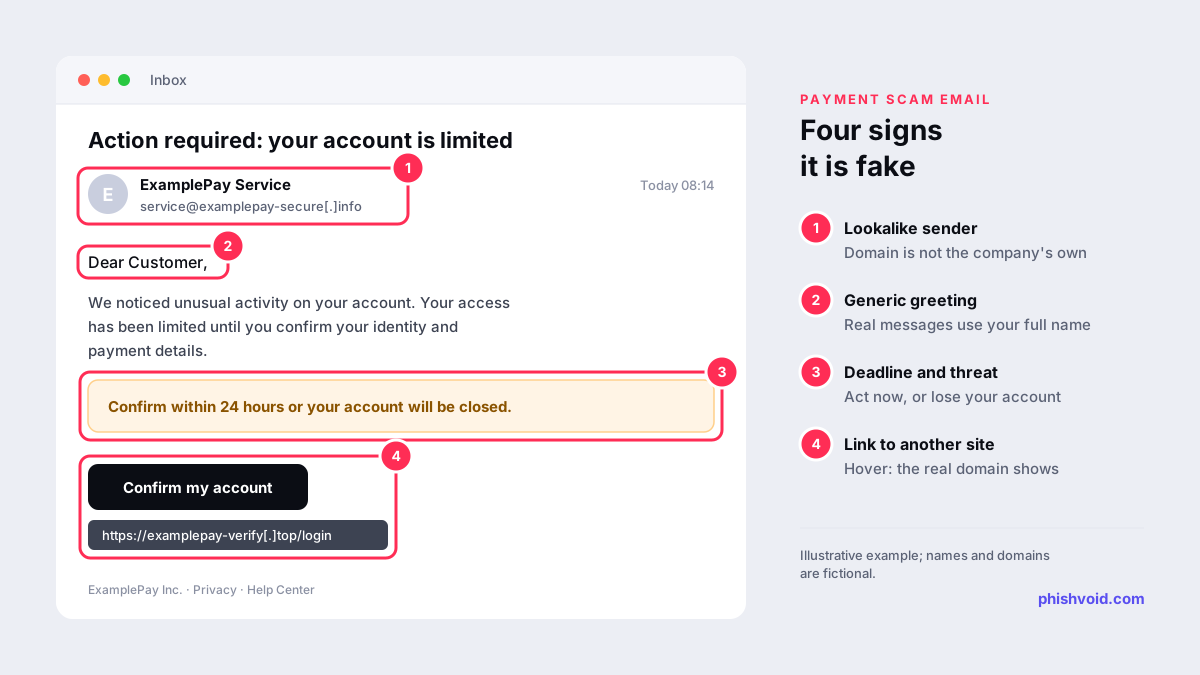
- "Your account has been limited." A warning that your account is restricted or suspended until you confirm your details through a link. The link leads to a lookalike login page that collects your email address, password and often your card details.
- Fake receipts. A confirmation of a payment you never made, often for an expensive gadget or a cryptocurrency purchase, with a phone number to call "if you did not authorise this transaction". The number reaches the scammer, not PayPal.
- Unexpected invoices and money requests. Real requests sent through PayPal's own system by scammers. These are covered in their own section below because the usual sender checks don't catch them.
- "You have received money." A message saying a payment is waiting and that you must log in, pay a fee or upgrade your account to release it.
- Attachments. A "statement" or "invoice" attached as a file. PayPal warns that attachments can contain malware and should never be opened unless you are completely sure they are legitimate.
The common thread is a reason to act now and a route away from the real PayPal site: a link, a phone number or a file. The design, the logo and even the footer text are easy to copy, so they tell you nothing.
How to check whether a PayPal email is real
- Don't use anything in the email. Not the button, not the phone number, not the attachment.
- Open PayPal yourself. PayPal's own advice is to open the app or type www.paypal.com into a new browser window and log in. Real payments, limitations and requests appear in your account.
- Check the greeting. PayPal says its messages always use the full name listed in your PayPal account (PayPal). "Dear user" or "Hello, PayPal member" is a warning sign. The reverse is not proof, because some scammers already know your name.
- Look at the sender and the links, but don't stop there. A sender on a domain that isn't PayPal's, or a link whose real destination differs from its text, settles the question. A sender that looks right does not, because display names cost nothing and From addresses can be spoofed. Our guide to spotting a phishing email shows how to read the headers.
- Notice what it asks for. PayPal tells customers never to provide personal, credit card or account information by email, text or phone.
If you want to look at a link without opening it, copy it (right-click, copy link address) and paste it into our link checker.
The invoice and money request trap
Not every PayPal scam email is fake. Some are genuine PayPal notifications that carry a scammer's request. Anyone with an account can send an invoice or a money request, so scammers send one for something you never ordered and use the note field for an alarming message and a "support" phone number. Because the email really comes from PayPal's system, the sender address and authentication checks pass.
PayPal's help article on invoice and money request scams says not to pay invoices or requests you didn't expect, to ignore urgent warnings that push you to call a number, and never to send money to a cryptocurrency wallet listed in an invoice. The goal of the phone number is to get you talking to the scammer, who will then ask for personal or financial details, a verification code or remote access to your computer to "process a refund".
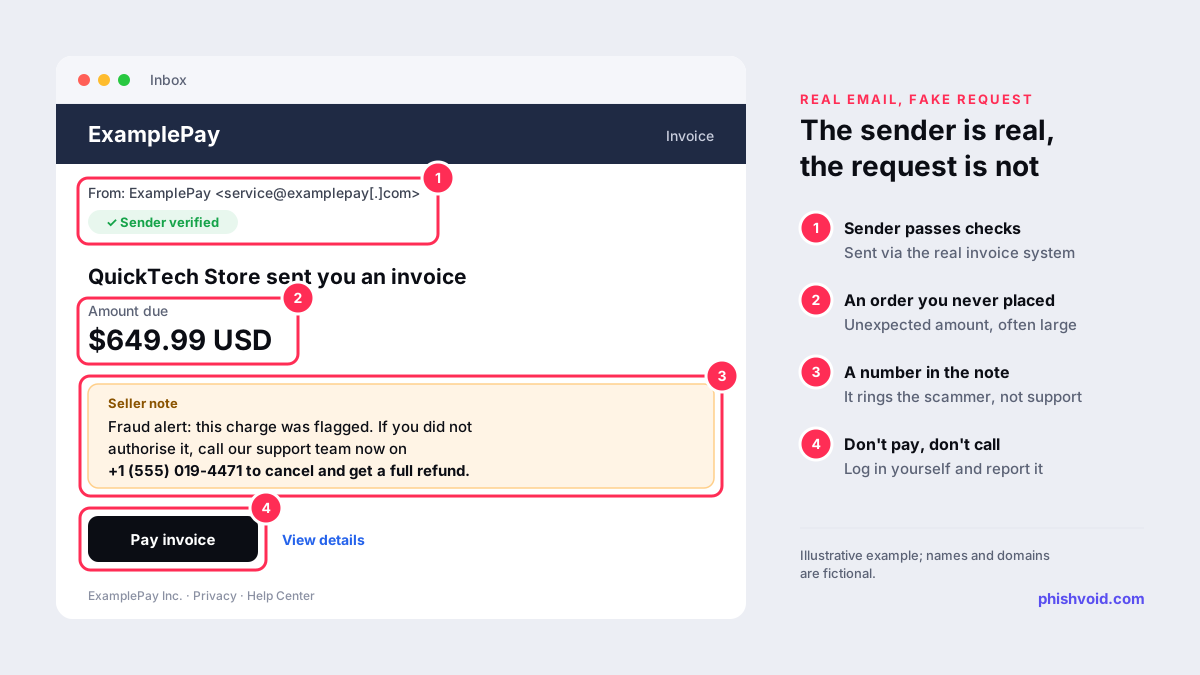
The safe response is the same as for a fake email: log in through the app or website, find the request, and report it from inside your account. Then forward the email to phishing@paypal.com and delete it.
How to report a PayPal scam email
- Suspicious email: forward the entire email to
phishing@paypal.com, then delete it from your inbox, as PayPal's report suspicious messages page asks. Forward the message itself rather than a screenshot. - Suspicious text: forward the text to the same address, then block the sender and delete the message. In the US you can also forward scam texts to 7726 (SPAM), which helps your wireless provider block similar messages (FTC). The UK uses the same 7726 number.
- Fake PayPal website: send the web address to phishing@paypal.com. PayPal's invoice scam article lists suspicious websites alongside emails for this address.
- Unwanted invoice or money request: report it by logging into your PayPal account on the website or app.
- Your email provider: use the Report phishing option in your mail app so the provider can filter similar messages. Our guide to reporting phishing in Outlook covers each version.
- In the UK: you can also forward scam emails to
report@phishing.gov.uk, which the National Cyber Security Centre investigates (GOV.UK).
If you lost money, report it to the police or your national fraud service as well. In the US that is ReportFraud.ftc.gov; our guide on how to report a scam lists the services in other countries.
If you clicked, logged in or called the number
- Change your PayPal password by opening the app or typing paypal.com, never through the email. If you used the same password anywhere else, change it there too, starting with your email account.
- Turn on two-step verification in your PayPal security settings if it isn't already on.
- Check your account activity for payments, linked cards, bank accounts and contact details you don't recognise.
- Call your bank or card issuer on the number printed on your card if you entered card details or sent money.
- If a caller had you install software, uninstall it, disconnect the device from the internet and run a security scan, or have the device checked. Change your passwords from a different device.
- Report what happened to PayPal and to the fraud services above.
Be careful with anyone who contacts you afterwards offering to recover your money for a fee; treat it as another possible scam. Our I got phished page has a fuller recovery checklist.
For businesses: when your name is the bait
The same playbook is used against customers of banks, shops and payment services of every size: a copied email, a lookalike domain and a login page built to harvest credentials. Customers can only report what reaches them; the pages themselves have to be removed at the hosting provider, the registrar and browser blocklists. Phishvoid finds these lookalike login and payment pages, verifies each one and reports it until it comes down.
FAQ
What is PayPal's official email address for reporting scams?
PayPal asks customers to forward suspicious emails and texts to phishing@paypal.com and then delete them. Unwanted invoices and money requests should be reported from inside your PayPal account.
Can a PayPal scam email come from a real PayPal address?
Yes. Scammers can send genuine invoices and money requests through PayPal's system and put a fake support number in the note. Don't pay or call; check the request by logging in yourself.
Should I call the number in the email to cancel a payment I didn't make?
No. A number in a suspicious email or invoice note belongs to the scammer. Log in to PayPal directly to see whether the payment exists, and use the contact options on PayPal's own website.
I only opened the email. Am I at risk?
Opening an email without clicking anything is generally low risk. Don't click its links or open its attachments, forward it to phishing@paypal.com and delete it.
Will PayPal reply to my report?
PayPal's reporting page asks you to forward the message and delete it, and doesn't promise an individual reply. Don't wait for one: check your account yourself straight away.
Is someone impersonating your brand?
We find lookalike domains and cloned pages and take them down. Start with a free exposure scan.