Got a Netflix payment declined message? Learn how to check in a minute whether it is real, spot the scam, report it and what to do if you entered your card.
Quick answer: An email or text saying your Netflix payment was declined, with a link to re-enter your card, is very likely a scam. Scammers use the Netflix name because so many people pay for it every month. To check, ignore the link, open the Netflix app or type netflix.com yourself and look at your account. If there is no payment warning there, the message is fake: forward it to phishing@netflix.com and delete it.
This guide covers the one-minute check, the signs that give the message away, where to report it and what to do if you already typed in your card details. For scam texts in general, see our guide to phishing links and texts.
What the Netflix payment declined scam looks like
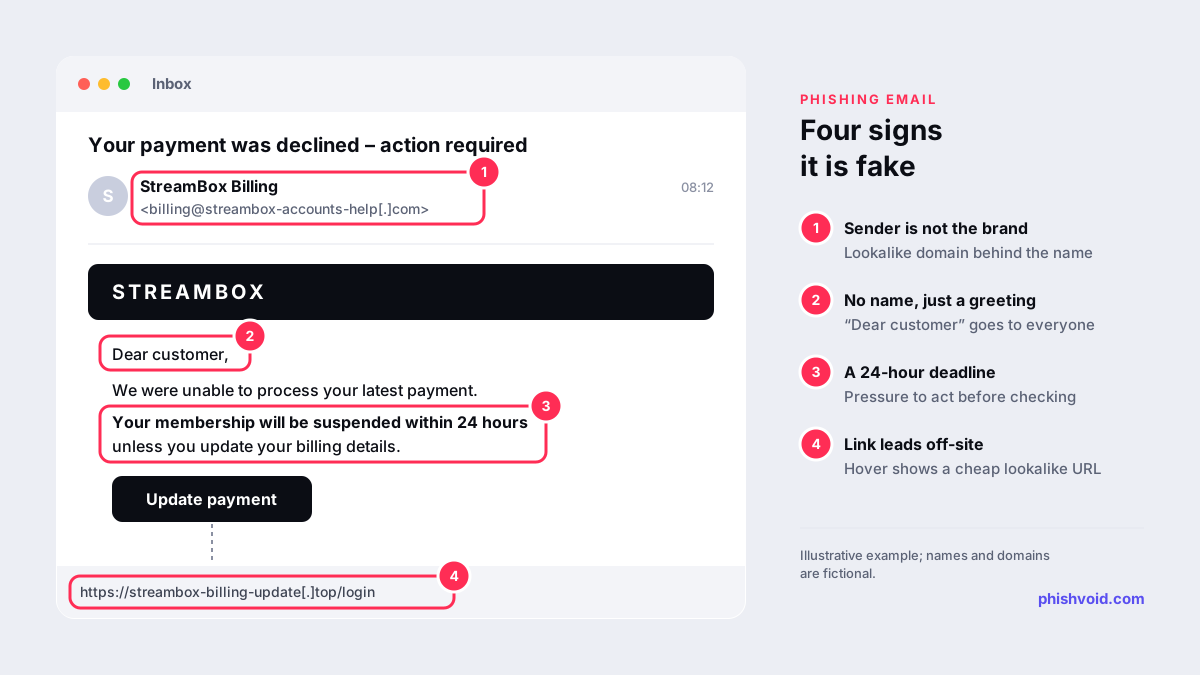
The message arrives by email, SMS or sometimes WhatsApp. The wording changes from wave to wave, but the structure rarely does:
- An opening line such as "Your payment was declined", "Your account is on hold" or "Update your billing information".
- A deadline: the membership will be suspended or cancelled within 24 or 48 hours.
- A button or link to "update payment details", which opens a page copying the Netflix sign-in and billing screens.
- A generic greeting such as "Dear customer" instead of the name on your account.
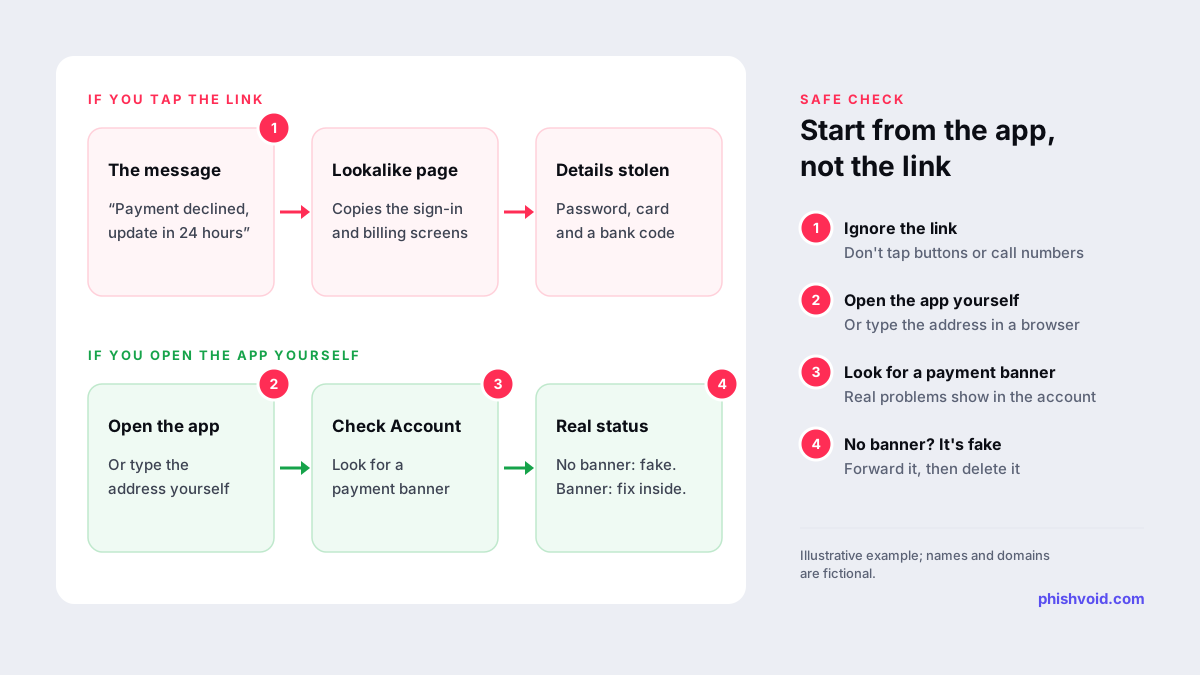
The fake page usually asks for your email and password first, then your full card number, expiry date and security code. Some versions add a final step asking for a one-time code from your bank, which can let the scammer approve a payment of their own. The US Federal Trade Commission described the same pattern, an account "on hold" over a billing problem with a link to update payment details, in a consumer alert, and the lure is still in circulation.
How to check whether your Netflix payment really failed
You never need the link in the message to answer this question. Netflix shows real payment problems inside your account.
- Open Netflix on your own. Use the app you already have, or type netflix.com into the browser. Don't use any link, button or phone number from the message.
- Look for a payment banner. When a payment genuinely fails, Netflix shows a message such as "Your account is on hold because of a problem with your last payment" (Netflix Help).
- Check your payment details in your account. Netflix explains how to update a card from the Manage payment info page inside your account (Netflix Help).
- If someone else bills you, check there. When your phone, TV or internet provider bills you for Netflix, a declined payment is fixed in that provider's account (Netflix Help).
- Check your banking app. A real failed charge usually shows up as a declined transaction or a card alert.
If your account plays normally and shows no warning, the message is fake. If you do see a genuine warning, fix it from inside the account. There is no reason to rush: Netflix says it retries failed payments automatically during the billing cycle (Netflix Help).
Signs the message is fake
Any one of these is reason enough to stop:
- The sender's domain isn't Netflix's. Read the full address, not the display name. Lookalike domains that add words such as "billing", "help" or "account" to a brand name are common, and so are random webmail addresses. Our guide to typosquatting and homoglyph domains explains the tricks.
- The link goes somewhere else. Hover over it on a computer, or press and hold on a phone. Netflix says it will never ask for payment through a third-party vendor or website (Netflix Help).
- It asks for personal or card details. Netflix states that it will never ask you to share personal information in a text or email (same page).
- Pressure and a deadline. "Within 24 hours" exists to stop you from checking.
- A generic greeting and clumsy wording. Not proof on its own, but a frequent sign.
- You don't have a Netflix account, or someone else pays for it. The same message goes out to huge lists of addresses and numbers.
For deeper email checks, such as reading the authentication results in Gmail or Outlook, use our 7-step legit-email checklist.
How to report a Netflix payment scam
Reporting takes a minute and helps get the fake page blocked sooner.
- To Netflix: forward the email or text to
phishing@netflix.com, then delete it. Netflix notes that if the forward bounces, it already has a copy (Netflix Help). - To your email provider: use the Report phishing option in Gmail, Outlook or your mail app so similar messages get filtered.
- In the US: forward phishing emails to the Anti-Phishing Working Group at
reportphishing@apwg.org, forward scam texts to 7726 (SPAM) and report at ReportFraud.ftc.gov, as the FTC advises. - In the UK: forward emails to
report@phishing.gov.uk(NCSC) and texts to 7726 (NCSC). - The fake website itself: report the link to Google Safe Browsing so browsers start warning visitors. Copy the address from the message instead of opening it.
Our country-by-country reporting guide lists more options.
If you already entered your details
Work through these steps in order. Speed matters most for the card.
- Call your bank or card issuer on the number printed on your card. Ask them to block the card and to watch for or dispute charges you don't recognise. Netflix itself advises contacting your financial institution if you entered payment information (Netflix Help).
- Change your Netflix password to a new, unique one, and change it anywhere else you used the same password (same page).
- Sign out other devices from your account settings, so anyone using your stolen login loses access.
- Expect follow-up calls. Scammers sometimes call next, posing as your bank's fraud team and quoting what they already stole. Never read a one-time code to a caller.
- Report the message as described above and keep a copy as evidence.
Our I got phished page walks through the same recovery steps for other kinds of account.
Why subscription brands keep getting copied
A "payment declined" lure works for any subscription, from streaming and music to cloud storage and software. The customer already expects a monthly charge, a failed payment sounds plausible, and the fix the scam offers, "update your card", is exactly what the scammer wants. That is why the same template is reused with different brand names.
For the brand being copied, every wave means a fresh set of short-lived lookalike domains and cloned billing pages, often several at once. Limiting the damage depends on finding each page quickly and reporting it to the host, the registrar and the browser blocklists. That is the work Phishvoid does for enterprise brands: a human team verifies every fake page, then reports it to Google Safe Browsing, Microsoft SmartScreen, hosting providers and registrars until it comes down.
FAQ
Does Netflix send emails about declined payments?
Netflix does contact members about their accounts, but it says it will never ask you to share personal information in a text or email, or to pay through a third-party website. Whatever a message says, check by opening the app or typing netflix.com yourself. If your account shows no warning, the message is fake.
I clicked the link but didn't enter anything. Am I safe?
In most cases, yes. The fake page needs you to type your details. Close it, don't download anything it offers, and run a security scan if a file was downloaded. Then report the message so the page gets blocked for others.
Why did I get this scam if I don't have Netflix?
Scammers send the same message to very large lists of email addresses and phone numbers, hoping enough recipients are customers. Receiving it doesn't mean your details were leaked by Netflix.
Should I reply to the message or call the number in it?
No. A reply confirms that your address or number is active, and a phone number in a scam message leads to the scammer. If you want to talk to Netflix, find the contact options in the Netflix Help Center yourself.
Is someone impersonating your brand?
We find lookalike domains and cloned pages and take them down. Start with a free exposure scan.