Google Ads account phishing steals advertiser logins with fake emails, sponsored ads and calls. Learn how to verify messages, recover and lock down access.
Quick answer: Google Ads account phishing is an attempt to steal an advertiser's Google login so the attacker can take over the ad account, add their own administrators and spend the budget on their own ads. Scammers use the Google Ads name in three main ways: emails about suspensions, billing or user invitations; sponsored search results that lead to a fake sign-in page; and phone calls from fake "specialists". Google says it will never send an unsolicited message asking for your password or other sensitive information by email or through a link (Google Ads Help). Reach your account only by typing ads.google.com yourself or using a bookmark.
This guide is for advertisers, in-house marketing teams and agencies. It explains how each attack reaches you, how to verify a message, what to do if an account is taken over and which Google Ads security settings make takeover much harder.
Three ways attackers go after Google Ads logins
1. Emails about suspensions, billing and access
The most common lure is an email that sounds like routine account admin: "Your account has been suspended", "Your payment was declined and your campaigns are paused" or "You've been invited to manage an account". The link opens a page copying the Google sign-in screen. Google's guidance is to check the email headers: the From address and the Return-Path should contain @google.com or @ads.google.com (Google Ads Help). Our legit-email checklist shows how to read headers in Gmail and Outlook.
2. Sponsored search results for "Google Ads"
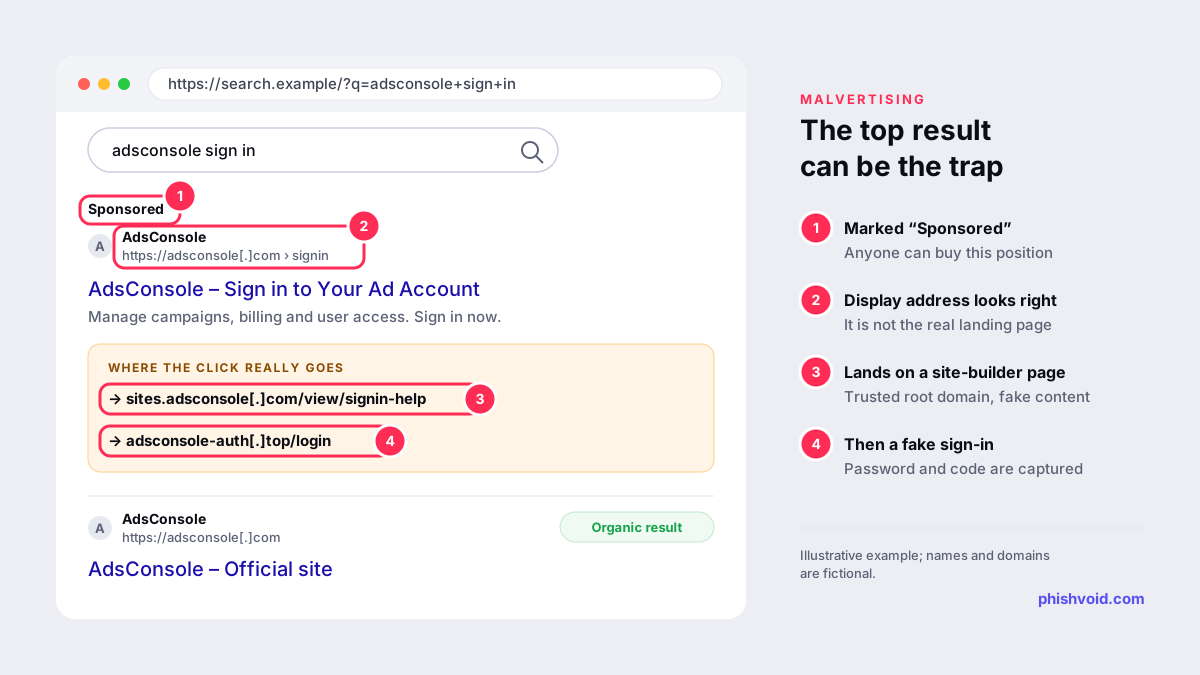
Advertisers often search for the sign-in page instead of typing the address, and attackers buy ads against exactly that search. In January 2025, Malwarebytes documented a large campaign in which sponsored results impersonating Google Ads led to a fake Google Ads home page built on Google Sites, which then sent visitors to a phishing kit. Because the page sat on a google.com subdomain, the ad's display address looked consistent with Google. Malwarebytes also found that the ads themselves ran from previously hijacked advertiser accounts. This is a form of malvertising.
3. Phone calls and unsolicited "account managers"
Some attacks start with a call offering help with a suspension or a free campaign review, then ask for access or a sign-in code. Google's advice is to ask the caller to send you an email: a genuine Google representative's email shows @google.com as the sender and Return-Path (Google Ads Help). If a third party says it works with Google, check whether it really is a Google Partner.
How to verify a Google Ads message
- Don't sign in from the message. Open ads.google.com from a bookmark or by typing it, and check whether the account shows the same suspension, billing or access issue.
- Check where the link really goes. Google suggests right-clicking the link, copying the address and pasting it into a text field; if it doesn't lead to google.com, don't trust it (Google Ads Help). Go one step further: the Google sign-in page lives on
accounts.google.com. A sign-in form on any other address, including a page hosted on Google Sites, should be treated as fake. Our link checker helps you read an address safely. - Read the headers for the From and Return-Path domains described above.
- Treat unexpected invitations with suspicion. If you don't know why you were invited to an account, confirm with the sender through a channel you already use before accepting.
- Never share a sign-in code with a caller, a chat or a form reached from a message. Some phishing kits pass codes to the real site in real time, a technique known as adversary-in-the-middle phishing.
What happens after an account is taken over
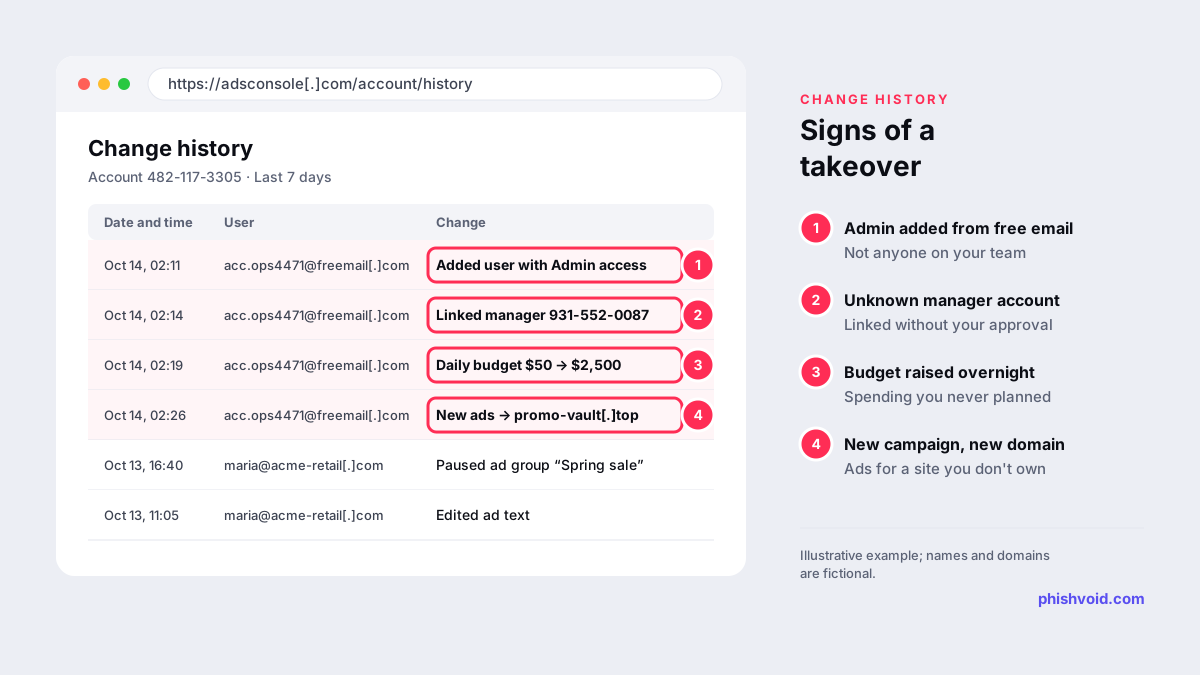
According to Malwarebytes, victims of the 2025 campaign often received a login alert from an unusual location. If the sign-in wasn't stopped, the attacker added a new administrator using a different Gmail address, ran up spending and tried to lock the owner out. The researchers believe stolen accounts are resold or kept to run further malicious ads.
Google lists the evidence it wants when you report a compromise, and the same items are the signs to look for in your change history: unauthorised users being added, unknown manager accounts linked to your account, and budget increases or automated rules that don't match how you manage the account (Google Ads Help).
If your Google Ads account is compromised
Google's recovery process for a compromised account runs in this order (Google Ads Help):
- Report it through the compromised account form as soon as possible, with a timeline of the unauthorised changes. If you still have access, review the change history first.
- Complete the guided recovery and its verification questions. If Google confirms unauthorised activity, it can suspend the account temporarily, pause changed campaigns, remove unauthorised users and unlink unknown manager accounts.
- Review the change log Google emails you. Only an administrator who held the role before the confirmed compromise date can submit the decision: clean up the account, restore it as is, or ask for more investigation.
- Re-secure every administrator: complete 2-Step Verification and change the Google Account password.
- Clean up after reinstatement: scan every computer that accesses the account for malware, then audit users, manager links, payment profiles and campaigns.
- Request reimbursement for unauthorised charges once the account is reactivated. Google notes that choosing "Restore this account as is" makes the event ineligible.
Our I got phished page covers the wider steps, such as securing the email account behind the login.
Harden the account before it is targeted
- 2-Step Verification for every user. Google strongly encourages all advertisers to use it (Google Ads Help).
- Passkeys for sensitive actions. Administrators can require passkeys or hardware security keys as the only accepted second step for actions such as adding users or changing billing. Once switched on, the setting cannot be turned off, and new passkeys take a day or two before they work for sensitive actions (Google Ads Help).
- Multi-party approval. On accounts with more than three administrators, adding or removing users or changing roles needs approval from a second admin (Google Ads Help).
- Corporate email addresses. Google is piloting a rule that blocks sensitive actions for users signed in with free email domains such as Gmail (Google Ads Help). Moving users to company addresses now avoids surprises.
- Regular access reviews. Remove former staff and agencies, and check manager links and payment profiles each quarter.
How to report Google Ads phishing
- Suspicious emails or calls: contact Google Ads support through the contact form listed on Google's security page (Google Ads Help).
- The fake sign-in page: report it to Google Safe Browsing. Copy the link rather than visiting it.
- A malicious sponsored result: report the ad from its menu. Our guide to fake bank ads on Google walks through the reporting routes.
Hijacked ad accounts are also a supply line for ads that impersonate other companies. If such ads send people to a copy of your login page or store, the landing site needs taking down as well as the ad. Phishvoid handles that part for enterprise brands, reporting each verified site to hosts, registrars, Google Safe Browsing and other blocklists.
FAQ
Does Google Ads ever ask for my password by email?
No. Google says it will never send an unsolicited message asking for your password or other sensitive information by email or through a link. Any message that does is likely phishing.
Is a sign-in page on a google.com address always genuine?
Not necessarily. Attackers have hosted fake Google Ads pages on Google Sites, which sits under google.com. The real Google sign-in page is on accounts.google.com, so a login form anywhere else deserves suspicion.
Will Google refund money spent by the attacker?
Google lets you request reimbursement for unauthorised charges after the account is reactivated and 2-Step Verification is on, unless you chose "Restore this account as is" during recovery. Approval depends on Google's review.
Do passkeys stop this kind of phishing?
They make it much harder. A passkey only works on the real site it was created for, so a fake sign-in page can't capture and reuse it. Requiring passkeys for sensitive actions also protects user and billing changes if a password leaks.
Is someone impersonating your brand?
We find lookalike domains and cloned pages and take them down. Start with a free exposure scan.