Executive impersonation uses fake profiles, emails and sites to pose as your leaders. See where it appears and how companies prevent, detect and remove it.
Quick answer: Executive impersonation is when criminals pose as a company's leaders, typically the CEO, CFO or founder, using fake social media and professional profiles, lookalike email addresses, messaging app accounts, websites or deepfake media. They use that borrowed authority to get staff to pay, partners to share data, or customers and investors to send money. Companies reduce it by publishing their official channels, enforcing verification rules, authenticating their email, monitoring for fakes and reporting them quickly.
It overlaps with spear phishing and whaling, but the problem is wider than email. This guide looks at where executive impersonation appears, who it targets and what a company can do about each channel.
Where executive impersonation shows up
Fake social and professional profiles
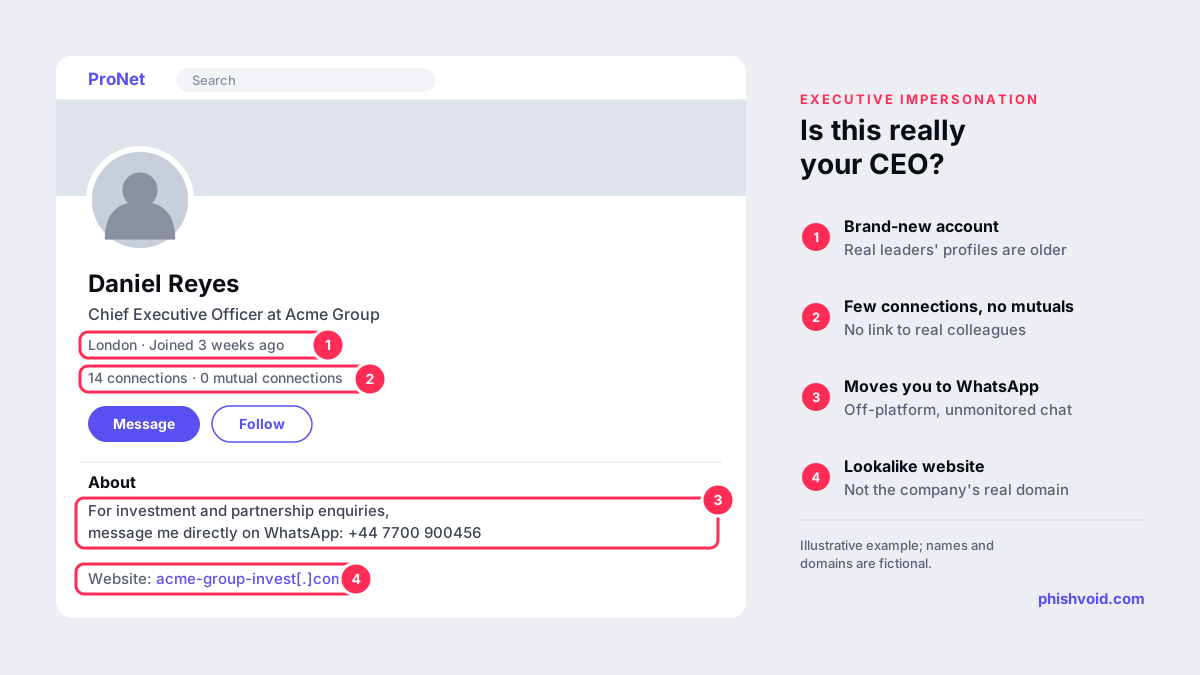
Copies of an executive's profile, with the same photo, title and biography, are used to message employees, job seekers, suppliers or investors. LinkedIn lists claiming to be a public figure or company executive without verifiable connections as one sign of a fake profile (LinkedIn). Our glossary entry on social media impersonation explains the wider pattern.
Messaging apps and texts
A WhatsApp, Telegram or SMS message arrives from a new number with the executive's photo: "I'm in a meeting, can you handle something for me?" In January 2026 the FTC warned about scammers who pretend to be your boss and ask you to buy gift cards (FTC). In a case reported by The Guardian in May 2024, criminals set up a WhatsApp account using a public photo of the CEO of WPP and used it to arrange a video meeting with a senior executive; the attempt failed (The Guardian).
Common forms are display-name spoofing (the executive's name on a free webmail address), lookalike domains such as acme-group[.]co instead of acme.com, and genuinely compromised mailboxes. This is the core of business email compromise, which accounted for about $3.05 billion in losses reported to the FBI in 2025 (FBI IC3).
Fake websites and pages
Examples include fake interviews in which the CEO "reveals" an investment platform, fake investor relations pages and fake recruitment pages signed by a real HR director. The investment variant, usually promoted through ads with deepfake video, is covered in fake ads and deepfake investment scams.
Deepfake voice and video
Cloned voices and AI-generated video make an impersonation interactive. Our guide to the deepfake CEO scam covers verified cases and the payment controls that stop them.
Who gets targeted, and what it costs
- Employees: payment transfers, gift cards, payroll changes, credentials and confidential files.
- Suppliers and partners: fake orders, changed bank details and requests for pricing or contracts.
- Customers and investors: fake investment schemes and "exclusive" offers that use the founder's face.
- Job seekers: fake interviews and offers that collect fees and identity documents.
Direct losses are only part of the cost. Victims outside the company often blame the business whose leader was impersonated, and the executive's own reputation suffers. In the US, the FTC's Impersonation Rule, in force since April 2024, gives the agency stronger tools against scammers who impersonate businesses and government agencies, including court cases to get money back to consumers (FTC). For the broader picture across channels, see brand impersonation protection.
Prevent: make impersonation harder and easier to spot
- Publish your official channels. Keep a page that lists executives' real accounts and states what leaders will never do: ask for gift cards, ask staff to move money over a messaging app, or promote investments in ads. Link it from your website footer and careers page.
- Claim and verify accounts. Register executive and company handles on the major platforms, even ones you don't use actively, and apply for verification where it is offered.
- Lock down email. Enforce DMARC on every domain you own, including parked ones, so nobody can send as your exact domain. Tag external email and flag incoming messages whose display name matches an executive.
- Set internal rules. Executives make requests only through approved channels, and payment or data requests are verified by calling back a known number. When the CEO announces this personally, staff feel safe checking.
- Watch for lookalike domains. Domains that combine your brand with words like "group", "hr" or "invest" are often registered shortly before use. Our lookalike domain finder shows common variants of your name.
Detect and remove fake profiles, emails and sites
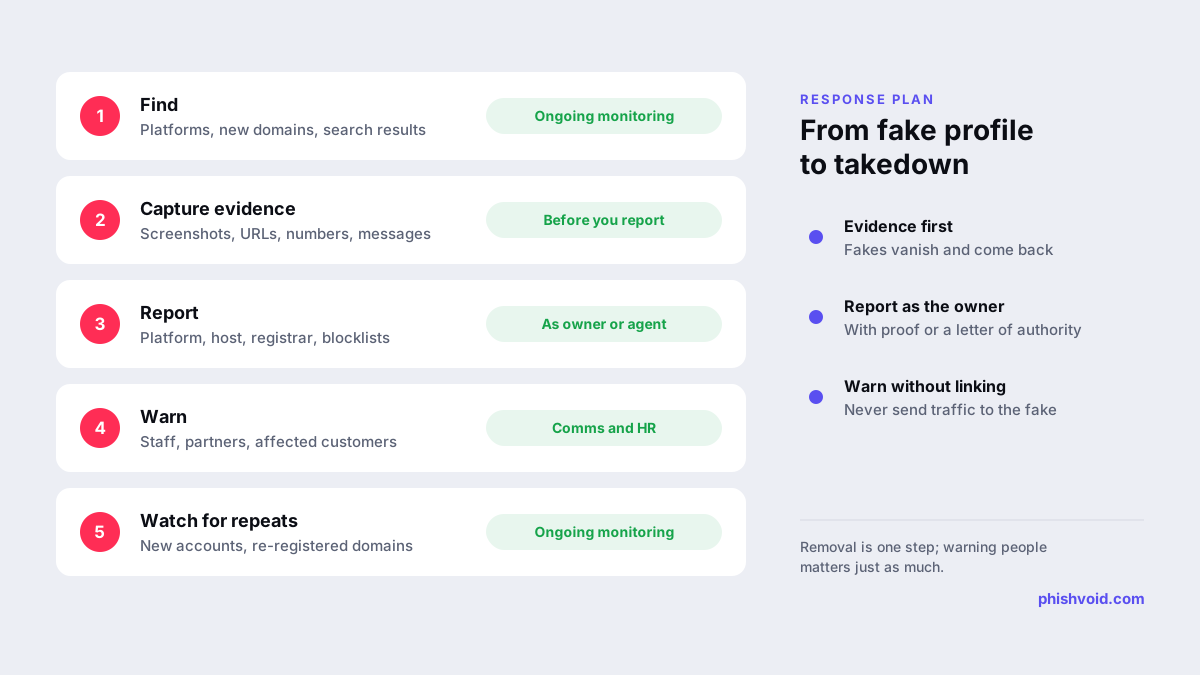
Monitoring should cover the major social networks, new domain registrations and search results for each executive's name combined with words such as "investment", "WhatsApp" or "hiring". When you find a fake, capture evidence first: screenshots, profile URLs, usernames, phone numbers and any messages people received. Then report it through the right channel:
- LinkedIn: on the profile, open More, choose Report / Block and select the option for impersonating someone (LinkedIn Help).
- X: the impersonated person or an authorized representative can file an impersonation report through the Help Center; misuse of a company's trademark goes through the trademark process (X Help Center).
- Facebook: report the profile or Page as impersonation from its menu; a contact form exists for people without an account (Facebook Help Center).
- Messaging apps: use in-app reporting for the number or account, and warn the people it contacted.
- Domains and websites: report lookalike domains and fake pages to the hosting provider, the registrar and browser blocklists such as Google Safe Browsing. For domains that stay up, trademark-based procedures such as UDRP are an option.
Reports from the company or its authorized agent, with proof of identity or a letter of authorization, are generally taken more seriously than anonymous flags. Phishvoid's team does the website and domain side of this work under one subscription: it verifies each fake site, then reports it to hosts, registrars, CDNs, blocklists, search engines and social platforms.
When an impersonation reaches people
- Alert staff with a screenshot of the fake and a reminder of the verification rule.
- Tell affected suppliers, partners or candidates directly, using contact details you already have.
- Post a short notice on your official channels without linking to the fake account.
- If money was sent, contact the bank immediately and report to the police; in the US, also file at ic3.gov.
- Watch for repeats: removed accounts often return under slightly different names or numbers.
FAQ
What is executive impersonation?
It is fraud in which criminals pretend to be a company's senior leaders on social media, messaging apps, email, websites or through deepfake media, to get money, data or access from staff, partners, customers or investors.
How do we report a fake LinkedIn profile of our CEO?
Open the fake profile, choose More, then Report / Block, and select the impersonation option. Keep screenshots and the profile URL, and ask the CEO to report it too, since the impersonated person's report carries weight.
Can we stop someone registering a domain with our executive's name?
Not in advance in most cases. You can register obvious variants yourself, monitor new registrations, and act quickly when a domain is used for fraud by reporting it to the registrar and host, or by using UDRP where a trademark is involved.
How long does it take to remove a fake executive profile?
It varies by platform and by how complete the report is, and platforms do not publish reliable averages. Reports from the impersonated person or an authorized representative, with clear evidence, tend to move faster.
Is executive impersonation illegal?
Using someone's identity to defraud people is illegal in most countries. In the US, the FTC's Impersonation Rule also specifically targets scammers who impersonate businesses and government agencies.
Is someone impersonating your brand?
We find lookalike domains and cloned pages and take them down. Start with a free exposure scan.