Fake online stores on social media ads take your money and send nothing. Eight checks before you buy, what to do if you paid and where to report the ad.
Quick answer: Fake online stores on social media ads promise big discounts on popular or branded products, take your payment and then send nothing, or send a cheap copy. Before you buy from an ad, check who the seller really is: the shop's domain, how old the page and website are, the contact details and the payment options at checkout. If you already paid, contact your card provider to dispute the charge, report the ad on the platform and report the shop.
This guide is for shoppers. If a fake store is using your own brand, read our guide for brand owners on fake online stores using your brand instead.
How fake stores use social media ads
Shopping is the most common way people lose money to scams that start on social media. In data published in April 2026, the US Federal Trade Commission said nearly 30% of people who reported losing money to a scam in 2025 said it started on social media, with reported losses of $2.1 billion. More than 40% of the people who lost money to a scam on social media said they had ordered something they saw in a social media ad. The FTC also notes that platforms don't always thoroughly vet the ads you see or the advertisers behind them.
The ads follow a few familiar patterns:
- The closing-down sale. A "family business" or "much-loved boutique" is supposedly shutting down and selling everything at 70–90% off.
- The brand outlet. The ad uses a well-known brand's photos and name, but links to a shop the brand doesn't run.
- The viral gadget. A product seen in videos, sold at a price far below every other shop.
- The countdown. "Last 24 hours" or "only 3 left" to stop you from checking.
After payment, the FTC says most people report that nothing arrived. Others receive a knock-off or something completely different from what they ordered.
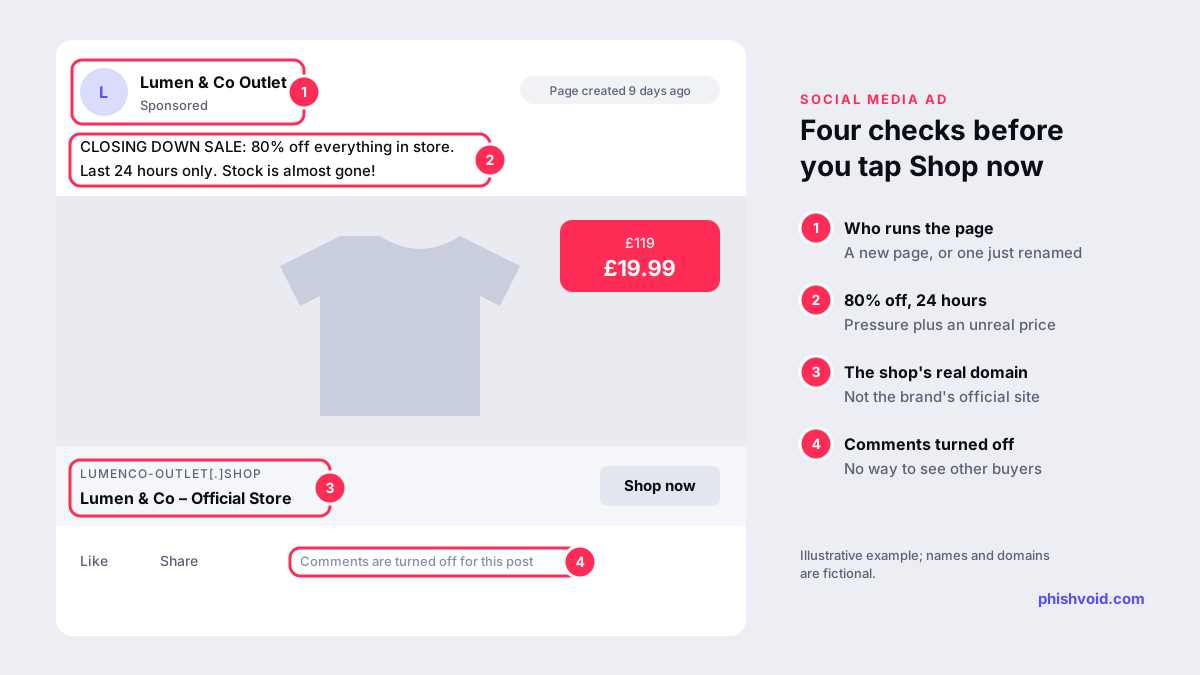
Eight checks before you buy from an ad
- Read the domain, not the ad. The page name in the ad can say anything. Look at the web address the "Shop now" button opens. If the ad names a brand, type the brand's website into your browser yourself and compare. The FTC's advice is simple: "Don't assume the seller is the company brand named in the ad."
- Look at the page behind the ad. On Facebook and Instagram, the Page transparency section shows when a page was created and whether its name has changed. The Meta Ad Library shows the other ads the same page is running. A page created last week, or one that used to sell something else, is a warning sign.
- Check how old the website is. A domain registered a few weeks ago that claims a 30-year history doesn't add up. A WHOIS lookup shows the registration date; see our explainer on newly registered domains.
- Compare the price. The FTC says that if an ad offers prices that are much lower than everywhere else, "it's probably a scam".
- Search the shop's name with words like "scam", "complaint" or "review", as the FTC suggests. Check reviews on sites other than the shop itself.
- Find a real contact. Look for a company name, a postal address and a phone number. A contact form and a free email address are not enough.
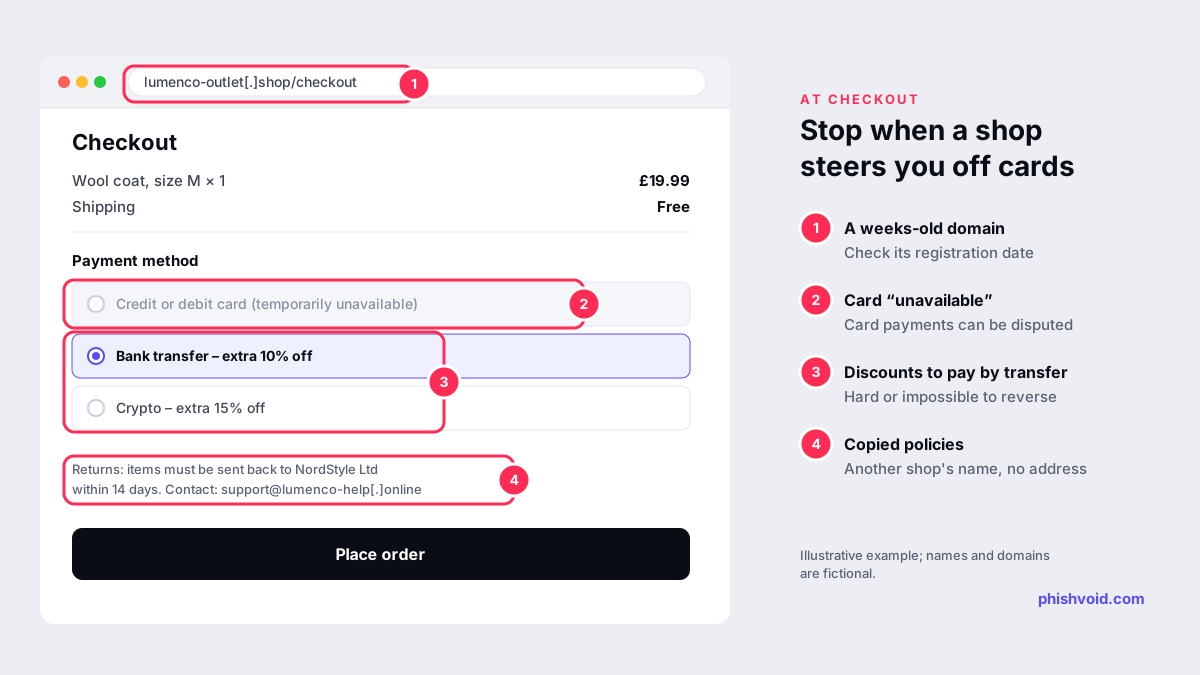
- Read the policies. Copied returns pages often still mention another shop's name, or don't say where returns go.
- Look at the payment options. Pay by credit card if you buy. The FTC says paying by credit card gives you the best protection if something goes wrong, and that "only scammers" demand payment by gift card, wire transfer, payment app or cryptocurrency.
Checking takes a few minutes, which is exactly why these ads use countdown timers. If you want to look at a link without opening it, try our link checker.
What a fake checkout looks like
The checkout page is often where a fake shop gives itself away. Card payment may be "temporarily unavailable", while bank transfer or crypto comes with an extra discount. That is not generosity: card payments can be disputed, while a bank transfer or crypto payment is hard or impossible to reverse.
Already paid? What to do now
- Contact your card provider. Explain that the goods never arrived or were not as described, and ask to dispute the charge. In the US, the FTC's guide to disputing credit card charges explains that a written dispute for goods that weren't delivered should reach the issuer within 60 days of the first bill showing the charge. In the UK, MoneyHelper explains section 75 and chargeback: section 75 covers credit card purchases between £100 and £30,000, and chargeback can also apply to debit cards.
- If you paid by bank transfer, call your bank straight away and report it as a scam. In the UK, many transfers made after a scam can be reimbursed; our guide to the bank fraud text scam explains the rules.
- Keep everything: screenshots of the ad, the shop, the order confirmation and any emails.
- Change your password if you created an account at the shop with a password you also use elsewhere.
- Watch for follow-up scams. People who lost money are often contacted by "recovery services" that promise to get it back for a fee. Treat these as a second scam.
Where to report a fake store ad
- The platform. Use the menu on the ad (usually three dots) and choose the option to report it as a scam. Report the page too.
- In the US: report the shop and the ad to the FTC at ReportFraud.ftc.gov.
- In the UK: report paid scam ads to the Advertising Standards Authority through its scam ad reporting form. The ASA says these reports are shared with the National Cyber Security Centre and used to alert platforms. Report the website itself through the NCSC's scam website form. If you lost money, report it to Report Fraud at reportfraud.police.uk.
- Browser blocklists: if the shop collects card details, reporting it to Google Safe Browsing helps warn other buyers. Our guide on how to report a scam website covers the options.
If the fake store is using your brand
For brands, these ads arrive in waves: the same shop template appears on dozens of domains, each promoted by a fresh page. Customers who lose money often blame the real brand. Reporting individual ads helps, but it works better to remove the shop domains, the payment routes and the ads together. Our guides on counterfeit website takedown and fake stores using your brand explain how. Phishvoid finds and takes down fake stores and lookalike domains like these, with a person verifying each site before it is reported.
FAQ
Are ads on Facebook and Instagram checked before they run?
Platforms review ads, but the FTC says they don't always thoroughly vet the ads or the advertisers behind them. An ad appearing on a big platform is not proof that the shop is real.
My order from a social media ad never arrived. Is it a scam?
If the shop has stopped replying, the tracking number doesn't work or the website has disappeared, treat it as a scam. Contact your card provider or bank straight away and report the ad and the shop.
I received a cheap copy instead of what I ordered. Can I get my money back?
Often, if you paid by card. Ask your card provider about a dispute or chargeback, and keep photos of what arrived next to the original ad. Don't pay to send the item back to an overseas address unless your card provider tells you to.
How can I tell how old a shop's website is?
Run a WHOIS lookup on the domain to see its registration date. A shop that claims years of history on a domain registered a few weeks ago is a strong warning sign.
Is someone impersonating your brand?
We find lookalike domains and cloned pages and take them down. Start with a free exposure scan.