A bank fraud text scam sends a fake fraud alert, then a caller asks for your codes or a transfer. How to check it, what to do if you replied, where to report.
Quick answer: A bank fraud text scam is a fake fraud alert. A text that looks like it comes from your bank asks whether you made a large purchase and tells you to reply YES or NO or to call a number. Then a fake "fraud team" phones you to get your one-time codes or talk you into moving your money. Don't reply, don't call the number in the text and don't tap any link. Call your bank on the number on the back of your card (in the UK you can also dial 159), then forward the text to 7726.
This guide covers the text and the phone call that follows it. If the message sent you to a login page instead, our guide to fake bank websites covers that version. For checking links in texts in general, see phishing links and texts.
How the fake fraud alert text works
This is one of the most common text scams in the United States. The Federal Trade Commission listed fake fraud alerts among the top five text scams of 2024 in its Data Spotlight on text scams. A year earlier it called a fake bank fraud alert the most-reported text scam. The script rarely changes:
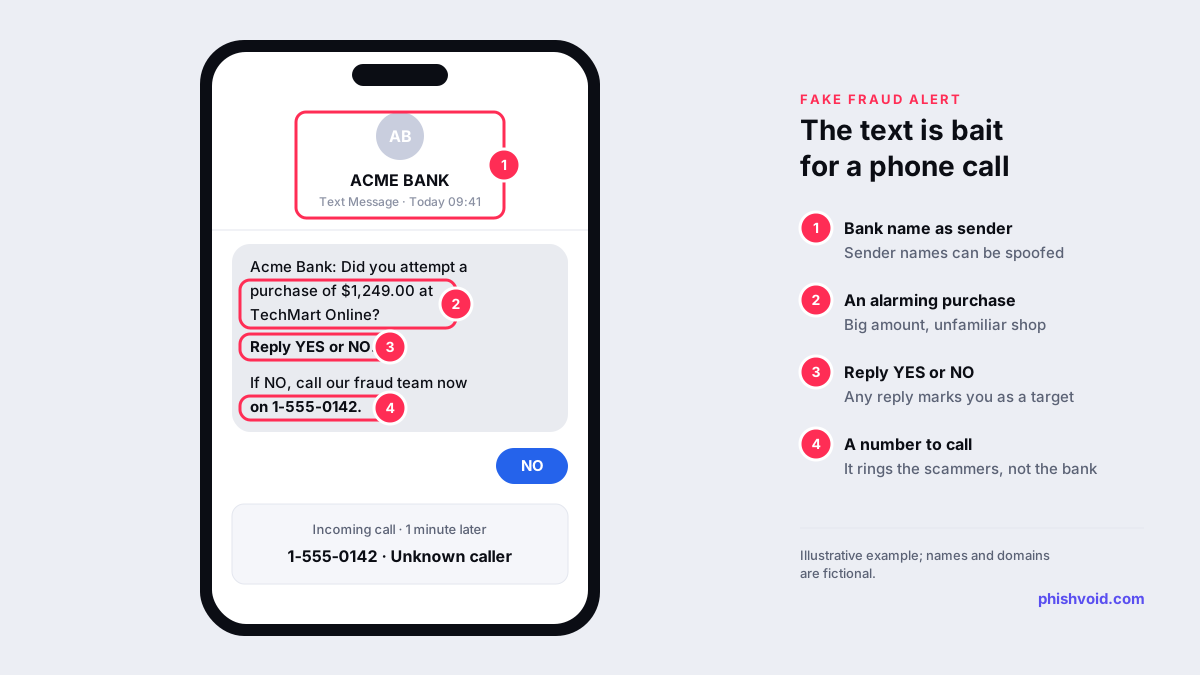
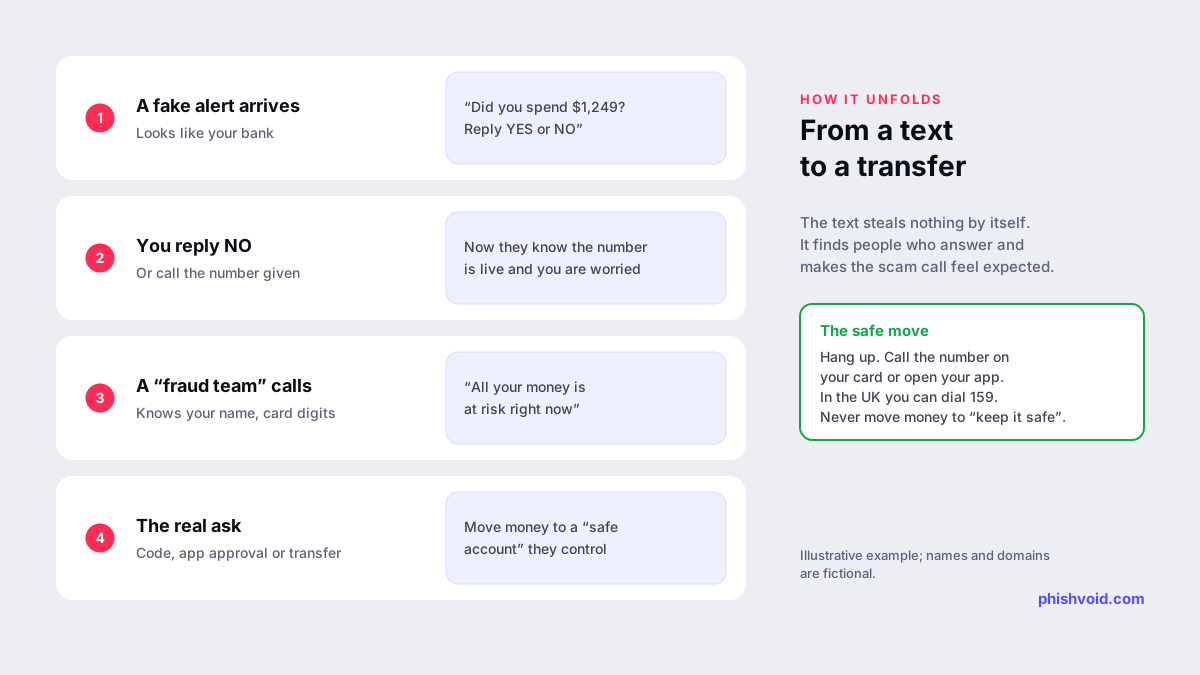
- The alert. A text says there is suspicious activity on your account, or asks whether you just approved a large payment at a shop you don't recognise.
- The hook. You're asked to reply YES or NO, or to call a "fraud line". Most people reply NO, because they didn't make the purchase.
- The call. Someone phones, says they work in the fraud department and offers to help. The FTC says these scammers quickly raise the stakes, often telling people that all their money is at risk.
- The ask. The caller asks you to read out a one-time code, approve something in your banking app, or move your money to a new "safe" account. That account belongs to the criminals.
The text itself steals nothing. Its job is to find people who answer and to make the call that follows feel expected. By the time the phone rings, you think you are the one who reported the fraud, so you are far less guarded.
Signs the fraud alert is fake
Real banks do send fraud alerts by text, so the fact that a text arrived proves nothing either way. Look at what it wants you to do next.
- It points you to a phone number or link inside the message. A genuine alert can always be checked in your banking app or on the number printed on your card, so you never need the contact details in the text.
- It describes an alarming purchase. A large amount at an unfamiliar shop is chosen to make you react before you think.
- It sits in your bank's message thread. Sender names can be spoofed, so a fake text can show your bank's name and even land in the same conversation as genuine messages. Where a text appears is not proof of who sent it.
- The caller already knows things about you. Your name, your bank or the last digits of your card can come from earlier data leaks. Knowing details doesn't make someone your bank.
- Someone asks for a code, PIN or password. One-time codes exist so that you can approve something yourself. Anyone who asks you to read one out is trying to use it.
- You're told to move money to keep it safe. The FTC warns that these scammers pressure people into moving money out of their accounts "to supposedly keep it safe", and that people who move it do not get any of it back. UK banks repeat the same rule through the Take Five to Stop Fraud campaign: your bank will never ask you to transfer money to a safe account.
How to check whether the alert is real
- Don't reply at all, not even STOP. Any reply tells the sender that the number is live and that someone is reading.
- Open your banking app yourself and look for the transaction or a security message. If the payment isn't there, the text was fake.
- Call the bank on a number you already trust: the one on the back of your card, on a statement or on the bank's own website typed into your browser. The FTC gives the same advice.
- In the UK, dial 159. Stop Scams UK says the number connects customers of more than 99% of UK retail bank current accounts to their bank and cannot be spoofed.
- If "the bank" calls you, hang up and call back on the trusted number, from a different phone if you can. A real fraud team will not mind.
What to do if you replied, called or shared a code
What you need to do depends on how far it went.
- You only replied. Nothing has been taken. Expect a call or more texts, don't engage, and block the number after you report it.
- You shared a code, PIN or password. Call your bank immediately on the number on your card. Ask them to block the card and check for new payees, new devices or payments you didn't approve. Change your online banking password and the password of any email account linked to it.
- You moved money. Call your bank straight away and ask them to try to stop or recall the payment. Speed matters more than anything else here.
Then report it. In the US, report the scam at ReportFraud.ftc.gov. In England, Wales and Northern Ireland, report to Report Fraud at reportfraud.police.uk or on 0300 123 2040; in Scotland, call Police Scotland on 101.
In the UK, transfers made after this kind of scam may be refunded. Under the reimbursement rules described by UK Finance, Faster Payments and CHAPS transfers made on or after 7 October 2024 can be reimbursed up to £85,000 per claim if you report within 13 months of the last payment, unless the bank shows you were grossly negligent. Our I got phished page has a fuller checklist for the first hours.
How to report a bank fraud text
- Forward the text to 7726. Most mobile networks in the US and the UK accept spam reports on this free number. The UK's National Cyber Security Centre explains how to forward a text to 7726 on iPhone and Android.
- Tell your bank. Many banks publish an address or form for reporting fake messages on their own website. Find it there, not in the text.
- Report the website if there was one. In the UK you can send a suspicious link to the NCSC through its scam website reporting form. Our guide on how to report a scam lists the channels for other countries.
- Delete the text once it has been reported, so you don't tap it by accident later.
For banks: make the real alerts easy to recognise
Customers can only spot a fake alert if they know exactly what the real one looks like. Tell them in plain words, in the app and on your website, what your fraud texts will and won't do: for example, that you never ask anyone to call a number from a text, read out a code or move money to another account. Make the bank's own contact routes easy to find, and train phone staff to welcome customers who call back to check.
The texts are rarely the whole campaign. They usually lead to phone numbers, lookalike domains and fake login pages that can be reported and removed. Phishvoid finds and takes down those impersonation sites for banks, with a person verifying each one before it is reported. Our guide to brand protection for banks covers what else to monitor.
FAQ
Do banks send fraud alert texts?
Many do. A genuine alert won't ask for a code, PIN or password, and it won't ask you to move money. If you are unsure, ignore the text and check in your banking app or call the number on your card.
I replied NO to a fraud alert text. What now?
Nothing has been taken yet. Expect a call from a fake fraud team. If anyone calls, hang up and call your bank on a trusted number. Then forward the text to 7726 and delete it.
Can a scam text appear in the same thread as my bank's real texts?
Yes. Sender names can be spoofed, so a fake message may appear under your bank's name and alongside genuine ones. Judge the text by what it asks you to do, not by where it appears.
What is 159?
In the UK, 159 is a short number run with Stop Scams UK that puts you through to your own bank's official line. Use it when you get an unexpected call or message about your account.
Will my bank refund me if I moved the money myself?
It depends on where you are and how you paid. In the UK, many transfers made after a scam are covered by reimbursement rules if reported within 13 months. Elsewhere, call your bank at once and ask what it can recover.
Is someone impersonating your brand?
We find lookalike domains and cloned pages and take them down. Start with a free exposure scan.