SaaS login page phishing copies your sign-in page to steal passwords and sessions. Learn how these fake pages work and what SaaS companies can do about them.
Quick answer: SaaS login page phishing is when attackers copy the sign-in page of a software-as-a-service product, host it on a lookalike domain and lure users there to capture their passwords, MFA codes or session cookies. For the SaaS company whose page is copied, the most effective responses are to make stolen credentials useless with phishing-resistant sign-in, to give customers one login domain they can trust, to detect clones early and to get each fake page taken down quickly.
This article is for SaaS providers whose brand is being copied. If you are a user who entered a password on a fake page, start with what to do if you got phished.
Why attackers copy SaaS login pages
A SaaS account is often a key to business data: customer records, files, payroll, code or email. One set of credentials can open a whole workspace, which is why SaaS is at the top of current targeting data. In APWG's Phishing Activity Trends Report for Q2 2026, member Crane Authentication found that SaaS and webmail was the most attacked category, with 29.1% of phishing attacks, up from 20% in the first quarter.
SaaS login pages are also easy to copy. They are simple, public and look the same for every customer, and phishing kits sell ready-made templates. Microsoft's analysis of the Tycoon2FA kit, disrupted in March 2026, found that it imitated sign-in pages for Microsoft 365, OneDrive, Outlook, SharePoint and Gmail, sometimes with the target company's own branding, while lure emails borrowed the names of business apps (Microsoft).
How a fake SaaS login page works
Most campaigns follow one of two patterns:
- Static clone: a copy of the login page that saves the username and password, then redirects the user to the real site. These are cheap and common, and they fail against accounts protected by MFA.
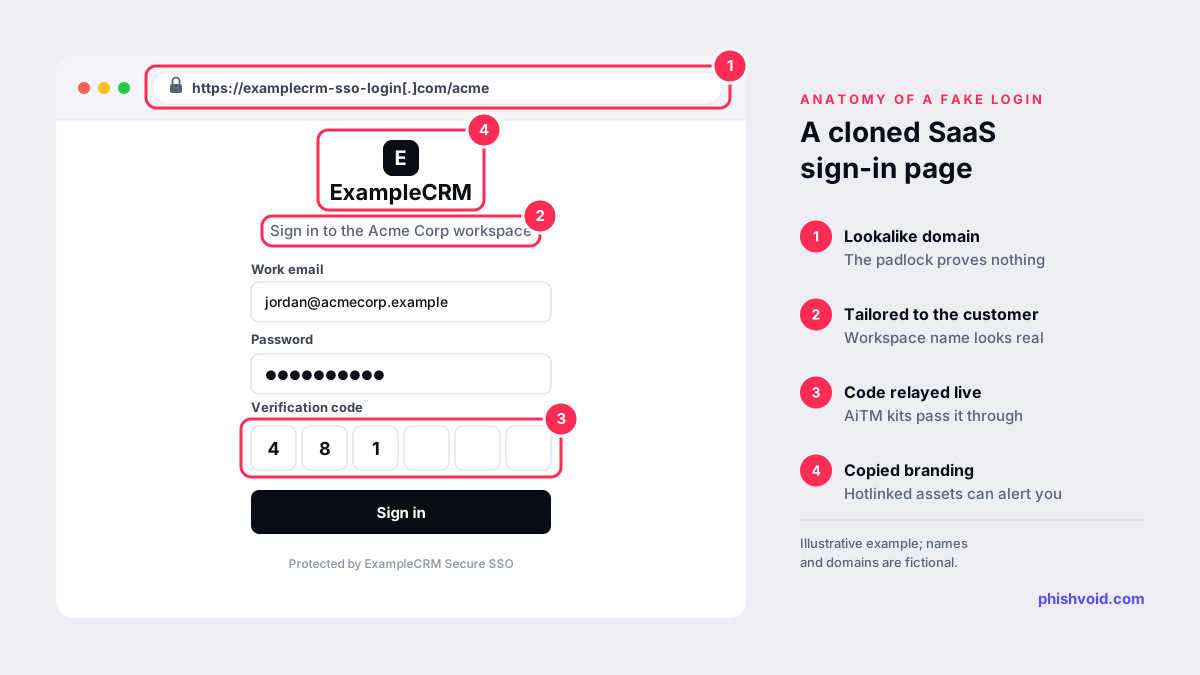
- Adversary-in-the-middle proxy: the fake page relays everything to the real service in real time. The real service sends its MFA challenge, the victim completes it on the fake page, and the attacker captures the session cookie. Microsoft notes that this gives the attacker access without further authentication until sessions and tokens are revoked. Our glossary entry on AiTM phishing explains the technique.
Lures vary: a shared document, an expiring licence, a failed invoice, a security alert or a text message to an employee's phone. Domains often combine the product name with words such as sso, login or auth, or with the customer's company name, as in examplecrm-sso-login[.]com or acme-examplecrm[.]app.
Why the key matters more than the password
In July 2022, Cloudflare described an SMS campaign in which at least 76 employees received texts linking to a copy of its Okta sign-in page, on a domain registered less than 40 minutes before the messages went out. Three employees entered their credentials, but the attack failed. Every employee used a FIDO2 hardware security key, and because those keys are bound to the real site's origin, the fake page could not use them (Cloudflare).
CISA makes the same point in its fact sheet on implementing phishing-resistant MFA, which describes FIDO/WebAuthn as "the only widely available phishing-resistant authentication". Codes sent by SMS or shown in an app can be relayed by a proxy; a passkey or security key cannot be used on the wrong domain.
What SaaS companies can do
Make stolen credentials less useful
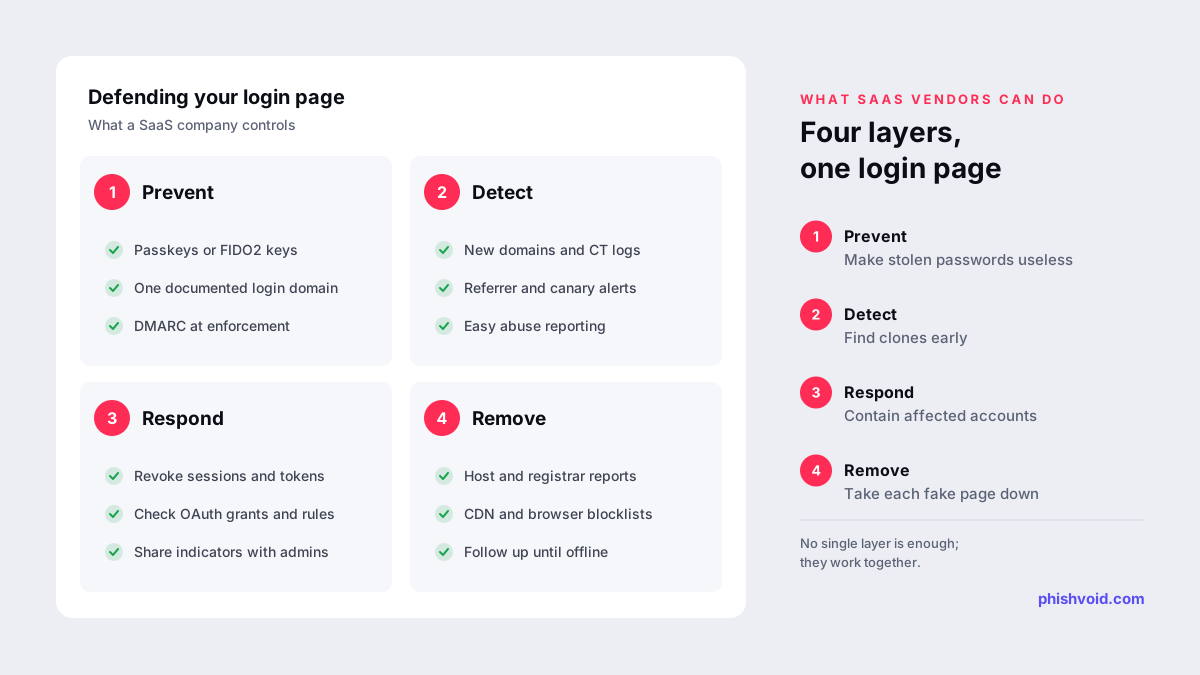
- Offer passkeys or FIDO2 security keys to every customer, and let workspace admins require them.
- Give customer admins a simple way to revoke all sessions and tokens for a user at once.
- Where your platform supports it, tie sessions to the device that created them, so a copied cookie is harder to reuse elsewhere.
- Flag unusual sign-ins, such as a new device and location straight after a password entry, and require a step-up check.
Give customers one login to trust
- Serve sign-in from a single, documented domain and publish it in your help centre. Avoid sending login links from third-party domains.
- Protect your sending domains with SPF, DKIM and DMARC at enforcement, so lures cannot use your exact address. See our SPF, DKIM and DMARC guide.
- If customers get their own subdomains or custom domains, document the pattern so users know what a real address looks like.
- Tell customers plainly what your emails will never ask them to do.
Detect clones early
- Monitor new domain registrations and certificate transparency logs for your product name and common combinations.
- Watch your server logs for images, scripts or styles loaded with an unfamiliar referrer. Lazy clones often hotlink assets from your own servers. Thinkst's free Canarytokens service also offers a CSS cloned-website token that alerts you when your page is served from an unexpected domain, including some third-party login portals where you cannot add JavaScript.
- Make reporting easy: a visible abuse address, a security.txt file as described in RFC 9116, and a report button for customer admins.
Take fake pages down fast
A fake login page keeps collecting credentials until it is removed or blocked. Report each one to the hosting provider, the registrar, the CDN in front of it and browser blocklists such as Google Safe Browsing, then follow up until it is offline. Keep the evidence with each report, including screenshots, the full URL, timestamps and a copy of the lure, because providers need it to verify the case. Our guide to the phishing site takedown process covers each report.
When a customer's users were phished
- Help the customer admin revoke sessions and tokens for affected users, then reset passwords and review registered MFA devices.
- Check for persistence: new OAuth app grants, API keys, mail forwarding or inbox rules, and changed payout or bank details.
- Share the indicators you hold, such as the fake domain and the time window, so the customer can search its own logs.
- Get the page down and keep watching for the same kit on new domains.
For SaaS companies that see a steady stream of clones, Phishvoid can take the detection-to-removal work off the security team. A human team verifies each fake login page and reports it to every relevant party, with unlimited takedowns under one subscription.
FAQ
How do I know if someone has cloned my SaaS login page?
Common signs are requests for your images or scripts with an unfamiliar referrer, new certificates or domains containing your product name, customer reports of odd login links, and sign-ins from unusual locations straight after a password entry.
Does MFA stop SaaS login page phishing?
Codes, push prompts and SMS stop simple clones but can be relayed by adversary-in-the-middle kits. Passkeys and FIDO2 security keys resist this because they only work on the real site's domain. Our guide to MFA phishing attacks explains the difference.
Who should report a fake login page, the SaaS company or its customer?
Either can. The SaaS company owns the brand and trademark, which usually makes its reports to hosts, registrars and platforms easier to act on. Customers should still report the lure email through their own mail system.
Can a fake login page behind a CDN be taken down?
Yes. The CDN can forward the complaint to the real host and may act on confirmed phishing itself. Our guide to taking down a phishing site behind Cloudflare explains the route.
Is someone impersonating your brand?
We find lookalike domains and cloned pages and take them down. Start with a free exposure scan.