Dark web monitoring for brands tracks leaked credentials, stolen data and phishing kits that name your company. See what it covers, its limits and next steps.
Quick answer: Dark web monitoring for brands means watching criminal forums, marketplaces, leak sites and encrypted chat channels for anything that names your company: employee and customer credentials, stolen databases, phishing kits built to copy your login page, and offers to sell access to your systems. It gives you early warning. It does not remove anything by itself, so its value depends on what you do with each finding.
Most brand and security teams meet the dark web in one of two ways: a vendor shows a worrying screenshot of a forum post, or a wave of account takeovers follows a breach somewhere else. This guide explains what monitoring actually covers, how it connects to the impersonation you see on the open web, and how to turn findings into action. If you are weighing it against a wider programme, see our comparison of digital risk protection vs brand protection.
What dark web monitoring for brands covers
The term "dark web" is used loosely. Strictly, it means sites reachable only through anonymity networks such as Tor. In practice, monitoring services also cover closed forums on the ordinary internet, paste sites and channels on encrypted messaging apps, because much of the trade now happens there. Europol's 2025 Internet Organised Crime Threat Assessment, Steal, deal and repeat, is built around this market: how criminals acquire stolen data, sell it and reuse it for further crime.
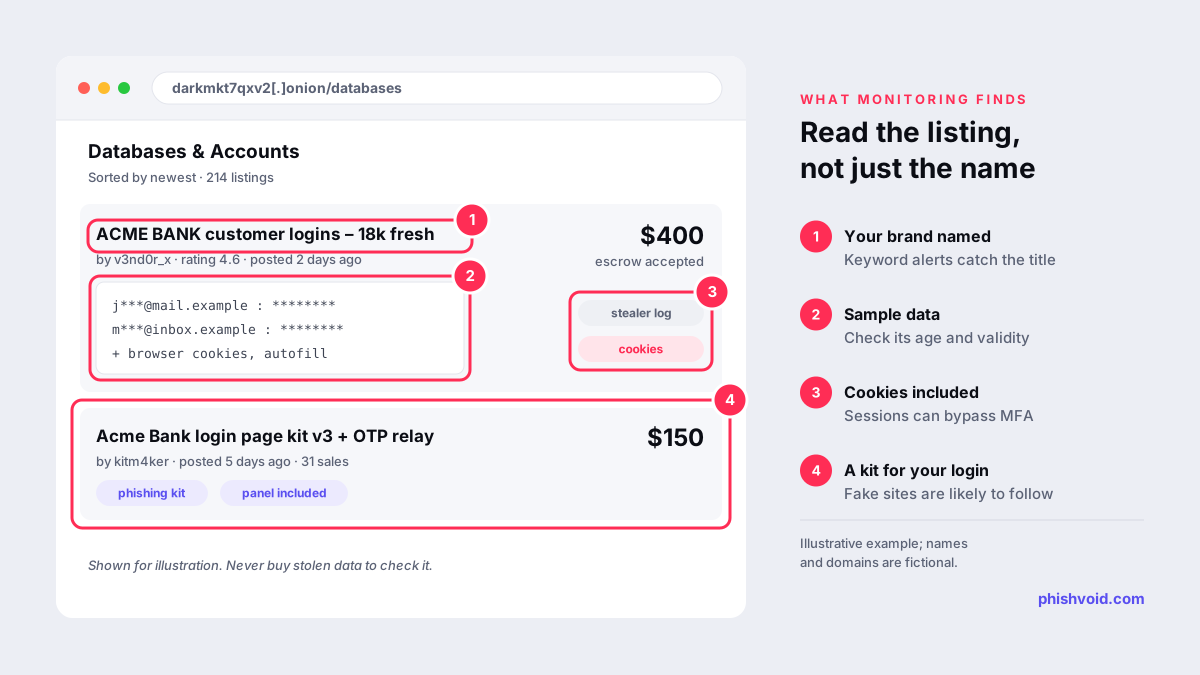
For a brand, useful findings usually fall into five groups:
- Credentials: email and password pairs for staff or customers in breach dumps, combolists or infostealer logs. Stealer logs are especially serious, because they can include browser session cookies as well as passwords.
- Stolen data: customer databases, internal documents or source code offered for sale or leaked to pressure a victim.
- Phishing kits and services: ready-made copies of your login or payment pages, and phishing-as-a-service panels that offer your brand as a template.
- Access sales: posts offering VPN, remote desktop or cloud accounts at a named company.
- Fraud chatter: discussion of refund abuse, loyalty-point theft, fake vouchers or cash-out methods aimed at your customers.
Why it matters: the dark web feeds phishing
Phishing and the dark web feed each other. Credentials captured by a fake login page are sold or shared, and the kits for building the next fake page are bought in the same places. Two recent actions show the scale. Microsoft said it identified more than 394,000 Windows computers infected with the Lumma infostealer between 16 March and 16 May 2025, before a coordinated action took down about 2,300 domains behind the malware (Microsoft). In March 2026, Europol and Microsoft announced the disruption of Tycoon 2FA, a phishing-as-a-service platform, with 330 domains taken offline (Europol). Microsoft reported that access to the platform's panel had been sold for $120 for ten days (Microsoft).
The practical point: when a kit or a batch of credentials for your brand appears for sale, a phishing campaign against your customers or staff is often already running or about to start. Dark web findings are most useful when you check them against what is live on the open web: new lookalike domains, cloned pages and fake support accounts.
What dark web monitoring cannot do
- It cannot see everything. Many forums are invite-only, and sales are often agreed in private messages. No provider covers every channel, so treat claims of complete coverage with care.
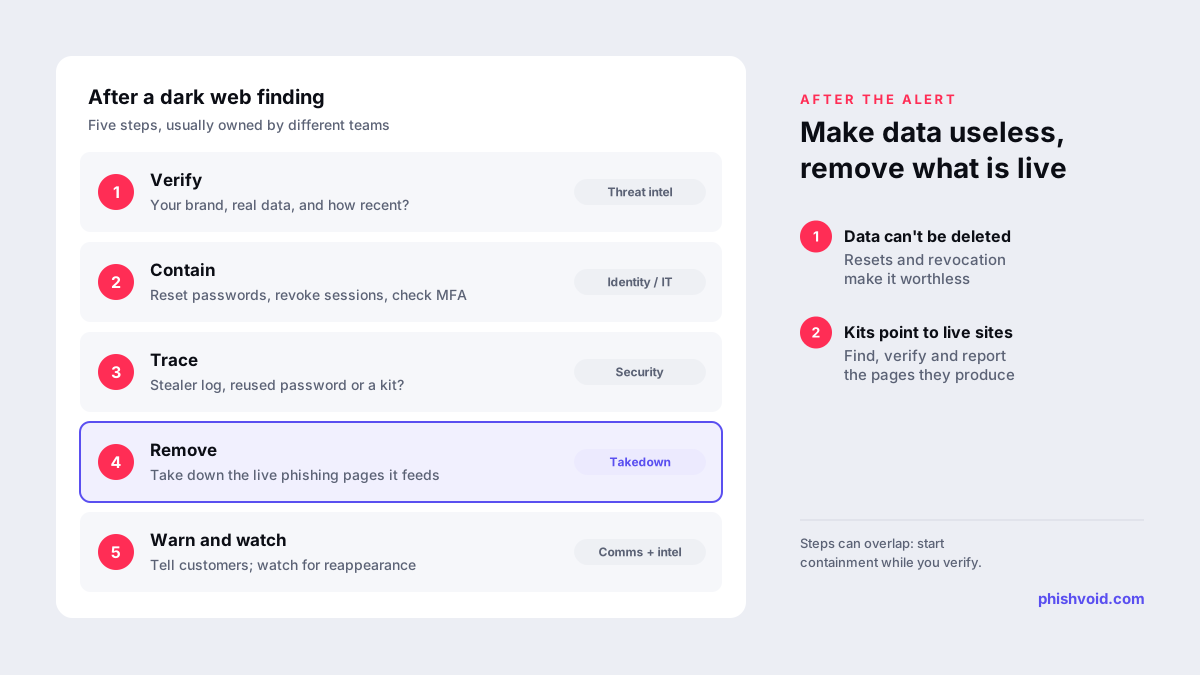
- It cannot delete data. Once a database is copied, it stays copied. The response is to make the data useless: reset passwords, revoke sessions, rotate keys and warn the people affected.
- It is noisy. Old breaches are repackaged and resold as new, and many combolists are recycled. Each finding needs a check of its age, its source and whether the credentials still work in your systems.
- It does not stop the phishing site. The fake page that collects the next batch of passwords sits on an ordinary host and domain, where it can be reported and removed.
Two cautions also apply. Buying stolen data to "check" it creates legal and ethical problems, so reputable providers work from what is visible or shared through lawful intelligence channels. And personal data you collect about victims is still personal data, with the usual privacy obligations.
How to act on a dark web finding
- Verify. Confirm that your brand is really the target, that the data is genuine and how old it is. Compare a sample of usernames with your identity provider records without using the passwords to sign in.
- Contain. For staff accounts, force password resets, revoke active sessions and review registered MFA devices. For customers, trigger resets or step-up checks on the affected accounts.
- Trace the source. A stealer log points to an infected device, a combolist to password reuse, and a kit to a phishing campaign that is live or coming.
- Remove what is live. If the finding is a kit or panel for your brand, search for the phishing pages it produces and report them to the host, registrar, CDN and browser blocklists. Our takedown process guide walks through each report.
- Warn and watch. Remind customers how you will and will not contact them, and keep watching for the same data or kit to reappear.
Building it into your brand protection programme
There is a free starting point for credential exposure. Have I Been Pwned's domain search lets you verify ownership of your domain and see which addresses on it appear in known breaches. Its creator has said that most domain searches remain free, with paid tiers for the largest ones (Troy Hunt). Commercial services add stealer log feeds, forum and chat coverage, and analysts who read posts in context.
When you compare services, ask:
- Which sources are covered, and how is access to closed forums maintained?
- Does every alert include the source, date, a sample and an analyst verdict, or only a keyword match?
- Can findings flow into your identity and ticketing tools so resets happen quickly?
- When a finding points to a live phishing site, who takes it down?
The last question is where many programmes stall. Dark web intelligence tells you an attack is coming; removing the fake sites, domains and accounts is what limits the harm. Phishvoid works on that second part: a human team verifies each site impersonating your brand and reports it to hosts, registrars, CDNs, Google Safe Browsing, Microsoft SmartScreen and other blocklists, with unlimited takedowns under one subscription. For the open-web side of detection, see lookalike domain monitoring.
FAQ
Is dark web monitoring worth it for a brand?
It is worth it when you can act on what it finds: reset exposed accounts, warn customers and remove phishing sites. Without a response process it mainly produces alerts. Smaller companies can start with free breach notifications for their own domain before paying for wider coverage.
Can dark web monitoring remove my data?
No. Stolen data cannot be recalled once it has been copied. Monitoring tells you what is exposed so you can make it useless, by resetting passwords, revoking sessions and rotating keys.
What is the difference between dark web monitoring and brand monitoring?
Dark web monitoring watches criminal markets and channels for stolen data and tools that name your company. Brand monitoring watches the open web, app stores, social media and ads for impersonation that customers can see. Phishing links the two, so mature programmes usually use both.
How quickly should we respond to leaked employee credentials?
Treat them as urgent, especially stealer logs that include session cookies. Reset the password, revoke sessions and check the device the log came from. Phishing-resistant MFA limits the damage when passwords leak; our guide to MFA phishing attacks explains why.
Is someone impersonating your brand?
We find lookalike domains and cloned pages and take them down. Start with a free exposure scan.