MFA phishing attacks steal sessions, spam push prompts or abuse device codes. Learn how each works, the warning signs and why phishing-resistant MFA helps.
Quick answer: An MFA phishing attack is phishing designed to get past multi-factor authentication, not just to steal a password. The three common forms are adversary-in-the-middle (AiTM) phishing, which relays your login through a fake site and steals the session cookie; MFA fatigue, or push bombing, which floods you with approval prompts until you accept one; and device code phishing, which tricks you into entering an attacker's code on a genuine sign-in page. One-time codes, plain push approvals and SMS can all be phished. The strongest defence is phishing-resistant MFA, such as passkeys or FIDO2 security keys, together with tighter sign-in policies and fast response when an account is hijacked.
This guide is written for IT and security teams, and for anyone who wants to understand why "we have MFA" is not the end of the phishing problem.
How MFA phishing attacks work
MFA still blocks a great deal, including attacks that rely only on stolen passwords. But CISA's fact sheet on implementing phishing-resistant MFA points out that not all forms of MFA are equally secure, and lists phishing, push bombing, SIM swap and SS7 attacks as ways criminals get around it. Its example of phishing is a fake login portal that collects the username, password and the 6-digit code from the user's authenticator app. The three techniques below are the ones most security teams now see.
AiTM phishing: the fake page relays the real one
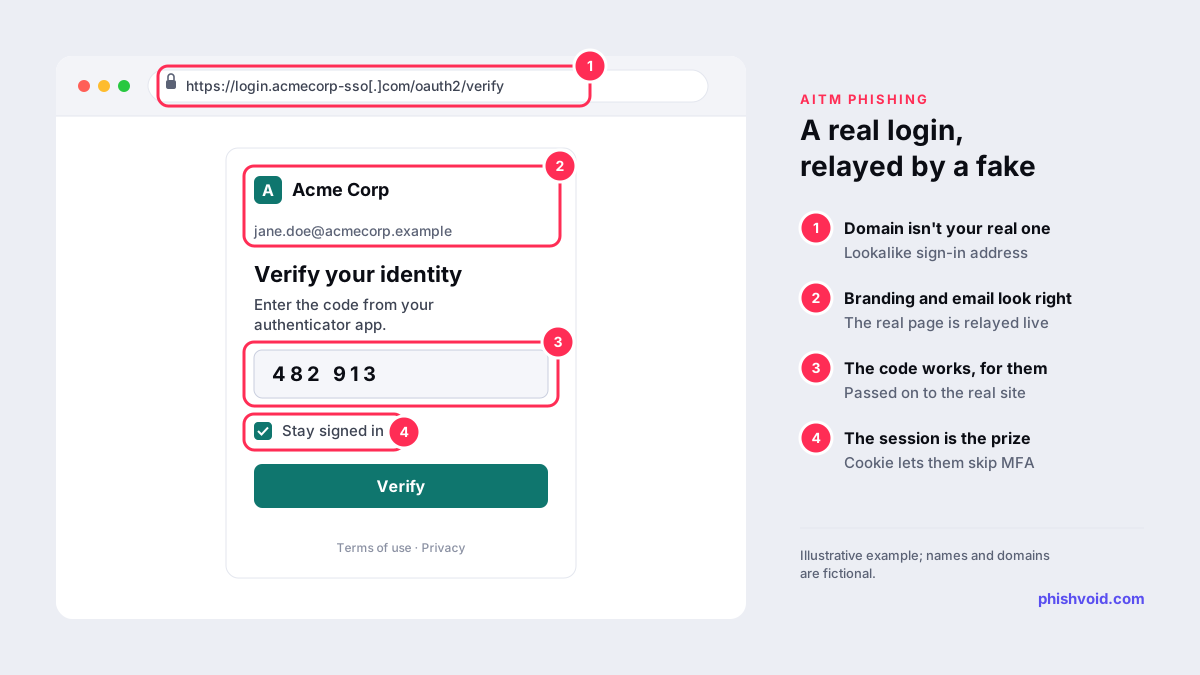
In AiTM phishing, the phishing site sits between the victim and the real sign-in service as a proxy. The victim sees the genuine login flow, with the right logo and even their own name, because the proxy is relaying it live. When they enter the password and the MFA code, both go to the real service, which issues a session cookie. The proxy keeps the cookie, and the attacker uses it to act as the signed-in user without needing MFA again. Microsoft described an AiTM campaign that attempted to target more than 10,000 organisations from September 2021, with stolen sessions used for follow-on payment fraud. Ready-made phishing kits make this setup cheap to run, and QR codes are a common way to deliver the link; see our guide to the QR code scam.
MFA fatigue: approve to make it stop
If an attacker already has a password, they can trigger sign-in after sign-in so the victim's phone keeps asking them to approve. CISA calls this push bombing, or push fatigue: the attacker keeps sending notifications until the user presses "Accept". It is often paired with a phone call or message from a fake helpdesk saying the prompts will stop once you approve one. CISA's fact sheet on number matching recommends making the user type a number shown on the login screen into the app, which makes repeated prompts ineffective.
Device code phishing: the real page, the attacker's code
Some sign-in systems let devices without a keyboard, such as TVs and meeting-room screens, log in with a short code that the user enters on another device. In device code phishing, the attacker requests a code and sends it to the victim as part of a lure, such as a meeting invitation. The victim enters it on the genuine sign-in page and completes MFA, and the attacker's session receives the access tokens. In February 2025 Microsoft reported a device code phishing campaign that used fake online meeting invitations and had been active since August 2024. Microsoft recommends blocking device code flow wherever possible.
Warning signs for users
- The sign-in page is on an unfamiliar domain, even though it looks right and already knows your email address.
- You get an MFA prompt you didn't start, or several in a row. Deny it and report it; it means someone has your password.
- Someone asks you to approve a prompt or read out a code, claiming to be IT support. Genuine helpdesks don't need your codes.
- A message asks you to enter a code on a sign-in page to join a meeting, open a document or verify a device.
- A QR code in an email asks you to sign in on your phone to fix a security problem.
What phishing-resistant MFA is and why it works
CISA's fact sheet calls phishing-resistant MFA the gold standard and names two kinds: FIDO/WebAuthn authentication, which includes passkeys and hardware security keys, and PKI-based authentication such as smart cards. These methods are tied to the real website: the browser only lets the credential answer a sign-in request from the domain it was registered for. A proxy on a lookalike domain receives nothing it can replay, and there is no code for the user to type into the wrong place or read out over the phone. There is no push prompt either, so push bombing doesn't apply.
CISA ranks the other methods below that. App-based codes and push with number matching resist push bombing but can still be phished. Plain push approval is vulnerable to push bombing and user error. SMS and voice codes should be a last resort, as they are also exposed to SIM swap attacks. For organisations that can't move to phishing-resistant MFA at once, CISA describes number matching as a good interim step.
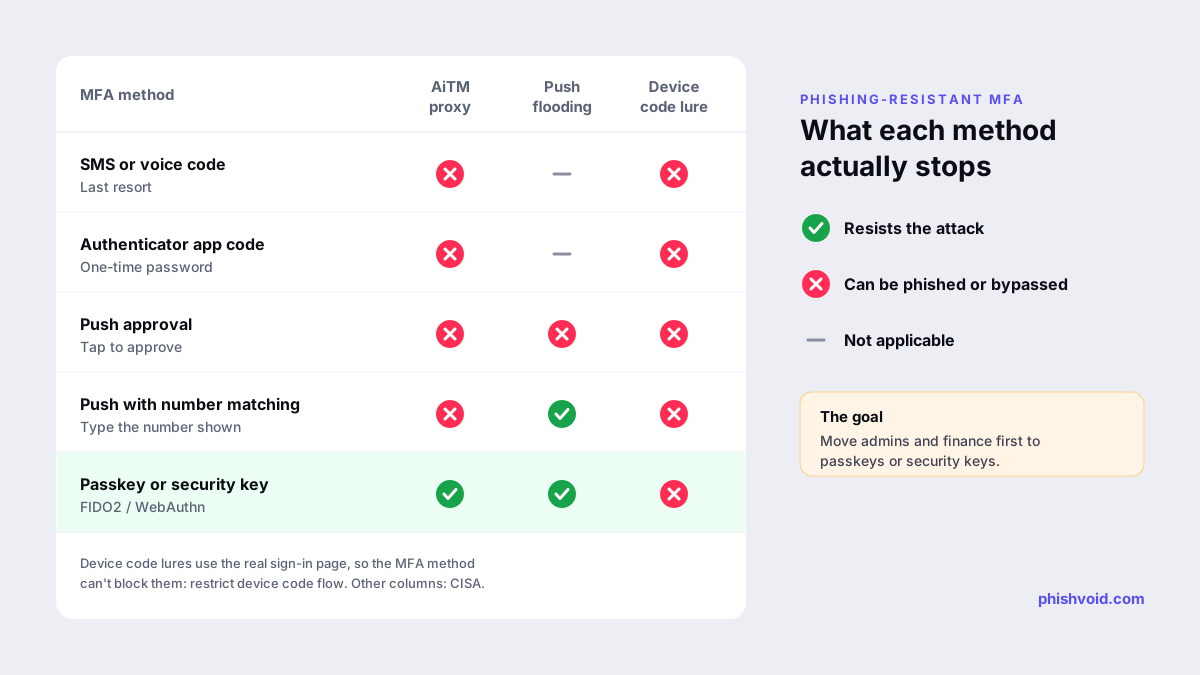
Device code phishing is the exception. Because the victim signs in on the genuine page, even a passkey will do its job and authenticate them, and the attacker's session receives the result. The control that helps there is restricting device code flow to the few users and devices that need it.
Other controls that close the gaps
- Roll out phishing-resistant MFA by risk. Start with administrators, finance and executives, then remove weaker fallback methods so attackers can't downgrade the sign-in.
- Use conditional access. Microsoft's AiTM write-up recommends policies such as requiring compliant devices or trusted IP addresses, which are checked again each time a stolen cookie is used.
- Block or restrict device code flow where it isn't needed.
- Watch for what attackers do next. Microsoft saw attackers create inbox rules to hide replies and hijack payment threads; alert on new inbox rules, new MFA methods and sign-ins from unusual locations.
- Take down the phishing sites. AiTM pages run on lookalike domains that imitate your sign-in portal. Phishvoid monitors for these domains and has each verified site reported to the host, the registrar and browser blocklists; our guide to the phishing site takedown process explains each step.
If you think an MFA phishing attack succeeded
- Revoke sessions and tokens, not just the password. A stolen session cookie or refresh token can keep working after a password reset. For device code phishing, Microsoft advises revoking the user's refresh tokens.
- Check what changed: new MFA methods, registered devices, inbox rules, forwarding settings and app consents.
- Warn finance and key contacts. Hijacked mailboxes are often used to send fake invoices or bank detail changes; see our guide to the invoice fraud email.
- Report it. In the US, report cyber incidents to the FBI at ic3.gov; in the UK, the NCSC recommends starting at GOV.UK's report a cyber incident service, which shows where to report.
FAQ
Can MFA be phished?
Yes. One-time codes, push approvals and SMS codes can all be captured or approved through a phishing page or a social engineering call. Passkeys and FIDO2 security keys are designed to resist this because they only work on the real website.
What is the difference between AiTM and MFA fatigue?
AiTM phishing tricks you into signing in through a fake site that relays the real one and steals the session. MFA fatigue starts with a stolen password and floods you with prompts until you approve one.
Does number matching stop phishing?
It stops push bombing, because a random prompt can't be approved without the number on the attacker's screen. It does not stop an AiTM page, which can show you the real number.
Do passkeys stop device code phishing?
Not on their own, because the victim signs in on the genuine page. Restricting device code flow, and training staff never to enter codes they received in a message, are the controls that help.
Is someone impersonating your brand?
We find lookalike domains and cloned pages and take them down. Start with a free exposure scan.