An invoice fraud email asks you to pay a real bill into a criminal's account. Learn the warning signs, a call-back check that works and what to do fast.
Quick answer: An invoice fraud email looks like it comes from a supplier, contractor or colleague and asks you to pay an invoice, or to update the bank details you hold, so that the money goes to an account the criminal controls. The invoice is often real; only the bank details are fake. The most reliable defence is simple: before paying to new or changed bank details, call the supplier on a phone number you already had, not one from the email. If you have already paid, call your bank immediately and ask for a recall, then report it to IC3 in the US or Report Fraud in the UK.
This guide is for accounts payable teams, small business owners and anyone who pays suppliers. It explains how these emails are built, the signs to look for, a verification routine that stops most of them and what to do in the first hours after a fraudulent payment.
How invoice fraud emails work
Invoice fraud is one of the most common forms of business email compromise. UK Finance's Annual Fraud Report 2026 describes it as a victim trying to pay a legitimate payee while the criminal convinces them to send the money elsewhere, often by intercepting emails or compromising an email account. Criminals usually reach the inbox in one of three ways:
- A compromised supplier mailbox. The message comes from the supplier's real address, in a real thread, sometimes with a genuine invoice attached. This is the hardest version to spot by looking at the email.
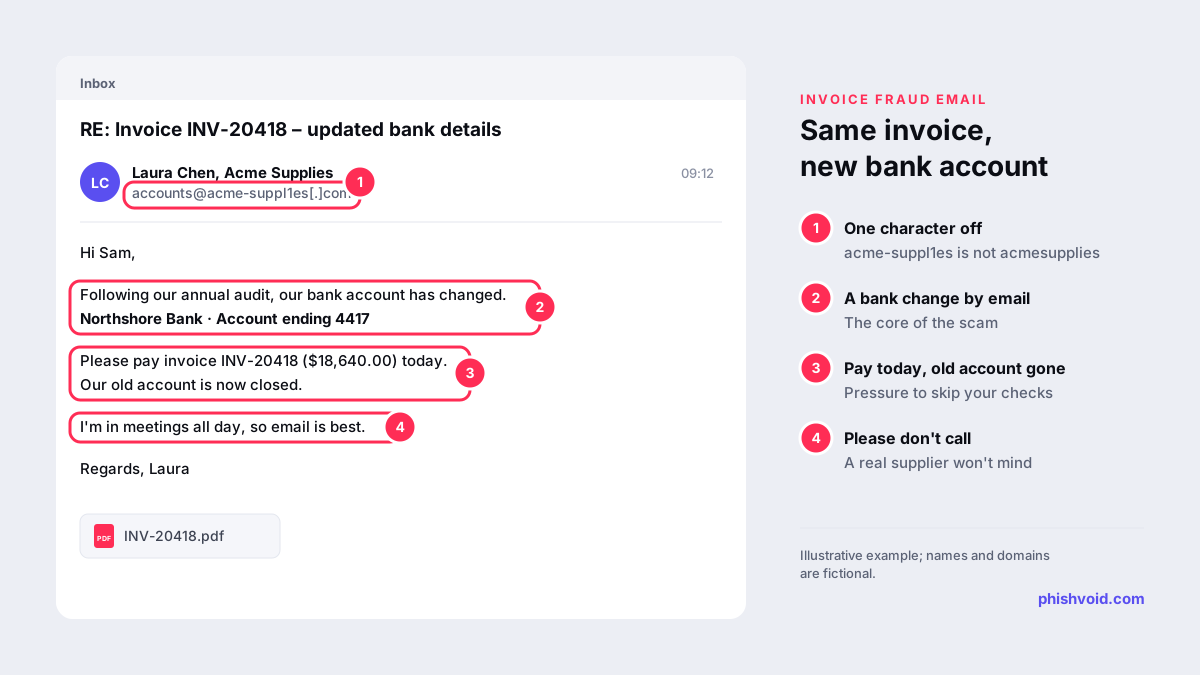
- A lookalike domain. The sender's address differs by a character or a word, such as
acme-suppl1es[.]cominstead of the supplier's real domain. - Your own account, hijacked. Attackers who take over a mailbox in your company can watch payment threads and step in at the right moment. Microsoft documented attackers doing exactly this after stealing sessions through phishing; our guide to the MFA phishing attack explains how.
The losses are large. The FBI's 2025 Internet Crime Report recorded 24,768 business email compromise complaints with reported losses of about $3.05 billion, second only to investment fraud among the cyber-enabled fraud types it tracks. In the UK, UK Finance counted £41.3 million lost to invoice and mandate scams in 2025 across 2,305 cases, and 68 per cent of those losses fell on business accounts.
Warning signs in an invoice fraud email
- Any change of bank details sent by email. Treat it as suspicious until it is verified, whoever it appears to come from.
- A reason for the change such as an audit, a new bank, a tax issue or a "frozen" account.
- Urgency and a deadline: pay today, the old account is closed, the order will be held.
- Discouraging a phone call: the sender is travelling, in meetings or "only available by email".
- A sender or reply-to address that is slightly off, or a reply-to that points to a different domain. The FBI advises checking that sender domains match the organisation and watching for subtle misspellings.
- A new account in a different name or country from the supplier you know.
- Small changes to a familiar invoice: a different PDF layout, a new reference format or an unusual amount.
None of these is proof on its own, and a compromised mailbox may show none of them. That is why the check below matters more than any visual inspection. For a general routine to test any suspicious message, see our checklist on whether an email is legit.
The check that stops it: verify out of band
The FBI's public service announcement on business email compromise recommends confirming requested changes to account details through a separate channel. In practice, that means a short, written procedure that everyone follows every time:
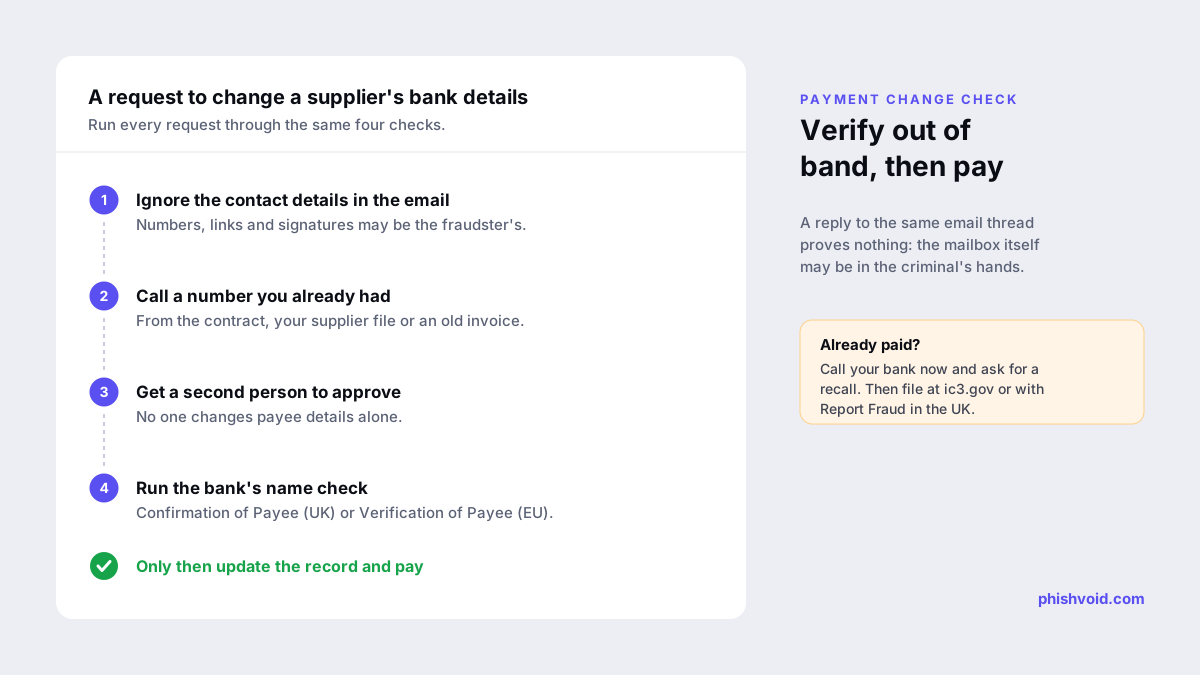
- Ignore the contact details in the request. Phone numbers, links and email signatures in the message may belong to the fraudster.
- Call a number you already had, from the contract, your supplier records or an old invoice, and speak to someone you know. Ask them to confirm the change and the new account details.
- Require a second approver for any change to payee bank details, so no single person can be rushed into it.
- Use your bank's name check. In the UK, Confirmation of Payee checks the account name against the sort code and account number when you set up or amend a payee. In the euro area, banks have had to offer Verification of Payee for credit transfers since 9 October 2025. A "no match" or "close match" result is a reason to stop and call.
- Record the verification in the supplier file: who confirmed, when and on which number.
Replying to the same email thread doesn't count as verification, because the mailbox itself may be in the criminal's hands.
If you already paid: the first hours
- Call your bank immediately and ask it to recall the payment, and to contact the receiving bank. The IC3 says time is of the essence and advises asking for a recall along with any indemnification documents the bank needs.
- Report it in the US at ic3.gov, whatever the amount, with the full transaction details. The IC3's Recovery Asset Team works with banks to freeze funds: its 2025 report says the team handled 3,900 incidents that year and froze about $679 million, a 58% success rate.
- Report it in the UK to Report Fraud online or on 0300 123 2040 after you have called your bank. UK Finance reports that 48% of invoice and mandate scam losses were returned to victims in 2025.
- Tell the real supplier through a known contact. Their mailbox may be compromised and other customers may be targeted.
- Keep the evidence: the original email with full headers, the invoice, the payment confirmation and any call records.
- Check your own mailbox for unfamiliar forwarding or inbox rules, and reset access if anything looks wrong.
Make your company harder to impersonate
- Protect your own domain with DMARC at an enforcing policy, so criminals can't send from your exact address to your customers. Our guide to SPF, DKIM and DMARC explains the setup.
- Tell customers how you handle bank details: state on invoices and your website that you will never change them by email alone.
- Use phishing-resistant MFA for finance mailboxes and banking portals, so a phishing page can't hand over the session.
- Watch for lookalike domains of your company name, especially ones used to email your customers. Phishvoid monitors for new lookalikes and has the verified ones taken down at the host and the registrar, which removes the sending domain and any fake payment page behind it.
FAQ
Is invoice fraud the same as business email compromise?
It is one of its most common forms. Business email compromise covers any fraud carried out by impersonating or taking over a business email account; invoice fraud is the version that redirects a supplier payment.
The email came from the supplier's real address. Can it still be fraud?
Yes. If the supplier's mailbox has been compromised, the fraudster can write from their real address and reply in a real thread. Verify any bank detail change by phone on a number you already had.
Can a bank reverse an invoice fraud payment?
Sometimes, if you act quickly. Call your bank at once and ask for a recall, and in the US also file at ic3.gov so the Recovery Asset Team can help freeze funds. Recovery is never guaranteed.
How do I check a supplier's new bank details?
Call the supplier on a number from your own records, confirm the change with someone you know, have a second person approve it and run your bank's payee name check before paying.
Is someone impersonating your brand?
We find lookalike domains and cloned pages and take them down. Start with a free exposure scan.