A QR code scam hides a fake link behind a code on a meter, a parcel or an email. Learn to check a code before you tap and what to do if you scanned one.
Quick answer: A QR code scam uses a QR code instead of a visible link to send you to a fake website, usually a payment or login page built to take your money, card details or passwords. The code itself is harmless; the danger is where it leads. Criminals stick their own codes over real ones on parking meters, put them in emails and texts, and slip them into parcels you never ordered. Before you open a scanned link, read the web address in the preview. If you are paying or signing in, use the official app or type the address yourself. If you already entered details, change the password or call your bank now, then report it.
This guide covers where QR code scams turn up, how to check a code in a few seconds, what to do after a bad scan, and where to report it in the US and the UK. For the technique itself, see our glossary entry on quishing.
How a QR code scam works
A QR code is a link in a form people can't read. That is exactly what makes it useful to criminals: you can't see the destination until you scan, and the scan happens on a phone, where the address is small and easy to ignore. The FBI's Internet Crime Complaint Center (IC3) warned in January 2022 that criminals were tampering with both digital and physical QR codes to send people to sites that ask for login and financial information. It added that some malicious codes can lead to malware, and that QR codes are not malicious in themselves.
The destination is almost always a lookalike site: a copy of a parking app, a bank, a delivery company or a court, on a web address that only resembles the real one. The page usually asks for something straight away, such as card details for a small fee or a login to "confirm your account".
Where QR code scams show up
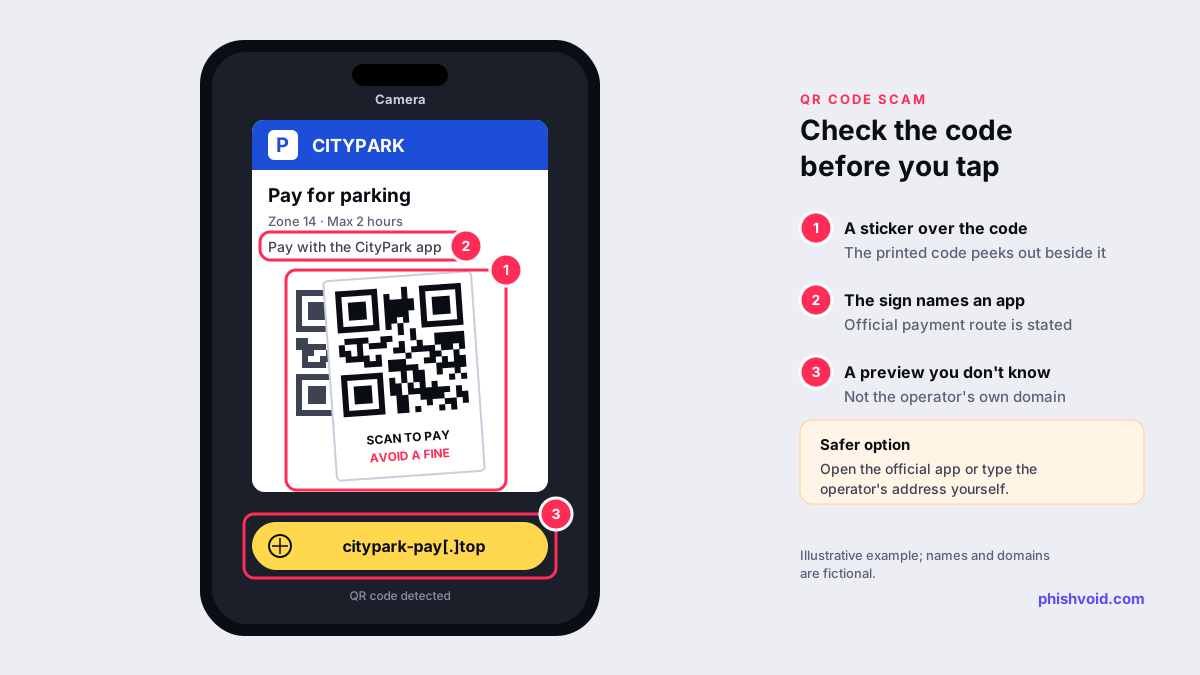
- Parking meters and pay stations. In September 2026 the US Federal Trade Commission warned that scammers are placing their own QR codes over legitimate ones on parking meters, leading to fake sites designed to steal money, personal information or both. The same sticker trick works on any public sign that asks for payment.
- Texts that look official. In April 2026 the FTC described a text with a QR code telling people to scan it and pay for a traffic violation to avoid court. Its advice was not to respond and not to scan the code.
- Parcels you didn't order. An FTC alert from January 2025 describes unexpected packages with a note asking you to scan a code to find out who sent it or how to return it. The code can lead to a phishing site or download malware.
- Work email. Messages about an expiring password, a shared document or a security update may carry a QR code instead of a link. In a January 2026 FLASH alert the FBI explained that this moves the victim from a work computer to a mobile phone, bypassing traditional email security controls, and that such campaigns often end with stolen session tokens that get around multi-factor authentication. Our guide to MFA phishing attacks covers that side in depth.
- Letters, flyers and packaging. The same FBI alert advises treating unsolicited codes with caution whatever their source, including letters, flyers and packaging.
How to check a QR code before you scan or tap
- Look at the code itself. On a sign or meter, check whether it is a sticker on top of the printed code, or whether it is peeling, crooked or covering other text. The IC3 advises checking physical codes for tampering such as a sticker placed over the original.
- Read the preview before you open it. Most phone cameras show the web address first. The FTC says to check it for spelling mistakes or switched letters. Focus on the domain, the part before the first single slash:
citypark.exampleandcitypark-pay[.]topbelong to different owners. Our guide to typosquatting and homoglyph domains shows the common tricks. - Use the official route to pay. If the sign names an app or a website, open that app or type the address yourself. The IC3 suggests avoiding payment through a site opened from a QR code and typing a known, trusted address instead.
- Never install an app from a QR code. Get apps from your phone's official store. The IC3 also advises against downloading a separate QR scanner app, since most phone cameras can read codes.
- Treat a code in an email or text like any other link. If the message is unexpected, urgent or about your password, don't scan it. Go to the service directly, or check with the sender through a contact method you already trust.
- Not sure? Check the address first. Copy the decoded link into our free link checker instead of opening it.
One habit covers most cases: a QR code is fine for reading a menu or a timetable, but for anything that takes money or a password, go to the organisation yourself.
What to do if you scanned a scam QR code
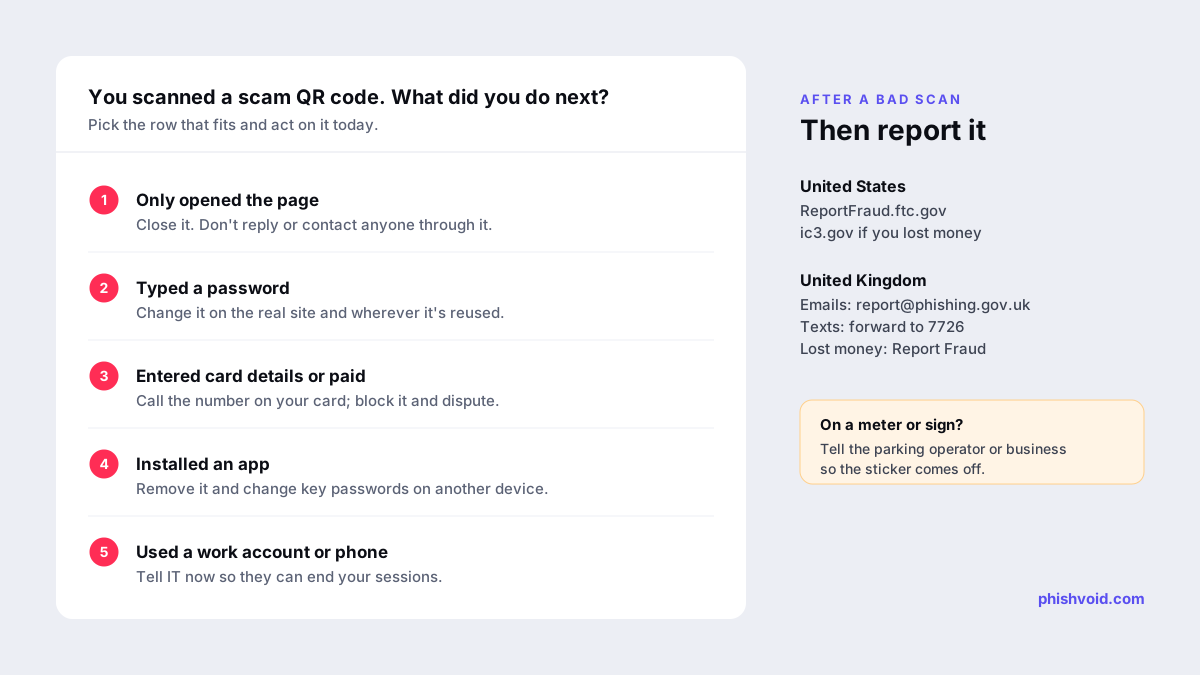
What you need to do depends on what happened after the scan. Work through the steps that apply to you.
- You only opened the page: close it and don't go back. The FTC warns against contacting anyone through the fake site, because that can lead to more requests for money or information. Keep your phone's software up to date.
- You typed a password: change it on the real site straight away, and on any other account that uses the same password. Turn on multi-factor authentication where you can.
- You entered card details or paid: call your bank or card issuer on the number on the back of your card, block the card and dispute the payment. Then check your statements for transactions you don't recognise.
- You installed an app: remove it, and change your important passwords from a different device.
- You gave personal details: in the US, the FTC suggests checking your free credit report at AnnualCreditReport.com and reporting identity theft at IdentityTheft.gov.
- It was a work account or work phone: tell your IT or security team immediately, even if you think you closed the page in time. Stolen sessions can bypass MFA, so they may need to sign you out everywhere.
Our I got phished page has a fuller recovery checklist.
Where to report a QR code scam
In the United States
- Report it to the FTC at ReportFraud.ftc.gov, which is where its QR code alerts direct people.
- If you lost money, also file a complaint with the FBI at ic3.gov, as the IC3 advises victims of QR code fraud to do.
- Tell the owner of the sign. For a meter or pay station, contact the parking operator or the city using details from its official website, so the sticker can be removed.
In the United Kingdom
- Forward suspicious emails to report@phishing.gov.uk and suspicious texts to 7726, as described on GOV.UK's page on reporting suspicious messages.
- If you lost money or were hacked, report it to Report Fraud online or on 0300 123 2040. In Scotland, report it to Police Scotland.
For other countries, our guide on how to report a scam lists the official channels.
If your organisation uses QR codes
Parking operators, restaurants, retailers and banks all use QR codes, and every one of them can be copied. A sticker can only be removed physically, but the website behind it can be reported to its host, its registrar and browser blocklists such as Google Safe Browsing, which disarms the code even while the sticker is still in place. Print your official domain or app name next to every code so people can compare it with the preview, and keep your payment address short and easy to recognise. Phishvoid finds lookalike payment and login sites that imitate your brand and gets them taken down, with a person verifying each one before it is reported.
FAQ
Can scanning a QR code hack my phone?
The FTC and the IC3 both say a malicious code can lead to malware as well as to phishing pages. In practice, most of the harm comes from what you enter or install afterwards, so keep your phone updated and never install apps from a code.
Is it safe to pay for parking with a QR code?
It can be, if the code leads to the operator's real site or app. Check for a sticker over the printed code and read the preview. If in doubt, pay through the official app or at the machine.
How can I tell if a QR code is fake?
Look for a sticker on top of the original code, a preview domain that doesn't match the organisation named on the sign, and a page that immediately asks for card details or a login.
What is quishing?
Quishing is phishing through a QR code. It is the name used when a QR code, often in an email, replaces a link so the victim scans it on a phone and lands on a fake login or payment page.
Is someone impersonating your brand?
We find lookalike domains and cloned pages and take them down. Start with a free exposure scan.