Found a fake YouTube channel impersonating your brand? Learn which YouTube reports to file, what evidence to send and how to remove the site it links to.
Quick answer: If you find a fake YouTube channel impersonating your brand, report it in layers. Report the channel itself from its page (…more in the description, then Report user), report each scam video or live stream separately, and file YouTube's impersonation report as the brand. If the channel uses your registered name or logo, add a trademark complaint. All of these routes are free. Then report the website the channel sends viewers to, because removing the channel does not remove that site.
This guide is for brand, security and legal teams dealing with YouTube specifically. It covers the patterns fake brand channels follow, which report fits which part of the problem, the evidence that makes a report easy to act on, and how to stop the channel returning under a new name. For impostors posing as your help desk on several platforms at once, see our wider guide to fake customer-support accounts, and for the general term, the glossary entry on social media impersonation.
What a fake brand channel on YouTube looks like
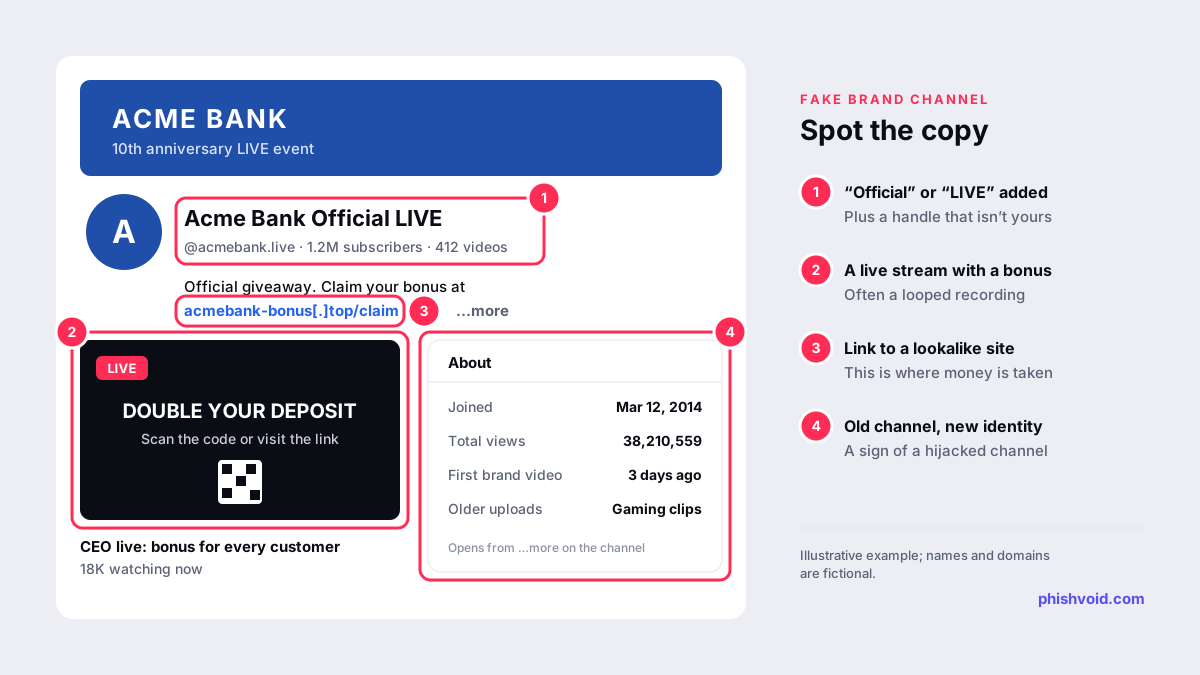
YouTube's impersonation policy prohibits channels that deceptively copy the name, branding or content of a person, channel or entity. It lists the tricks impostors use: adding words such as "Official", "Live" or "Backup" to a real name, typos, special fonts or extra punctuation, handles that look or sound like an established entity, and copied profile pictures, banners and colour schemes. The copy does not have to be perfect. YouTube says what matters is that the intent to copy is clear.
In brand cases, a fake channel usually has one of three jobs:
- Scam live streams. A channel renamed to look like your brand runs a "live" event, often a looped recording, promising a giveaway, airdrop or bonus to viewers who visit a link or scan a QR code.
- Fake support. The description and pinned comments list a "help line" or a chat link, and the channel replies to customers who comment under your real videos.
- Fake endorsements. Edited clips or AI-generated video make your executives appear to promote an investment or product. Our guide to fake ads and deepfake investment scams covers that pattern in detail.
A common sign of a hijacked channel is a mismatch between identity and history: your name and logo on top of years of unrelated uploads, or a large subscriber count with no brand videos older than a few days. Open the About panel from …more in the channel description and screenshot the join date and view count before you report. Impostors delete evidence once they notice attention.
Four ways to report it, and what each one covers
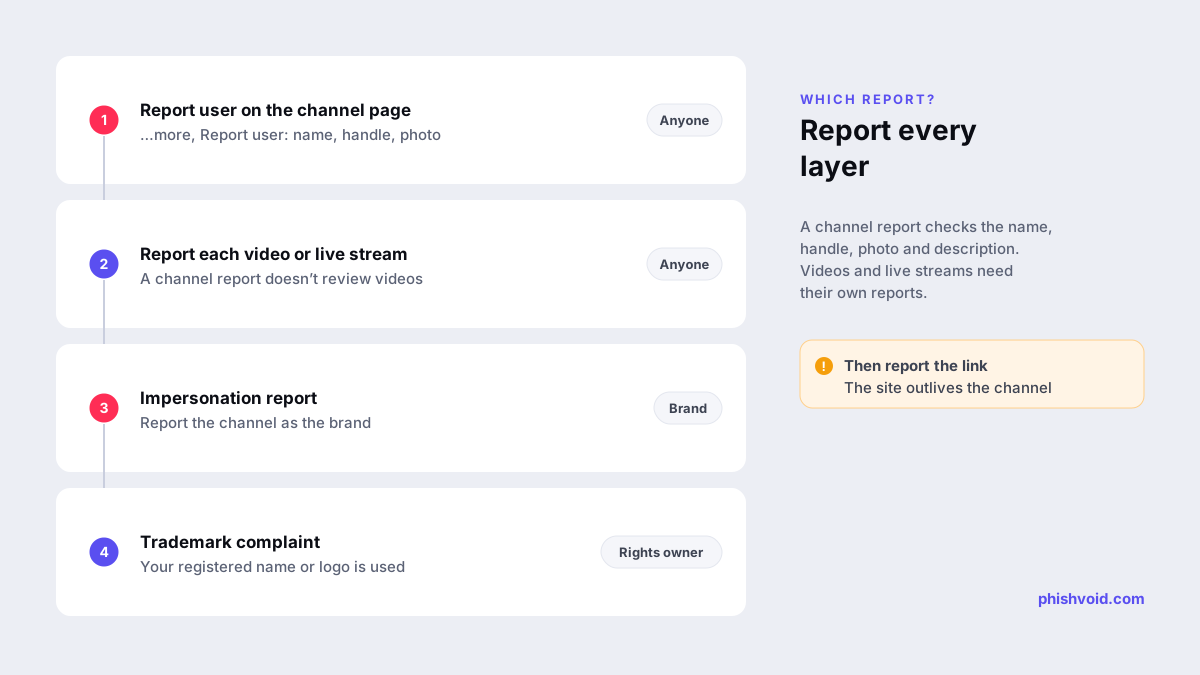
The routes overlap, but they are not interchangeable. YouTube's help page on reporting channels and content says that a channel report reviews features such as the profile photo, handle and description, not the channel's videos. A scam live stream therefore needs its own report.
| Route | What it covers | Who files |
|---|---|---|
| Report user (channel page) | Name, handle, profile photo, banner, description | Anyone, anonymously |
| Video or live report | A specific scam video, Short or live stream | Anyone, anonymously |
| Impersonation report | A channel set up to pose as you | The brand or its representative |
| Trademark complaint | Use of your registered name or logo | The trademark owner or its agent |
1. Report the channel
Sign in, open the channel page, click …more in the channel description and choose Report user. You can then report the user, the channel art or the profile picture. Pick the option that fits, select the reason, add details and submit. If the impostor uses your logo as its profile picture or your campaign artwork as its banner, report those elements as well.
2. Report every scam video and live stream
Open the video, click More, then Report, and choose the closest reason. In the details, say which brand is being impersonated and give the timestamp where viewers are told to visit a link, scan a code or send money. Report live scams while they are running: a clear, specific report is worth more than many vague ones.
3. File the impersonation report as the brand
The impersonation policy page links to a dedicated form to report the channel when your own channel, or a channel you represent, is being impersonated. File it from an account linked to your official channel where possible, include the URLs of both the fake channel and your real one, and explain plainly what was copied and how viewers are being misled. YouTube says a channel established to impersonate another person or entity may be removed.
4. Add a trademark, counterfeit or copyright complaint
If the channel uses your registered brand name or logo, submit YouTube's trademark complaint form. YouTube's trademark page says it performs a limited review, removes content in clear cases of infringement, and forwards each complaint to the uploader before acting. The same page encourages trademark owners to contact the uploader first. That can work with a reseller or a fan, but not with a channel running a scam, so go straight to the form. Use YouTube's counterfeit complaint if the channel promotes fake goods, and a copyright removal request for re-uploaded videos you own.
Evidence that makes the report easy to approve
A reviewer has to compare two channels quickly. Give them:
- The full URL of the fake channel, including its channel ID (the address that starts with
/channel/UC), plus its @handle and your official channel URL. - Screenshots of the channel header, description and About panel, with the date and time visible.
- Links to the scam videos or live streams, with timestamps.
- The destination link as text, defanged in internal notes, for example
acmebank-bonus[.]top. - For trademark complaints, the registration number and the office that issued it.
- If an agency or law firm files for you, a signed letter of authorization.
Keep the channel ID in your case log. Impostors rename and rebrand channels often, but the ID stays the same, so it is how you show that a "new" channel is the one you already reported.
Remove what the channel points to
The channel is a traffic source. The money or credentials are taken somewhere else: a website, a chat on a messaging app or a wallet address. When YouTube removes the channel, the phishing page keeps working for anyone who saved the link, and the same page is often promoted from several channels at once. Report the domain to its host, its registrar and browser blocklists; our guide on how to report a scam website walks through each step. Phishvoid handles this as one case for brands: analysts verify the channel and the site behind it, then report both to the platform, the host, the registrar and the blocklists, and keep watching for the next copy.
Keep it from coming back
- Make your real channel easy to identify. Link it from your website and your other official profiles, and keep the handle consistent with your accounts elsewhere.
- Tell viewers what you never do. A line in your channel description and a pinned comment saying you never run giveaways that require a payment, a login or a wallet connection give customers something to check against.
- Filter comments under your own videos. YouTube's comment settings let you hold comments containing blocked words or links for review, which stops impostor replies from reaching your audience.
- Search on a schedule. Search YouTube for your brand name together with "official", "live", "support" and "giveaway", and filter for live results. Check for lookalike domains that such channels could link to with the lookalike domain finder.
- Protect your own channel. Many fake brand channels are hijacked accounts. Use two-step verification on every account with access to your channel and remove managers who no longer need access.
FAQ
How long does YouTube take to remove a fake brand channel?
YouTube does not publish a fixed timeframe for impersonation reports. Reports filed by the brand itself, with both channel URLs and clear evidence of deception, are the easiest to act on. Report live scams as soon as you see them.
Does reporting a fake YouTube channel cost anything?
No. In-app reports, the impersonation report, and the trademark, counterfeit and copyright forms are all free to use.
Will the channel owner know we reported it?
Ordinary reports are anonymous, according to YouTube. Trademark complaints are forwarded to the uploader, so file them from a company address rather than a personal one.
What if the channel calls itself a fan channel?
YouTube allows fan channels if the name or handle makes clear that they are fan channels and don't represent the original. A "fan" channel that asks viewers for money, logins or wallet connections is still a scam, and its videos can be reported on their own.
Is someone impersonating your brand?
We find lookalike domains and cloned pages and take them down. Start with a free exposure scan.