Phishing site examples, from cloned bank logins to fake parcel fees and crypto claim pages, with the tell that gives each one away and how to report them.
Quick answer: Common phishing site examples include fake bank or email login pages, fake "shared document" pages, parcel or toll fee payment pages, too-cheap online shops, crypto "claim" pages and fake tech support screens. They look different, but almost all of them sit on a domain the real organization does not own and ask for something the situation does not need: a password, a card number or a one-time code.
The examples below are illustrative composites. Every name and domain is fictional and defanged, like acmebank-secure[.]top, so nothing here is clickable. For a checklist of warning signs rather than examples, see how to spot a phishing website; to test a page in front of you, use is this a scam?
Credential phishing site examples
These pages exist to collect usernames and passwords, a technique known as credential harvesting.
1. The cloned bank login
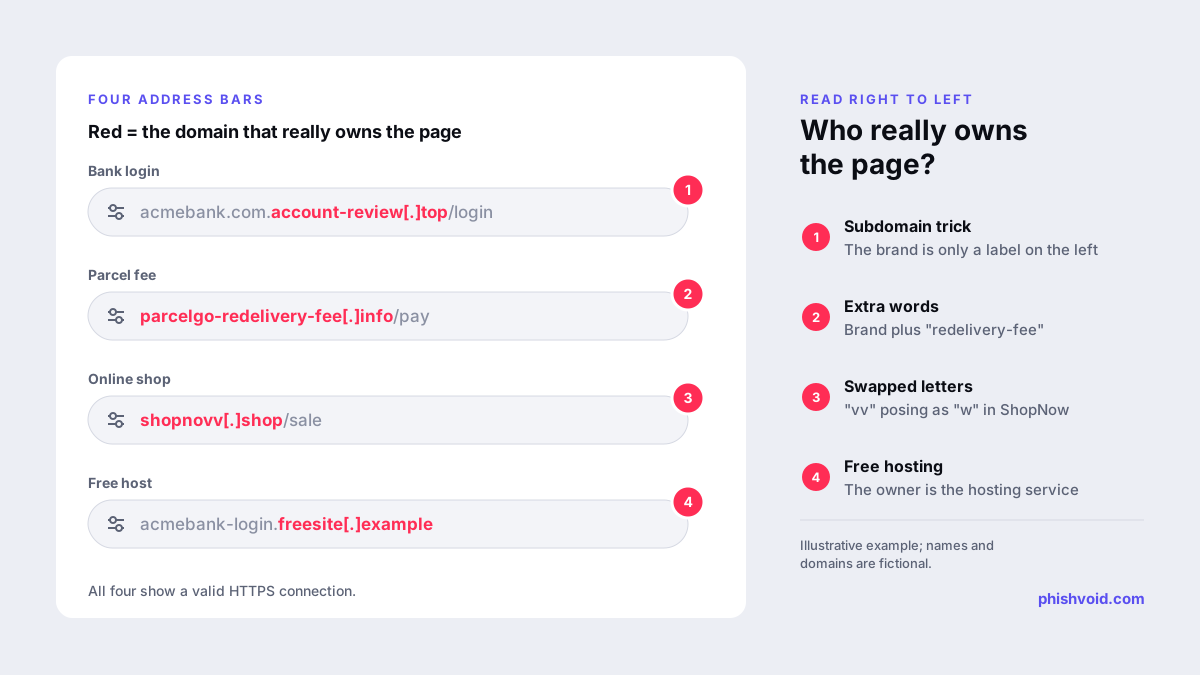
What you see: a pixel-perfect copy of Acme Bank's sign-in page, reached from a text saying a payment has been blocked. Address: acmebank.com.account-review[.]top. The tell: the page belongs to account-review[.]top; "acmebank.com" is just a label at the front. After the password, the page usually asks for the code the bank has just texted you.
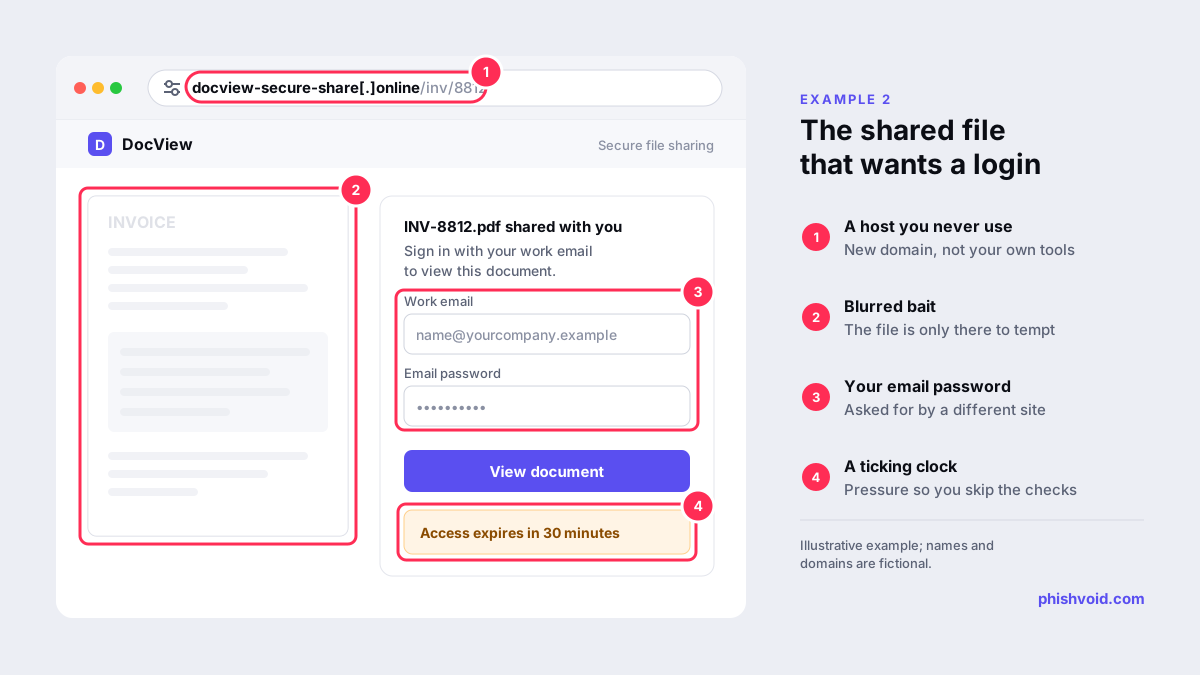
2. The shared document that needs your password
What you see: an email says a supplier has shared an invoice. The link opens a page with a blurred document and a box: "Sign in with your work email to view." Address: docview-secure-share[.]online. The tell: a document host you have never used asks for the password of a different service, your company email. Real file-sharing services ask you to sign in to their own account, on their own domain.
3. The real-time code relay
What you see: a convincing login page that, after your password, asks for your authenticator or SMS code, then shows "Verifying, please wait." Address: login-acmemail[.]com. The tell: behind the scenes, the site passes your password and code to the real service as you type, a setup known as adversary-in-the-middle phishing. Ordinary codes do not stop it; passkeys and hardware security keys do, because they only work on the genuine domain. Our guide to MFA phishing attacks explains how.
Payment and card phishing site examples
These pages ask for small amounts so you do not stop to think. The real goal is your full card details, and often the code your bank sends to approve a much larger payment.
4. The parcel redelivery fee
What you see: a ParcelGo tracking page saying your parcel is on hold until you pay a small redelivery fee. Address: parcelgo-redelivery[.]info. The tell: you were sent the link by text, the fee is tiny, and the form wants card number, expiry, security code and your date of birth.
5. The too-cheap online shop
What you see: a polished store selling branded trainers at 80% off, with a countdown timer and stock that is "almost gone." Address: shopnow-outlet-sale[.]shop. The tell: the domain is weeks old, there is no company address, and at checkout the card option "fails" and suggests a bank transfer instead. Some of these shops take card details and ship nothing; others ship counterfeits.
6. The unpaid fine or toll
What you see: an official-looking page for a city parking or toll authority, with a reference number and a late fee that doubles "tomorrow." Address: city-fines-payment[.]xyz. The tell: government services use their own official domains, and they do not usually threaten next-day penalties by text with a payment link.
Other phishing site examples
7. The crypto airdrop or wallet check
What you see: a page announcing a token airdrop or a "wallet security check", with a big Connect Wallet button. Address: claim-examplecoin[.]app. The tell: it asks you to type your recovery phrase or to sign a transaction you cannot read. No legitimate service ever needs your recovery phrase. Signing the wrong transaction can hand over control of your tokens.
8. The fake security alert
What you see: a full-screen page claiming your computer is infected, with a loud alarm and a support number to call. Address: a random-looking domain reached through a pop-up or a misleading ad. The tell: real security warnings do not come with a phone number in a web page. The "technician" who answers will ask for remote access or payment.
What these examples have in common
Change the logo and the story, and the same five patterns keep appearing:
- The owning domain is wrong. The brand name sits in a subdomain, has extra words attached, swaps a letter, or lives on a free hosting platform. Reading the domain from right to left exposes most of them.
- You arrived by a link you did not ask for. A text, email, ad, QR code or direct message started the journey.
- There is a clock. Suspensions, fees that rise, countdowns and stock that is about to run out are there to stop you checking.
- The page asks for more than the task needs. A tracking update does not need your card's security code; a document does not need your email password.
- The padlock is present. Nearly all phishing sites use HTTPS, as the Chromium team has noted (Chromium Blog). Our article does HTTPS mean a site is safe? explains why it proves so little.
Two more details catch out even well-made fakes. Your password manager will not offer to fill in a login on a domain it does not recognize. And the links around the main form, such as the privacy policy, help pages or language switcher, are often dead or point back to the same page.
How to check a suspicious site and report it
- Do not type anything into it. Close the tab if you are unsure; you can always reach the real service by typing its address or opening its app.
- Check the address without visiting it again. Paste it into Google's Safe Browsing site status tool and look up the domain's creation date at ICANN Lookup. A domain registered days ago is a strong warning sign; a clean reputation result is not proof of safety.
- Report it to the browser blocklists. Google Safe Browsing and Netcraft accept reports from anyone. In the UK you can also report a scam website to the NCSC.
- Tell the brand being copied. Use the contact details on its real website. Brands can get the site removed at the host and registrar, which protects everyone, not just people using one browser.
You can also report a phishing site to Phishvoid. Our analysts verify each report and send it to the hosting provider, registrar and blocklists. The full sequence is laid out in how to report a scam website. If you already entered details on one of these pages, change the password through the real site and contact your bank.
FAQ
What does a phishing website look like?
Often exactly like the real one, because many are copied from it. The difference is usually in the address bar: the domain is not the organization's own. The page also tends to ask for more than the task needs, such as a code, a full card number or a password for another service.
Are these real phishing sites?
No. The examples are composites of common patterns, and every name and domain is fictional. The domains are written in defanged form, with brackets around the dot, so they cannot be opened by accident.
Can a phishing site look exactly like the real site?
Yes. Phishing kits copy the real page's code, images and text, and some even relay your login to the genuine service. That is why checking the domain matters more than judging the design.
What should I do if I find a phishing site?
Do not enter anything. Report the address to Google Safe Browsing and Netcraft, tell the company being impersonated, and, in the UK, report it to the NCSC. If you entered details, change your password and contact your bank.
Is someone impersonating your brand?
We find lookalike domains and cloned pages and take them down. Start with a free exposure scan.