Does HTTPS mean a site is safe? No. Learn what HTTPS and certificates really prove, why phishing sites use them, and the checks that actually tell you more.
Quick answer: No. HTTPS means the connection between your browser and the site is encrypted and that the site controls the domain shown in the address bar. It does not tell you who runs the site or whether they are honest. Phishing sites use HTTPS as routinely as real ones, so the padlock, or the settings icon that has replaced it in Chrome, is not a safety signal.
This guide explains what HTTPS really proves, why scammers get certificates so easily, what the different certificate types mean, and which checks actually tell you whether a site is safe. If you want the quick version for a page in front of you right now, our is this a scam? checklist takes two minutes.
What HTTPS actually guarantees
When a site loads over HTTPS, three things are true:
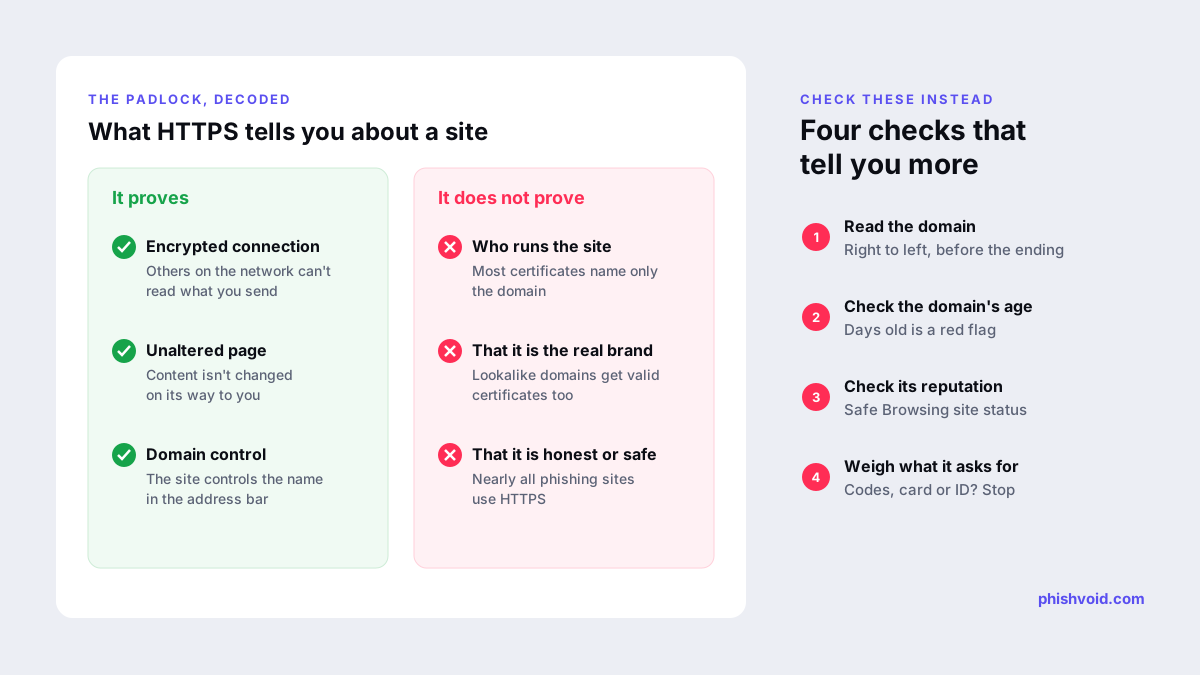
- Encryption: what you send and receive cannot easily be read by someone on the same network, such as public Wi-Fi.
- Integrity: the page cannot be silently altered on its way to you.
- Domain match: a certificate authority confirmed that whoever requested the certificate controlled the domain name in the address bar.
That third point is the one people overestimate. Most certificates are domain-validated (DV): the authority checks control of the domain, nothing more. Let's Encrypt, one of the largest certificate authorities, states plainly that DV certificates do not include any information about a website's reputation, real-world identity or safety (Let's Encrypt).
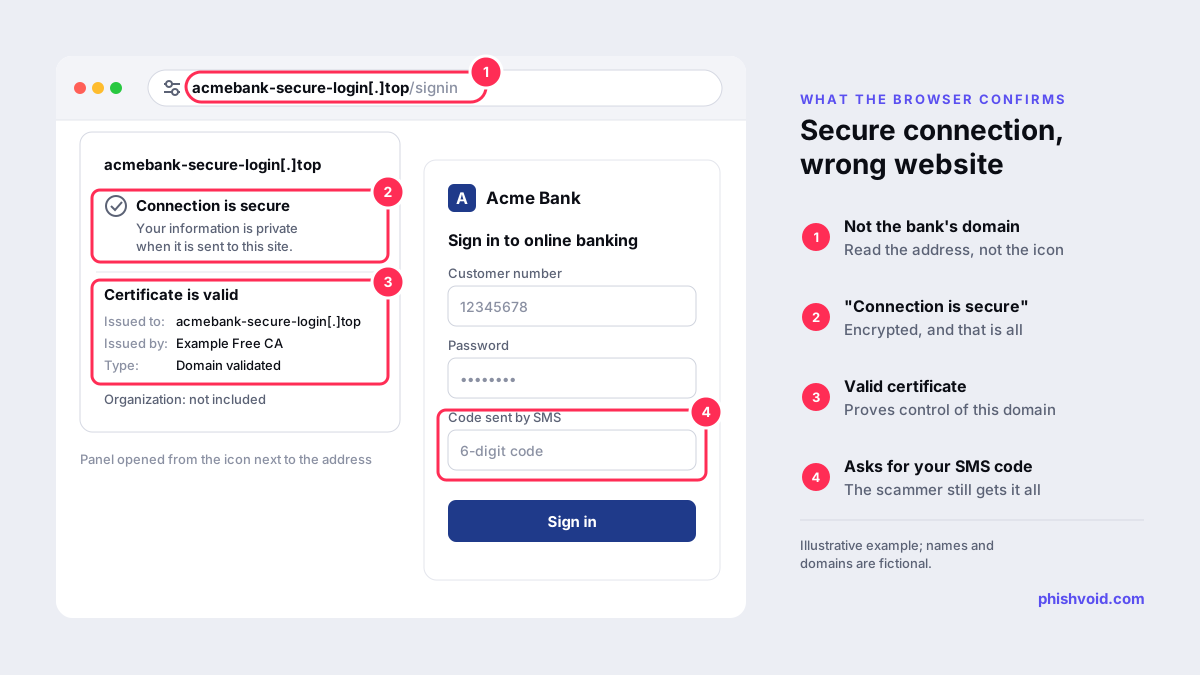
So if a scammer registers acmebank-secure-login[.]top, they can get a perfectly valid certificate for it within minutes. Your browser will then confirm, correctly, that you have a private connection to acmebank-secure-login[.]top. It just has no opinion on whether that domain belongs to your bank.
Why phishing sites have HTTPS too
Certificates used to cost money and take paperwork, so a padlock once hinted at some effort by the site owner. That changed when free, automated certificates became the norm. Today a phishing kit can request a certificate as part of its setup, and many hosting platforms add one automatically.
Google's Chrome team drew the same conclusion. In announcing that Chrome 117 would replace the padlock with a neutral "tune" icon, the Chromium team wrote that the lock icon does not indicate website trustworthiness, that nearly all phishing sites use HTTPS, and that a 2021 study found only 11% of participants correctly understood what the lock meant (Chromium Blog). The FBI has likewise warned the public not to trust a site just because it shows a lock icon or "https" (FBI IC3).
The practical takeaway: HTTPS is now the baseline for every site, good or bad. Its absence on a login or payment page is a red flag. Its presence is not a green one.
DV, OV and EV certificates: does the type matter?
Certificates come in three validation levels. The difference is how much the certificate authority checks before issuing.
| Type | What is checked | What it tells you |
|---|---|---|
| Domain Validation (DV) | Control of the domain name | The site controls that domain. Nothing about who runs it. |
| Organization Validation (OV) | Domain control plus basic checks on a registered organization | An organization name appears in the certificate details. |
| Extended Validation (EV) | Stricter checks on the legal entity | A verified legal name in the certificate details. |
In theory, OV and EV add identity. In practice they are hard to use as a safety test. Chrome moved the EV company name out of the address bar into the Page Info panel in Chrome 77 after its research found the indicator did not protect users as intended (Chromium). Many legitimate companies, banks included, use DV certificates, so a DV certificate is not a warning sign on its own. And an organization name only helps if you already know the exact legal name of the company you expected.
The certificate field that matters most is the simplest one: the domain it was issued to. If it matches the address bar but the address bar is wrong, the certificate is working perfectly for the scammer.
What to check instead of the padlock
These checks take a minute and tell you far more than HTTPS does:
- Read the domain from right to left. The part just before the ending (.com, .co.uk, .top) is who owns the page. In
acmebank.com.verify-id[.]netthe owner is verify-id[.]net, not Acme Bank. Lookalike tricks are covered in typosquatting and homoglyph domains. - Think about how you got there. A link in a text, email, ad, QR code or direct message deserves more suspicion than an address you typed or a bookmark you saved.
- Check the domain's age. Look it up at ICANN Lookup. A domain created last week is not a long-established bank or retailer.
- Check its reputation. Paste the address into Google's Safe Browsing site status tool. A clean result does not prove safety, because new phishing sites may not be flagged yet.
- Watch your password manager. A password manager fills in logins by domain. If it offers nothing on a page that looks like your bank, the domain is probably different.
- Weigh what the page asks for. Card numbers for a parcel fee, a one-time code to "verify" an account, or an ID scan for a newsletter are classic signs of a fake. Our guide on how to spot a phishing website walks through ten warning signs with examples.
When HTTPS warnings do matter
HTTPS is not proof of safety, but browser warnings about it are worth taking seriously:
- "Not secure" on a page that asks for a password or card number. Data you type there can be read or changed in transit. Do not enter it. Google advises checking the site name in the address bar and being careful with personal information even on secure connections (Google Chrome Help).
- A full-page certificate error. Messages such as "Your connection is not private" mean the certificate does not match the site, has expired or cannot be trusted. On public or unfamiliar networks, close the page rather than clicking through.
- A red "Dangerous" warning. Chrome shows this when Google Safe Browsing has flagged the site. Leave the page.
Think of it this way: a missing or broken HTTPS connection can disqualify a site, but a working one can never qualify it.
If you entered details on an HTTPS phishing site
The encryption protected your data on its way to the scammer, not from the scammer. Act as if they have it:
- Change the password through the real site or app, and anywhere else you reused it.
- Turn on multi-factor authentication, preferably an app or passkey rather than SMS.
- If you entered card or bank details, call the number on your card and ask for the card to be blocked.
- Report the page to Google Safe Browsing so other people get a warning, and see our step-by-step page for what to do if you got phished.
For brands, the same logic applies in reverse. Scammers obtain certificates for domains containing your name, and every certificate is recorded in public certificate transparency logs. Watching those logs, together with new registrations, is one of the earliest ways to spot a lookalike domain before it goes live. Phishvoid uses these signals in its monitoring, then has a human analyst verify each site before reporting it to hosts, registrars and browser blocklists. Our guide to lookalike domain monitoring explains the approach.
FAQ
Does HTTPS mean a website is legit?
No. HTTPS confirms an encrypted connection to the domain in the address bar. Anyone can get a certificate for a domain they control, including scammers, so HTTPS says nothing about who runs the site or whether it is honest.
Is a site without HTTPS dangerous?
Not automatically, but you should never enter a password, card number or personal details on a page marked "Not secure". Any data you type there could be read or changed in transit.
Why did Chrome remove the padlock icon?
Google said the lock was widely misunderstood as a sign of trustworthiness, even though nearly all phishing sites use HTTPS. Since Chrome 117 the address bar shows a neutral tune icon that opens the site's connection and permission settings.
Can I check who owns a site from its certificate?
Only partly. Most certificates are domain-validated and contain just the domain name. OV and EV certificates list an organization, but you still need to confirm that it is the company you expected. Domain age and reputation checks are usually more useful.
Are free SSL certificates less safe?
No. A free domain-validated certificate encrypts the connection just as well as a paid one. The difference between certificate types is how much identity checking happens, not how strong the encryption is.
Is someone impersonating your brand?
We find lookalike domains and cloned pages and take them down. Start with a free exposure scan.