How to report phishing to Netcraft with its free web form, scam@netcraft.com, the browser extension or app, and what each result status of your report means.
Quick answer: To report phishing to Netcraft, paste the suspicious URL into the form at report.netcraft.com/report and click Report Malicious URL, or forward the phishing email to scam@netcraft.com. You can also report from Netcraft's browser extension and mobile apps. Reporting is free, no account is needed, and if you leave an email address Netcraft emails you the result of your submission.
Netcraft is an internet services company that runs one of the blocklists security teams report phishing to. According to its reporting FAQ, its feed is used by many browsers, so a confirmed report can lead to warnings well beyond Netcraft's own tools; the same FAQ notes that Netcraft does not control what those browsers block or how quickly. This guide covers each reporting route and how to read the result. For the other two big blocklists, see our guides to Google Safe Browsing and Microsoft SmartScreen.
How to report phishing to Netcraft with the web form
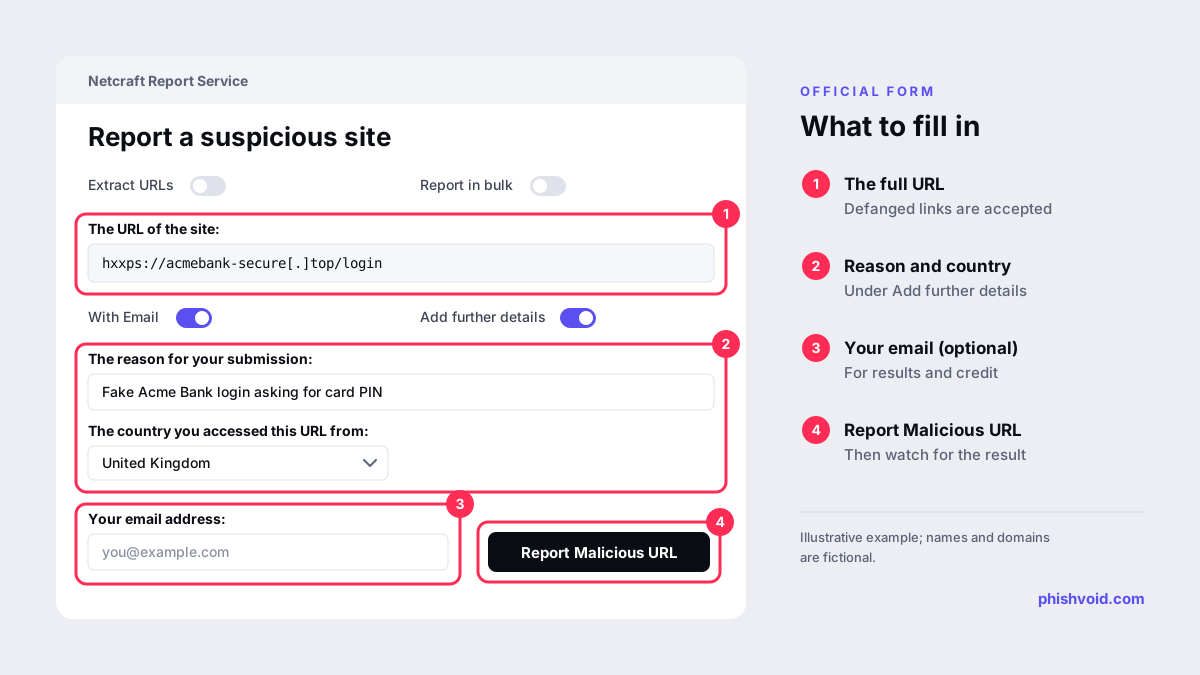
- Open report.netcraft.com/report. You do not need to sign in.
- Paste the full address into The URL of the site. Netcraft's FAQ says it accepts defanged URLs, with
hxxp://orhxxps://in place of the scheme and[.]in place of the dots, so you can paste a link straight from an incident note. - To submit several links at once, use the Report in bulk or Extract URLs switches above the URL box.
- Turn on Add further details. Fill in The reason for your submission in one line, for example "fake Acme Bank login asking for card PIN", and choose The country you accessed this URL from. Some phishing pages only appear to visitors from the targeted country, so this helps the classifier see what you saw.
- Leave With Email on and enter your address if you want the result by email and credit for the report. Anonymous reports are accepted but, per the FAQ, are not eligible for credit.
- Click Report Malicious URL and complete the verification check if one appears.
What Netcraft accepts
The form currently lists phishing, malware, cryptocurrency scam, support scam, fake shop, web shell and phishing kit URLs. Netcraft defines a phishing URL as one that imitates a site run by an organisation the victim already deals with, in order to obtain passwords or other personal information for fraud. Report the page that collects the data, and the link that led to it if it is different.
Report a phishing email to scam@netcraft.com
If the phishing arrived by email, forward it to scam@netcraft.com. Netcraft's FAQ says email reports are treated the same way as reports made through the web form or the API, and that only the first 1,000 URLs in an email submission are processed. Forward the message as an attachment if your mail program offers it, so the original headers stay intact.
Do not be surprised if the submission lists fewer links than the email contained. Netcraft says it removes links that mail programs add on their own, such as "download our app" footers, to avoid processing them again and again.
For regular reporting from a mailbox, Netcraft publishes free email add-ons for Outlook (desktop and Outlook on the web) and for Gmail, listed on its apps page, which says all emails submitted this way are analysed automatically. Reporting to Netcraft does not replace your mail provider's own button; see how to report phishing in Gmail for that side.
Report from the browser extension or mobile app
Netcraft's browser extension is available for Chrome, Firefox and Edge and lets you report the page you are on with one click. Its mobile apps for iOS and Android, according to Netcraft's incentives page, also let you report suspicious sites and SMS messages from your phone. Netcraft's apps page says any report sent this way is analysed automatically and, if the site is found to be malicious, it is blocked.
The extension route is handy when you meet a phishing page while browsing. For links you have not opened, the web form is safer, because you never need to load the page.
What happens after you report
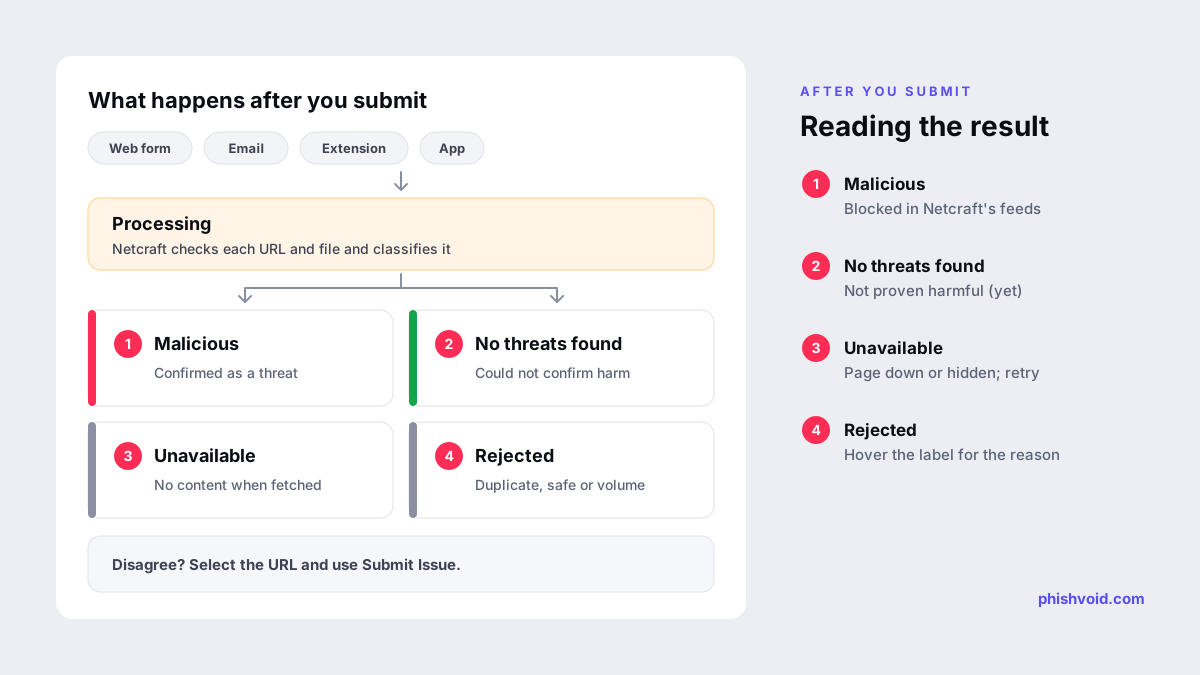
Each URL starts in a processing state and is then classified. Netcraft's FAQ describes four outcomes:
- Malicious. Netcraft confirmed the threat. Confirmed sites are blocked in Netcraft's malicious site feeds.
- No threats found. Netcraft could not confirm the content is malicious. It may still be unpleasant, but it does not fit the categories Netcraft blocks.
- Unavailable. Netcraft could not fetch any content when you submitted it. The page may have been down, or hidden from automated visitors by cloaking. Resubmit the exact link a victim received, with the reason and country filled in.
- Rejected. Reasons include a very high volume of submissions on the same domain, or the URL having already been reported and found safe. Hovering over the label shows the reason.
A whole submission, such as a forwarded email, can also be marked suspicious when no single URL or file is confirmed malicious but the email still looks wrong. Netcraft takes no action in that case.
Some submissions show a takedown status of not started, in progress or resolved, with an incident report link. That means Netcraft has taken countermeasures against the site itself. If you think a result is wrong, open the submission page, select the URLs and click Submit Issue. Submissions are archived after 30 days by default, so save anything you need before then.
Credits, rewards and limits
Netcraft credits the first person to report a new malicious URL. Its incentives page lists prizes that start at 100 credited reports, and a separate competition for reporters who pass 5,000. Credit applies to phishing, phishing kit, fake shop, web shell and scam site URLs.
Two limits are worth knowing. Netcraft rate-limits submissions to prevent abuse, and asks anyone who needs to report at higher volume to contact its support team. And if you report from a free email provider such as Gmail or Yahoo, the FAQ says you may not receive result emails until you have made more than one submission.
Netcraft is one report, not the whole takedown
A Netcraft listing warns people, but it does not remove the site. The hosting provider and the domain registrar are the ones that can take it offline, so send them evidence at the same time; our guide to filing a Namecheap abuse report shows what a registrar report looks like. Brands dealing with many sites at once usually run all of these channels together. Phishvoid's team, for example, verifies each phishing site and submits it to Netcraft alongside Google Safe Browsing, Microsoft SmartScreen, APWG, the host and the registrar.
FAQ
Is reporting phishing to Netcraft free?
Yes. The web form, the scam@netcraft.com address, the browser extension and the mobile apps are free to use.
Do I need a Netcraft account to report a URL?
No. You can submit the form without signing in. Adding your email address gets you the result by email and makes the report eligible for credit; anonymous reports are not credited.
How do I report a phishing email to Netcraft?
Forward it to scam@netcraft.com, ideally as an attachment. Netcraft extracts and checks the links and files in it, and processes up to the first 1,000 URLs.
Why was my URL marked "no threats found"?
Netcraft could not confirm the page was malicious when it checked. If you are sure it is phishing, report an issue from the submission page, or resubmit the exact link with the reason and the country you accessed it from.
Does Netcraft take phishing sites down?
Reporting gets a confirmed URL blocked in Netcraft's feeds. A takedown status on a submission shows that Netcraft has also taken countermeasures against that site. Report to the host and registrar yourself as well.
Is someone impersonating your brand?
We find lookalike domains and cloned pages and take them down. Start with a free exposure scan.