A fake Coinbase website copies the sign-in page to steal passwords, 2FA codes and crypto. Learn the warning signs and how to report it to Coinbase and others.
Quick answer: A fake Coinbase website is a phishing page that borrows the Coinbase name and look to collect sign-in details, two-step verification codes or a wallet recovery phrase. Coinbase does not run these sites; scammers simply use its name. To check a page, look at the address bar first: Coinbase's help center tells users to make sure they are on https://www.coinbase.com directly. To report a fake site, Coinbase's Reporting phishing sites page asks you to email the full URL to security@coinbase.com.
This guide is for Coinbase customers and for anyone who lands on a page that claims to be Coinbase and is not sure. It covers the warning signs, what to do if you already typed something in, and every place worth reporting the site so it is blocked and removed. If you are checking a different trading platform altogether, our guide on how to tell if a crypto exchange is legit covers regulators and warning lists.
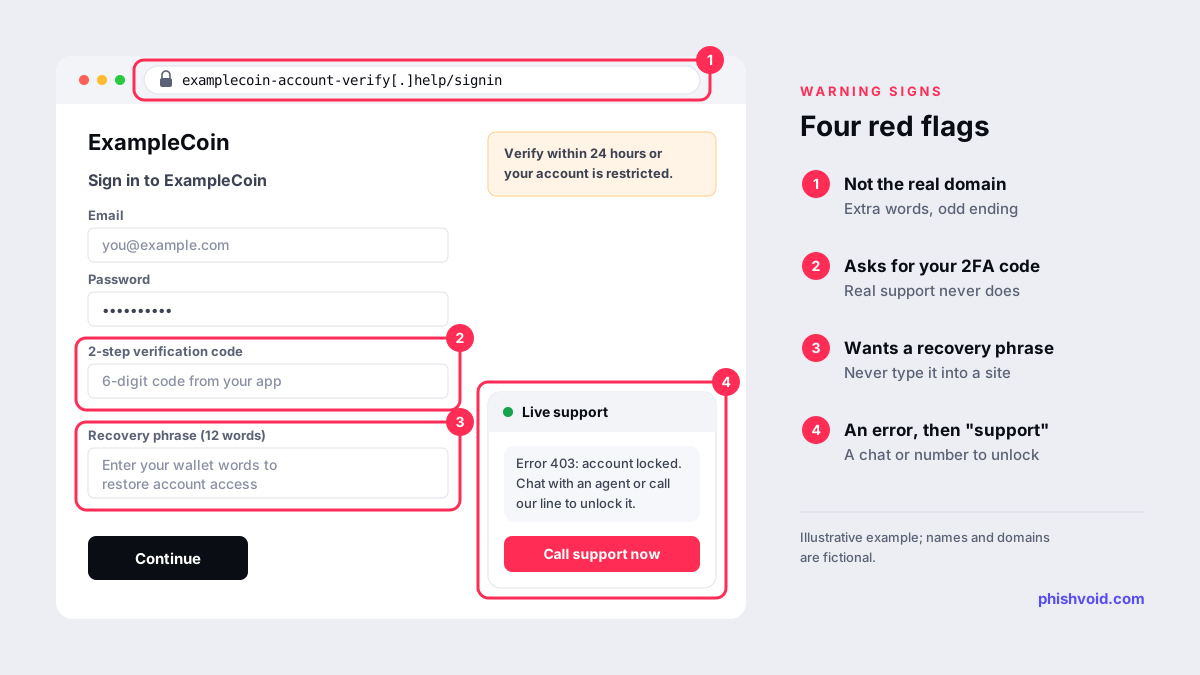
Warning signs of a fake Coinbase website
Copied pages often look identical to the real sign-in screen, so the design tells you very little. The address and what the page asks you for tell you much more.
- The domain is not coinbase.com. In a 2022 security notice on search engine phishing, Coinbase's security team said its sites follow the pattern
[page].coinbase.com. A different domain, a long hyphenated name in the style ofcoinbase-account-verify[.]example, or a page on a free website builder is not Coinbase, however convincing it looks. Read the domain from right to left: the name directly before the ending is the one that counts. - You were redirected. The same notice says that if a search result or a button takes you to a domain other than the one you expected, it is likely a phishing page.
- It asks for a 2-step verification code or tells you to move funds. Coinbase's page on support and impersonation scams says no one will ask for your password or 2FA codes, or ask you to transfer assets to a new address, account, vault or wallet.
- It asks for a recovery phrase. The same page says Coinbase customer service agents will never give you a seed phrase or ask for yours. A form that wants your 12 or 24 words is trying to take the wallet.
- An error is followed by "support". A lock message after you sign in, a chat window that opens on its own, or a phone number to call. Coinbase's 2022 notice describes this pattern as a support scam, and its help center says to contact Coinbase only through the details on its own Contact us page.
- Pressure. Countdown timers, threats of permanent closure, or a "verification" that must be done within hours.
How people end up on a fake Coinbase site
Few people type a fake address by accident. They are sent there. The common routes are:
- Search results and ads. Coinbase's notice describes fake pages that rank for searches such as "Coinbase login". It says they are often hosted on website builders or cloud services and then send the visitor on to a second page where the actual phishing happens. Bookmarking the real site removes the need to search for it each time.
- Emails and texts. Messages about a locked account, an unrecognised withdrawal or a required verification, with a link to a lookalike sign-in page. Coinbase publishes its trusted email addresses, all on coinbase.com domains, but a sender name alone proves nothing.
- Fake support. Calls, chats and social media accounts that claim to be Coinbase staff and then send a link "to secure your account".
- Rewards and giveaways. Posts and direct messages that promise free crypto, airdrops or recovery help if you sign in or connect a wallet.
What to do if you entered details on a fake site
Act in this order, starting from the real app or by typing the address yourself, never from a link in the message.
- Lock first. Coinbase's scam guidance says that if something feels off, lock your account in the app and email
security@coinbase.com. If you are signed in, Coinbase says its Scam Hub also lets you lock your account and report scams and phishing emails. - Change passwords for Coinbase and for the email account linked to it. If you reused either password anywhere else, change it there too.
- Strengthen sign-in and withdrawals. Coinbase recommends strong two-step verification, with hardware security keys as the best option, and withdrawal allow-listing so that on-chain sends can only go to addresses you trust.
- If you typed a recovery phrase for a self-custody wallet, treat that wallet as compromised. Move any remaining funds to a new wallet with a new phrase, created on a device you trust.
- If money or crypto was sent, report it to the police or your national fraud reporting service. In the United States that means the FBI's IC3 and the FTC at ReportFraud.ftc.gov. Keep transaction IDs, wallet addresses, screenshots and the site's URL.
Be wary of anyone who contacts you afterwards offering to recover lost crypto for an upfront fee. Our checklist for people who got phished covers the remaining account clean-up steps.
How to report a fake Coinbase website
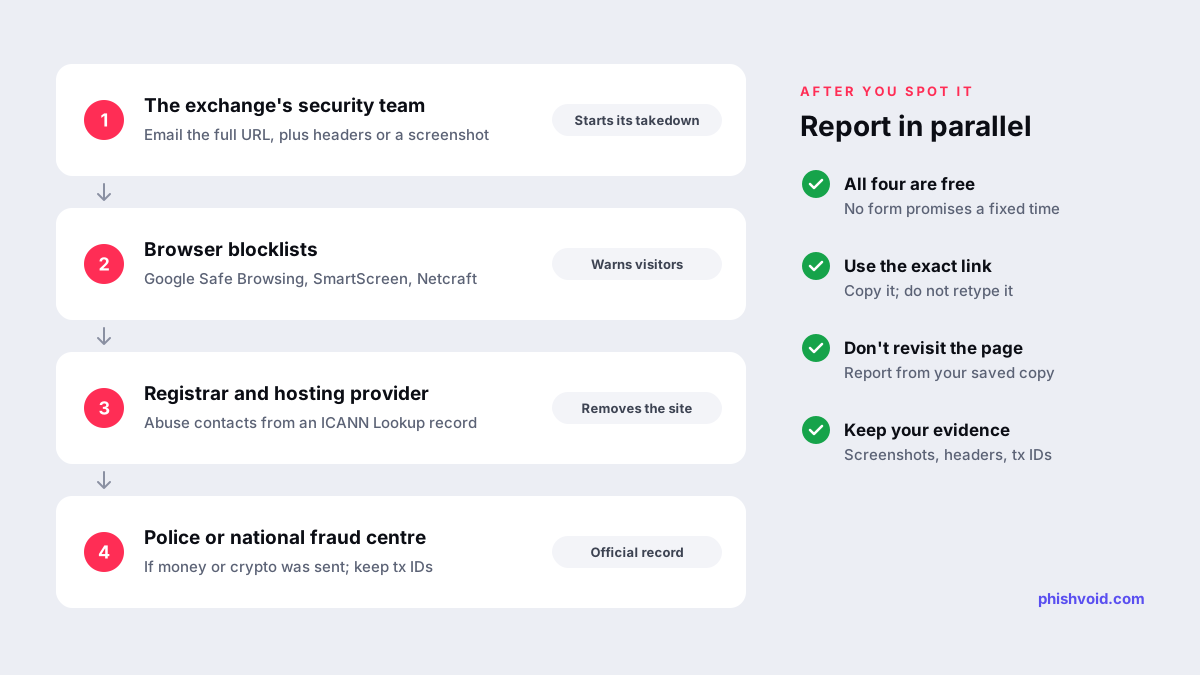
Report in several places at once. Each report does a different job, and none of them depends on the others.
1. Coinbase's security team
Coinbase asks for the full URL of the phishing site by email to security@coinbase.com. If the link arrived by email, include the full email headers. Coinbase says it cannot complete a full investigation without them, because headers show which mail server sent the message. In Gmail you can copy them with More, then Show original. For a phishing text, Coinbase asks for a screenshot sent to the same address. In the United States you can also forward the text to 7726 (SPAM) so carriers can block similar messages. Coinbase says its security team investigates each submission and acts to shut down malicious sites targeting its customers.
2. Browser blocklists
Submit the exact URL to Google Safe Browsing, Microsoft's Report unsafe site form and Netcraft. Once a URL is listed, browsers and security tools can show a warning before the page loads, which protects the next person who clicks. Netcraft's form lists cryptocurrency scams as one of the types it accepts. Our step-by-step guides cover reporting to Google Safe Browsing and reporting phishing to Netcraft.
3. The registrar and the host
The domain's registrar and the company hosting the page are the ones that can take it offline. Enter the domain at ICANN Lookup to find the registrar and its abuse contact, then send a short report with the URL, a screenshot and a one-line explanation of what the page imitates. Our guide to reporting domain abuse to a registrar explains what registrars are required to do with such reports.
4. Police and community reports
If you lost money, file the police or IC3 report described above. Coinbase also points to Chainabuse, a third-party, community-driven platform where people share reports about scam crypto addresses and domains; Coinbase notes it is not affiliated with it and that submissions are user-generated.
How long it takes and what it costs
Every report above is free. None of the forms promises a fixed timeframe. Blocklists review a URL before listing it, and registrars and hosts work through their own abuse queues, so a page can stay reachable for a while after you report it. Do not keep revisiting it to check; use a fresh report with the same link if you see it again in a new message.
For the exchange itself, the work does not stop at one site. A copied page can reappear on a new domain after the first one is removed, which is why crypto platforms watch for lookalikes continuously. Phishvoid does this for brands: its team verifies each fake site and reports it to blocklists, hosts and registrars until it is down. Our article on brand protection for crypto exchanges explains the approach.
FAQ
How can I tell I am on the real Coinbase website?
Type the address yourself or use a bookmark. Coinbase's help center tells users to access https://www.coinbase.com directly, and its 2022 security notice says its pages follow the [page].coinbase.com pattern. A page on any other domain, or one you reached through a redirect, should be treated as fake.
Will Coinbase ever ask for my 2FA code or recovery phrase?
No. Coinbase's help center says its customer service agents will never ask for your password or 2-step verification code, never ask for or provide a seed phrase, and never ask you to move funds to a new address or wallet.
Where do I report a fake Coinbase email or text?
Email security@coinbase.com. For an email, include the full headers; for a text, include a screenshot. US users can also forward the text to 7726 (SPAM).
Does reporting a fake Coinbase site take it down?
Not on its own. Coinbase's security team and browser blocklists act on reports, but only the hosting provider or the registrar can remove the site or suspend the domain, so report to them as well.
Is someone impersonating your brand?
We find lookalike domains and cloned pages and take them down. Start with a free exposure scan.