Got an email, text or call claiming to be the IRS? Learn how the IRS really contacts you and how to report phishing to phishing@irs.gov and TIGTA.
Quick answer: An IRS phishing scam is an email, text, social media message or call that pretends to be from the Internal Revenue Service to get your money, your Social Security number or your bank details. The IRS normally contacts people for the first time by mail, emails or texts only people who opted in, and never sends direct messages on social media. Don't click links, scan QR codes or reply. Send suspected IRS phishing to phishing@irs.gov, forward scam texts to 7726, and report phone impersonators to TIGTA.
This guide explains what IRS phishing looks like in 2026, how to check a message without clicking it, the exact reporting format the IRS asks for and what to do if you already shared information. For a general checklist that works on any suspicious email, see is this email legit.
What IRS phishing looks like in 2026
Impersonation by email and text sits at the top of the IRS's 2026 Dirty Dozen list of tax scams (IR-2026-30, March 5, 2026). The IRS says scammers send emails, direct messages and texts that appear to come from the agency, often with alarming language and QR codes that lead to fake IRS websites. The same list warns about phone calls that use computer-generated voices and spoofed caller ID.
The most common lures are:
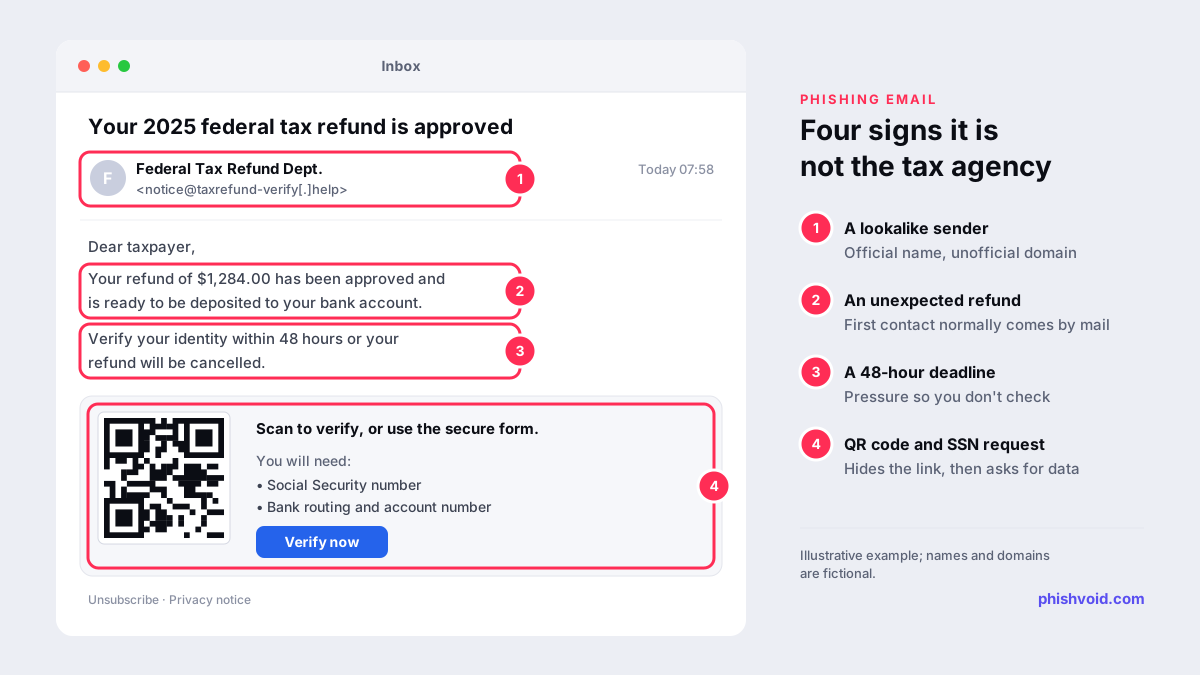
- A refund that needs "verifying". The Federal Trade Commission warned in January 2026 about texts and emails that say your refund has been "processed" or "approved", then ask for your Social Security and bank account numbers to verify your identity.
- A balance due right now. A message or prerecorded call says you owe tax and threatens penalties or arrest unless you pay today.
- An account problem. A message says your IRS account is locked, suspended or needs updating and links to a sign-in page.
- A QR code letter. In July 2026, IRS Criminal Investigation warned about fake IRS letters sent to cryptocurrency holders that tell them to enrol in a "Digital Asset Compliance Portal" through a QR code. The IRS says it does not operate any such portal.
How the IRS really contacts you
The IRS page How to know it's really the IRS sets out the rules, and they make most phishing easy to rule out:
- Mail comes first. The IRS says it normally contacts you the first time by letter delivered by the U.S. Postal Service. Some letters come from private collection agencies that work for the IRS.
- Email and text only if you opted in. The IRS emails only people who signed up, from specific addresses, and texts only people who opted in, from specific short codes.
- No social media direct messages. The IRS says a direct message on social media is never from it.
- No pressure calls. The IRS does not leave urgent, threatening prerecorded messages, call to demand immediate payment or threaten arrest, and its reporting page adds that it doesn't call to tell you about a refund.
A message is unlikely to be from the IRS if it is unexpected, pressures or threatens you, asks for personal or financial information or demands immediate payment.
How to check an IRS message safely
- Don't use anything in the message. No links, no QR codes, no attachments and no phone numbers from the message itself.
- Type IRS.gov yourself. Sign in to your IRS online account to see balances, payments, notices and refunds. To check a pending refund, the FTC says never to use the link from the message.
- Read the address, not the logo. Real IRS links go to irs.gov. Lookalike domains, link shorteners and addresses that merely contain the word "tax" are red flags. Our link checker can break a link down without opening it.
- Compare letters with your records. If you got a paper notice, check that the notice and the amount appear in your online account before you pay anything.
QR codes deserve extra care because they hide the destination until you scan. Our guide to QR code scams shows how to preview a code first.
How to report IRS phishing: phishing@irs.gov and TIGTA
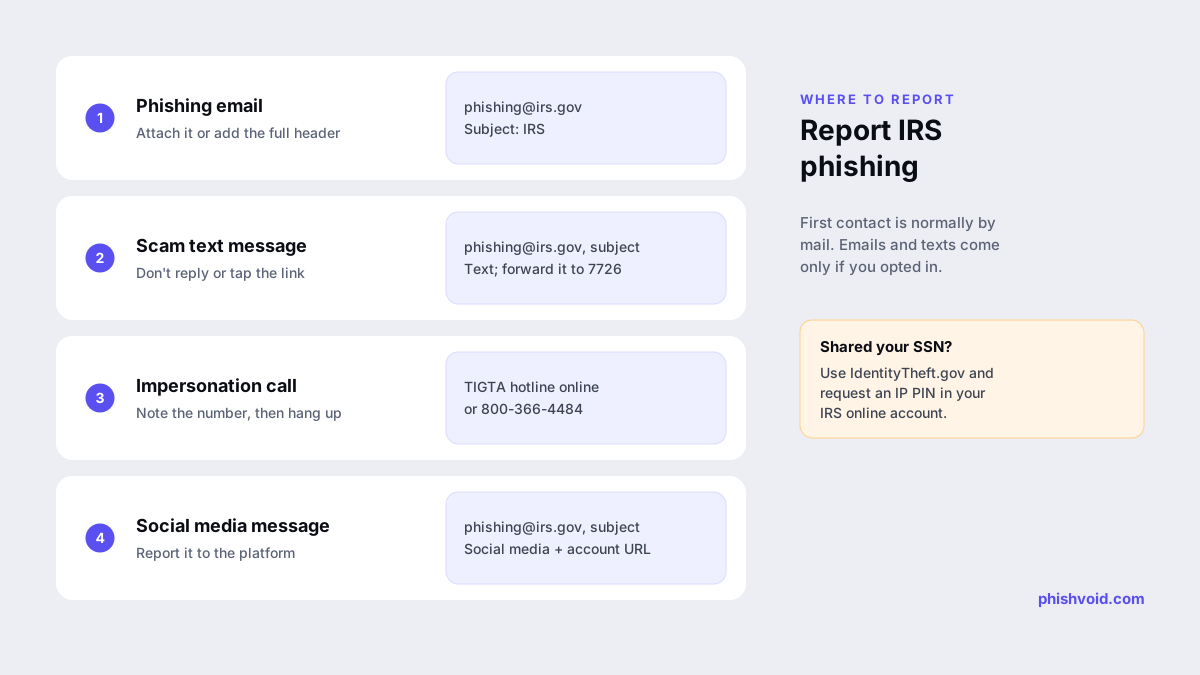
The IRS report phishing page asks for different details depending on how the scam reached you:
| Channel | What to do |
|---|---|
Send it to phishing@irs.gov with the subject "IRS". Attach the email as a file, use "forward as attachment" or include the full email header. Then report it to TIGTA and delete it. | |
| Text message | Email phishing@irs.gov with the subject "Text". Include the sender's number, the message, the number it was sent to and the date, time and time zone. Forward the text to 7726 (SPAM), then delete it. |
| Social media | Report the account to the platform, then email phishing@irs.gov with the full account URL and the subject "Social media". |
| Phone call | Write down the number and hang up. Report it to the TIGTA hotline online or on 800-366-4484. |
The IRS warns that a plain forward strips data investigators need to trace the sender, which is why it prefers an attachment or the full header. Our guide to spotting a phishing email explains what headers show. You can also report scams to the FTC at ReportFraud.ftc.gov.
If you clicked, paid or shared your details
Act on the information you gave away, not only on the message:
- Stop contact. Don't reply, send money or call back. If you opened an attachment, run your security software.
- Call your bank or card issuer if you shared account or card numbers or made a payment, and ask about blocking and disputing it.
- Change your IRS online account password if you typed it into a fake sign-in page, and change it anywhere else you reused it.
- Protect your Social Security number. If you gave it out, follow the steps on IdentityTheft.gov and the IRS identity theft guide. Most people don't need to file Form 14039; the guide explains when to.
- Get an Identity Protection PIN. An IP PIN is a six-digit number that stops anyone else from filing a federal return with your SSN or ITIN. You request it in your IRS online account, and a new one is issued each year.
- Check your state tax agency for any extra steps, as the IRS suggests.
If you lost money, also report it to the FBI's Internet Crime Complaint Center. Our I got phished page has a general checklist for the first hours.
For tax professionals and payroll teams
The 2026 Dirty Dozen also lists spear phishing aimed at tax professionals, such as fake "new client" emails that carry malicious links or attachments. Firms hold exactly the data that tax identity thieves want, so verify new clients through a channel you already trust and keep the reporting addresses above in your incident plan. If criminals register lookalike domains of your firm to trick clients, the domains can be reported to registrars, hosts and browser blocklists. Phishvoid does that work for organisations as a managed takedown service.
FAQ
Does the IRS send emails or text messages?
Only to people who opted in, and from specific addresses and short codes. The IRS normally makes first contact by mail and never sends direct messages on social media.
What is phishing@irs.gov?
It is the IRS address for reporting phishing that impersonates the IRS. For emails, attach the original or include the full header and use the subject "IRS". For texts, use the subject "Text" and include the sender, the message and the date and time.
Does the IRS call about refunds?
The IRS says it never calls to demand immediate payment, threaten arrest or inform you of a refund. Hang up and report the call to TIGTA on 800-366-4484.
I gave my Social Security number to a fake IRS site. What now?
Go to IdentityTheft.gov for a recovery plan, request an IP PIN through your IRS online account, and tell your bank if you shared account details. Report the message to phishing@irs.gov.
Is someone impersonating your brand?
We find lookalike domains and cloned pages and take them down. Start with a free exposure scan.