Got a text or email saying HMRC owes you a tax refund? See what genuine HMRC contact looks like and how to report scams to phishing@hmrc.gov.uk or 60599.
Quick answer: A text, email, call or social media message that says you are due a tax refund and asks you to click a link or give your bank or card details is almost certainly an HMRC tax refund scam. HMRC says it will never send a notification of a tax rebate by text or ask for personal or payment information by text, and it will not use social media to offer a tax rebate. Don't click anything. Forward scam emails to phishing@hmrc.gov.uk, forward scam texts to 60599, and report suspicious calls with HMRC's online form. If you lost money, call your bank and report it to Report Fraud.
This guide covers the UK tax refund version of the scam: what the messages look like, how a genuine HMRC refund reaches you, where each type of message should be reported and what to do if you have already entered details. For checking links in texts in general, see our guide to phishing links and texts.
What an HMRC tax refund scam looks like
Refund messages are among the most common HMRC scams. In August 2025 HMRC said it had received more than 170,000 scam referrals in the 12 months to 31 July 2025, a 12% fall on the previous year, and that more than 47,000 of those reports still involved fake tax refund claims.
HMRC's own examples of phishing emails, calls and texts show the same pattern across channels:
- Texts that say you are owed a refund and push you to tap a link and enter your details.
- Emails about a "tax rebate" that lead to a fake website built to collect personal information. The sender's address can be spoofed, or only the display name changed, so the "From" line proves little.
- Phone calls that offer a refund in exchange for bank or card details, or automated calls that claim HMRC is taking legal action and ask you to press 1.
- Social media messages offering a refund from accounts that are not genuine HMRC accounts.
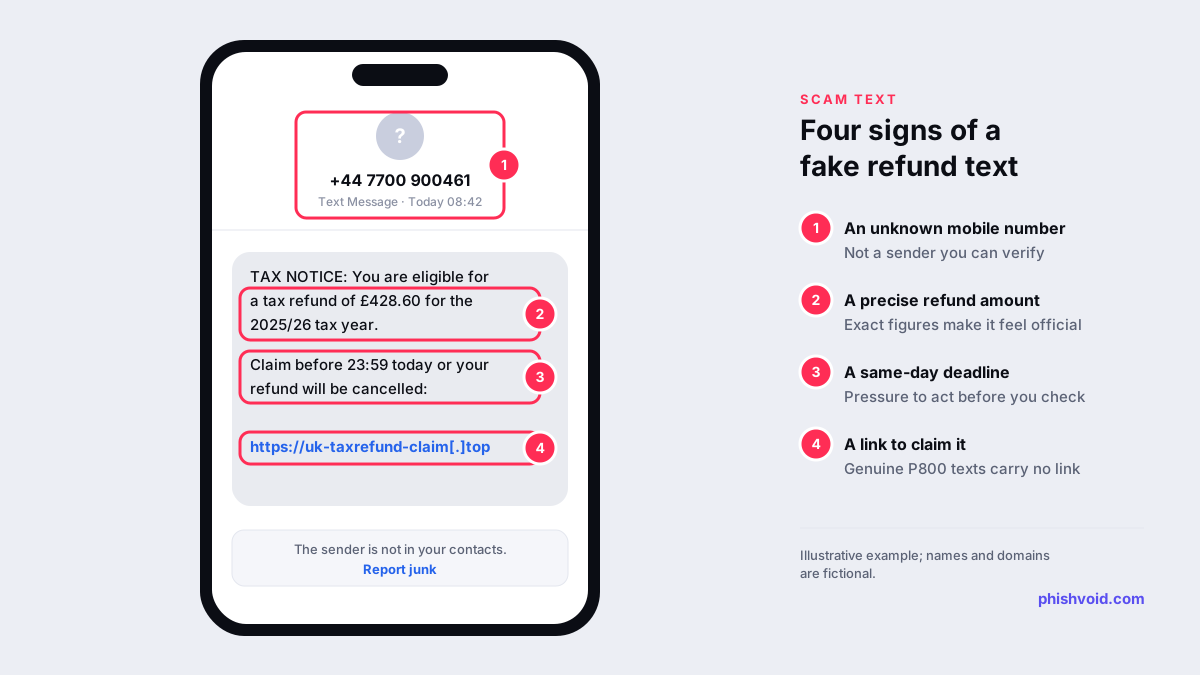
The details change, but most fake refund messages share four traits: an unexpected sender, a specific refund amount to make it feel real, a short deadline and a link to a page that asks for card or bank details.
How a genuine HMRC tax refund reaches you
HMRC does sometimes contact people about refunds, which is why these scams work. The difference is in what a real message asks you to do.
- P800 refund texts and emails exist. HMRC may text or email you to say you are due a tax refund, also called a P800 refund, if it has already written to you and had no reply. According to HMRC's guidance on checking a text or an email, these messages will not ask for personal or financial information and will not provide any links to websites.
- Refund emails come from hmrc.gov.uk. HMRC's reporting page says it will never email you about a tax rebate, or ask for personal or payment information, from an address that doesn't end in hmrc.gov.uk. Sender details can be faked, so treat this as a minimum test.
- You claim inside your own account. HMRC says anyone due a refund can claim it securely through their HMRC online account or the free HMRC app. You get there by typing GOV.UK into your browser or opening the app, not through a link in a message.
- No WhatsApp or social media refunds. HMRC says it will not use social media to offer a tax rebate, and it does not use WhatsApp to contact you other than for occasional government channel updates.
HMRC also notes that firms not connected to HMRC may offer to claim a refund for you, usually for a fee. Whether you use one is your choice, but a firm that contacts you out of the blue and asks for your Government Gateway details is a warning sign.
How to check a refund message without the link
- Leave the message alone. Don't tap the link, scan a QR code in it, reply or call a number it gives.
- Go to HMRC yourself. Sign in to your HMRC online account by typing the GOV.UK address, or open the HMRC app. If a refund is due, it will show there.
- Compare with HMRC's list. HMRC publishes a list of genuine HMRC contacts that describes the texts, emails and letters it really sends.
- Don't trust caller ID. Scammers can make a call look as though it comes from a real number. If you can't verify who is calling, HMRC recommends that you don't speak to them. Hang up and call HMRC on a number you find on GOV.UK.
- Look at the domain, not the logo. If you want to inspect a link without opening it, our link checker breaks it down safely. The signs of a fake site are the same as for any phishing website.
How to report an HMRC tax refund scam
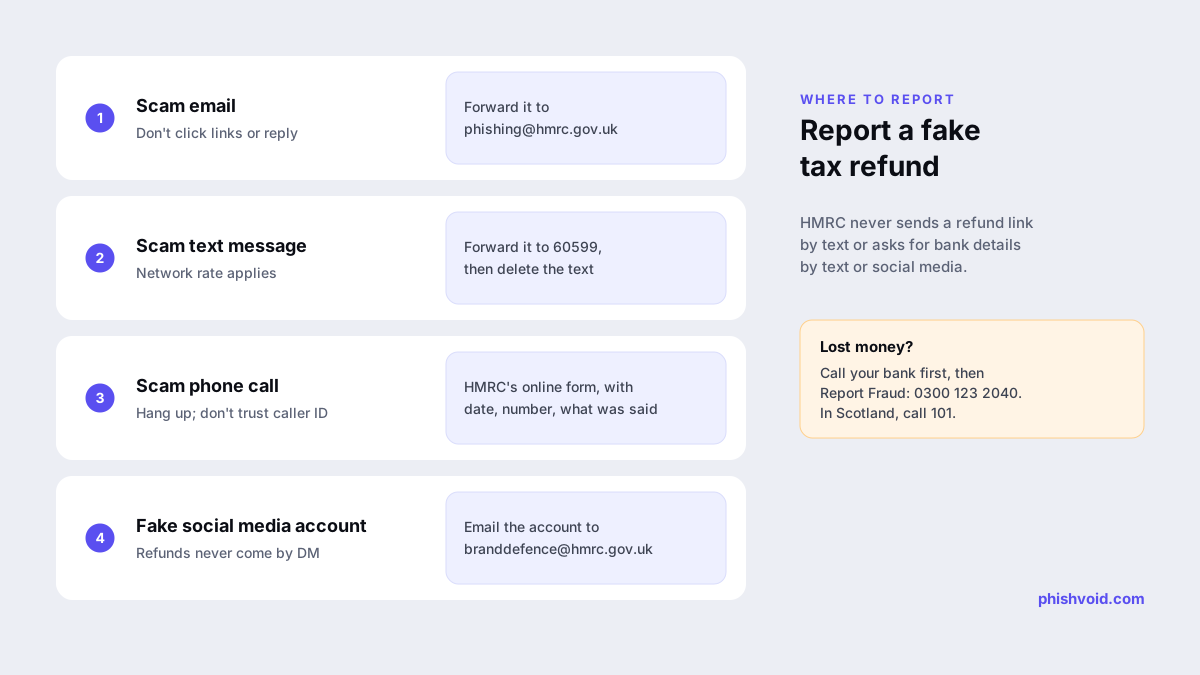
Reporting takes a minute and helps HMRC get scam websites and phone numbers shut down. HMRC says it may share the email address and phone number you report from with other organisations in order to close down scams. Use the channel that matches the message:
| You received | Where to report it |
|---|---|
| An email | Forward it to phishing@hmrc.gov.uk, then delete it |
| A text message | Forward it to 60599 (network charges apply) or email phishing@hmrc.gov.uk, then delete it |
| A phone call | Use HMRC's report a suspicious HMRC phone call form, with the date, the number and what was said |
| A social media message or account | Email the account details to branddefence@hmrc.gov.uk |
For scam emails and websites that pretend to be other organisations, the government's general guidance on how to report suspicious emails, websites and phishing lists the right channels. Our guide on how to report a scam covers other countries.
If you clicked, paid or gave your details
Reporting the message to HMRC doesn't recover money or protect your accounts, so act on those separately and quickly:
- Call your bank or card provider on the number printed on your card or statement. Tell them which details you entered and ask them to block the card and look at any payments.
- Report the fraud. In England, Wales and Northern Ireland, report it to Report Fraud online or on 0300 123 2040. Report Fraud replaced Action Fraud on 4 December 2025. In Scotland, contact Police Scotland on 101. HMRC's examples page also points people who suffered a financial loss to Report Fraud.
- Secure your HMRC sign-in. If you typed your Government Gateway user ID and password into a fake page, change the password and follow HMRC's guidance to report suspicious activity in your HMRC online account.
- Change reused passwords. If you use the same password anywhere else, change it there too and turn on two-step verification.
- Expect follow-up contact. Scammers who have your number may call next, posing as your bank's fraud team or as HMRC. Hang up and call back on a number you find yourself.
Our I got phished page has a fuller checklist for the first hours after a scam.
For accountants, payroll providers and employers
Refund scams often peak around tax deadlines, when clients and staff expect to hear about tax. A few habits reduce the damage. Tell clients in writing that you never send refund links by text, keep your own client emails free of shortened links, and give staff the HMRC reporting addresses above so they can pass suspicious messages on. If a scam page starts copying your firm's name or branding, treat it as impersonation and report the domain to the registrar, the host and browser blocklists. That is the work Phishvoid does for brands, with a person verifying every site before it is reported.
FAQ
Does HMRC text you about tax refunds?
Sometimes. HMRC may text you about a P800 refund if it has already written to you and had no reply. A genuine text will not include a link or ask for personal or financial information. A refund text with a link is a scam.
What is phishing@hmrc.gov.uk?
It is HMRC's address for reporting suspicious emails and texts that claim to come from HMRC. Forward suspicious emails there. Texts can go to 60599 or be emailed to the same address. Then delete the original.
Is 60599 a real HMRC number?
Yes. HMRC asks people to forward suspicious texts to 60599. Your network's standard text rate applies. Then delete the message.
How do I claim a genuine tax refund?
HMRC says anyone due a refund can claim it securely through their HMRC online account or the free HMRC app. Go there directly, not through a link in a text or email.
I entered my bank details on a fake refund site. What now?
Call your bank straight away on the number on your card, then report it to Report Fraud, or to Police Scotland on 101 if you live in Scotland. Forward the original message to HMRC too.
Is someone impersonating your brand?
We find lookalike domains and cloned pages and take them down. Start with a free exposure scan.