How to send a Namecheap abuse report about a phishing site: which address to use, the evidence Namecheap asks for, response times and what to do if it stalls.
Quick answer: To file a Namecheap abuse report about a phishing site, email abuse@namecheap.com for domains registered with Namecheap and abuse@namecheaphosting.com for sites hosted with Namecheap. Namecheap's guide to filing abuse complaints asks phishing reports to include the abusive domain names and URLs, the legitimate website being targeted, the country your IP address belongs to, and the device and browser you used. It gives 72 hours as its general processing time.
This guide covers the Namecheap-specific details: how to confirm Namecheap's role, which address to use, the evidence it asks for, what happens after you send, and what to do if Namecheap is only the registrar. For the rules that apply to every ICANN-accredited registrar, see our general guide to reporting domain abuse to a registrar.
Step 1: Confirm Namecheap's role
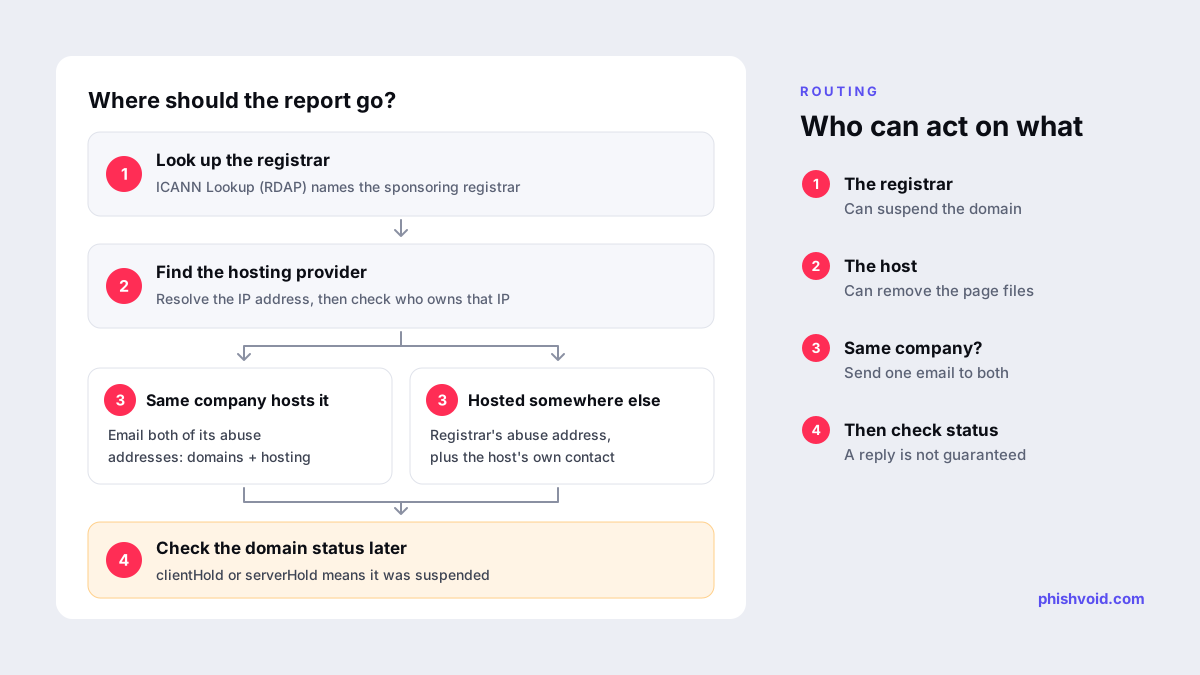
Namecheap can be connected to a phishing site in two ways, and the right address depends on which one applies:
- As the registrar. The domain was registered through Namecheap. Check by entering the domain at ICANN Lookup or in Namecheap's own Whois lookup and reading the registrar field.
- As the host. The site's files sit on Namecheap's servers. Namecheap's guide suggests resolving the domain to its IP address with a DNS tool and then checking who that IP address belongs to. Our guide on who is hosting this website walks through it.
The two roles are independent. A domain registered at Namecheap may point to a server elsewhere, and a site hosted at Namecheap may use a domain registered with another company. If the IP address belongs to a CDN or reverse proxy, that company is not the real host; it can usually pass your report on or reveal the origin to the right party.
Step 2: Choose the right Namecheap address
Namecheap routes different types of complaint to different mailboxes. For a phishing site, its guide lists both abuse addresses, so if Namecheap is both registrar and host, one email addressed to both is the simplest route.
| Situation | Where to send it |
|---|---|
| Phishing domain registered with Namecheap | abuse@namecheap.com, plus the actual host's abuse contact |
| Phishing site hosted with Namecheap | abuse@namecheaphosting.com |
| A copy of your site's content (copyright) | dmca@namecheap.com, with a formal DMCA notice |
| Your trademark inside the domain name itself | UDRP or URS; Namecheap handles dispute correspondence at udrp@namecheap.com |
| False registration (Whois) details | whoisinaccuracy@namecheap.com |
| Law enforcement or government agency | lea_abuse@namecheap.com, which Namecheap says it processes within 24 hours |
Two practical points from Namecheap's guide. First, it advises against Live Chat for urgent abuse: chat operators have to pass the report to the Legal and Abuse Department, which adds delay. Second, cybersecurity companies that send phishing reports regularly can ask about reporting by API through abuseescalation@namecheap.com. Its Phishing Reports API terms describe access as granted at Namecheap's discretion.
Step 3: Send the evidence Namecheap asks for
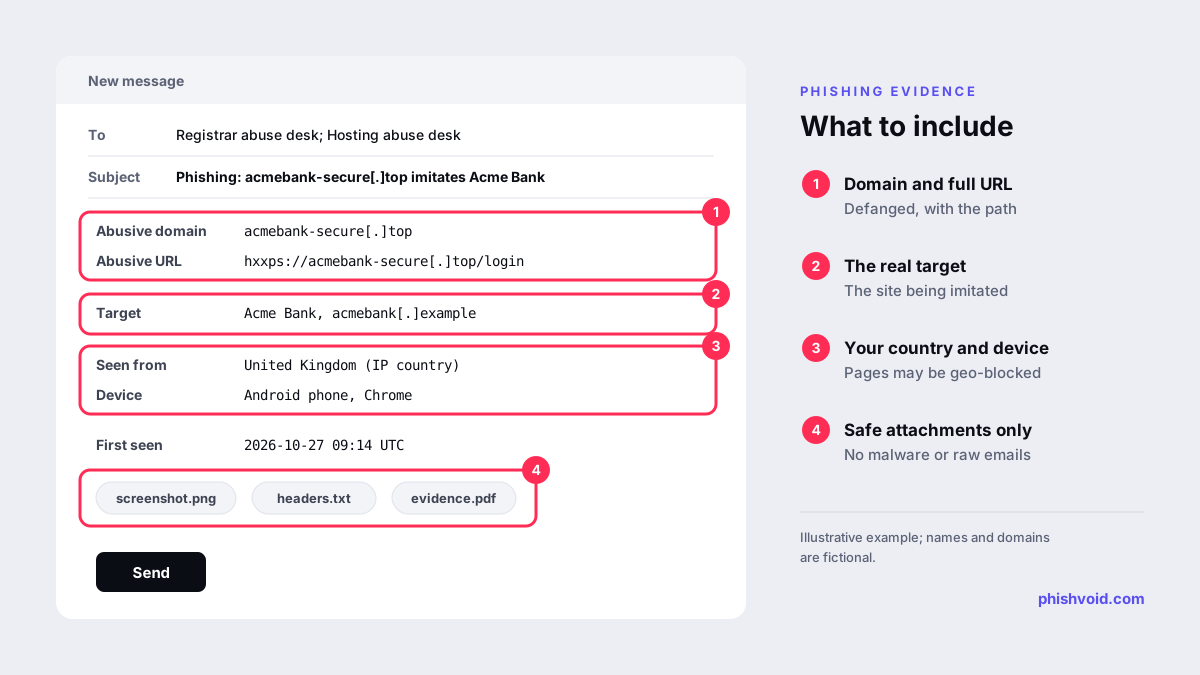
For phishing, Namecheap lists five pieces of useful evidence:
- Abusive domain names. Every domain in the campaign, not just the one in front of you.
- Abusive URLs. The full address of the page that asks for data, including the path.
- The target of the attack. The legitimate website being imitated.
- The country your IP address belongs to. Namecheap explains that content may be geo-blocked, so it will try a proxy in the matching country.
- User-agent and browser. Whether you used a phone or a computer, and which browser, because the content may vary by device and software.
Points 4 and 5 matter because many phishing pages use cloaking to show a harmless page to anyone who does not look like a target. Without them, an analyst may open the URL, see nothing and close the case.
Namecheap also sets rules for attachments. It accepts only csv, doc, docx, eml, jpeg, jpg, pdf, png, txt, xls and xlsx files, and asks you not to send malware samples or original malicious emails. Send safe evidence instead: headers as plain text, screenshots, defanged URLs such as acmebank-secure[.]top, or links to sandbox or VirusTotal reports. Our abuse report generator builds a message in this shape.
Step 4: After you send the report
- Timing. Namecheap's general processing time for abuse complaints is 72 hours. It notes that this is not necessarily the time it takes to resolve the issue, which depends on the case.
- Replies. Namecheap says it may not always respond with the results of its investigation. Silence does not mean the report was ignored.
- Checking the result. Look the domain up yourself. Namecheap says a status of
clientHoldorserverHoldmeans the domain has been suspended and is not available on the internet. - Follow-ups. Keep every message about the same case in one email thread, with the engagement ID in the subject line, so Namecheap can match your replies to the case.
While you wait, submit the same URL to browser blocklists such as Google Safe Browsing, Microsoft SmartScreen and Netcraft. Warnings can reach visitors before the site comes down.
When Namecheap is only the registrar
Namecheap's guide is open about a limit: when it acts only as the registrar and the content sits on third-party servers, some types of abuse may not be verifiable from its side, and it will not take restrictive action that risks a false positive. It names copyright, spam, fraud and malware among the affected categories, and recommends taking those cases to the hosting provider with sufficient evidence.
For a phishing domain, report to the registrar and the host at the same time rather than one after the other. If the host is slow, the registrar can still suspend the domain once it has verified the abuse; if the registrar cannot verify it, the host can remove the files. Our guide to reporting abuse to a web hosting provider covers the host side. Namecheap also mentions that you can write to a privacy-protected domain holder through the forwarding address in the Whois record, but for a phishing domain that rarely helps and may alert the operator.
Namecheap will not share a customer's contact details without permission, except in limited cases such as an official US court order or subpoena. If you need the registrant's identity for legal action, that is the route. For a brand facing repeated cases, Phishvoid handles the registrar and host reports with the evidence each provider asks for and follows them until the site is down.
FAQ
What is Namecheap's abuse email address?
Use abuse@namecheap.com for domains registered with Namecheap and abuse@namecheaphosting.com for sites hosted with Namecheap. For phishing, Namecheap lists both addresses.
How long does Namecheap take to act on an abuse report?
Namecheap gives 72 hours as its general processing time for abuse complaints, but says resolution can take longer depending on the case.
Will Namecheap tell me who owns the phishing domain?
No, not on request. Namecheap says it does not share a domain holder's contact details without the customer's permission, except in limited circumstances such as an official US court order or subpoena.
How do I know if Namecheap suspended the domain?
Check the domain's status in a Whois or RDAP lookup. Namecheap says clientHold or serverHold means the domain has been suspended.
Can I report phishing to Namecheap through Live Chat?
Namecheap recommends email instead. Chat operators have to forward reports to its Legal and Abuse Department, which adds delay.
Is someone impersonating your brand?
We find lookalike domains and cloned pages and take them down. Start with a free exposure scan.