Fake LinkedIn company page using your name? Use LinkedIn's official report, duplicate and trademark routes, remove fake employees and stop it returning.
Quick answer: To report a fake LinkedIn company page, open the Page, click More on its Home tab, choose Report abuse, select the option that fits and submit (LinkedIn Help). If the fake duplicates your organization's established Page, LinkedIn says you can contact its support team to request removal as a duplicate (LinkedIn Help). Where your trademark is misused, LinkedIn also has a Notice of Trademark Infringement form.
This guide is for the company being impersonated. It covers what fake Pages are used for, the evidence to keep, each official LinkedIn route, the off-platform reports that matter just as much, and how to make your real Page harder to copy. If the problem is a fake profile of one of your executives, see executive impersonation instead.
What fake LinkedIn company pages are used for
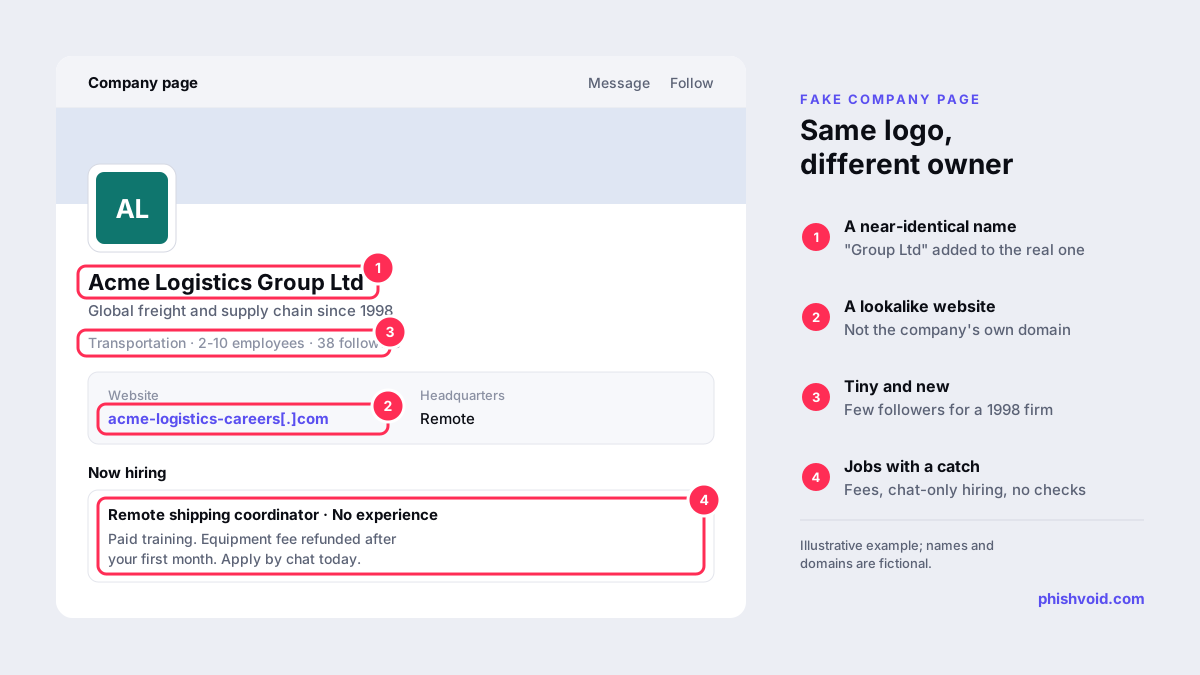
A company page on a professional network lends instant credibility. Scammers create look-alike Pages to:
- Run fake recruitment. Fake "recruiters" list the Page as their employer, post jobs and then ask candidates for ID documents, bank details or payment for equipment and training. The FTC has warned about scammers impersonating well-known companies on LinkedIn and other job platforms (FTC).
- Back up invoice and supplier fraud. A Page with your name and logo makes a fake supplier email or a changed bank account look plausible.
- Promote investment or crypto schemes that borrow a real firm's reputation.
- Point people to a phishing website on a lookalike domain, where candidates or customers are asked to log in or upload documents.
The harm lands on your company too: candidates who were scammed contact your HR team, and your name shows up in complaints. Our guide to recruitment fraud impersonating your company covers the wider response plan.
Collect evidence before you report
Pages and profiles can be renamed or deleted once reported, so capture them first:
- The fake Page's full URL and a screenshot of its Home and About tabs, including the website link, industry, size and location.
- Profiles that list the fake Page as their employer, with their URLs.
- Job posts, messages or emails sent to candidates or customers, with dates.
- The website and email domains the Page links to.
- Proof of your own identity: your official Page URL, website, and trademark registration numbers if you have them.
How to report a fake LinkedIn company page: the official routes
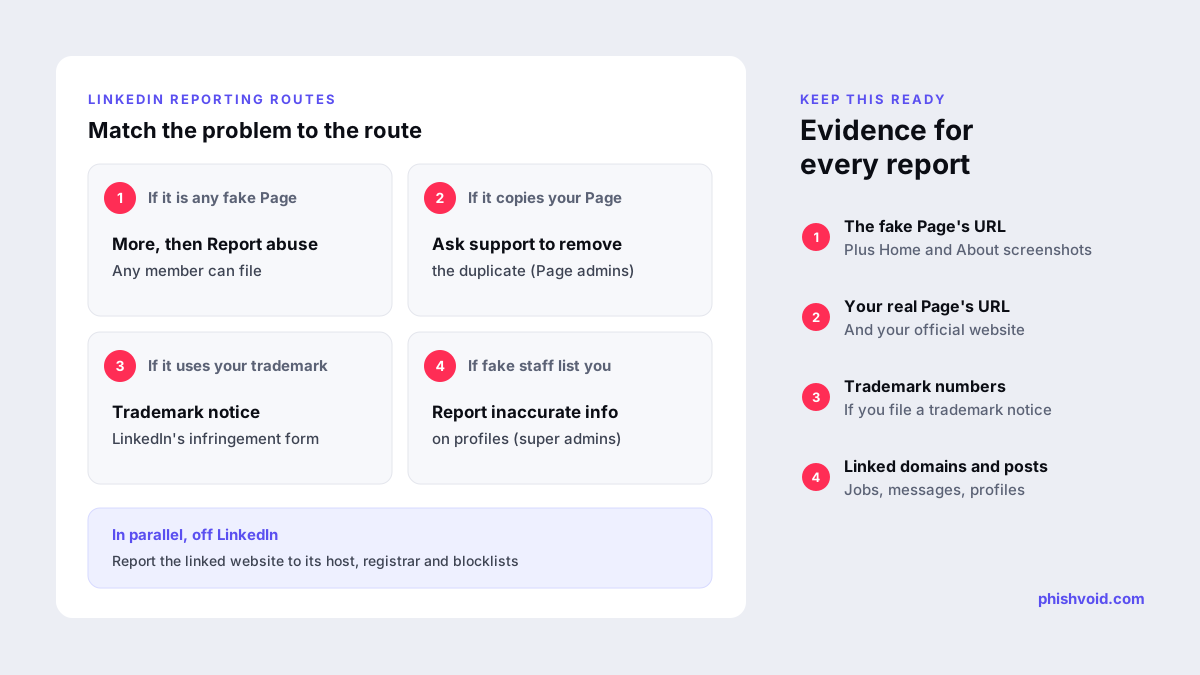
LinkedIn offers several routes. Which one fits depends on what the fake is doing, and you can use more than one.
1. Report the Page through Report abuse
This is the route anyone can use, including your employees and customers. On desktop, go to the Page, click More on the Home tab, click Report abuse, choose the option that fits your concern and click Submit. In the mobile app, tap the More icon, then Report abuse, and follow the same steps (LinkedIn Help). Choose the option that most closely describes impersonation or fraud, and keep the wording factual.
2. Ask support to remove a duplicate of your Page
If the fake presents itself as your organization and you already have an established Page, LinkedIn's guidance on protecting Pages says you can request its removal as a duplicate by contacting the support team; for Pages that do not belong on LinkedIn at all, it points you to the report option (LinkedIn Help). Send the request from an admin of your real Page and include the fake Page's URL, your Page's URL and your evidence.
3. File a trademark notice
If the fake uses your registered name or logo, LinkedIn's trademark policy directs rights holders to its Notice of Trademark Infringement form. Statements in the form are made under penalty of perjury, so the person filing should be the owner or authorized to act for them (LinkedIn Help). Copied photos or text can also be reported under LinkedIn's copyright policy.
4. Deal with fake employees
Fake recruiters often list your real Page, not just the fake one, as their employer. Super admins can report inaccurate employment on a member's profile. On a verified Page, super admins can report a member's current employment directly; the member then has seven days to verify a work email or the experience is disassociated from the Page. Without a verified Page, super admins use the "Report inaccurate profile information" form, and LinkedIn says the information is removed within 14 days if the member does not challenge it (LinkedIn Help).
5. Report fake job posts
Open the job, click the More icon, choose Report this job, and pick either the scam option or "incorrect company" under broken or incorrect (LinkedIn Help).
Take down what the fake page links to
Removing the Page is only half the job. The fake usually points to a website, an email domain or a messaging account that does the actual damage, and those stay online after the Page is gone. In parallel with your LinkedIn reports:
- Find the host and registrar of any linked website. Our guide who is hosting this website? shows how.
- Send abuse reports with your evidence to the host and the registrar. Our abuse report generator drafts a clear notice, and reporting domain abuse to a registrar explains the rules registrars follow.
- Report phishing pages to browser blocklists such as Google Safe Browsing, so visitors see a warning while the takedown is in progress.
Phishvoid handles this end to end for brands: a human analyst verifies each fake page and site, then files reports with the platform, host, registrar, CDN and blocklists, and follows up until they are removed.
Make your real Page harder to impersonate
- Get the Page verified where available. LinkedIn says a verification badge signals a Page is the organization's official presence, and that the feature is rolling out gradually (LinkedIn Help). Verification also unlocks the faster employee reporting described above.
- Restrict job posting to your email domains. Super admins can add domains they own, so only people with a verified address on those domains can post jobs under your Page (LinkedIn Help).
- Protect admin accounts with two-factor authentication and review admin roles regularly. A hijacked admin account can do more harm than any fake.
- Publish your official channels. A careers page on your own domain that lists your real LinkedIn Page, says which domains your recruiters email from and states that you never charge candidates gives people something to check against.
- Search regularly for Pages and profiles using your name, including misspellings and regional variants.
FAQ
How long does LinkedIn take to remove a fake company page?
LinkedIn does not publish a timeline for Page reports. Clear evidence and the right route help. For inaccurate employment reports filed with the form, LinkedIn says the information is removed within 14 days if the member does not challenge it.
Can I report a fake LinkedIn company page if I am not an admin?
Yes. Any member can use Report abuse on a Page. Duplicate removal requests and inaccurate employment reports work best, or only, when they come from your real Page's admins or super admins.
Do I need a registered trademark to get a fake page removed?
Not for a Report abuse or duplicate request, which are based on impersonation and LinkedIn's policies. A trademark notice requires rights in the mark, so a registration makes that route much stronger.
What if the fake page uses a slightly different company name?
Report it anyway and explain the connection: same logo, copied description, links to a lookalike domain or messages that claim to be from your company. Include screenshots, since a near-identical name is exactly how these Pages mislead people.
Should we warn candidates and customers?
Yes, briefly and on your own channels. State that the Page is not yours, give the URL of your real Page and careers site, and avoid linking to the fake so you do not boost it.
Is someone impersonating your brand?
We find lookalike domains and cloned pages and take them down. Start with a free exposure scan.