How a Telegram impersonation scam works, from fake admins to cloned channels, and how brands report it in the app, via @NoToScam and by email to Telegram.
Quick answer: A Telegram impersonation scam uses a fake account, bot, group or channel that copies a brand's name, logo or staff to contact its customers, usually offering "support" and then asking for a login code, a payment or a wallet's recovery phrase. Brands can report it with Telegram's in-app Report button, through @NoToScam when a scammer pretends to be them, by email to abuse@telegram.org with t.me links to public content, and to dmca@telegram.org for copied material. All of these are free.
This guide looks at Telegram only: how fake admins and cloned channels work, which Telegram route to use for each kind of report, and how to show your community which accounts are real. For fake support accounts across social networks generally, see our guide to fake customer-support accounts.
How Telegram impersonation scams work
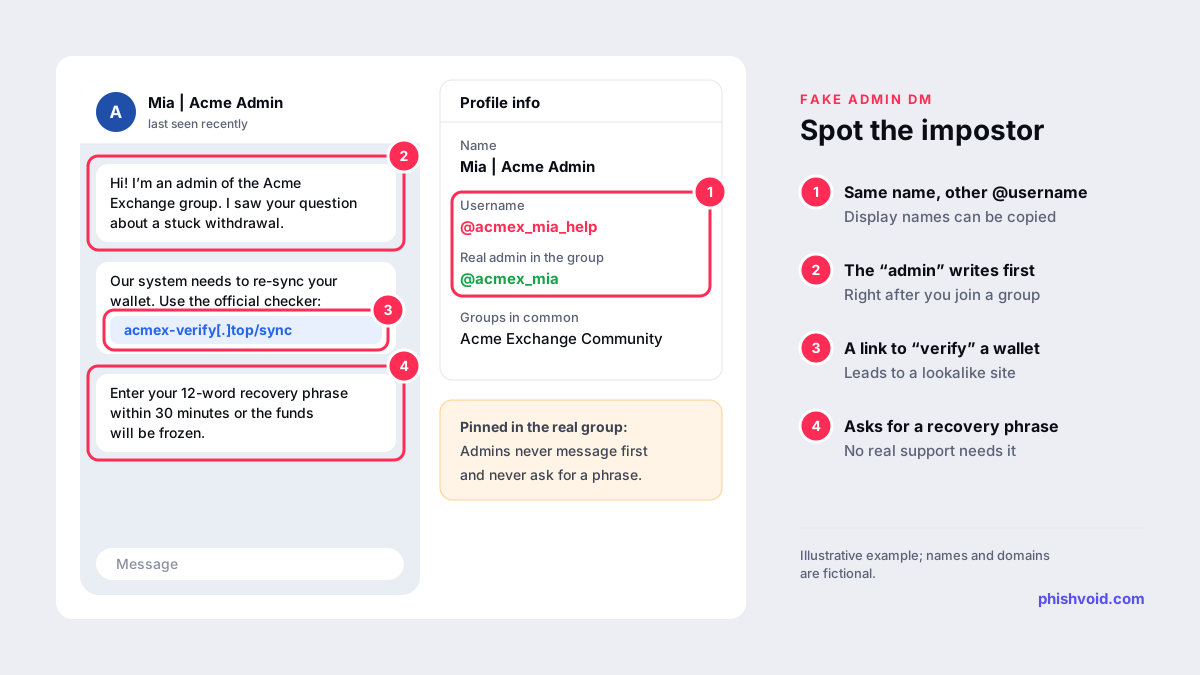
Telegram suits impostors for a simple reason: anyone can set any display name and profile photo, and only the @username has to be unique. In a busy group, most people never look past the name. The common patterns are:
- Fake admins. Someone joins your public group, copies an admin's name and photo, and privately messages new members: "I'm from the Acme team, I saw your question about a withdrawal."
- Fake support accounts and bots. An account or bot called "Acme Support" answers questions, then moves the user to a private chat or a "verification" bot that asks for a login code, card details or a recovery phrase.
- Cloned channels. A channel with your name, logo and copied posts announces a giveaway, a token sale or a "new official app", linking to a lookalike website.
- Cloned groups. A copy of your community group, promoted through comments or ads, where every "admin" is the scammer.
Crypto exchanges, wallets, fintech apps and online games are frequent targets because their users already use Telegram for announcements and help, and because a recovery phrase or login code can be used at once. Our guide to wallet drainer scams explains what happens after a user connects a wallet to a fake site. Exchanges can find a wider monitoring plan in brand protection for crypto exchanges.
Telegram's reporting options
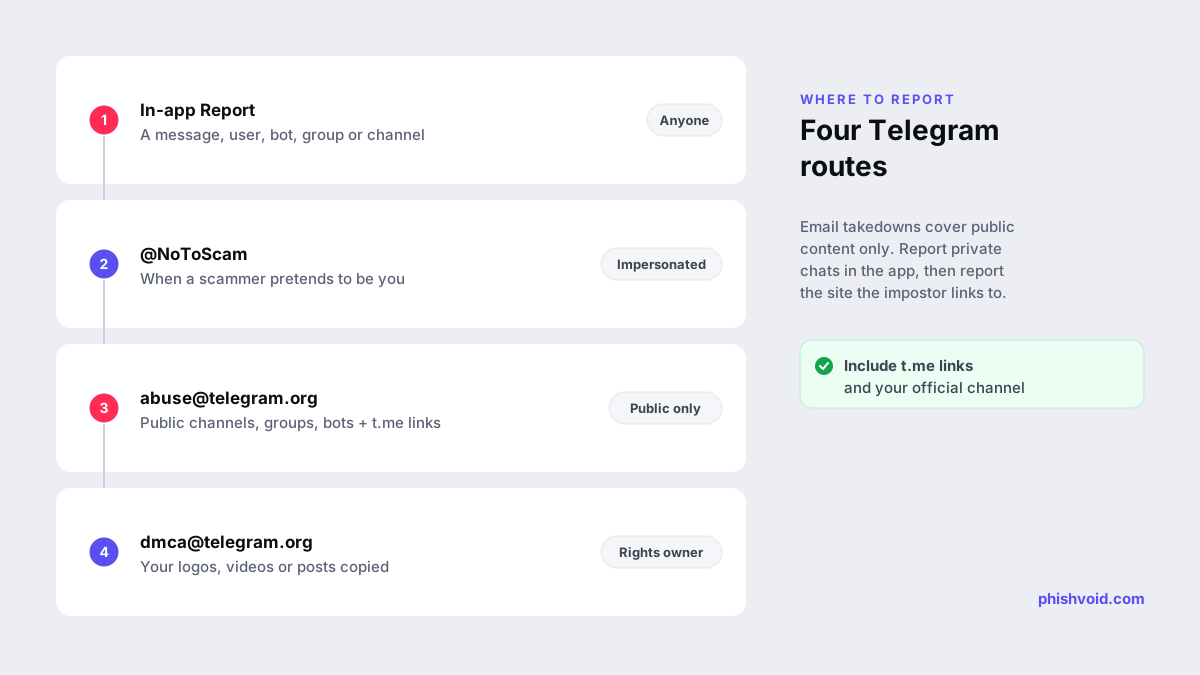
Telegram doesn't have a dedicated impersonation form for brands. Instead, it offers four channels, each suited to a different part of the problem.
| Route | Use it for | Who can use it |
|---|---|---|
| In-app Report | Messages, users, bots, groups and channels | Anyone |
| @NoToScam | A scammer pretending to be you | The party being impersonated |
| abuse@telegram.org | Public channels, groups and bots running fraud | Anyone, with t.me links |
| dmca@telegram.org | Your copyrighted content in public channels, bots or sticker sets | The copyright owner or its agent |
Report in the app
Telegram's moderation page says every Telegram app lets users report messages to moderators: tap the message on Android, hold it on iOS, or right-click it on desktop and web, then choose Report, pick a reason and add a comment if needed. Accounts, bots, groups and channels can also be reported from the menu on their profile. Report the impostor account and the specific messages that ask for codes, payments or wallet connections, and say in the comment which official account it copies.
Contact @NoToScam
Telegram's FAQ tells people who find a scammer pretending to be them to contact @NoToScam. Check the username carefully before you write, because impostors copy Telegram's own names too. Give the impostor's @username, the link to your official channel or account, and a short explanation of what was copied.
Email abuse@telegram.org
The same FAQ lists abuse@telegram.org as Telegram's takedown address for illegal content and asks you to include links to the content, such as t.me/... addresses or @usernames. Use it for public channels, groups and bots that impersonate your brand to defraud people. Telegram says it does not process requests about private chats and private groups, so focus on the public entry points: the channel, the public group, the bot and the account's public username.
Send copyright complaints to dmca@telegram.org
If a cloned channel or bot reposts your logo artwork, videos or other content you own, the FAQ says the copyright owner or an authorised agent can complain to dmca@telegram.org. This can remove the copied material even when the impersonation itself is harder to show.
Show your community which accounts are real
- Get your channel verified. Telegram's verification guidelines say it verifies active official channels, bots and public groups of public figures and organisations. Applicants generally need notable verified accounts on at least two other platforms that link to the Telegram entity, plus press coverage. You apply through @VerifyBot.
- Publish your handles. List every official channel, group, bot and staff username on your website, and link to that page from your channel description.
- Pin a clear rule. In every group, pin a message saying admins never message first and never ask for codes, passwords, payments or recovery phrases.
- Hide the member list. Telegram lets admins of groups with 100 or more members hide the member list, which makes it harder for impostors to pick targets.
- Teach users to check the @username. Display names and photos can be copied exactly. The username can't.
Telegram can also mark accounts with a Scam or Fake label. Its API documentation describes the fake label as applying to users that many people have reported as fake or scam accounts. The label helps, but it appears only after enough reports, so it won't protect the first victims.
Take down the site, not just the account
Most Telegram impersonation scams end on a website: a fake login page, a "wallet sync" page or a payment form. When Telegram blocks the account or channel, the site keeps working for anyone who has the link, and the next impostor account will share it again. Report the domain to its host, its registrar and browser blocklists; our guide on how to report a scam website covers each step. Phishvoid monitors and takes down these sites for brands and reports the Telegram channels and bots that promote them in the same case.
If a customer has already been caught
- Stop replying, block the account and report it in the app.
- If they shared a password or a login code, change the password and sign out other sessions. On Telegram itself, Settings → Devices lists active sessions and lets you end them.
- If they shared card details, call the bank using the number printed on the card.
- If they shared a recovery phrase or approved a wallet connection, treat the wallet as compromised and move any remaining funds to a new wallet.
- Our I got phished page has a step-by-step checklist they can follow.
FAQ
Does Telegram support ever message users first?
Telegram's FAQ says its support runs through Settings → Ask a Question, that it relies on volunteers, and that it has no support accounts on other social media platforms. Login codes arrive in a verified service chat named Telegram. Treat unsolicited "support" messages, whether they claim to be from Telegram or from a brand, as suspicious.
Can Telegram remove an impostor who only sends private messages?
Report the account and its messages in the app. Telegram says it doesn't process takedown requests about private chats, so in-app reports are the route for anything sent privately.
How long does Telegram take to act on an impersonation report?
Telegram doesn't publish a timeframe for these reports. Clear evidence, t.me links and a direct comparison with your official channel make a report easier to act on.
Is reporting a Telegram impersonation scam free?
Yes. The in-app Report button, @NoToScam and the email addresses Telegram publishes cost nothing to use.
Is someone impersonating your brand?
We find lookalike domains and cloned pages and take them down. Start with a free exposure scan.