How to report impersonation on X as a business: the company form and ID check, the trademark route, parody account rules, timelines and the evidence to send.
Quick answer: To report impersonation on X as a business, use X's impersonation form in the Help Center, choose My company, brand, or organization, verify your identity with a government ID, and give the fake account's username and your company details. You don't need an X account to file. If the account misuses your registered trademark, file X's trademark report as well. Anyone can flag an impostor from its profile, but the formal report comes from the brand or its authorised representative. Reporting is free.
Below: which route to use, what the company form asks for, how X treats parody and fan accounts, how long a decision takes, and what to do about the links and DMs the impostor uses. For the same problem on other networks, see our guides to impersonation on Instagram and on Facebook Pages.
Three ways to report impersonation on X
X's help article Report impersonation accounts separates reports by who files them:
| Route | Who files | What you need |
|---|---|---|
| Report from the profile | Anyone who sees the account | An X account |
| Impersonation form | The brand or its authorised representative | Government ID, company details |
| Trademark report | The trademark holder or its authorised representative | Registration details |
1. Flag it from the profile
Open the account, select the overflow (three-dot) icon, choose Report and pick the type of issue. X's guide to reporting violations lists impersonation among the issues you can report straight from a profile. X describes this as a bystander report: useful when employees or customers spot the account, but it doesn't tell X that the report comes from the brand. File the form as well.
2. File the impersonation form as the company
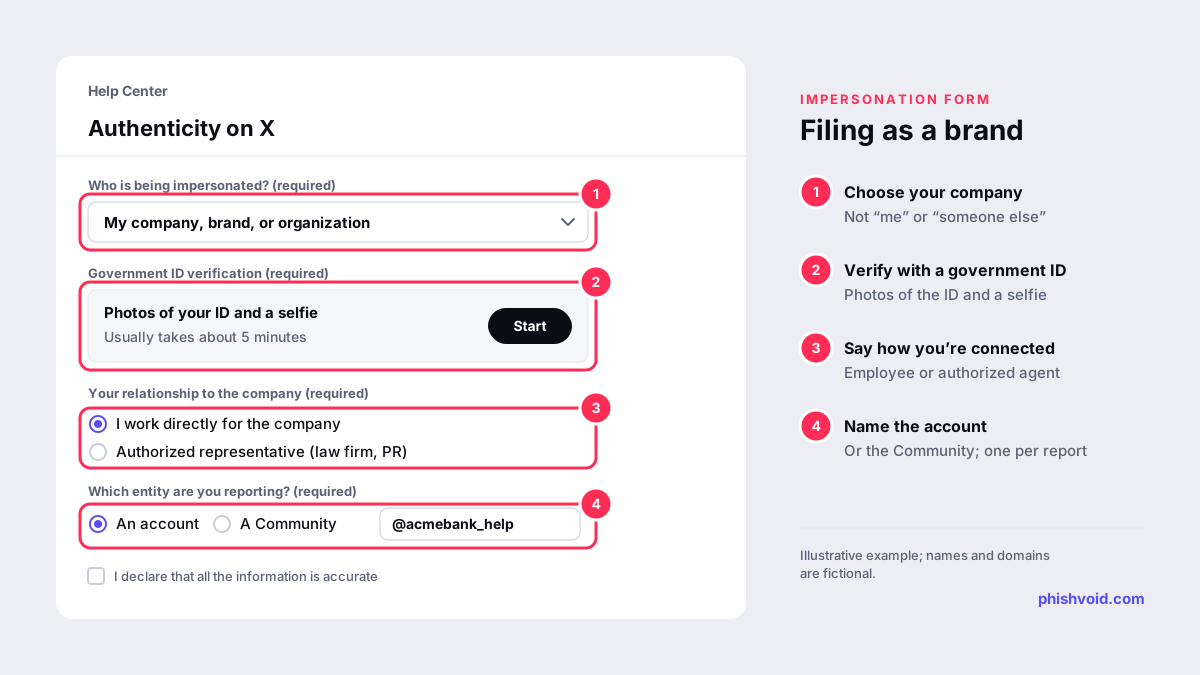
The impersonation form first asks who is being impersonated. Choosing My company, brand, or organization opens the company version, which asks for:
- An identity check with a government-issued ID, run with the verification provider Persona, including photos of the ID and a selfie. X says this usually takes about five minutes.
- Your full name, a company email address and your job title.
- Your relationship to the company: you work for it directly, or you are an authorised representative such as a law firm, marketing or PR company.
- The company's name, address, country and website, and whether it has an X account.
- Whether you are reporting an account or a Community, and details of what is happening.
You also confirm that the information is accurate and acknowledge that X may share details of the report with third parties such as the reported user. X states that your contact information will not be disclosed. If you want the report tied to your official account, sign in to it before you start.
3. File a trademark report
X's help page says companies should report accounts misusing their trademarks or brand under its trademark policy. The policy covers using another's trademark in a way that may mislead people about affiliation, and X only investigates reports from the trademark holder or an authorised representative. File through the trademark report form and complete every field: X follows up on incomplete reports, which delays them. X also notes that it may give the account holder your name and other information from the report, so file under a company identity, not a personal one.
What X does not treat as impersonation
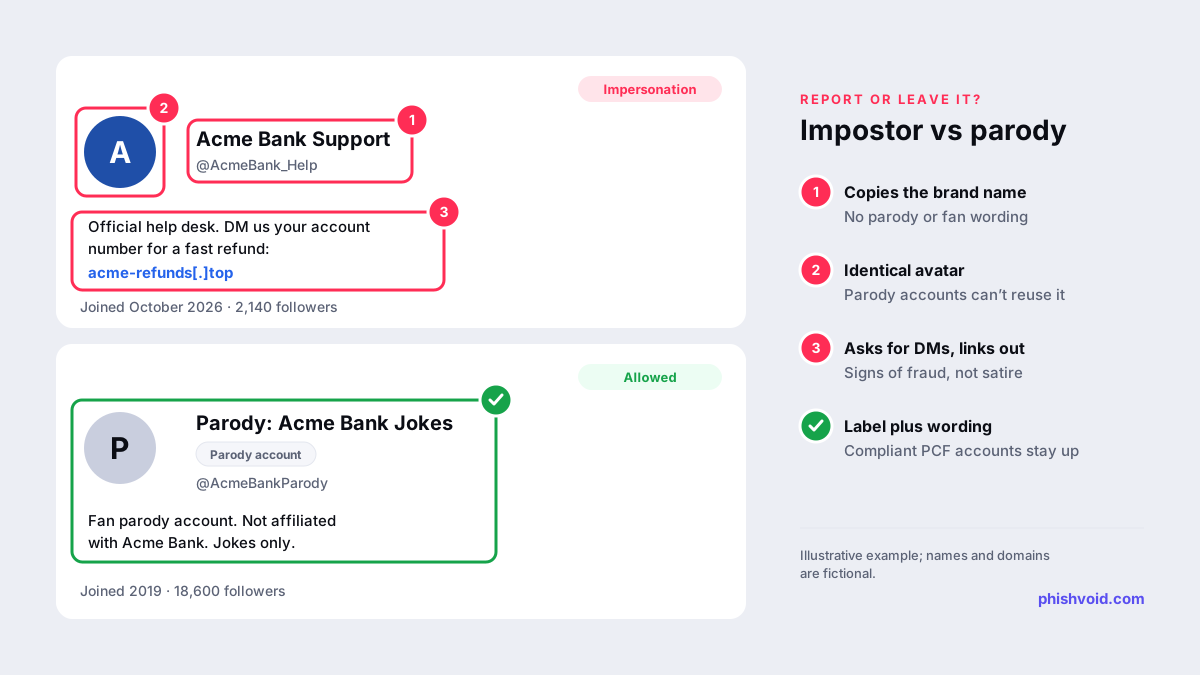
X's authenticity policy prohibits impersonating individuals, groups or organisations to deceive others, but it allows parody, commentary and fan (PCF) accounts. To stay within the rules, a PCF account must meet all of these conditions:
- it shows X's PCF label;
- it doesn't use the same avatar as the entity it depicts;
- its account name begins with a term such as "parody", "fake", "fan" or "commentary";
- its bio uses one of those terms as well.
An account that meets all four is unlikely to be removed for impersonation, even if it is unkind about your brand. One that misses a condition is a reasonable report: a "fan" account using your exact logo, for example, or a parody label hidden behind a name like "Acme Bank Support". Reviews, criticism and plain references to your brand name are generally not trademark violations either. X's trademark policy treats nominative and other fair use as outside its scope.
Evidence to gather before you file
- The impostor's @username and profile URL, and your official handle.
- Screenshots of the profile, header, bio and pinned post, with the date and time.
- Posts or replies that show deception: "official support", requests to DM, links to forms, payment or wallet requests.
- Replies the account left under your real posts. Impostors often answer customers who tag your brand.
- Every link from the bio and replies, saved as text.
- For trademark reports, the registration number and issuing office. For agencies, a letter of authorization from the brand.
File one report per account and list each handle separately. Don't ask staff or followers to mass-report the account: X's authenticity policy names submitting duplicate or false reports in large numbers as a violation in its own right.
How long it takes and what happens next
X's reporting guide says it acknowledges properly submitted reports within 24 hours. Reports are typically resolved within a few days, but X says resolution can take up to 30 days, depending on factors such as the need for user input and whether the user appeals. If X finds a violation of its misleading and deceptive identities policy, it either suspends the account or asks the owner to update it so it no longer violates the policy.
That second outcome matters. An account that is renamed rather than suspended keeps its followers, so check what it looks like afterwards. X also says it generally does not accept requests for inactive or suspended usernames, so don't plan on taking over the impostor's handle once it is gone.
Deal with the links and DMs, not only the account
Most brand impostors on X exist to move people somewhere else: a lookalike login page, a fake refund form or a chat on another app. It is the same pattern described in our guide to fake customer-support accounts. Suspending the account doesn't take down the site. Report the domain to its host, registrar and browser blocklists; the abuse report generator drafts those notices for you. For brands, Phishvoid's analysts handle the account and the site behind it as one case, then watch for the next handle.
In the meantime, post a short notice from your official account naming your real handle, and say plainly that you never ask for passwords, codes or payments by DM.
FAQ
Do I need an X account to report impersonation?
No. X says you don't need an account to report impersonation. You do need to complete the identity check in the impersonation form.
Can our agency report an impersonation account on X for us?
Yes. The company form lets an authorised representative, such as a law firm, marketing or PR company, file for the brand. Keep a signed letter of authorization on file.
Will the impostor see who reported them?
For impersonation reports, X says it may share details of the report with the reported user but not your contact information. For trademark reports, X may share your name and other information from the report.
Does a verified account stop impersonation?
No. X treats impersonation reports separately from verification. A checkmark can help customers recognise your real account, but it doesn't stop others from copying your name and logo, and you don't need one to file a report.
Does the form cover X Communities?
Yes. The company form asks whether you are reporting an account or a Community.
Is someone impersonating your brand?
We find lookalike domains and cloned pages and take them down. Start with a free exposure scan.