How to file a TikTok impersonation report as a business: the web form steps, the U.S. form, when to add a trademark report and the evidence TikTok needs.
Quick answer: To file a TikTok impersonation report for a business, use TikTok's web form rather than only the in-app menu. For accounts outside the U.S., open the Report a problem form and choose Report a potential violation, Account violation, Impersonation, then A business or organization. U.S. accounts have a separate form that asks for identification. Add a trademark report if the account uses your registered name or logo. Reporting is free.
Below: why brands should not stop at the in-app report, what each form asks for, when to switch to an intellectual property report, and what to do about the links and DMs impostors use. For the same job on Instagram, see our guide to reporting an impersonation account on Instagram as a business; for the wider problem, the glossary entry on social media impersonation.
Why the in-app report isn't enough for brands
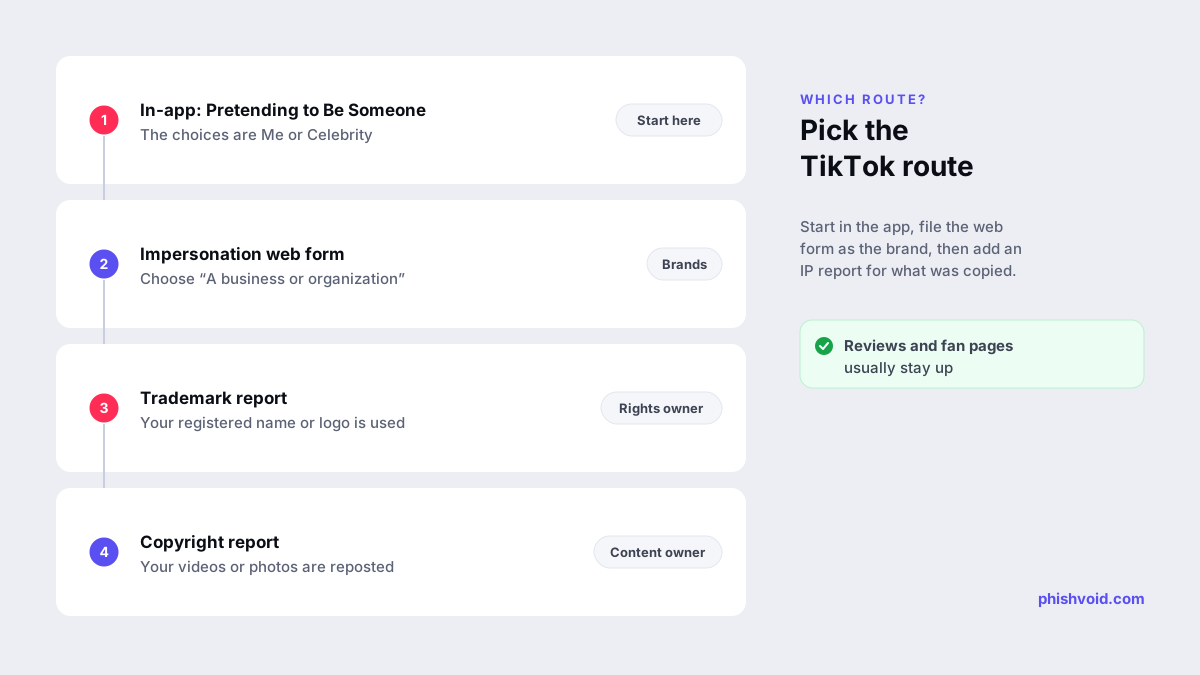
TikTok's help article on reporting an impersonation account describes the in-app flow. Open the profile and tap Share (on the web, More options), then Report, Report account and Pretending to Be Someone. The next step asks whether the account is impersonating Me or a Celebrity. There is no business option at that step.
If the impostor copies your official brand account and you report while signed in to it, choosing Me is accurate, and the report is quick to send. But the web form captures what a business case needs: which company is being copied, both usernames, whether intellectual property is involved, and screenshots of the deception. File both.
How to file the impersonation form as a business
Accounts outside the U.S.
- Open TikTok's Report a problem form.
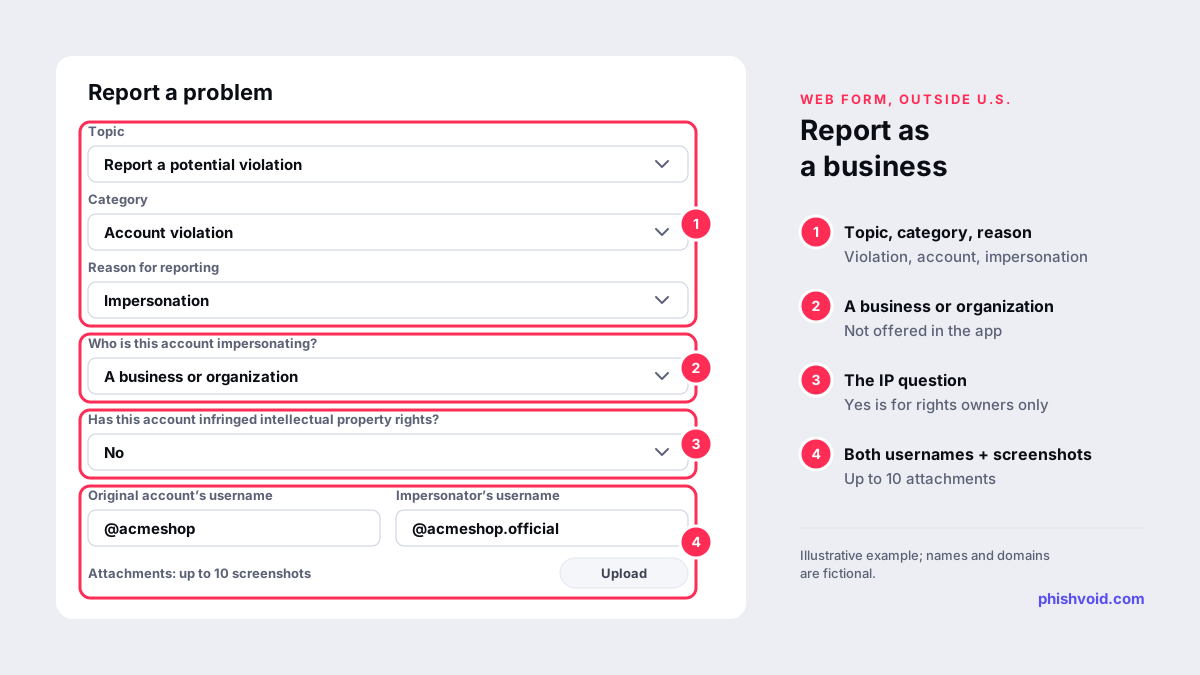
- For Topic, choose Report a potential violation. For Category, choose Account violation. For Reason for reporting, choose Impersonation.
- Under Who is this account impersonating?, choose A business or organization. The other options cover yourself, a celebrity or public figure, your child, someone you are authorised to represent, and someone else.
- Answer Has this account infringed intellectual property rights? If you answer No, the form asks for the original account's username, the impersonator's username, a contact email, a link to the account, further details and up to 10 screenshots.
- Confirm the declaration and submit.
If you answer Yes to the intellectual property question, the form warns that such reports must come from the trademark or copyright owner or someone authorised to report for them, and asks for the infringement type. Answer Yes only if you hold the rights or act for the rights holder.
Accounts in the U.S.
For U.S. accounts, TikTok points to a separate request form. Select Report an Impersonation Account on TikTok, enter your email address and country, choose who is being impersonated, upload valid identification from the list TikTok accepts, tick the confirmation statements and sign with your name.
When to add a trademark or copyright report
An impersonation report asks TikTok whether the account is pretending to be you. An intellectual property report asks whether it uses your rights without permission. The two can run in parallel.
- Trademark. TikTok's intellectual property policy says content that violates someone's trademark rights may be taken down and that accounts of repeat infringers can be banned. File through the online trademark infringement report with your registration details. The policy notes that TikTok may share information about the report, such as the trademark owner's name, with the user.
- Copyright. If the account reposts your videos, photos or artwork, use TikTok's copyright report. Removing the copied posts makes the account look less like you even before it is banned.
- Counterfeits. The same policy says TikTok does not permit the sale or promotion of counterfeit goods. If the profile links to a fake store, our guide to counterfeit website takedown covers the store, the ads and the payment side.
The policy is also clear about what is generally not a violation: accurately referencing, reviewing, criticising, comparing or parodying a brand, and fan pages that don't claim to speak for it or be associated with it. Reports against those accounts are likely to be rejected and take your team's time.
Evidence that makes the report stick
- Both usernames, starting with @, and both profile links.
- Screenshots of the profile, bio, link in bio and pinned videos, with the date and time visible. The form takes up to 10, so choose the ones that show deception.
- Videos, comments or LIVE moments where the account claims to be official, offers support, or asks for money, codes or personal details.
- Replies the account left under your own videos to pull your customers into DMs.
- Trademark registration numbers for an IP report, and a letter of authorization if an agency files for you.
Use a company email address as the contact, report each impostor account separately, and keep a log of usernames and report dates. Removed accounts often come back with a dot, an underscore or "official" added to the name, and your log shows the pattern.
Deal with the link in bio and the DMs
A fake brand account on TikTok usually exists to send people somewhere else: a lookalike online store, a fake giveaway page, or a chat on WhatsApp or Telegram. Removing the account doesn't remove that destination. Report the site to its host, registrar and browser blocklists; our guide to a fake online store using your brand walks through the store case step by step. For brands, Phishvoid's analysts handle the account and the site as one case and watch for replacement handles.
On your own account, post a short notice naming your official handle and saying what you never ask for in DMs. Link your official profiles from your website so customers can check against a source you control.
FAQ
How long does a TikTok impersonation report take?
TikTok doesn't publish a fixed timeframe for impersonation reports. Clear evidence, both usernames and a report from the brand or its authorised representative make the decision easier.
Can I report a TikTok impersonator without a TikTok account?
The web forms can be completed in a browser with a contact email address. The in-app report needs a TikTok account.
Will the impostor know our company reported them?
TikTok's intellectual property policy says it may share information about an IP report, such as the trademark owner's name, with the user. File IP reports under a company identity rather than a personal one.
Does a TikTok impersonation report cost anything?
No. The in-app report, the impersonation forms and the intellectual property forms are all free.
Is someone impersonating your brand?
We find lookalike domains and cloned pages and take them down. Start with a free exposure scan.